Two Document Folders in the Same Location

mmkarma

New member
Local time
12:44 AM
Messages
2
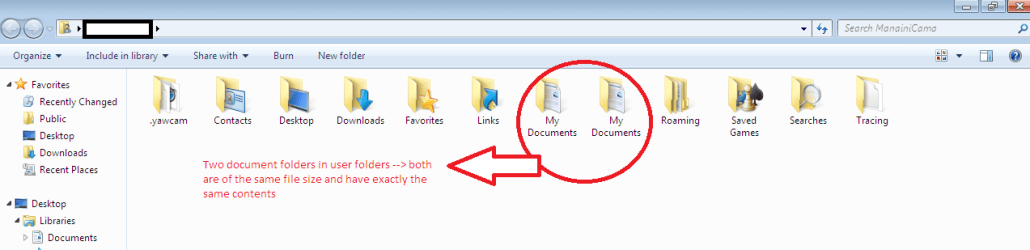
I was trying to change the location of "my videos" folder in the user folder accounts to move it into "my documents" and instead of that happening now i have two "my documents" folders in my users folder < Local DiskC:/Users/*UserName*/>. these two folders contain the same sub-folders and files, are of the same size, and also if i delete one the other gets automatically deleted. I have been trying to restore the " My videos" folder but to no avail :(
If anyone can help me through restoring these folders as it use to .... I would highly appreciate !!

..... screenshot below on the situation ......
 

Attachments
  • Users Folder.png
    Users Folder.png
    20.7 KB · Views: 75

My Computer My Computer

Computer Manufacturer/Model Number
Acer Aspire 5290G
OS
Windows 7 Ultimate
Should be easy to correct. Try using the back up and restore funtion. That should work. If for some reason it does not system restore should work. System restore us usually reserved for OS problems, but it may work if Backup and restore does not.
 

My Computer My Computer

Computer type
PC/Desktop
Computer Manufacturer/Model Number
Dell XPS 420
OS
Windows 10, Home Clean Install
CPU
Intel Core2 processsor Q8200(2.33Ghz 1333FSB) Quad Core Tech
Motherboard
Dell
Memory
6 gb
Graphics Card(s)
ATI Radeon 256MB HD3650
Sound Card
Intergrated 7.1 Channel Audio
Monitor(s) Displays
Dell SP2009W 20"
Hard Drives
640 GB Serial ATA Hard drive
Cooling
Fan
Keyboard
Dell USB Keyboard
Mouse
Dell Premium Optical USB
Internet Speed
DSL 2.85
Hello mmkarma, and welcome to Seven Forums.

You should be able to do this to fix this:
  • copy the files in these folders to another location as a backup to make sure that you do not lose any of them.
  • Restore both the default My Documents and My Videos user folder locations using OPTION TWO in this tutorial, then restart the computer. It may take a few times of restarting, but see if they have both been restored without duplicates.
  • If not, then repeat restoring, delete all copies of these two folders, and restart again.
Hope this helps,
Shawn
 

My Computer My Computer

Computer type
PC/Desktop
Computer Manufacturer/Model Number
Self built custom
OS
64-bit Windows 11 Pro for Workstations
CPU
Intel i7-8700K OC'd to 5 GHz
Motherboard
ASUS ROG Maximus XI Formula Z390
Memory
64 GB (4x16GB) G.SKILL TridentZ RGB DDR4 3600 MHz
Graphics Card(s)
ASUS ROG-STRIX-GTX1080TI-O11G-GAMING
Sound Card
Integrated
Monitor(s) Displays
2 x Samsung Odyssey G7 27"
Screen Resolution
2560x1440
Hard Drives
1TB Samsung 990 PRO M.2,
4TB Samsung 990 PRO PRO M.2,
TerraMaster F8 SSD Plus NAS
PSU
Seasonic Prime Titanium 850W
Case
Thermaltake Core P3
Cooling
Corsair Hydro H115i
Keyboard
Logitech wireless K800
Mouse
Logitech MX Master 4
Internet Speed
2 Gb/s Download and 100 Mb/s Upload
Antivirus
Malwarebyte Anti-Malware Premium
Browser
Google Chrome
Other Info
Logitech Z625 speaker system,
Logitech BRIO 4K Pro webcam,
HP Color LaserJet Pro MFP M477fdn,
APC SMART-UPS RT 1000 XL - SURT1000XLI,
Galaxy S23 Plus phone
Fwiw. You may have altered the view defaults in Windows Explorer?
One of those folders is normally (by default) hidden, and should, in fact, be locked.

(Tools - Folder Options - View, and "don't show hidden..etc" , and "Hide prtotected ...etc")

The locked folder is a junction file and is not meant to be altered in any way.
 

My Computer My Computer

Computer Manufacturer/Model Number
Three desktops and one laptop with good specs..
OS
Vista and now 7 in 32 and 64 bit.
Hello mmkarma, and welcome to Seven Forums.

You should be able to do this to fix this:
  • copy the files in these folders to another location as a backup to make sure that you do not lose any of them.
  • Restore both the default My Documents and My Videos user folder locations using OPTION TWO in this tutorial, then restart the computer. It may take a few times of restarting, but see if they have both been restored without duplicates.
  • If not, then repeat restoring, delete all copies of these two folders, and restart again.
Hope this helps,
Shawn

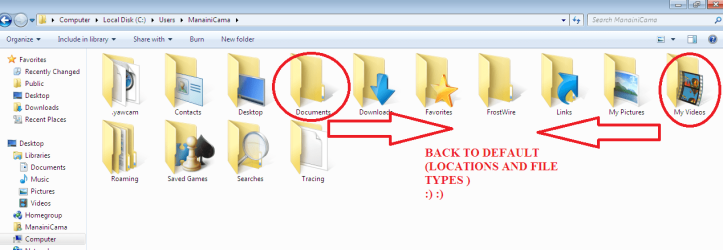
Thanks Guys !! All your suggestions helped..Shawn yours was the deal breaker in getting my folders restored ... and yes I did need to restart a couple of times to get it back to default settings :)
 

Attachments

  • End Result.png
    End Result.png
    48.1 KB · Views: 63

My Computer My Computer

Computer Manufacturer/Model Number
Acer Aspire 5290G
OS
Windows 7 Ultimate
That's great news. I'm happy to hear that you got it sorted. :)
 

My Computer My Computer

Computer type
PC/Desktop
Computer Manufacturer/Model Number
Self built custom
OS
64-bit Windows 11 Pro for Workstations
CPU
Intel i7-8700K OC'd to 5 GHz
Motherboard
ASUS ROG Maximus XI Formula Z390
Memory
64 GB (4x16GB) G.SKILL TridentZ RGB DDR4 3600 MHz
Graphics Card(s)
ASUS ROG-STRIX-GTX1080TI-O11G-GAMING
Sound Card
Integrated
Monitor(s) Displays
2 x Samsung Odyssey G7 27"
Screen Resolution
2560x1440
Hard Drives
1TB Samsung 990 PRO M.2,
4TB Samsung 990 PRO PRO M.2,
TerraMaster F8 SSD Plus NAS
PSU
Seasonic Prime Titanium 850W
Case
Thermaltake Core P3
Cooling
Corsair Hydro H115i
Keyboard
Logitech wireless K800
Mouse
Logitech MX Master 4
Internet Speed
2 Gb/s Download and 100 Mb/s Upload
Antivirus
Malwarebyte Anti-Malware Premium
Browser
Google Chrome
Other Info
Logitech Z625 speaker system,
Logitech BRIO 4K Pro webcam,
HP Color LaserJet Pro MFP M477fdn,
APC SMART-UPS RT 1000 XL - SURT1000XLI,
Galaxy S23 Plus phone
Back
Top