- Local time
- 6:50 PM
- Messages
- 36
My Computer
At a glance
Windows 7-Home Edition
- OS
- Windows 7-Home Edition


Wrong adapter. These properties are for the Local Area Connection (your Ethernet adapter).The pics is attached.
That's because your Ethernet adapter is using DHCP, meaning it has a dynamic internal IP address. Totally normal.Another problem also is that the IP address is changing constantly...
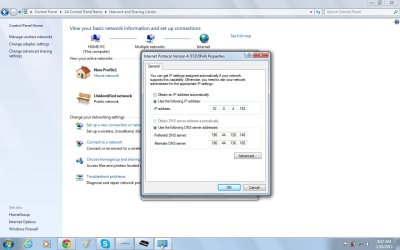
OK, this is correct properties. As I suspected the gateway is missing.Another pic with numbers I normally use except for the default gateway number.
Another pic with numbers I normally use except for the default gateway number.
So you did have the default gateway entered?
are those the numbers that you got from your service provider?
Nope. I am trying to call them right now but the phone is just ringing. Their probably sleeping on duty ...lol....just kidding.Wrong adapter. These properties are for the Local Area Connection (your Ethernet adapter).The pics is attached.
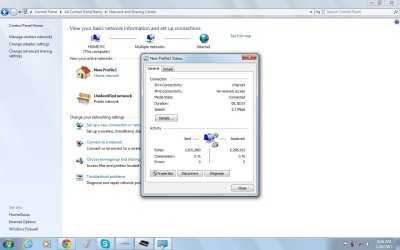
I asked you to post properties of your 3G USB dongle, that connection seems to be named as "New Profile1" on your laptop.
That's because your Ethernet adapter is using DHCP, meaning it has a dynamic internal IP address. Totally normal.Another problem also is that the IP address is changing constantly...
OK, this is correct properties. As I suspected the gateway is missing.Another pic with numbers I normally use except for the default gateway number.
Do you have a manual from your mobile data service provider? We need to find out which IP the default gateway should have.
Kari

Yes, enabling DHCP is a good idea.My best suggestions right now is to change it from manual to automatic, and see if you can pickup an address via dhcp.
or
Call your service provider and find out the information you need to use.
My best suggestions right now is to change it from manual to automatic, and see if you can pickup an address via dhcp.
or
Call your service provider and find out the information you need to use.
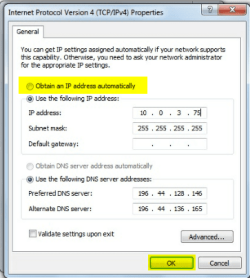
My best suggestions right now is to change it from manual to automatic, and see if you can pickup an address via dhcp.
or
Call your service provider and find out the information you need to use.
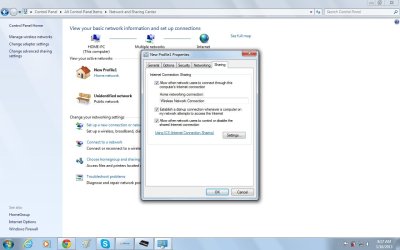
Are you absolutely sure you have enabled ICS on your 3G adapter? It must be enabled in the adapter you are using to connect to Internet, it's no help for you to enable it in Ethernet adapter (Local Area Connection).
Are you absolutely sure you have enabled ICS on your 3G adapter? It must be enabled in the adapter you are using to connect to Internet, it's no help for you to enable it in Ethernet adapter (Local Area Connection).
Also for sharing you need to select your Ethernet adapter instead of wireless as the tutorial i posted showed.
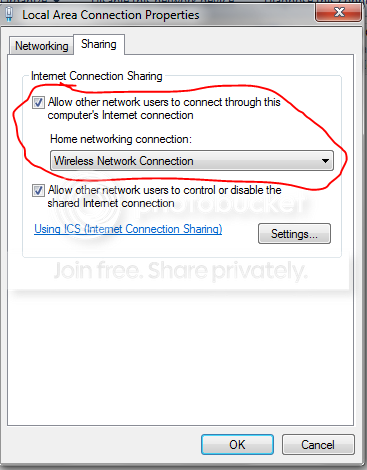
Are you absolutely sure you have enabled ICS on your 3G adapter? It must be enabled in the adapter you are using to connect to Internet, it's no help for you to enable it in Ethernet adapter (Local Area Connection).
Are you absolutely sure you have enabled ICS on your 3G adapter? It must be enabled in the adapter you are using to connect to Internet, it's no help for you to enable it in Ethernet adapter (Local Area Connection).
Also for sharing you need to select your Ethernet adapter instead of wireless as the tutorial i posted showed.
NO NO NO!
There is no connection to share, he's not using Ethernet to connect to Internet. He's connecting with this 3G USB dongle, and that's the connection that needs to be shared.

New Profile1 is the name of the connection you use to connect to Internet. That connection needs to have ICS enabled.