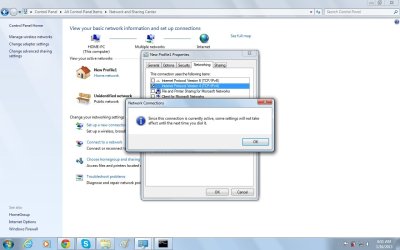
TWO PROBLEMS-urgent help needed

What does this message mean?
 

Attachments

  • 8.jpg
    8.jpg
    178.5 KB · Views: 5

My Computer

OS
Windows 7-Home Edition
The pics is attached.
Wrong adapter. These properties are for the Local Area Connection (your Ethernet adapter).

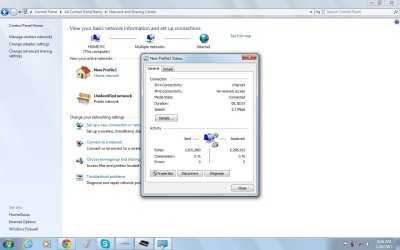
I asked you to post properties of your 3G USB dongle, that connection seems to be named as "New Profile1" on your laptop.

Another problem also is that the IP address is changing constantly...
That's because your Ethernet adapter is using DHCP, meaning it has a dynamic internal IP address. Totally normal.
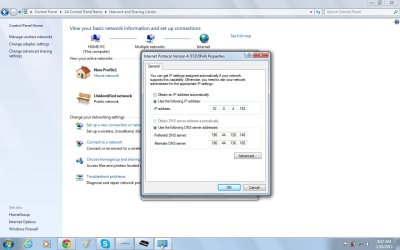
Another pic with numbers I normally use except for the default gateway number.
OK, this is correct properties. As I suspected the gateway is missing.

Do you have a manual from your mobile data service provider? We need to find out which IP the default gateway should have.

Kari
 

My Computer

Computer type
Laptop
Computer Manufacturer/Model Number
HP ENVY 17-1150eg
OS
Windows 10 Pro x64 EN-GB
CPU
1.6 GHz Intel Core i7-720QM Processor
Memory
6 GB
Graphics Card(s)
ATI Mobility Radeon HD 5850 Graphics
Sound Card
Beats sound system with integrated subwoofer
Monitor(s) Displays
17" laptop display, 22" LED and 32" Full HD TV through HDMI
Screen Resolution
1600*900 (1), 1920*1080 (2&3)
Hard Drives
Internal: 2 x 500 GB SATA Hard Disk Drive 7200 rpm
External: 2TB for backups, 3TB USB3 network drive for media
Cooling
As Envy runs a bit warm, I have it on a Cooler Master pad
Keyboard
Logitech diNovo Media Desktop Laser (bluetooth)
Mouse
Logitech Performance Mouse MX
Internet Speed
50/10 Mbps VDSL
Antivirus
Windows Defender 4.3.9431.0
Browser
Maxthon 3.5.2., IE11
The pics is attached.
Wrong adapter. These properties are for the Local Area Connection (your Ethernet adapter).

I asked you to post properties of your 3G USB dongle, that connection seems to be named as "New Profile1" on your laptop.

Another problem also is that the IP address is changing constantly...
That's because your Ethernet adapter is using DHCP, meaning it has a dynamic internal IP address. Totally normal.
Another pic with numbers I normally use except for the default gateway number.
OK, this is correct properties. As I suspected the gateway is missing.

Do you have a manual from your mobile data service provider? We need to find out which IP the default gateway should have.

Kari
Nope. I am trying to call them right now but the phone is just ringing. Their probably sleeping on duty ...lol....just kidding.
 

My Computer

OS
Windows 7-Home Edition
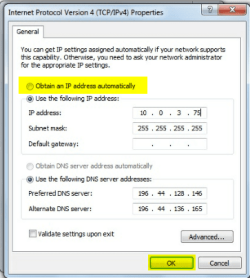
My best suggestions right now is to change it from manual to automatic, and see if you can pickup an address via dhcp.

or

Call your service provider and find out the information you need to use.
 

My Computer

OS
Windows 7 Ultimate x64
My best suggestions right now is to change it from manual to automatic, and see if you can pickup an address via dhcp.

or

Call your service provider and find out the information you need to use.
Yes, enabling DHCP is a good idea.

I would go as far as disconnect the 3G USB adapter, completely uninstall the software that is used with it to connect, reboot, insert the adapter and reinstall connection software.
 

My Computer

Computer type
Laptop
Computer Manufacturer/Model Number
HP ENVY 17-1150eg
OS
Windows 10 Pro x64 EN-GB
CPU
1.6 GHz Intel Core i7-720QM Processor
Memory
6 GB
Graphics Card(s)
ATI Mobility Radeon HD 5850 Graphics
Sound Card
Beats sound system with integrated subwoofer
Monitor(s) Displays
17" laptop display, 22" LED and 32" Full HD TV through HDMI
Screen Resolution
1600*900 (1), 1920*1080 (2&3)
Hard Drives
Internal: 2 x 500 GB SATA Hard Disk Drive 7200 rpm
External: 2TB for backups, 3TB USB3 network drive for media
Cooling
As Envy runs a bit warm, I have it on a Cooler Master pad
Keyboard
Logitech diNovo Media Desktop Laser (bluetooth)
Mouse
Logitech Performance Mouse MX
Internet Speed
50/10 Mbps VDSL
Antivirus
Windows Defender 4.3.9431.0
Browser
Maxthon 3.5.2., IE11
My best suggestions right now is to change it from manual to automatic, and see if you can pickup an address via dhcp.

or

Call your service provider and find out the information you need to use.

How do I do that?
 

My Computer

OS
Windows 7-Home Edition
Select Obtain an IP address automatically, click OK to save settings:

DHCP_Issue_2.png
 

My Computer

Computer type
Laptop
Computer Manufacturer/Model Number
HP ENVY 17-1150eg
OS
Windows 10 Pro x64 EN-GB
CPU
1.6 GHz Intel Core i7-720QM Processor
Memory
6 GB
Graphics Card(s)
ATI Mobility Radeon HD 5850 Graphics
Sound Card
Beats sound system with integrated subwoofer
Monitor(s) Displays
17" laptop display, 22" LED and 32" Full HD TV through HDMI
Screen Resolution
1600*900 (1), 1920*1080 (2&3)
Hard Drives
Internal: 2 x 500 GB SATA Hard Disk Drive 7200 rpm
External: 2TB for backups, 3TB USB3 network drive for media
Cooling
As Envy runs a bit warm, I have it on a Cooler Master pad
Keyboard
Logitech diNovo Media Desktop Laser (bluetooth)
Mouse
Logitech Performance Mouse MX
Internet Speed
50/10 Mbps VDSL
Antivirus
Windows Defender 4.3.9431.0
Browser
Maxthon 3.5.2., IE11
My best suggestions right now is to change it from manual to automatic, and see if you can pickup an address via dhcp.

or

Call your service provider and find out the information you need to use.

This is strange; apparently the service provider don't give out default gateway numbers to 3G users for hacking purposes. One other thing the guy mentioned is that because it's a dial up service the default router number is in any case constantly going to change just like the IP address.
 

My Computer

OS
Windows 7-Home Edition
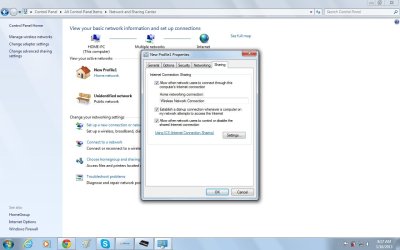
Are you absolutely sure you have enabled ICS on your 3G adapter? It must be enabled in the adapter you are using to connect to Internet, it's no help for you to enable it in Ethernet adapter (Local Area Connection).
 

My Computer

Computer type
Laptop
Computer Manufacturer/Model Number
HP ENVY 17-1150eg
OS
Windows 10 Pro x64 EN-GB
CPU
1.6 GHz Intel Core i7-720QM Processor
Memory
6 GB
Graphics Card(s)
ATI Mobility Radeon HD 5850 Graphics
Sound Card
Beats sound system with integrated subwoofer
Monitor(s) Displays
17" laptop display, 22" LED and 32" Full HD TV through HDMI
Screen Resolution
1600*900 (1), 1920*1080 (2&3)
Hard Drives
Internal: 2 x 500 GB SATA Hard Disk Drive 7200 rpm
External: 2TB for backups, 3TB USB3 network drive for media
Cooling
As Envy runs a bit warm, I have it on a Cooler Master pad
Keyboard
Logitech diNovo Media Desktop Laser (bluetooth)
Mouse
Logitech Performance Mouse MX
Internet Speed
50/10 Mbps VDSL
Antivirus
Windows Defender 4.3.9431.0
Browser
Maxthon 3.5.2., IE11
Are you absolutely sure you have enabled ICS on your 3G adapter? It must be enabled in the adapter you are using to connect to Internet, it's no help for you to enable it in Ethernet adapter (Local Area Connection).

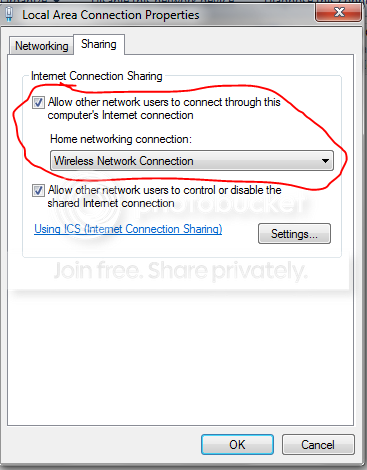
Also for sharing you need to select your Ethernet adapter instead of wireless as the tutorial i posted showed.
 

My Computer

OS
Windows 7 Ultimate x64
Are you absolutely sure you have enabled ICS on your 3G adapter? It must be enabled in the adapter you are using to connect to Internet, it's no help for you to enable it in Ethernet adapter (Local Area Connection).

Also for sharing you need to select your Ethernet adapter instead of wireless as the tutorial i posted showed.

NO NO NO!

There is no connection to share, he's not using Ethernet to connect to Internet. He's connecting with this 3G USB dongle, and that's the connection that needs to be shared.
 

My Computer

Computer type
Laptop
Computer Manufacturer/Model Number
HP ENVY 17-1150eg
OS
Windows 10 Pro x64 EN-GB
CPU
1.6 GHz Intel Core i7-720QM Processor
Memory
6 GB
Graphics Card(s)
ATI Mobility Radeon HD 5850 Graphics
Sound Card
Beats sound system with integrated subwoofer
Monitor(s) Displays
17" laptop display, 22" LED and 32" Full HD TV through HDMI
Screen Resolution
1600*900 (1), 1920*1080 (2&3)
Hard Drives
Internal: 2 x 500 GB SATA Hard Disk Drive 7200 rpm
External: 2TB for backups, 3TB USB3 network drive for media
Cooling
As Envy runs a bit warm, I have it on a Cooler Master pad
Keyboard
Logitech diNovo Media Desktop Laser (bluetooth)
Mouse
Logitech Performance Mouse MX
Internet Speed
50/10 Mbps VDSL
Antivirus
Windows Defender 4.3.9431.0
Browser
Maxthon 3.5.2., IE11
Right but hes using his ethernet to connect to his playstation. I was talking about this setting is that wrong?

ICS3.png
 

My Computer

OS
Windows 7 Ultimate x64
It's not wrong but it is not needed. Ethernet adapter is not sharing anything, it's in OP's case only used to connect to laptop. Sharing the connection must be done on device that is used to connect to Internet.
 

My Computer

Computer type
Laptop
Computer Manufacturer/Model Number
HP ENVY 17-1150eg
OS
Windows 10 Pro x64 EN-GB
CPU
1.6 GHz Intel Core i7-720QM Processor
Memory
6 GB
Graphics Card(s)
ATI Mobility Radeon HD 5850 Graphics
Sound Card
Beats sound system with integrated subwoofer
Monitor(s) Displays
17" laptop display, 22" LED and 32" Full HD TV through HDMI
Screen Resolution
1600*900 (1), 1920*1080 (2&3)
Hard Drives
Internal: 2 x 500 GB SATA Hard Disk Drive 7200 rpm
External: 2TB for backups, 3TB USB3 network drive for media
Cooling
As Envy runs a bit warm, I have it on a Cooler Master pad
Keyboard
Logitech diNovo Media Desktop Laser (bluetooth)
Mouse
Logitech Performance Mouse MX
Internet Speed
50/10 Mbps VDSL
Antivirus
Windows Defender 4.3.9431.0
Browser
Maxthon 3.5.2., IE11
Are you absolutely sure you have enabled ICS on your 3G adapter? It must be enabled in the adapter you are using to connect to Internet, it's no help for you to enable it in Ethernet adapter (Local Area Connection).

I am confused now? So it's not the one with Newprofile1? Or should it be the LAN?
 

Attachments

  • 1.jpg
    1.jpg
    149.6 KB · Views: 4

My Computer

OS
Windows 7-Home Edition
Are you absolutely sure you have enabled ICS on your 3G adapter? It must be enabled in the adapter you are using to connect to Internet, it's no help for you to enable it in Ethernet adapter (Local Area Connection).

Also for sharing you need to select your Ethernet adapter instead of wireless as the tutorial i posted showed.

NO NO NO!

There is no connection to share, he's not using Ethernet to connect to Internet. He's connecting with this 3G USB dongle, and that's the connection that needs to be shared.

100% i AM USING 3G dongle:D
 

My Computer

OS
Windows 7-Home Edition
New Profile1 is the name of the connection you use to connect to Internet. That connection needs to have ICS enabled.
 

My Computer

Computer type
Laptop
Computer Manufacturer/Model Number
HP ENVY 17-1150eg
OS
Windows 10 Pro x64 EN-GB
CPU
1.6 GHz Intel Core i7-720QM Processor
Memory
6 GB
Graphics Card(s)
ATI Mobility Radeon HD 5850 Graphics
Sound Card
Beats sound system with integrated subwoofer
Monitor(s) Displays
17" laptop display, 22" LED and 32" Full HD TV through HDMI
Screen Resolution
1600*900 (1), 1920*1080 (2&3)
Hard Drives
Internal: 2 x 500 GB SATA Hard Disk Drive 7200 rpm
External: 2TB for backups, 3TB USB3 network drive for media
Cooling
As Envy runs a bit warm, I have it on a Cooler Master pad
Keyboard
Logitech diNovo Media Desktop Laser (bluetooth)
Mouse
Logitech Performance Mouse MX
Internet Speed
50/10 Mbps VDSL
Antivirus
Windows Defender 4.3.9431.0
Browser
Maxthon 3.5.2., IE11
New Profile1 is the name of the connection you use to connect to Internet. That connection needs to have ICS enabled.

This is what it currently looks like;
 

Attachments

  • 1.jpg
    1.jpg
    164.9 KB · Views: 9
  • 2.jpg
    2.jpg
    176.9 KB · Views: 9
  • 3.jpg
    3.jpg
    179.8 KB · Views: 9

My Computer

OS
Windows 7-Home Edition
Now can your PS3 connect to the internet via the laptop?

I remember you saying something about a Ps3 proxy. Dont worry about that right now. Mostly because i have no idea what that is. Let just get internet connection.

Try to connect to the internet from your ps3. Let the PS3 automatically get the address.
 
Last edited:

My Computer

OS
Windows 7 Ultimate x64
Back
Top