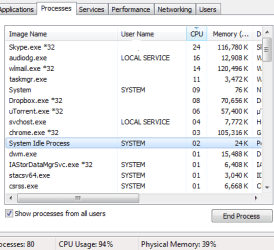
typical low cpu usage medium memory AND MORE!

wildheart25c

New member
Local time
1:57 PM
Messages
17
You've read similar threads like this a lot of times. Sorry to have to make you go through it again.

History:
I was uninstalling a few programs i either didn't know of or no longer needed. A day or two later my laptop lagged a lot. Eventually it became unbareable so I formated it.

I downloaded a windows 7 64bit copy off microsoft.
I formatted formatted my laptop and installed this copy.
I entered my ms key and activated my windows.
Naturally I immediately went to windows updates and accepted almost all important and suggested updates.

I thought it was over when I ended up spending 3 days, including installing and updating my windows, trying to do my laptop's bidding. At the beginning, when windows update was active, cpu would go high. I couldn't watch a video when cpu went past 20 or 25%. So I stopped and waited for the updates to finish. It got better a bit but then I noticed that cpu was going up again. I noticed that NET FRAMEWORK related processes were the ones taking up my cpu's power. Btw, during these 3 days my laptop shutdown by itself a few times because it overheated. CPU usage of course.

Anyways, 2 more days have passed and I've been living almost peacefully. Every now and then the laptop would remind me that I can't do whatever i want. Today for instance, I used teamviewer to record a session I was having with a contractor. I was talking to him via skype but had a meeting via teamviewer. Voice started slowing down and freezing like an audio track going super slow and the laptop lagged a lot of course. Skype audio call was fine last night. Had a one hour convo. Today i figured it was becasue of the recording via teamviewer but skype was still a problem even after i closed teamviewer. I ended up skyping via mobile.

There was something else that I noticed. Ever since the installation and updates, my memory was never lower than 20 or 30% even though I wasn't running any major apps. I'm talking about me staring at my desktop. Not doing anything.

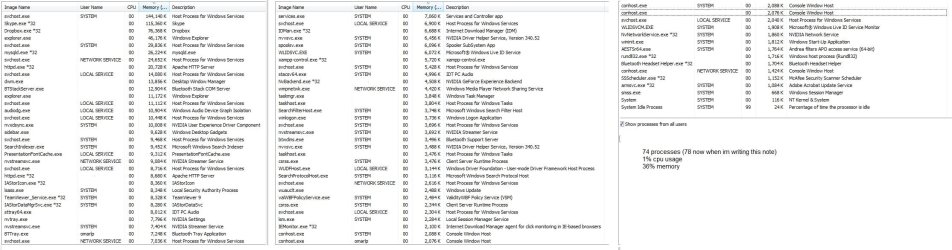
After some reading I confirmed that it wasnt because of windows media player service, I confirmed that there is something wrong with my laptop running 74 processes when I'm not doing anything really (image attached), and that my registry is fine. Also, my hp laptop has hp assistant app. I used it to download any and all updates for my laptop. There are still 4 items in device manager that haven't been identified yet. I'll have to use some driver detector for that later but im sure it's got nothing to do with it because I can't remember the last time my laptop had all its items on.


I need to know what's going on with my laptop. It's got 6gb memory, i7 1.6ghz turbo processor and nvidia 230m card with its own memory. HP Pavilion Entertainment Notebook dv6 2170ee. I'll format my pc and install again if i have to! But I need to be sure that this won't happen again.

What would you like me to post screenshots off?
I'm pretty sure that playing a game on my laptop is out of the question. So please help me.
 

Attachments
  • computer state.jpg
    computer state.jpg
    456.6 KB · Views: 6

My Computer

Computer type
Laptop
Computer Manufacturer/Model Number
HP Pavilion dv6 2170ee Notebook PC
OS
windows 7 64 bit professional
CPU
intel (r) core (tm) i7 cpu q720 1.6GHz
Memory
6 GB
Graphics Card(s)
nvidia geforce gt 230m
Sound Card
NVIDIA High Definition Audio + IDT High Def Audio CODEC
Screen Resolution
1366x768
Hard Drives
toshiba mq01abd100 1 TB
Internet Speed
3 MB/s
Antivirus
ms security essentials + malwarebytes
Browser
chrome firefox and IE8
There's nothing wrong with the 74 processes, it's exactly what I have as well when doing nothing else but having FF running.
Teamviewer and skype will both by default use port 80 or 443 so they might need to wait for one another. Have you tried changing the default port for one of them? I am fairly certain that at least Teamviewer can be configured to use another port.
Another tip is to fiddle with your AV and firewall settings to not constantly check/monitor on those two applications.
I'm pretty sure that playing a game on my laptop is out of the question.
Just give it a try....
 

My Computer

Computer type
PC/Desktop
OS
windows 7 ultimate x64
Thanx for replying. Though I'm afraid you havent addressed my memory issue. Right now my cpu is at 6% and my ram at 45%. That's not normal :D Even if i had chrome or fox running that's still not normal. I used to run 5 diff applications including video players and i wouldn't see a tiny glitch. There's something wrong with my system and I don't know what it is :(

In regards to what you recommended about my antivirus, firewall, skype and teamviewer, I'm sorry but I can't accept it. I'm just covering up the flaw in my system whatever it is. It's exactly what I did after the installation. This service was taking up too much power? Disable it. This program using too much memory? End Process Tree.

There's something wrong wtih my system. I used to be able to run many programs without any issues. I know I said this before but I had to say it again :D Right now I can't run windows update and watch a video because the video will lag and freeze. I can't play a game trust me. Yes I haven't tried yet but I don't have one installed yet. Won't go through the trouble until my system is normal again.

Any other suggestions please? Should I run disk error check at windows start? Memory check? Or perhaps run an online virus scanner to find out what the issue is? Is it my registry?
Something is keeping my ram up for no reason. That's a great clue to start with, wouldnt you agree? :D
 

My Computer

Computer type
Laptop
Computer Manufacturer/Model Number
HP Pavilion dv6 2170ee Notebook PC
OS
windows 7 64 bit professional
CPU
intel (r) core (tm) i7 cpu q720 1.6GHz
Memory
6 GB
Graphics Card(s)
nvidia geforce gt 230m
Sound Card
NVIDIA High Definition Audio + IDT High Def Audio CODEC
Screen Resolution
1366x768
Hard Drives
toshiba mq01abd100 1 TB
Internet Speed
3 MB/s
Antivirus
ms security essentials + malwarebytes
Browser
chrome firefox and IE8
I would suggest after a format and you are into the Windows Update stage of the install do nothing else on your system and that includes watching videos, phone, Teamviewer.

Lets get back to the basics.

**Have you completed all Windows 7 updates? If not which ones are still left to do?

**After all WU are completed you need to install a anti virus programs.
Using your computer online without a anti virus program is foolish. You could already be infected.
I use MSE and Malwarebytes.

Microsoft Security Essentials - Microsoft Windows

Malwarebytes Anti-Malware - Protect, Detect & Remove Malware From Your PC

**It would be helpful if you filled out your System Spec completely. The serial #of your laptop would be nice to have also.

**What programs did you install right after you complete your clean install? What programs do you have installed at this time?

**What Windows 7 did your laptop come with?

Lets start with those and then get back to us.
 

My Computer

Computer type
PC/Desktop
Computer Manufacturer/Model Number
Home made Desktop
OS
Windows 10 Pro. 64/ version 1709 Windows 7 Pro/64
CPU
Intel i7-6800K @ 4.3
Motherboard
ASUS X-99 Deluxe II
Memory
Corsair Platinum 16 gig @2400
Graphics Card(s)
EVGA GTX 1070 OC
Monitor(s) Displays
Asus 27" LED LCD/VE278Q
Screen Resolution
1920-1080 or 1280-720 HDMI
Hard Drives
INTEL SSD 730-240 Gb Sata 3.0/
PSU
EVGA Platium 1200W
Case
Phanteks Luxe Tempered Glass 8 fans/ one radiator
Cooling
XSPC/ Water Cooled CPU
Keyboard
Das 4 Professional
Mouse
Logitech M705/MX Anywhere 2-S
Internet Speed
100 mbits
Antivirus
Microsoft Security Essentials/ Malwarebytes Premium 3.0/ SAS
Browser
I.E. 11 default/Firefox/ ISP Time Warner Cable/Spectrum
Other Info
LG BluRay Burner/
Sound system-KLipsch-THX/
Icy Dock ssd Hot Swap bays.
i need to say this before i forget.
One very important example as to how normal my system was, was the ability to have 5 youtube tabs open where MOST OF THE TIME, a few of those clips would be playing. Now i had 3 tabs open. One had the sound on. The others no. 20 seconds after the others started loading, the voice slowed down like robotic and my pc lagged. My cpu went up to more than 90%. I had my video player open but on pause as well.
I could do this before. Now I can't.

I'll answer your questions in my next post.\


EDIT:
i closed everything like i said then opened youtbue again. one tab. not even the video player was on. Just one chrome tab openning youtube. I moved from one clip to the other. Pretty soon cpu went really high again. REALLY HIGH. I closed chrome then openned it again and came here .My cpu is at 50 now. See what I mean? :D The process taking up the cpu was svchost.exe as usual :P
 

My Computer

Computer type
Laptop
Computer Manufacturer/Model Number
HP Pavilion dv6 2170ee Notebook PC
OS
windows 7 64 bit professional
CPU
intel (r) core (tm) i7 cpu q720 1.6GHz
Memory
6 GB
Graphics Card(s)
nvidia geforce gt 230m
Sound Card
NVIDIA High Definition Audio + IDT High Def Audio CODEC
Screen Resolution
1366x768
Hard Drives
toshiba mq01abd100 1 TB
Internet Speed
3 MB/s
Antivirus
ms security essentials + malwarebytes
Browser
chrome firefox and IE8
1. yes all updates have been applied

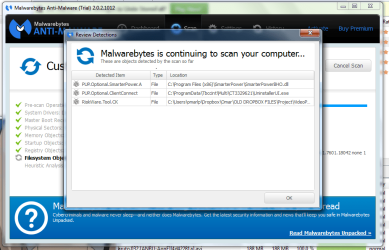
2. i installed these and did one full scan via MSE where i only got one virus/warning regarding a patch app for an app. i either deleted or quarantined it. and i completed half a full scan via malwarebytes. three results from this half scan which i quarantined. image attached of results. god i left it open for 9 hours and it didnt finish scanning :O i hope it's enough for now :P i can tell you that almost all the hours were spent on the windows folder.

3. serial is CNF9522XZR and i completed the profile you asked for. i have two sound: one from nvidia driver and one from ms updates. I never had problems before.

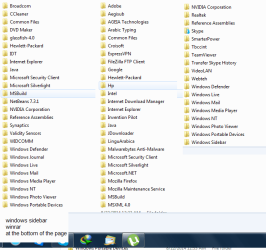
4. image attached of program files and program files 86 folders

5. no idea what windows version it came with. i bought this laptop 4 years ago


I forgot to add that when looking at device manager, I have 4 unidentified base system devices. How do I know what those are?
I bought driver tuner a long time ago so I just used it. It said that there are 3 out of date so I'm downloading and installing. See what happens.

Also is it normal that the CONFLICT SHARING page in SYSTEM INFORMATION is not empty? that there is content that there I don't understand? Is it expected to have conflict?
 

Attachments

  • program files.png
    program files.png
    83.3 KB · Views: 34
  • malware result.png
    malware result.png
    170.1 KB · Views: 3

My Computer

Computer type
Laptop
Computer Manufacturer/Model Number
HP Pavilion dv6 2170ee Notebook PC
OS
windows 7 64 bit professional
CPU
intel (r) core (tm) i7 cpu q720 1.6GHz
Memory
6 GB
Graphics Card(s)
nvidia geforce gt 230m
Sound Card
NVIDIA High Definition Audio + IDT High Def Audio CODEC
Screen Resolution
1366x768
Hard Drives
toshiba mq01abd100 1 TB
Internet Speed
3 MB/s
Antivirus
ms security essentials + malwarebytes
Browser
chrome firefox and IE8
Sooner or later, we're going to need to see pictures of these things:

Windows Task Manager, performance tab

Resource Monitor, memory tab
 

My Computer

Computer type
PC/Desktop
Computer Manufacturer/Model Number
Ignatz Special; 4 speed manual gearbox; factory air conditioning; one of one
OS
Windows 7 Home Premium SP1, 64-bit
CPU
Intel Skylake i5-6600K, not overclocked
Motherboard
AsRock Z170M Extreme 4, micro ATX
Memory
8 GB HyperX DDR4-2666 (2 x 4 GB)
Graphics Card(s)
none; graphics are integrated on CPU
Sound Card
onboard: Realtek ALC1150; external: USB Behringer UF0-202
Monitor(s) Displays
Dell S2340M 23 inch IPS
Screen Resolution
1600 x 900
Hard Drives
System: Crucial MX100 series SSD, 128 GB;
Data: Samsung Spinpoint 103SJ, 1 TB;
Backup: WD Caviar Green WD30EZRX-00D8PB0, 3 TB
PSU
Rosewill SilentNight 500 watt fanless, semi-modular
Case
Antec Solo II
Cooling
Noctua NH-U12S; Noctua F12 intake, Noctua S12A exhaust
Keyboard
Microsoft 200 6JH-00001 USB
Mouse
Dell or Microsoft optical wired; USB
Antivirus
Microsoft Security Essentials and Malwarebytes Premium
Browser
Pale Moon
Other Info
All fans PWM; speeds at idle: CPU circa 500 rpm; intake circa 600 rpm; exhaust circa 600 rpm; CPU temps 27 idle and 47 C load in a warm room (27 C/81 F) when running Intel Extreme Tuning Utility stress test.
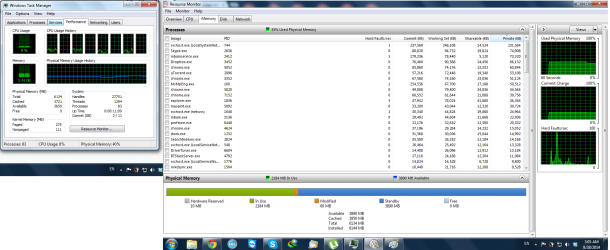
here are the images. resource app shows many running. should i take a screenshot of the rest or is the info in that part of the pic enough?
driver tuner fixed all but one. i'm down to one unknown device in my device manager.
i should point out that i haven't install chipset driver. at least i dont think i did.
 

Attachments

  • performance and memory.png
    performance and memory.png
    206.7 KB · Views: 10

My Computer

Computer type
Laptop
Computer Manufacturer/Model Number
HP Pavilion dv6 2170ee Notebook PC
OS
windows 7 64 bit professional
CPU
intel (r) core (tm) i7 cpu q720 1.6GHz
Memory
6 GB
Graphics Card(s)
nvidia geforce gt 230m
Sound Card
NVIDIA High Definition Audio + IDT High Def Audio CODEC
Screen Resolution
1366x768
Hard Drives
toshiba mq01abd100 1 TB
Internet Speed
3 MB/s
Antivirus
ms security essentials + malwarebytes
Browser
chrome firefox and IE8
I don't see anything wrong with memory usage. You've got close to 4 GB available for use.

I'd guess you have more processes running than many people, but 83 is not outrageous.

CPU usage at 8 percent;

Your complaints are lagging, general slowness, can't watch videos cleanly?

You say you recently formatted. Did you have these issues 6 months ago before the format? Or were these problems always there?

I wouldn't be too eager to use any type of "driver tuner".
 

My Computer

Computer type
PC/Desktop
Computer Manufacturer/Model Number
Ignatz Special; 4 speed manual gearbox; factory air conditioning; one of one
OS
Windows 7 Home Premium SP1, 64-bit
CPU
Intel Skylake i5-6600K, not overclocked
Motherboard
AsRock Z170M Extreme 4, micro ATX
Memory
8 GB HyperX DDR4-2666 (2 x 4 GB)
Graphics Card(s)
none; graphics are integrated on CPU
Sound Card
onboard: Realtek ALC1150; external: USB Behringer UF0-202
Monitor(s) Displays
Dell S2340M 23 inch IPS
Screen Resolution
1600 x 900
Hard Drives
System: Crucial MX100 series SSD, 128 GB;
Data: Samsung Spinpoint 103SJ, 1 TB;
Backup: WD Caviar Green WD30EZRX-00D8PB0, 3 TB
PSU
Rosewill SilentNight 500 watt fanless, semi-modular
Case
Antec Solo II
Cooling
Noctua NH-U12S; Noctua F12 intake, Noctua S12A exhaust
Keyboard
Microsoft 200 6JH-00001 USB
Mouse
Dell or Microsoft optical wired; USB
Antivirus
Microsoft Security Essentials and Malwarebytes Premium
Browser
Pale Moon
Other Info
All fans PWM; speeds at idle: CPU circa 500 rpm; intake circa 600 rpm; exhaust circa 600 rpm; CPU temps 27 idle and 47 C load in a warm room (27 C/81 F) when running Intel Extreme Tuning Utility stress test.
The picture in post #8 isn't as clean as it could be but not bad.
In my opinion a system with your hardware running utorrent and JDownloader it's doing fine.

You have a notebook with nvidia geforce gt 230m that will do up to dx10 but not dx11. You could run into some problems there.

You have been using your computer and utorrant without security so their is a good chance you are still infected by who know what.

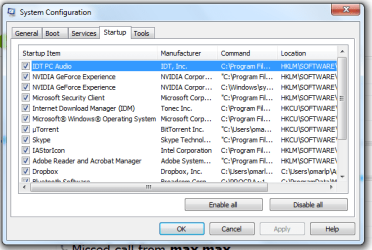
Showing us msconfig Startup might also help.

There should be a sticker on you notebook stating what Windows system it came with. It might be in the battery compartment.
 

My Computer

Computer type
PC/Desktop
Computer Manufacturer/Model Number
Home made Desktop
OS
Windows 10 Pro. 64/ version 1709 Windows 7 Pro/64
CPU
Intel i7-6800K @ 4.3
Motherboard
ASUS X-99 Deluxe II
Memory
Corsair Platinum 16 gig @2400
Graphics Card(s)
EVGA GTX 1070 OC
Monitor(s) Displays
Asus 27" LED LCD/VE278Q
Screen Resolution
1920-1080 or 1280-720 HDMI
Hard Drives
INTEL SSD 730-240 Gb Sata 3.0/
PSU
EVGA Platium 1200W
Case
Phanteks Luxe Tempered Glass 8 fans/ one radiator
Cooling
XSPC/ Water Cooled CPU
Keyboard
Das 4 Professional
Mouse
Logitech M705/MX Anywhere 2-S
Internet Speed
100 mbits
Antivirus
Microsoft Security Essentials/ Malwarebytes Premium 3.0/ SAS
Browser
I.E. 11 default/Firefox/ ISP Time Warner Cable/Spectrum
Other Info
LG BluRay Burner/
Sound system-KLipsch-THX/
Icy Dock ssd Hot Swap bays.
1. yes i have 4 gb but where did the 2gb go? is it normal for ur memory to be up to 30% when ur system is idle?

2. My issue is the cpu because whether my cpu is at 8% or 80%, it barely goes up :D

3. yes i do have more than avg process running. I don't know if tha'ts normal or not but considering what's been going on with my system, I'd say one or some of these processes might be the reason.

4. My complaints are single. my system isn't running like it used to. It's not normal for my system to have a black screen for a minute before finally showing my desktop. Furthermore, it's not normal that a recently formatted system is a bit slow between going into desktop and beginning your work (openning files etc). My video experience isn't bad because it's bad. It'ss bad because of the slowness which is due to god knows what.

5. no it wasn't like this 6 months ago. everything was fine until one day i decided ot uninstall a bunch of apps because i didnt know what they were or i didnt need them anymore. soon after the problems started.

6. So far it seems that ms sec and malware are doing this. I'm uninstalling them then observing my pc's behavior for a while. I don't think that the reason why i could do so many things at the same time was because I didn't have ms sec.

7. utorrent was NEVER an issue. I'm even surprised it sometimes takes several processes threads. As for jdownloader, the only type of issue it caused was memory. My cpu never overheated because i had these two running before. Ever. And even if i were infected, it didnt do this kind of damage :D Anyways I've had ms sec and malware for days. I keep scanning and quarantining but there's not that much effect.

8. the image shows bluetooth software at the end of that list and 3 others under it but these 3 aren't checked.

9. found the sticker. but no version. it's been wiped off. found numbers and characters. words. but no windows version. I don't think im imagining this but im sure I told him i wanted 64. Also, regardless of the version, things were great before. I've had 64 bit for a long loooong time.
 

Attachments

  • startup.png
    startup.png
    54.9 KB · Views: 22

My Computer

Computer type
Laptop
Computer Manufacturer/Model Number
HP Pavilion dv6 2170ee Notebook PC
OS
windows 7 64 bit professional
CPU
intel (r) core (tm) i7 cpu q720 1.6GHz
Memory
6 GB
Graphics Card(s)
nvidia geforce gt 230m
Sound Card
NVIDIA High Definition Audio + IDT High Def Audio CODEC
Screen Resolution
1366x768
Hard Drives
toshiba mq01abd100 1 TB
Internet Speed
3 MB/s
Antivirus
ms security essentials + malwarebytes
Browser
chrome firefox and IE8
From your post # 11

I keep scanning and quarantining but there's not that much effect.
If you have to keep quarantining things then something is continuing to infect your system.

Utorrent will keep you infected whether or not you believe it or not.
Download Manager is iffy at best. It normally will also download a lot of things you don't know about.

Iastor??

Check out this site.

http://www.file.net/process/iastor.sys.html


All those things you got started at boot are not necessary.

I'm done preaching. Your system do as you please.
 

My Computer

Computer type
PC/Desktop
Computer Manufacturer/Model Number
Home made Desktop
OS
Windows 10 Pro. 64/ version 1709 Windows 7 Pro/64
CPU
Intel i7-6800K @ 4.3
Motherboard
ASUS X-99 Deluxe II
Memory
Corsair Platinum 16 gig @2400
Graphics Card(s)
EVGA GTX 1070 OC
Monitor(s) Displays
Asus 27" LED LCD/VE278Q
Screen Resolution
1920-1080 or 1280-720 HDMI
Hard Drives
INTEL SSD 730-240 Gb Sata 3.0/
PSU
EVGA Platium 1200W
Case
Phanteks Luxe Tempered Glass 8 fans/ one radiator
Cooling
XSPC/ Water Cooled CPU
Keyboard
Das 4 Professional
Mouse
Logitech M705/MX Anywhere 2-S
Internet Speed
100 mbits
Antivirus
Microsoft Security Essentials/ Malwarebytes Premium 3.0/ SAS
Browser
I.E. 11 default/Firefox/ ISP Time Warner Cable/Spectrum
Other Info
LG BluRay Burner/
Sound system-KLipsch-THX/
Icy Dock ssd Hot Swap bays.
okay look at this.
everything was fine. and i started a skype call. 23 min later he tells me he can't hear me. 30 seconds later the screen lags a lot.
image is while call was on

i will address your reply later. But really look at this .... not fair :P even after i closed skype and torrent, it was still slow for a while. i was almost going to end my epxlorer and start a new one when it FINALLy slowed down.
 

Attachments

  • During.png
    During.png
    27.4 KB · Views: 20

My Computer

Computer type
Laptop
Computer Manufacturer/Model Number
HP Pavilion dv6 2170ee Notebook PC
OS
windows 7 64 bit professional
CPU
intel (r) core (tm) i7 cpu q720 1.6GHz
Memory
6 GB
Graphics Card(s)
nvidia geforce gt 230m
Sound Card
NVIDIA High Definition Audio + IDT High Def Audio CODEC
Screen Resolution
1366x768
Hard Drives
toshiba mq01abd100 1 TB
Internet Speed
3 MB/s
Antivirus
ms security essentials + malwarebytes
Browser
chrome firefox and IE8
What version of Skype are you using? 6.?
Also can you check the PID on the process running under svchost? You will need to add the PID column to the Processes tab, then check the PID for svchost and switch to the services tab and try to find the processes with the same PID. There will be several of them, that's OK. Post back with the results.
 

My Computer

Computer type
PC/Desktop
OS
windows 7 ultimate x64
1. yes i have 4 gb but where did the 2gb go? is it normal for ur memory to be up to 30% when ur system is idle?

3. yes i do have more than avg process running. I don't know if tha'ts normal or not but considering what's been going on with my system, I'd say one or some of these processes might be the reason.


5. no it wasn't like this 6 months ago. everything was fine until one day i decided ot uninstall a bunch of apps because i didnt know what they were or i didnt need them anymore. soon after the problems started.

6. So far it seems that ms sec and malware are doing this. I'm uninstalling them

A lean system might have 50 processes and use 1.4 GB of RAM shortly after a boot. I have 52 processes and am using 1.36 GB of RAM right now. With all the stuff you have running, I'm not surprised you are using as much RAM as you are.

Have you run SFC /scannow from a command prompt? I'm wondering what kind of damage you may have done when you uninstalled "a bunch of apps because I didnt know what they were".

What is ms sec? Microsoft Security Essentials????
 

My Computer

Computer type
PC/Desktop
Computer Manufacturer/Model Number
Ignatz Special; 4 speed manual gearbox; factory air conditioning; one of one
OS
Windows 7 Home Premium SP1, 64-bit
CPU
Intel Skylake i5-6600K, not overclocked
Motherboard
AsRock Z170M Extreme 4, micro ATX
Memory
8 GB HyperX DDR4-2666 (2 x 4 GB)
Graphics Card(s)
none; graphics are integrated on CPU
Sound Card
onboard: Realtek ALC1150; external: USB Behringer UF0-202
Monitor(s) Displays
Dell S2340M 23 inch IPS
Screen Resolution
1600 x 900
Hard Drives
System: Crucial MX100 series SSD, 128 GB;
Data: Samsung Spinpoint 103SJ, 1 TB;
Backup: WD Caviar Green WD30EZRX-00D8PB0, 3 TB
PSU
Rosewill SilentNight 500 watt fanless, semi-modular
Case
Antec Solo II
Cooling
Noctua NH-U12S; Noctua F12 intake, Noctua S12A exhaust
Keyboard
Microsoft 200 6JH-00001 USB
Mouse
Dell or Microsoft optical wired; USB
Antivirus
Microsoft Security Essentials and Malwarebytes Premium
Browser
Pale Moon
Other Info
All fans PWM; speeds at idle: CPU circa 500 rpm; intake circa 600 rpm; exhaust circa 600 rpm; CPU temps 27 idle and 47 C load in a warm room (27 C/81 F) when running Intel Extreme Tuning Utility stress test.
Yes Skype 6
Wesvc is the only service with pid matching svhost. Windows reporting service
Lay back bear I will get back to you promise.
I'll run the command and see what I get.
As for startup and memory, if I remove these from startup I'll still need to run them after startup. So at least you're saying that 2 gb is normal.
It just froze again. Lagged cup at 100 etc. Ms sec had 15 even tho it wasn't running a scan. A bunch of chrome had 7 each. I think there were 2. Still don't no why one page creates several processes. And a few other processes that made it go high up. If only I knew why it was doing this.
Yes ms sec is microsoft security


EDIT: passed sfc. no integrity violation found
shall go ahead and scan my disk and my memory? but ill have to do those when i sleep

EDIT EDIT: passed disk check too. that's the tool via computer properties. i restarted my pc and read 3 lines. 2 of which were THE FILE SYSTEM IS NTFS and THIS VOLUME IS CLEAN. This was all in a couple of seconds. it's like there was a check that told it whether it should bother scanning or not :D
 
Last edited:

My Computer

Computer type
Laptop
Computer Manufacturer/Model Number
HP Pavilion dv6 2170ee Notebook PC
OS
windows 7 64 bit professional
CPU
intel (r) core (tm) i7 cpu q720 1.6GHz
Memory
6 GB
Graphics Card(s)
nvidia geforce gt 230m
Sound Card
NVIDIA High Definition Audio + IDT High Def Audio CODEC
Screen Resolution
1366x768
Hard Drives
toshiba mq01abd100 1 TB
Internet Speed
3 MB/s
Antivirus
ms security essentials + malwarebytes
Browser
chrome firefox and IE8
sorry for double post. but svchost.exe now has a diff PID 5876 and therefore different services depending on it. right now it's pnprsvc, p2psvc and p2pimsvc. those are peer name resolution protocol, peer networking grouping, and peer networking identity manager. but i can go like this all day o.o whenever the PID changes, i make a post about the new services under svchost.exe. so i think perhaps, my next post will be the same but only when the laptop decides to go crazy again

Also please check previous post. Edited it twice.
 

My Computer

Computer type
Laptop
Computer Manufacturer/Model Number
HP Pavilion dv6 2170ee Notebook PC
OS
windows 7 64 bit professional
CPU
intel (r) core (tm) i7 cpu q720 1.6GHz
Memory
6 GB
Graphics Card(s)
nvidia geforce gt 230m
Sound Card
NVIDIA High Definition Audio + IDT High Def Audio CODEC
Screen Resolution
1366x768
Hard Drives
toshiba mq01abd100 1 TB
Internet Speed
3 MB/s
Antivirus
ms security essentials + malwarebytes
Browser
chrome firefox and IE8
leave your task manager running and sorted by CPU usage, highest at the top. What you need is to catch what brings the CPU to 100 because that's not normal. BTW Skype 6.9 is known to use 20-25 CPU!
Also keep an eye on the task manager. You want to see the PID when svchost is using more than 1% or so of CPU.
Incidentally what driver are you using for your audio? The CPU usage of audiodg.exe is quite high. Maybe it was just a fluke on the screen shot you posted, but if that app is frequently using more than 1-2% CPU you might want to review the driver and any sound effects.
 

My Computer

Computer type
PC/Desktop
OS
windows 7 ultimate x64
my skype is 6.18.0.xxxx

i started utorrent. it's CPU usage reached 15 for a few seconds. It's been a minute and it's averaging anywhere between 4 and 9 percent. What if it's the new version that's causing all this? at least causing it to take on that much cpu. utorrent build 3.4.2 32bit.

as for the svchost, i made a mistake. there were more than one svchost. at least the first time maybe there were one but the second time there were many. so ill have to take screenshots of all svc quickly and then later when the cpu calms down i can get the services running.

as for the audio, it's either in my profile or i wrote it in one of my long long posts. i have two i believe. one i got as an update from microsoft while the other was from nvidia. i can just uninstall the one from ms how about it? i dont know if i can uninstall the audio from nvidia. if i can id uninstall both and just download a driver from hp.

there are 2 processes called nvvsvc.exe and 3 called nvstreamsvc.exe. these are nvidia driver helper service and nvidia streamer service. is that normal?

i have 14 svchost running. all are 00. so like i said, ill have to take ss when cpu acts up. it's the only choice i have to get them all together.
 

My Computer

Computer type
Laptop
Computer Manufacturer/Model Number
HP Pavilion dv6 2170ee Notebook PC
OS
windows 7 64 bit professional
CPU
intel (r) core (tm) i7 cpu q720 1.6GHz
Memory
6 GB
Graphics Card(s)
nvidia geforce gt 230m
Sound Card
NVIDIA High Definition Audio + IDT High Def Audio CODEC
Screen Resolution
1366x768
Hard Drives
toshiba mq01abd100 1 TB
Internet Speed
3 MB/s
Antivirus
ms security essentials + malwarebytes
Browser
chrome firefox and IE8
I read about your slow Malwarebytes scan and its detections. Here's a super fast tip to scan with 50+ antivirus products :p

Process Explorer from Sysinternals(Microsoft). It's like Task Manager but MUCH better and has an option to check each file on VirusTotal, a multi-engine scanner with 50+ AV's. If you launch it as Administrator it will check all processes incl. those running as system and with high integrity. If the VirusTotal column shows for example 0/55 it means no AV detected anything out of 55 different AV's. If any process shows something else than 0 you can click on the rating to view the report on VirusTotal. See the report to find out if perhaps it's a false positive or a malware. Process Explorer

Go to the Options menu - VirusTotal.com and select Check VirusTotal.com. If you have any processes that hasn't previously been scanned on VirusTotal you could also select Submit Unknown Executables, in the same menu.
A review with screenshots here: http://www.ghacks.net/2014/01/30/pro...total-support/

If you find a suspicious process you can enable the lower pane by pressing Ctrl+L, then all DLL's used in that process will be checked on VirusTotal as well (assuming Process Explorer was launched as Administrator).
 

My Computer

Computer type
Laptop
Computer Manufacturer/Model Number
HP Elitebook 8540p
OS
Windows 7 Pro 32
CPU
Intel(R) Core(TM) i5 CPU M 540 @ 2.53GHz
Motherboard
Hewlett-Packard 1521
Memory
4,00 GB (Usable 2,98)
Graphics Card(s)
NVIDIA NVS 5100M
Sound Card
NVIDIA High Definition Audio
Screen Resolution
1600x900
Hard Drives
INTEL SSDSA2CW120G3
Antivirus
F-Secure Internet Security
Browser
IE, Firefox, Opera
Other Info
Sandboxie,
SRP (Software Restriction Policy),
EMET (Enhanced Mitigation Experience Toolkit),
WFC (Windows Firewall Control by BiniSoft),
Malwarebytes Premium
Back
Top