wildheart25c
New member
- Local time
- 6:05 AM
- Messages
- 17
You've read similar threads like this a lot of times. Sorry to have to make you go through it again.
History:
I was uninstalling a few programs i either didn't know of or no longer needed. A day or two later my laptop lagged a lot. Eventually it became unbareable so I formated it.
I downloaded a windows 7 64bit copy off microsoft.
I formatted formatted my laptop and installed this copy.
I entered my ms key and activated my windows.
Naturally I immediately went to windows updates and accepted almost all important and suggested updates.
I thought it was over when I ended up spending 3 days, including installing and updating my windows, trying to do my laptop's bidding. At the beginning, when windows update was active, cpu would go high. I couldn't watch a video when cpu went past 20 or 25%. So I stopped and waited for the updates to finish. It got better a bit but then I noticed that cpu was going up again. I noticed that NET FRAMEWORK related processes were the ones taking up my cpu's power. Btw, during these 3 days my laptop shutdown by itself a few times because it overheated. CPU usage of course.
Anyways, 2 more days have passed and I've been living almost peacefully. Every now and then the laptop would remind me that I can't do whatever i want. Today for instance, I used teamviewer to record a session I was having with a contractor. I was talking to him via skype but had a meeting via teamviewer. Voice started slowing down and freezing like an audio track going super slow and the laptop lagged a lot of course. Skype audio call was fine last night. Had a one hour convo. Today i figured it was becasue of the recording via teamviewer but skype was still a problem even after i closed teamviewer. I ended up skyping via mobile.
There was something else that I noticed. Ever since the installation and updates, my memory was never lower than 20 or 30% even though I wasn't running any major apps. I'm talking about me staring at my desktop. Not doing anything.
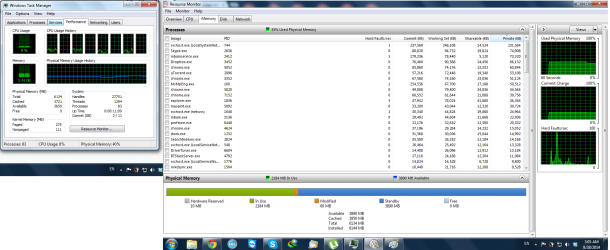
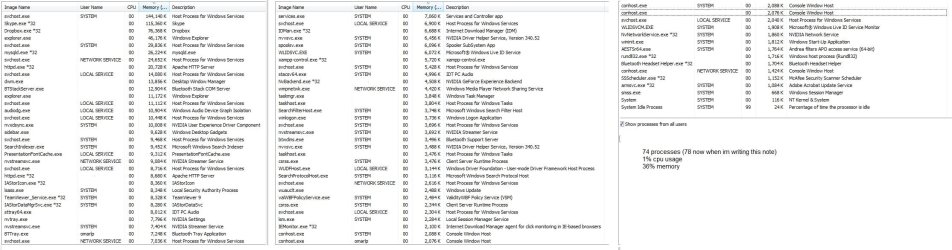
After some reading I confirmed that it wasnt because of windows media player service, I confirmed that there is something wrong with my laptop running 74 processes when I'm not doing anything really (image attached), and that my registry is fine. Also, my hp laptop has hp assistant app. I used it to download any and all updates for my laptop. There are still 4 items in device manager that haven't been identified yet. I'll have to use some driver detector for that later but im sure it's got nothing to do with it because I can't remember the last time my laptop had all its items on.
I need to know what's going on with my laptop. It's got 6gb memory, i7 1.6ghz turbo processor and nvidia 230m card with its own memory. HP Pavilion Entertainment Notebook dv6 2170ee. I'll format my pc and install again if i have to! But I need to be sure that this won't happen again.
What would you like me to post screenshots off?
I'm pretty sure that playing a game on my laptop is out of the question. So please help me.
History:
I was uninstalling a few programs i either didn't know of or no longer needed. A day or two later my laptop lagged a lot. Eventually it became unbareable so I formated it.
I downloaded a windows 7 64bit copy off microsoft.
I formatted formatted my laptop and installed this copy.
I entered my ms key and activated my windows.
Naturally I immediately went to windows updates and accepted almost all important and suggested updates.
I thought it was over when I ended up spending 3 days, including installing and updating my windows, trying to do my laptop's bidding. At the beginning, when windows update was active, cpu would go high. I couldn't watch a video when cpu went past 20 or 25%. So I stopped and waited for the updates to finish. It got better a bit but then I noticed that cpu was going up again. I noticed that NET FRAMEWORK related processes were the ones taking up my cpu's power. Btw, during these 3 days my laptop shutdown by itself a few times because it overheated. CPU usage of course.
Anyways, 2 more days have passed and I've been living almost peacefully. Every now and then the laptop would remind me that I can't do whatever i want. Today for instance, I used teamviewer to record a session I was having with a contractor. I was talking to him via skype but had a meeting via teamviewer. Voice started slowing down and freezing like an audio track going super slow and the laptop lagged a lot of course. Skype audio call was fine last night. Had a one hour convo. Today i figured it was becasue of the recording via teamviewer but skype was still a problem even after i closed teamviewer. I ended up skyping via mobile.
There was something else that I noticed. Ever since the installation and updates, my memory was never lower than 20 or 30% even though I wasn't running any major apps. I'm talking about me staring at my desktop. Not doing anything.
After some reading I confirmed that it wasnt because of windows media player service, I confirmed that there is something wrong with my laptop running 74 processes when I'm not doing anything really (image attached), and that my registry is fine. Also, my hp laptop has hp assistant app. I used it to download any and all updates for my laptop. There are still 4 items in device manager that haven't been identified yet. I'll have to use some driver detector for that later but im sure it's got nothing to do with it because I can't remember the last time my laptop had all its items on.
I need to know what's going on with my laptop. It's got 6gb memory, i7 1.6ghz turbo processor and nvidia 230m card with its own memory. HP Pavilion Entertainment Notebook dv6 2170ee. I'll format my pc and install again if i have to! But I need to be sure that this won't happen again.
What would you like me to post screenshots off?
I'm pretty sure that playing a game on my laptop is out of the question. So please help me.
Attachments
My Computer
At a glance
windows 7 64 bit professionalintel (r) core (tm) i7 cpu q720 1.6GHz6 GBnvidia geforce gt 230m
- Computer type
- Laptop
- Computer Manufacturer/Model Number
- HP Pavilion dv6 2170ee Notebook PC
- OS
- windows 7 64 bit professional
- CPU
- intel (r) core (tm) i7 cpu q720 1.6GHz
- Memory
- 6 GB
- Graphics Card(s)
- nvidia geforce gt 230m
- Sound Card
- NVIDIA High Definition Audio + IDT High Def Audio CODEC
- Screen Resolution
- 1366x768
- Hard Drives
- toshiba mq01abd100 1 TB
- Internet Speed
- 3 MB/s
- Antivirus
- ms security essentials + malwarebytes
- Browser
- chrome firefox and IE8

 Even if i had chrome or fox running that's still not normal. I used to run 5 diff applications including video players and i wouldn't see a tiny glitch. There's something wrong with my system and I don't know what it is