Uefi bios setup

gelapir

Banned
Local time
12:18 AM
Messages
22
Hello here,

I am new here and i would at first say thanks to all them who supports that site to be alive and help all in the world.

I need your help:

I want want install windows 7, it is asrock, but when i choose boot priority there is only one option hitachi there is no dvdrom to boot from it but there is no. what should i do? what is aproblem?

thanks in advanced.
 

My Computer

Computer type
PC/Desktop
Computer Manufacturer/Model Number
asus
OS
windows nome premium x86
Motherboard
asus
Memory
2
Hello and welcome to the forums,

I think I had a similar issue when I was building a PC for my Dad a while back.

I think you press F8 or something like that for a list of boot options right?
Then it gives you 2 choices UEFI and something else, I found one of the options showed the DVD drive in the list, the other option did not have it.

I am being a bit vague as it was a fair while ago since I did it.

What is the exact model of the motherboard?

Paul.
 

My Computer

OS
Windows 7 Professional 64 bit

My Computer

Computer type
PC/Desktop
Computer Manufacturer/Model Number
Airbot 2.0
OS
Windows 7 Ultimate x64 SP1
CPU
Core i7 920 (D0) @ 4Ghz, *26c idle *65c full load on air
Motherboard
Asus P6X58D Premium - Sata 6Gb/s - USB 3.0
Memory
12GB DDR3 Corsair Dominator -CMD12GX3M6A1600C8 at 1600MHz
Graphics Card(s)
Zotac Geforce GTX 770
Sound Card
ASUS Xonar D2X
Monitor(s) Displays
1 LG 24" Flatron W2453V-PF 1 Samsung 24" P2450H both 2ms RT
Screen Resolution
1920x1080@60hz
Hard Drives
1 Samsung 250GB 840 Evo SSD
1 OCZ Vertex2 180GB SSD
1 TB Samsung Spinpoint F1 7200RPM 32MB cache
2 500GB WD Caviar Blacks 7200RPM 32MB cache (WD5001AALS)

Pioneer DVD Burner DVR-S18M
PSU
Corsair HX1000W
Case
Cooler Master HAF 932
Cooling
Case Fans *3 230mm, *1 140mm/CPU - *Tuniq Tower 120 Extreme
Keyboard
Logitech Wireless MK700
Mouse
Logitech Wireless MK700
Internet Speed
DL 15 Mbps UL 0.98 Mbps
Antivirus
None
Browser
Firefox Nightly
Other Info
Processor-7.7 *RAM- 7.9 *Graphics-7.9 *Gaming Graphics- 7.9 *SSD- 7.8 W.E.I final score= 7.7
*Phone- LG Nexus 5
Hello and welcome to the forums,

I think I had a similar issue when I was building a PC for my Dad a while back.

I think you press F8 or something like that for a list of boot options right?
Then it gives you 2 choices UEFI and something else, I found one of the options showed the DVD drive in the list, the other option did not have it.

I am being a bit vague as it was a fair while ago since I did it.

What is the exact model of the motherboard?

Paul.

Thanks for your support,

sorry for above i wrote incorrect it is not asrock, it is samsung laptop bios version is P02ABF.

there is now 2 options of boot priority hhd hitachi and 2nd one is uefi rom media and when i choose second it says invalid operation and not going to installing windows.

what is problem? thanks in advanced.
 

My Computer

Computer type
PC/Desktop
Computer Manufacturer/Model Number
asus
OS
windows nome premium x86
Motherboard
asus
Memory
2
gelapir,

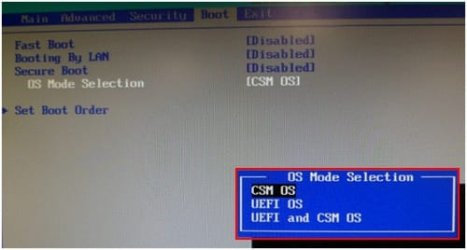
See if you can choose legacy boot, then after install go back to UEFI.
 

My Computer

Computer type
PC/Desktop
Computer Manufacturer/Model Number
Dude Build
OS
Windows 10 Pro X64
CPU
Intel(R) Core(TM) i5-3570K CPU OC@ 4.5GHZ Turbo
Motherboard
MSI Z77A-G45 Gaming
Memory
8.00 GB DDR3 1600Mhz
Graphics Card(s)
MSI Gaming X GTX 1070
Sound Card
Realtek High Definition
Monitor(s) Displays
Dell S23O9W, HP L1710
Screen Resolution
DELL-1920 x 1080 HP-1280 x1024
Hard Drives
Crucial m4 256 SSD, WD 7200RPM 500GB WD 1TB
PSU
Seasonic X650 GOLD
Case
Zalman Z12
Cooling
Antec Kuhler 920
Keyboard
Logitech
Mouse
MSI DS100 Interceptor
Internet Speed
50 down and 5 up
Antivirus
MSE
Browser
Chrome, IE 11
Other Info
Logitech X-620 Speakers
Is this Samsung NoteBoot a new PC with Windows 8 Pre-installed?
If Yes, set BIOS to UEFI & CSM.

Samsung 3.jpg

1) Downgrade to Windows 7.
Downgrade Windows 8 to Windows 7
Warning you must have the uEFI/BIOS firmware setting in Step Three set.


2) If Using a USB Pendrive on a PC with a uEFI BIOS.
USB Pendrive need to be formated to FAT32 as in
UEFI Bootable USB Flash Drive - Create in Windows
Take note of Step 11 for Windows 7.
Also you will need to use a USB 2.0 port, as there are no USB 3.0 drivers in Windows 7.

How to install Windows 64 bit on a uEFI/BIOS firmware:
http://www.sevenforums.com/tutorial...e-firmware-interface-install-windows-7-a.html
or
UEFI (Unified Extensible Firmware Interface) - Install Windows 8 with
 

My Computer

OS
ME/XP/Vista/Win7
gelapir,

See if you can choose legacy boot, then after install go back to UEFI.

If install in Legacy mode, than reset the BIOS to UEFI Windows will not boot.
 

My Computer

OS
ME/XP/Vista/Win7
gelapir,

See if you can choose legacy boot, then after install go back to UEFI.

If install in Legacy mode, than reset the BIOS to UEFI Windows will not boot.

Theog, thank you for pointing that out.

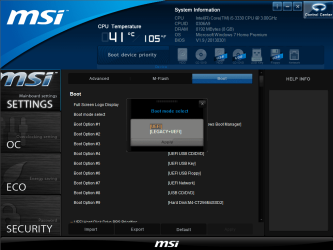
I did not word that right. In my bios I can enable both, I did not mean to disable UEFI.
bios.PNG
 

My Computer

Computer type
PC/Desktop
Computer Manufacturer/Model Number
Dude Build
OS
Windows 10 Pro X64
CPU
Intel(R) Core(TM) i5-3570K CPU OC@ 4.5GHZ Turbo
Motherboard
MSI Z77A-G45 Gaming
Memory
8.00 GB DDR3 1600Mhz
Graphics Card(s)
MSI Gaming X GTX 1070
Sound Card
Realtek High Definition
Monitor(s) Displays
Dell S23O9W, HP L1710
Screen Resolution
DELL-1920 x 1080 HP-1280 x1024
Hard Drives
Crucial m4 256 SSD, WD 7200RPM 500GB WD 1TB
PSU
Seasonic X650 GOLD
Case
Zalman Z12
Cooling
Antec Kuhler 920
Keyboard
Logitech
Mouse
MSI DS100 Interceptor
Internet Speed
50 down and 5 up
Antivirus
MSE
Browser
Chrome, IE 11
Other Info
Logitech X-620 Speakers
thanks friends' for your support it helped me much. my big thanks you all here who makes that site helpful. i wish u success.
 

My Computer

Computer type
PC/Desktop
Computer Manufacturer/Model Number
asus
OS
windows nome premium x86
Motherboard
asus
Memory
2
Back
Top