UEFI install? The quirks seem to say yes...

msalton1

New member
Member
VIP
Local time
12:48 AM
Messages
325
[FONT=&quot]I've read that win 7 x86 doesn't support UEFI, but my install seems very UEFI-like.[/FONT]
[FONT=&quot]The install
[/FONT]


  • [FONT=&quot]Installed win 7 Pro x86 with bios Boot Mode selection set to UEFI & Legacy[/FONT]

  • [FONT=&quot]Installed from an MS official win 7 pro sp1 x86 iso (X17-59183) copied to a Zalman ZM-VE300, which is formatted to NTFS[/FONT]
  • [FONT=&quot]The SSD is formatted to NTFS and has the Win 7 System partition (also NTFS) as well as the 'OS' partition
    [/FONT]

[FONT=&quot]
[/FONT]

[FONT=&quot]Hardware:[/FONT]

  • [FONT=&quot]Gigabyte H81-D3[/FONT]
  • [FONT=&quot]Pentium G3420 Dual Core[/FONT]
  • [FONT=&quot]Using onboard intel graphics and audio[/FONT]
  • [FONT=&quot]4GB Gskill RAM[/FONT]
  • [FONT=&quot]Kingston 120GB SSD /mbr
    [/FONT]

[FONT=&quot]I am able to access 2 different "forms" of the Bios. A point and click 'dashboard' mode that seems very UEFI and a "classic setup", which is more in the form of a traditional bios (with mouse support). I also have fast boot, secure boot and other UEFI features.

Another issue is that I have boot-from-media issues (could be motherboard issues, I guess). In example, boots from my Zalman ZM-VE300 (formated NTFS) are quirky. And I have to unplug it between boots. From CD, Hiren's will boot to mini xp, but mini xp only and none of the hiram's utilities. From my isostick (formatted FAT32), I can boot to Hirem's and have full use of the hirem utilities, but I have to edit the config file for the iso I want (the "isosel" menu doesn't come up, a known issue for UEFI booting).
[/FONT]​

If the conclusions I've drawn from what I've read and from my limited experience with UEFI, what I've described above fits. The system performs fine in windows (so far). Is this a 'legitimate' UEFI install? Are my issues to be expected?

Thanks for any ideas.


[FONT=&quot]
[/FONT]​
 

My Computer My Computer

At a glance

windows 7 Pro 64 Biti5 4670K16GB DDR3@933mhzRadeon R9 390 8192mb
Computer type
PC/Desktop
Computer Manufacturer/Model Number
custom
OS
windows 7 Pro 64 Bit
CPU
i5 4670K
Motherboard
Asus Max Hero 1150 socket
Memory
16GB DDR3@933mhz
Graphics Card(s)
Radeon R9 390 8192mb
Monitor(s) Displays
Dell U2415 x3
Screen Resolution
1920 (5760) x 1200 x3
Hard Drives
System: Kingston 128GB SSD

Installing to Samsung 860 EVO 500GB
WD Black 2 TB & 1 TB
PSU
Corsair CX750M
Cooling
Hyper 312
Internet Speed
50mbps
I always use mbr install, but still see the funky new graphic bios. Maybe you're confusing uefi with the latest groovy bios screens.
 

My Computer My Computer

At a glance

Windows 7 pro x64 SP1Intel i7-2600k o/c to 4.6GHz8GB Mushkin 1866MHzNvidia GTX 750 Ti 2GB
Computer type
PC/Desktop
Computer Manufacturer/Model Number
self build
OS
Windows 7 pro x64 SP1
CPU
Intel i7-2600k o/c to 4.6GHz
Motherboard
MSI Z68-GD80
Memory
8GB Mushkin 1866MHz
Graphics Card(s)
Nvidia GTX 750 Ti 2GB
Sound Card
integrated
Monitor(s) Displays
Liyama ProLite 27"
Screen Resolution
1920*1080 px
Hard Drives
Seagate 2TB
PSU
Coolermaster GX 750W
Case
Antec 300 case + 5 fans
Cooling
Dark Rock Pro
Internet Speed
62Mbit down 18Mbit up
Antivirus
MSE
Browser
Firefox
Other Info
Blackgold BGT3650 Quad HD TV card. Also have various 3770 + 4770K render boxes.
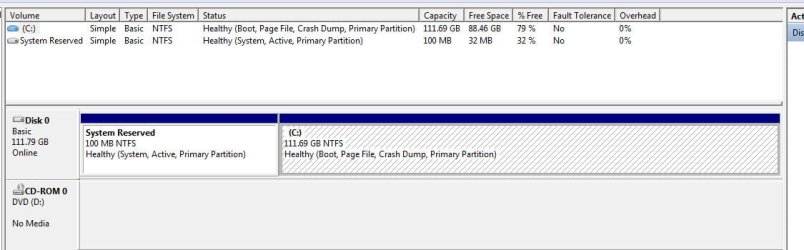
Hello, and thanks for your responses. Here is the requested screenshot:

HDstation Disk Mngmt.JPG
 

My Computer My Computer

At a glance

windows 7 Pro 64 Biti5 4670K16GB DDR3@933mhzRadeon R9 390 8192mb
Computer type
PC/Desktop
Computer Manufacturer/Model Number
custom
OS
windows 7 Pro 64 Bit
CPU
i5 4670K
Motherboard
Asus Max Hero 1150 socket
Memory
16GB DDR3@933mhz
Graphics Card(s)
Radeon R9 390 8192mb
Monitor(s) Displays
Dell U2415 x3
Screen Resolution
1920 (5760) x 1200 x3
Hard Drives
System: Kingston 128GB SSD

Installing to Samsung 860 EVO 500GB
WD Black 2 TB & 1 TB
PSU
Corsair CX750M
Cooling
Hyper 312
Internet Speed
50mbps
You clearly have an MBR install since there is no EFI System partition and the System Reserved boot partition is marked Active which cannot be done on a GPT disk.

What you probably have is a UEFI BIOS set to CSM or with Legacy only enabled and not set as the only choice. This means that if you booted a 64 bit Win7 installation media it would offer you an EFI DVD or USB choice to install from so you'd know you are installing to UEFI. However you'd have to wipe the disk first to clear it to be formatted GPT instead of MBR when that's what its currently formatted with.

Another way to confirm GPT or MBR disk easily is to right click on the Disk# panel in Disk Mgmt to see what it offers to convert it to, GPT or MBR. But don't ever do that unless you want to destroy everything on the disk.
 
What you probably have is a UEFI BIOS set to CSM or with Legacy only enabled and not set as the only choice. This means that if you booted a 64 bit Win7 installation media it would offer you an EFI DVD or USB choice to install from so you'd know you are installing to UEFI. However you'd have to wipe the disk first to clear it to be formatted GPT instead of MBR when that's what its currently formatted with.

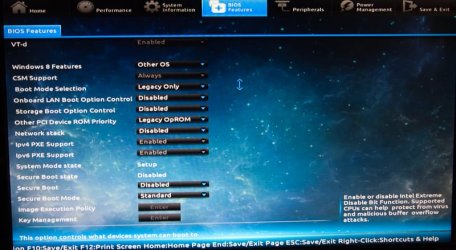
Hi Greg. Yes, it is mbr. This bios only provides the CSM option if you set the bios option "Windows 8 Features" to Windows 8 or Win 8 WHQL. Since I'm running win 7, I have that option set to 'Other OS'. Other than that, I have played around with the settings. Right now:

Boot Mode Selection
: Legacy Only (was set to "UEFI and Legacy")
Storage Boot Option Control: Disabled (tried Legacy Only and UEFI first)
Other PCI Device ROM priority: Legacy OpROM (was UEFI OpROM)
Secure Boot: Disabled

What has made a difference is changing USB ports when booting from a stick. I can now boot into hirems mini xp with full Hiren's menu items and mouse and keyboard support are back (USB wireless).
I can't boot linux isos (from the same stick). It can't seem to complete.

Booting from CD, however, results in Hiren's with no mouse/keyboard support (USB wireless).

My Zalman drive is very inconsistent, but is better since I started booting from a USB 2 port rather than USB 3.

The sticks are formatted FAT32. The zalman is NTFS. And the CD issues have me scratching my head. Must be bios (??).

I'm not sure if this is an install problem or hardware issue now. Is there a bios setting that I'm missing that would clear this up?
 

My Computer My Computer

At a glance

windows 7 Pro 64 Biti5 4670K16GB DDR3@933mhzRadeon R9 390 8192mb
Computer type
PC/Desktop
Computer Manufacturer/Model Number
custom
OS
windows 7 Pro 64 Bit
CPU
i5 4670K
Motherboard
Asus Max Hero 1150 socket
Memory
16GB DDR3@933mhz
Graphics Card(s)
Radeon R9 390 8192mb
Monitor(s) Displays
Dell U2415 x3
Screen Resolution
1920 (5760) x 1200 x3
Hard Drives
System: Kingston 128GB SSD

Installing to Samsung 860 EVO 500GB
WD Black 2 TB & 1 TB
PSU
Corsair CX750M
Cooling
Hyper 312
Internet Speed
50mbps
You only needed to ask us to sort these. Using Hirens is an XP era solution not suitable for EFI cases which we handle here by the hundreds and require the correct settings combination.

You are looking st the relevant settings.

Enable Storage Boot to boot from stick, along with possibly other USB settings choices.

If you want UEFI then you'd set all of those to UEFI or both. Then you'd boot disk or stick as a EFI device only. Delete all partitions if necessary with Diskpart Clean command followed by Convert GPT.

For UEFI flash stuck should only be formatted with Option One from UEFI Bootable USB Flash Drive - Create in Windows

Any resulting erred message will guide us further.
 
You only needed to ask us to sort these. Using Hirens is an XP era solution not suitable for EFI cases which we handle here by the hundreds and require the correct settings combination.
In re-reading my OP, I think it was a bit ambiguous. I wasn't intending to have a UEFI install, but the dual bios (3d type dashboard with all settings and also a more traditional type bios) and the boot issues have me confused. Hirens boots up fine with the isostick (full function), but not from CD (no Hirens menu and sometimes no mouse/keybd)?


You are looking st the relevant settings.

Enable Storage Boot to boot from stick, along with possibly other USB settings choices.

If you want UEFI then you'd set all of those to UEFI or both. Then you'd boot disk or stick as a EFI device only. Delete all partitions if necessary with Diskpart Clean command followed by Convert GPT.
I guess the real problem is that I'm UEFI illiterate, which I hope soon to remedy.

This wasn't intended to be a UEFI install and you seem to be confirming that it is not, given your instructions on how to convert to UEFI and GPT.

But I have tried many bios settings and still the media boot inconsistencies. And again, the Here is a screenshot of what I believe to be the relevant bios settings:

H81 Bios.jpg

And it's not just Hirens...Acronis TI with WINpe boots without mouse support, but a CD built from the Acronis Bootable Rescue Media Builder works fine.

Thanks again.
 

My Computer My Computer

At a glance

windows 7 Pro 64 Biti5 4670K16GB DDR3@933mhzRadeon R9 390 8192mb
Computer type
PC/Desktop
Computer Manufacturer/Model Number
custom
OS
windows 7 Pro 64 Bit
CPU
i5 4670K
Motherboard
Asus Max Hero 1150 socket
Memory
16GB DDR3@933mhz
Graphics Card(s)
Radeon R9 390 8192mb
Monitor(s) Displays
Dell U2415 x3
Screen Resolution
1920 (5760) x 1200 x3
Hard Drives
System: Kingston 128GB SSD

Installing to Samsung 860 EVO 500GB
WD Black 2 TB & 1 TB
PSU
Corsair CX750M
Cooling
Hyper 312
Internet Speed
50mbps
What are the choices for Storage Boot? It can include USB drives and sticks so might also include disks.

I'd question why Secure Boot mode is Standard when it's supposedly Disabled.

Are you reading the Help explanatory text to the right for each of the BIOS settings highlighted?
 
What are the choices for Storage Boot? It can include USB drives and sticks so might also include disks.

Nope. Just Disabled, UEFI only, Legacy Only, Legacy First and UEFI First. Maybe you are referring to the boot override option? It shows whatever disks I have, including any usb sticks, additional drives, etc. I've booted from that many times with the same aforementioned results.
I'd question why Secure Boot mode is Standard when it's supposedly Disabled.
That has me wondering also. It's changeable with Secure Boot disabled. The other option is Custom, which enables the Image Execution Policy and Key Management fields. Incidentally, I am flashed to the latest bios (F6).

Are you reading the Help explanatory text to the right for each of the BIOS settings highlighted?
Yes. I don't quite understand all of it, but I think I'm managing to relate it contextually.
 

My Computer My Computer

At a glance

windows 7 Pro 64 Biti5 4670K16GB DDR3@933mhzRadeon R9 390 8192mb
Computer type
PC/Desktop
Computer Manufacturer/Model Number
custom
OS
windows 7 Pro 64 Bit
CPU
i5 4670K
Motherboard
Asus Max Hero 1150 socket
Memory
16GB DDR3@933mhz
Graphics Card(s)
Radeon R9 390 8192mb
Monitor(s) Displays
Dell U2415 x3
Screen Resolution
1920 (5760) x 1200 x3
Hard Drives
System: Kingston 128GB SSD

Installing to Samsung 860 EVO 500GB
WD Black 2 TB & 1 TB
PSU
Corsair CX750M
Cooling
Hyper 312
Internet Speed
50mbps
For the third time: Storage Boot Option Control may need to be Enabled to boot a flash stick. It may even pertain to disk. I would have it enabled for Legacy or both.

Read the manual for your BIOS on the mobo's Support Downloads webpage to see what those Secure boot states are needed for and if they apply for you. Study fully the other settings to familiarize yourself with them.

Boot override choices are most often if you want to temporarily boot from media or another choice than the Boot Priority order, and should be the same as the BIOS Boot menu key choices which every mobo has, but isn't accessible in Windows 8 except via the Advanced Boot options.
 
For the third time: Storage Boot Option Control may need to be Enabled to boot a flash stick. It may even pertain to disk. I would have it enabled for Legacy or both.

Sorry, should have caught that and reiterated. But I did mention it here. It was disabled when I captured the screenshot, but I've tried it on Legacy, Legacy first and UEFI first with the same results. I've let it stay at Legacy Only.

Read the manual for your BIOS on the mobo's Support Downloads webpage to see what those Secure boot states are needed for and if they apply for you. Study fully the other settings to familiarize yourself with them.
Yes, I have been keeping the pdf manual up on another screen for reference. These manuals aren't always clear though. However, I've just finished posting a thread in the Gigabyte UK forum (no U.S. forums available...). So hopefully, there will be some insight from that end.

I'll post back when I find out something conclusive.

Thanks!
 

My Computer My Computer

At a glance

windows 7 Pro 64 Biti5 4670K16GB DDR3@933mhzRadeon R9 390 8192mb
Computer type
PC/Desktop
Computer Manufacturer/Model Number
custom
OS
windows 7 Pro 64 Bit
CPU
i5 4670K
Motherboard
Asus Max Hero 1150 socket
Memory
16GB DDR3@933mhz
Graphics Card(s)
Radeon R9 390 8192mb
Monitor(s) Displays
Dell U2415 x3
Screen Resolution
1920 (5760) x 1200 x3
Hard Drives
System: Kingston 128GB SSD

Installing to Samsung 860 EVO 500GB
WD Black 2 TB & 1 TB
PSU
Corsair CX750M
Cooling
Hyper 312
Internet Speed
50mbps
Back
Top