Solved Windows 7 UEFI install motherboard ASUS Sabertooth Z170 Mark 1

I spent weeks trying to find out how to do a USB install onto a new Asus Z170M-Plus, and never did get it to work.

The 'EZ Installer' you're quoting is intended for the Braswell platform, not Skylake-S, which is what I believe my Skylake Core i5 6500 to be. Please tell me if I'm wrong.

Z170M-PLUS - Specifications
https://www.asus.com/Motherboards/Z170M-PLUS/specifications/

Operating System Support

Windows® 10 , 64bit
Windows® 8.1 , 64bit
Windows® 7 , 32bit/64bit *3

*3: Please refer to ASUS website and download “Windows® 7 installation guide” and “ASUS EZ installer” to install Windows® 7.

Z170M-PLUS - Manual & Document
https://www.asus.com/Motherboards/Z170M-PLUS/HelpDesk_Manual/

Download "Win7 Installation guide".

Z170M-PLUS - Driver & Tools
https://www.asus.com/Motherboards/Z170M-PLUS/HelpDesk_Download/

> "Windows 7 64-bit" > "Utilities"

Download the "EZ Installer" (Windows® 7 and USB 3.0 driver installation for 100 Series and Braswell platform).

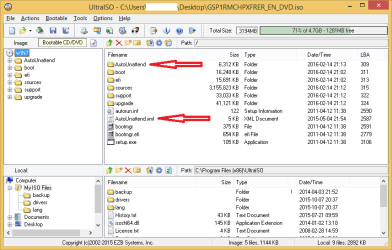
Then copy (from the OS folder) the AutoUnattend folder and AutoUnattend.xml file to the root of the USB stick.

EDIT: I added more information in my original post.
http://www.sevenforums.com/installa...s-sabertooth-z170-mark-1-a-2.html#post3213850
 
Last edited:

My Computer My Computer

At a glance

Windows 7 Home Premium x64
Computer type
PC/Desktop
OS
Windows 7 Home Premium x64
RootBeet, thanks for that. The EZ Install stuff wasn't there when I last looked. It looks useful, but I still don't understand the reference to 'Braswell platform', (or '100 series'), unless the Z170M-Plus was originally built to accommodate that earlier CPU.
 

My Computer My Computer

At a glance

Win7 Ultimate SP1Intel Core i5 9400 Coffee Lake 14nm16G DDR4NVidia GeForce GTX 960
Computer type
PC/Desktop
Computer Manufacturer/Model Number
My build
OS
Win7 Ultimate SP1
CPU
Intel Core i5 9400 Coffee Lake 14nm
Motherboard
Asus Prime H310M-E R2.0 (LGA1151)
Memory
16G DDR4
Graphics Card(s)
NVidia GeForce GTX 960
Sound Card
Realtek High Definition Audio (mobo)
Monitor(s) Displays
Asus PA248 24" 16:10 format
Screen Resolution
1920x1200@59Hz
Hard Drives
1863GB Seagate ST2000DM
3726GB Seagate ST4000DM
1863GB Seagate ST2000DM
6TB Seagate
465GB NVMe Samsung SSD 970
PSU
750G2
Case
Tower
Cooling
Standard
Keyboard
USB
Mouse
USB
Internet Speed
920Mbs/480Mbs
Antivirus
Malwarebytes
Browser
Firefox
I don`t get it, why not just install with a dvd, why put yourself through the agony :confused:

I think someone may have just misspelled Haswell ???
 

My Computer My Computer

At a glance

Windows 10 Pro x64Intel Core i7 6700KGSkill TridentZ RGB 16GB 3600 16-16-16-36EVGA GTX 980 Ti SC x2
Computer type
PC/Desktop
Computer Manufacturer/Model Number
Skylake Special #666
OS
Windows 10 Pro x64
CPU
Intel Core i7 6700K
Motherboard
Asus Sabertooth Z170 Mark 1
Memory
GSkill TridentZ RGB 16GB 3600 16-16-16-36
Graphics Card(s)
EVGA GTX 980 Ti SC x2
Sound Card
Realtek High Definition
Monitor(s) Displays
AOC G2460PG
Screen Resolution
1920 x 1080 144Hz
Hard Drives
Samsung 860 Pro 256GB, Seagate Barracuda 4TB x2
PSU
EVGA 1000 P2, EVGA White Custom Braided Cables
Case
Corsair Vengeance C70 Gunmetal Black
Cooling
Corsair H100i v2, Corsair ML120 x2, Thermal Grizzly Kryonaut
Keyboard
Logitech G910 Orion Spectrum
Mouse
Logitech G700s
Internet Speed
Verizon Fios Quantum Gateway 75/75
Antivirus
Windows Defender, Malwarebytes Free 3.8.3
Browser
Chrome
Other Info
Corsair SP120 x4, LG Blu-ray Drive, Durabrand HT-395 100 Watt Dolby Digital Amp, Corsair H2100 Wireless 7.1 Headset
Well, for me, I guess I've got a bit stubborn about installing an OS from USB. I mean, it shouldn't be that b****y difficult. So it's time someone sorted out a simple way of doing it. And another thing: Search the net and there are hundreds of purportedly successful methods of achieving this 'elementary' task. But I haven't found one that works. And that annoys me.

Re Braswell, google the name and you'll get heaps of hits, especially from Intel links.
 

My Computer My Computer

At a glance

Win7 Ultimate SP1Intel Core i5 9400 Coffee Lake 14nm16G DDR4NVidia GeForce GTX 960
Computer type
PC/Desktop
Computer Manufacturer/Model Number
My build
OS
Win7 Ultimate SP1
CPU
Intel Core i5 9400 Coffee Lake 14nm
Motherboard
Asus Prime H310M-E R2.0 (LGA1151)
Memory
16G DDR4
Graphics Card(s)
NVidia GeForce GTX 960
Sound Card
Realtek High Definition Audio (mobo)
Monitor(s) Displays
Asus PA248 24" 16:10 format
Screen Resolution
1920x1200@59Hz
Hard Drives
1863GB Seagate ST2000DM
3726GB Seagate ST4000DM
1863GB Seagate ST2000DM
6TB Seagate
465GB NVMe Samsung SSD 970
PSU
750G2
Case
Tower
Cooling
Standard
Keyboard
USB
Mouse
USB
Internet Speed
920Mbs/480Mbs
Antivirus
Malwarebytes
Browser
Firefox
Someone has. You loose usb 3.0 support (Supposedly, but I didn`t) when Installing 7 on a Z170, it`s been known for months.

Maybe you could post a link to Braswell for us all :)

Products (Formerly Braswell)

Intel quietly launches 14nm Braswell, Bay Trail?s successor | ExtremeTech


Granted , he wants a UEFI Raid install on a Z170 with a USB stick, and apparently no one here has done it so.....

I guess I`ll have to do a UEFI install on my 850 EVO when I feel like it, but I can`t help with the Raid issue, I have no need for Raid.

registus, once again, please fill in the system specs we are working with, I know it shouldn`t matter, we know what motherboard you`re working with but please fill in your specs at the bottom left corner, Thank You :)

Personally I would have contacted Asus a long time ago if he hasn`t already.

https://www.asus.com/bg/
 

My Computer My Computer

At a glance

Windows 10 Pro x64Intel Core i7 6700KGSkill TridentZ RGB 16GB 3600 16-16-16-36EVGA GTX 980 Ti SC x2
Computer type
PC/Desktop
Computer Manufacturer/Model Number
Skylake Special #666
OS
Windows 10 Pro x64
CPU
Intel Core i7 6700K
Motherboard
Asus Sabertooth Z170 Mark 1
Memory
GSkill TridentZ RGB 16GB 3600 16-16-16-36
Graphics Card(s)
EVGA GTX 980 Ti SC x2
Sound Card
Realtek High Definition
Monitor(s) Displays
AOC G2460PG
Screen Resolution
1920 x 1080 144Hz
Hard Drives
Samsung 860 Pro 256GB, Seagate Barracuda 4TB x2
PSU
EVGA 1000 P2, EVGA White Custom Braided Cables
Case
Corsair Vengeance C70 Gunmetal Black
Cooling
Corsair H100i v2, Corsair ML120 x2, Thermal Grizzly Kryonaut
Keyboard
Logitech G910 Orion Spectrum
Mouse
Logitech G700s
Internet Speed
Verizon Fios Quantum Gateway 75/75
Antivirus
Windows Defender, Malwarebytes Free 3.8.3
Browser
Chrome
Other Info
Corsair SP120 x4, LG Blu-ray Drive, Durabrand HT-395 100 Watt Dolby Digital Amp, Corsair H2100 Wireless 7.1 Headset
AddRAM, have you ever tried contacting Asus? If so, and you got results, perhaps you'd share the link with us.

When I realized that I was facing a steep learning curve with my new Asus Z170M-Plus mobo, one of the first things I did was to join this forum:
Asustek Computer Inc
https://vip.asus.com/forum/

Turned out to be an absolute and total waste of my time.

Apart from the fact that it took 6 days for someone to respond to my very polite request for info, the first thing the guy (a Mod with k's of posts) wanted to know was WHY I wanted to know.

I've been on lots and lots of forums over 25 years and there's very little that pees me more than someone asking why I'm asking.

Consequently, I've never been back, except to fictionalize my email address, so that I'll never, ever have to deal with those turkeys again. (Why is it that forums don't make it possible to un-join? Could it just be to boost their memberships?)

So, yes - I'd be very interested in learning who and how to contact at Asus.
 

My Computer My Computer

At a glance

Win7 Ultimate SP1Intel Core i5 9400 Coffee Lake 14nm16G DDR4NVidia GeForce GTX 960
Computer type
PC/Desktop
Computer Manufacturer/Model Number
My build
OS
Win7 Ultimate SP1
CPU
Intel Core i5 9400 Coffee Lake 14nm
Motherboard
Asus Prime H310M-E R2.0 (LGA1151)
Memory
16G DDR4
Graphics Card(s)
NVidia GeForce GTX 960
Sound Card
Realtek High Definition Audio (mobo)
Monitor(s) Displays
Asus PA248 24" 16:10 format
Screen Resolution
1920x1200@59Hz
Hard Drives
1863GB Seagate ST2000DM
3726GB Seagate ST4000DM
1863GB Seagate ST2000DM
6TB Seagate
465GB NVMe Samsung SSD 970
PSU
750G2
Case
Tower
Cooling
Standard
Keyboard
USB
Mouse
USB
Internet Speed
920Mbs/480Mbs
Antivirus
Malwarebytes
Browser
Firefox
No one asus help is useless :)
Even if you managed to make it through their silly laundry list to ask for support as you said it's useless :)
 

My Computer My Computer

At a glance

Win-7-Pro64bit 7-H-Prem-64biti7-5930K 2nd i9-9940x both water blocked VRM'...Trident-z 3200C14 2nd Trident-z 3600C16EVGA 1080ti ftw3 2nd Titan Xp both water blocked
Computer type
PC/Desktop
Computer Manufacturer/Model Number
Custom assembled by me :}
OS
Win-7-Pro64bit 7-H-Prem-64bit
CPU
i7-5930K 2nd i9-9940x both water blocked VRM's too
Motherboard
ASUS SABERTOOTH X99 2nd ASUS x299 Apex
Memory
Trident-z 3200C14 2nd Trident-z 3600C16
Graphics Card(s)
EVGA 1080ti ftw3 2nd Titan Xp both water blocked
Sound Card
Built-in Realtek
Monitor(s) Displays
1-AOC G2460PG 24"G-Sync 144Hz/ 2nd 1-ASUS VG248QE 24" 144Hz
Screen Resolution
1920 x 1080 144Hz
Hard Drives
2-Samsung M.2 Evo & Evo Plus
2-Samsung 850 EVO 500GB SSD's/ 3-2.5 W.D. Black 1tb-&3-1tb/3-3.5 WD Black 1tb hdd's
PSU
EVGA SuperNOVA 1000-P2 2nd 1200-P2
Case
2-Corsair Obsidian Series 450D Black ATX Mid Tower
Cooling
Custom water loops
Keyboard
Logitech G710+/ 2nd Logitech G910
Mouse
2-RedDragon M901 Perdition 16400 dpi Gaming mouse = wired
Internet Speed
Comcast Ping 19ms 89.31mbps download speed 6.12mbps upload
Antivirus
Malwarebytes Pro/ Superantispyware Pro
Browser
FireFox & Pale moon
Other Info
2nd ASUS X299 Apex/Intel i9-9940x with Custom water loop/7H-Prem-x64/Corsair 450D case/Ram Trident-z 3600C16 4x8gb / Samsung970Evo plus 500gb SSD/Dual ssd EZ swap evo/PSU EVGA SuperNova 1200w-P2 80+Platinum/GPU Titan Xp /8-ML-140 on push-pull on 2-280GTX rads
RootBeet:
I tried to boot USB under UEFI, but was not succesful. I described it few posts earlier. Under non-UEFI everything went well. However my case was RAID disk connection. I didn't try it with non-Raid configuration.

teckneeculler:
Do you want me to try do the USB boot without RAID to check how it works on Sabertooth Z170?

AddRAM
I already added system specs.
 

My Computer My Computer

At a glance

Windows 7 64-bitCPU Intel Core i7-6700K (4.0GHz, 8M, LGA1151,...Kingston HyperX Savage 2x8GB 2400 MHz DDR4 CL...
Computer type
PC/Desktop
OS
Windows 7 64-bit
CPU
CPU Intel Core i7-6700K (4.0GHz, 8M, LGA1151, VGA)
Motherboard
ASUS SABERTOOTH Z170 MARK 1
Memory
Kingston HyperX Savage 2x8GB 2400 MHz DDR4 CL12 DIMM 1.35V
Hard Drives
2x Samsung SSD 2,5" 512GB 850 Pro SATA III RAID
2x WD Black, 3000GB, 3.5", 7.200RPM, SATA III, 64MB cache
PSU
Fortron AURUM S 600W 80PLUS GOLD
Case
CoolerMaster miditower series N400, ATX, USB3.0
Internet Speed
1 Gbps
Antivirus
Eset Smart Security
@registus,

How to enable & setup SATA RAID on Z170 motherboards.
https://www.youtube.com/watch?v=SMFE6mF4NgA

Do you have a Windows 7 64-bit USB flash drive that is compatible with UEFI mode. As long as it is FAT32 formatted and has \efi\boot\bootx64.efi file, it should be UEFI bootable.

Boot > CSM (Compatibility Support Module) > Launch CSM > Enabled (Default)
Boot > Secure Boot > OS Type > Windows UEFI mode (Default)

When you install Windows 7 64-bit in UEFI mode, then you must enable CSM (Compatibility Support Module) support in UEFI BIOS.

When you install Windows 8 64-bit or Windows 10 64-bit in UEFI mode, then you don't need to enable CSM (Compatibility Support Module) support in UEFI BIOS.

You must boot the installation media as a UEFI device. Reboot PC and enter the Boot Menu by pressing F8. Select the name of your USB flash drive. If you have CSM enabled in UEFI BIOS you will see it twice, but one will have a UEFI: prefix, select that.
 

My Computer My Computer

At a glance

Windows 7 Home Premium x64
Computer type
PC/Desktop
OS
Windows 7 Home Premium x64
AddRAM, have you ever tried contacting Asus? If so, and you got results, perhaps you'd share the link with us.

When I realized that I was facing a steep learning curve with my new Asus Z170M-Plus mobo, one of the first things I did was to join this forum:
Asustek Computer Inc
https://vip.asus.com/forum/

Turned out to be an absolute and total waste of my time.

Apart from the fact that it took 6 days for someone to respond to my very polite request for info, the first thing the guy (a Mod with k's of posts) wanted to know was WHY I wanted to know.

I've been on lots and lots of forums over 25 years and there's very little that pees me more than someone asking why I'm asking.

Consequently, I've never been back, except to fictionalize my email address, so that I'll never, ever have to deal with those turkeys again. (Why is it that forums don't make it possible to un-join? Could it just be to boost their memberships?)

So, yes - I'd be very interested in learning who and how to contact at Asus.

Of course I have contacted Asus in the past, the link is the same you`d dig up on Google, asus.com :confused:

ASUS USA

Yours may vary

ASUSTeK Computer Inc. -Support- Call Us

The first thing you should do when having an issue with a piece of hardware you own is go to the manufacturer, not come to a forum and ask questions about a brand new platform that few people here know about, and especially trying to install using Raid on that new platform. This is a volunteer forum about Windows 7 issues, not a bunch of paid experts who know everything about the Z170 and Raid, we discourage Raid here every time it`s even brought up.

Sorry for the rant, but it just grinds my gears when someone goes on and on about the same issue over and over again, without going to the professionals who will help him get the job he wants done correctly.
 

My Computer My Computer

At a glance

Windows 10 Pro x64Intel Core i7 6700KGSkill TridentZ RGB 16GB 3600 16-16-16-36EVGA GTX 980 Ti SC x2
Computer type
PC/Desktop
Computer Manufacturer/Model Number
Skylake Special #666
OS
Windows 10 Pro x64
CPU
Intel Core i7 6700K
Motherboard
Asus Sabertooth Z170 Mark 1
Memory
GSkill TridentZ RGB 16GB 3600 16-16-16-36
Graphics Card(s)
EVGA GTX 980 Ti SC x2
Sound Card
Realtek High Definition
Monitor(s) Displays
AOC G2460PG
Screen Resolution
1920 x 1080 144Hz
Hard Drives
Samsung 860 Pro 256GB, Seagate Barracuda 4TB x2
PSU
EVGA 1000 P2, EVGA White Custom Braided Cables
Case
Corsair Vengeance C70 Gunmetal Black
Cooling
Corsair H100i v2, Corsair ML120 x2, Thermal Grizzly Kryonaut
Keyboard
Logitech G910 Orion Spectrum
Mouse
Logitech G700s
Internet Speed
Verizon Fios Quantum Gateway 75/75
Antivirus
Windows Defender, Malwarebytes Free 3.8.3
Browser
Chrome
Other Info
Corsair SP120 x4, LG Blu-ray Drive, Durabrand HT-395 100 Watt Dolby Digital Amp, Corsair H2100 Wireless 7.1 Headset
I don't have a RAID issue. Perhaps you're confusing me with Registus.

Anyway, as Registus has probably discovered, requests for help on most forums just seem to get people grumpy, possibly because they don't know the answer either.

Gears grinding? Perhaps you should oil your gearbox.
 

My Computer My Computer

At a glance

Win7 Ultimate SP1Intel Core i5 9400 Coffee Lake 14nm16G DDR4NVidia GeForce GTX 960
Computer type
PC/Desktop
Computer Manufacturer/Model Number
My build
OS
Win7 Ultimate SP1
CPU
Intel Core i5 9400 Coffee Lake 14nm
Motherboard
Asus Prime H310M-E R2.0 (LGA1151)
Memory
16G DDR4
Graphics Card(s)
NVidia GeForce GTX 960
Sound Card
Realtek High Definition Audio (mobo)
Monitor(s) Displays
Asus PA248 24" 16:10 format
Screen Resolution
1920x1200@59Hz
Hard Drives
1863GB Seagate ST2000DM
3726GB Seagate ST4000DM
1863GB Seagate ST2000DM
6TB Seagate
465GB NVMe Samsung SSD 970
PSU
750G2
Case
Tower
Cooling
Standard
Keyboard
USB
Mouse
USB
Internet Speed
920Mbs/480Mbs
Antivirus
Malwarebytes
Browser
Firefox
I never said you had a Raid issue, I was talking to you about Asus, if you had a bad experience with them, that`s your problem.

And you`re right, people here don`t have a clue about Raid on an M.2 on a Z170, so he should be contacting Asus.

They are the people that will help him, we are just a humble Windows 7 Forum.
 

My Computer My Computer

At a glance

Windows 10 Pro x64Intel Core i7 6700KGSkill TridentZ RGB 16GB 3600 16-16-16-36EVGA GTX 980 Ti SC x2
Computer type
PC/Desktop
Computer Manufacturer/Model Number
Skylake Special #666
OS
Windows 10 Pro x64
CPU
Intel Core i7 6700K
Motherboard
Asus Sabertooth Z170 Mark 1
Memory
GSkill TridentZ RGB 16GB 3600 16-16-16-36
Graphics Card(s)
EVGA GTX 980 Ti SC x2
Sound Card
Realtek High Definition
Monitor(s) Displays
AOC G2460PG
Screen Resolution
1920 x 1080 144Hz
Hard Drives
Samsung 860 Pro 256GB, Seagate Barracuda 4TB x2
PSU
EVGA 1000 P2, EVGA White Custom Braided Cables
Case
Corsair Vengeance C70 Gunmetal Black
Cooling
Corsair H100i v2, Corsair ML120 x2, Thermal Grizzly Kryonaut
Keyboard
Logitech G910 Orion Spectrum
Mouse
Logitech G700s
Internet Speed
Verizon Fios Quantum Gateway 75/75
Antivirus
Windows Defender, Malwarebytes Free 3.8.3
Browser
Chrome
Other Info
Corsair SP120 x4, LG Blu-ray Drive, Durabrand HT-395 100 Watt Dolby Digital Amp, Corsair H2100 Wireless 7.1 Headset
RootBeet
Your posts were not completely helpful, but in generaly helped me to step on the proper way, so thank you for them. I will describe it below.

AddRAM
As I mentioned already in some post before Asus support was useless and did not help me anyway. Generally they are able to solve maybe 90 % issues that can be also done by IT advanced users. For the rest of 10 % maybe they help maybe users have to check forums for help as thousands users are able to see the problem and may have already facing them. So your question is not waiting somewhere in a ticket system waiting for the support person. In my case I received the answer, but was not helpful at all.

teckneeculler
If you want to install UEFI Windows 7 with USB flash drive follow this advice. Maybe not all of them are necessary, but I did not check it with or without them, so I basically describe how was my procedure:

Note: My mobo is Sabertooth Z170 Mark 1, but this may work for other mobos from ASUS as well.
Note: I used USB 2.0 and USB 2.0 port as Sabertooth is familiar with this.

non RAID
1. Set BIOS to defaults, but in CSM settings set all options as UEFI driver first, because default are in Legacy (my case)

Note: Hard drive was not formatted so in case of troubles delete all partitions on your drive and keep it unformatted and unallocated.

2. Download EZ Installer from ASUS support wb page. It is under Drivers \ Utilities
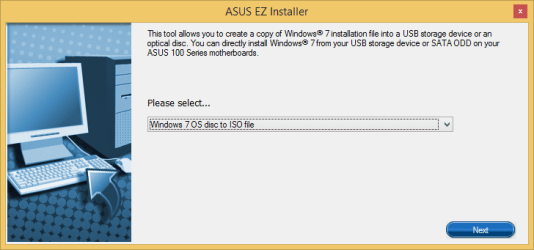
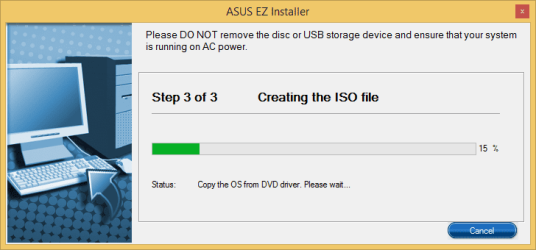
EZ installer allows you to create ISO file from DVD or "burn" it to USB flash drive

3. Insert Windows 7 DVD (I used original OEM version) and Create ISO file with EZ installer

4. Download Rufus https://rufus.akeo.ie/ and run it (no need to install). Choose the iso file you created with EZ installer

5. Choose the method of creating USB - ISO Image and click the icon to the right and choose your ISO file

Set partition scheme and target system type to:
GPT partition scheme for UEFI
File system to:
FAT32 (Default)

Other settings keep default no need to change them. Cluster size in my case was by default 8192 bytes.

Don't forget to backup your USB files.

Click on Start

Note: If you want to copy some files to your Bootable USB you can do it now.

6. Restart the computer and keep pressing F8 to show up Boot menu. You will have there 2 options for your USB Flash Drive, e.g.
1. UEFI: ABC Flash Drive
2. ABC Flash Drive

Choose UEFI

Let the installation process begin :party:.


For those who want to use Raid

Follow steps 1-5.

7. In BIOS go to Advanced and choose PCH Storage Configuration. Set SATA Mode Selection to RAID instead of AHCI, or turn the Intel Rapid Storage Technology On in the EZ mode (first you enter to BIOS)
8. In Advanced mode go to Advanced and you will see Intel Rapid Storage Technology on the bottom. Go there and set up RAID to your own. If you don't see it save the settings, restart and go back to BIOS. You will see it.

Note: You can also follow the instructions in video posted by RootBeet: https://www.youtube.com/watch?v=SMFE6mF4NgA

9. Since the RAID is set up you still have to download RAID drivers and copy it to your USB drive created in steps 1-5. Download it from ASUS Support Driver web page. They are under SATA and its name is for example: Intel(R) Rapid Storage Technology Driver Software V14.5.0.1081 for Windows 7 32bit & 64bit / 8.1 64bit / 10 64bit.

10. Create a directory on your USB drive. Unpack the drivers downloaded from Asus and copy the directory to the new one on USB drive.

11. Restart the computer and keep pressing F8 to show up Boot menu. You will have there 2 options for your USB Flash Drive, e.g.
1. UEFI: ABC Flash Drive
2. ABC Flash Drive

12. Your install will stop at the moment the installation process will not see any drives where to install the OS. Now choose Load Driver - Find your directory with drivers, my way was IRST_Win7-81-10_V14501081\Driver\Disk\64bit . You will get one listed (iaStorAC.inf). Click Next and your hard drive will be shown. Now continue on your own :party:.


I also did all these steps before, but probably did something wrong (the results were in some posts before). I Probably used wrong partition settings in Rufus. RootBeet posts and links motivated me to try it again, so thanks for posting them. Now I have no doubts about UEFI, as UEFI is everywhere exactly same as by installing W8 or W10.


There is also one issue. What to do if you have only USB 3 ports. You have to download USB 3 drivers the same way like I described RAID (and load them at the same moment). If this will not help you, try this How to Install Windows 7 with only USB 3.0 Ports

I did that as well even if it was not necessary to me (I used USB 2.0 flash drive and USB 2.0 port)

Hopefully this can help some users and spent time was worth it. Also thanks to all comments that tried to show the proper way ;).

So the result is that you are able to install Windows 7 UEFI from USB on your Sabertooth (and probably other ASUS mobos). If you use DVD only you can install it with Legacy settings in Bios (but you can do UEFI boot and it creates EFI partition to Boot) or create customized DVD with RAID drivers.

 

My Computer My Computer

At a glance

Windows 7 64-bitCPU Intel Core i7-6700K (4.0GHz, 8M, LGA1151,...Kingston HyperX Savage 2x8GB 2400 MHz DDR4 CL...
Computer type
PC/Desktop
OS
Windows 7 64-bit
CPU
CPU Intel Core i7-6700K (4.0GHz, 8M, LGA1151, VGA)
Motherboard
ASUS SABERTOOTH Z170 MARK 1
Memory
Kingston HyperX Savage 2x8GB 2400 MHz DDR4 CL12 DIMM 1.35V
Hard Drives
2x Samsung SSD 2,5" 512GB 850 Pro SATA III RAID
2x WD Black, 3000GB, 3.5", 7.200RPM, SATA III, 64MB cache
PSU
Fortron AURUM S 600W 80PLUS GOLD
Case
CoolerMaster miditower series N400, ATX, USB3.0
Internet Speed
1 Gbps
Antivirus
Eset Smart Security
There is also one issue. What to do if you have only USB 3 ports. You have to download USB 3 drivers the same way like I described RAID (and load them at the same moment). If this will not help you, try this How to Install Windows 7 with only USB 3.0 Ports

You can use a USB 2.0 or USB 3.0 port, because the ASUS EZ Installer automatically copies USB 3.0 drivers to ISO file.

ASUS EZ Installer 1.png

ASUS EZ Installer 2.png

ASUS EZ Installer 3.png
 

My Computer My Computer

At a glance

Windows 7 Home Premium x64
Computer type
PC/Desktop
OS
Windows 7 Home Premium x64
Yes you are right. That is the purpose of EZ installer. I just wanted to mention that I used USB 2 and some user experiences are that it did not work for them so there is also another way to solve it.
 
Last edited:

My Computer My Computer

At a glance

Windows 7 64-bitCPU Intel Core i7-6700K (4.0GHz, 8M, LGA1151,...Kingston HyperX Savage 2x8GB 2400 MHz DDR4 CL...
Computer type
PC/Desktop
OS
Windows 7 64-bit
CPU
CPU Intel Core i7-6700K (4.0GHz, 8M, LGA1151, VGA)
Motherboard
ASUS SABERTOOTH Z170 MARK 1
Memory
Kingston HyperX Savage 2x8GB 2400 MHz DDR4 CL12 DIMM 1.35V
Hard Drives
2x Samsung SSD 2,5" 512GB 850 Pro SATA III RAID
2x WD Black, 3000GB, 3.5", 7.200RPM, SATA III, 64MB cache
PSU
Fortron AURUM S 600W 80PLUS GOLD
Case
CoolerMaster miditower series N400, ATX, USB3.0
Internet Speed
1 Gbps
Antivirus
Eset Smart Security
OMG Registus. You are a saint and a scholar my friend.

I've been trolling through boards, reformatting drives, and toggling bios settings for three days straight this Memorial Day weekend and now at 2am I finally found this thread.

I know it took you a couple of weeks to solve, and this thread is now stale, but please know one guy out there is extremely thankful for this post. Thank you for your work, and if you're ever in Ohio I'll buy you a beer.
 

My Computer My Computer

At a glance

Windows 7 64 bit
Computer type
PC/Desktop
OS
Windows 7 64 bit
I'm happy it helped you Rusty and hopefully some other people, too ;-). It's quite far from Slovakia to Ohio yet ;-), but I've been nearby couple years ago, so who knows :)
 

My Computer My Computer

At a glance

Windows 7 64-bitCPU Intel Core i7-6700K (4.0GHz, 8M, LGA1151,...Kingston HyperX Savage 2x8GB 2400 MHz DDR4 CL...
Computer type
PC/Desktop
OS
Windows 7 64-bit
CPU
CPU Intel Core i7-6700K (4.0GHz, 8M, LGA1151, VGA)
Motherboard
ASUS SABERTOOTH Z170 MARK 1
Memory
Kingston HyperX Savage 2x8GB 2400 MHz DDR4 CL12 DIMM 1.35V
Hard Drives
2x Samsung SSD 2,5" 512GB 850 Pro SATA III RAID
2x WD Black, 3000GB, 3.5", 7.200RPM, SATA III, 64MB cache
PSU
Fortron AURUM S 600W 80PLUS GOLD
Case
CoolerMaster miditower series N400, ATX, USB3.0
Internet Speed
1 Gbps
Antivirus
Eset Smart Security
Back
Top