Solved UEFI USB Win 7 installed. How to check if it really is in UEFI?

Rudeboy

New member
Local time
4:08 PM
Messages
6
Hi,

I bought a new Asus desktop which came pre-installed with Windows 8. I've decided to ditch windows 8 and to install a SSD with windows 7 64 bit.

I noticed that my motherboard can handle UEFI and I went ahead and created a bootable USB with Win 7 64bit. When I go into BIOS I can see that it identifies the USB drive as a UEFI enabled device. I went ahead with the clean install of win 7.

This is where I'm confused. I followed the steps on this link
http://www.sevenforums.com/tutorial...e-firmware-interface-install-windows-7-a.html

When it comes to seeing 3 partitions I only see 2.

I tried msinfo32 to see "BIOS mode" but even that option is not there. All I see is "BIOS Version/Date" and "SMBIOS Version"

I have a working Windows 7 but just want to know if I did the installation correctly or not.
 

My Computer My Computer

At a glance

Windows 7 Pro 64 bit
Computer type
PC/Desktop
OS
Windows 7 Pro 64 bit
If you correctly formatted the USB as shown in UEFI Bootable USB Flash Drive - Create in Windows
and booted it as a UEFI-labeled device, then deleted all partitions and let it create new, it should be UEFI.

Is there a partition labeled EFI in Disk Mgmt?

When you click on the Disk # panel to the left of the drive map, does it offer to convert to GPT or MBR? Dont' convert it, just look to confirm if it's GPT meaning UEFI install.
 
When I check in Disk Management I see two partitions. System Reserverd and C: partitions. Both are NTFS file systems. I don't see anything about EFI. What do you mean by clicking on Disk # left panel...?
 

My Computer My Computer

At a glance

Windows 7 Pro 64 bit
Computer type
PC/Desktop
OS
Windows 7 Pro 64 bit
No need. Having SysReserved and C means it is an MBR install without UEFI.

If you want you can reinstall in UEFI but you'll need to make the settings changes in the BIOS to support this, and be sure to boot the flash stick this time as a UEFI Device, delete all partitions during install so that it will clear the MBR formatting and create GPT.

I personally prefer MBR installs for less hassle but there are a few meager benefits to UEFI so educate yourself on it to decide: UEFI BIOS vs. Legacy BIOS - YouTube
 
Thanks for the link that you provided.

When I go into the BIOS it identifies the USB as a UEFI device. During the install I make sure that I delete all partitions and to create new, but still I see two partition(MBR) instead of 3(GPT)
 

My Computer My Computer

At a glance

Windows 7 Pro 64 bit
Computer type
PC/Desktop
OS
Windows 7 Pro 64 bit

My Computer My Computer

At a glance

ME/XP/Vista/Win7
OS
ME/XP/Vista/Win7
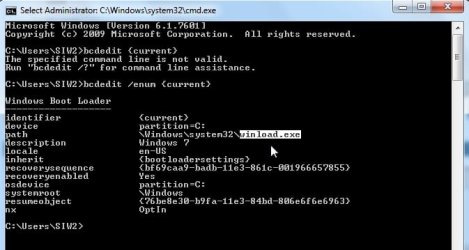
Check the bcd entry is easiest.

Open cmd prompt, type:

bcdedit /enum {current}

See if the path is winload.exe or winload.efi.

bios-efi-bcd.jpg

I agree with Greg. Benefits to the consumer are virtually nil. In practical terms, saves a couple of seconds at startup. A lot of complications and restrictions come with it. #

The industry introduced it for their own benefit.
 

My Computers My Computers

  • At a glance

    7 X64i5 84002x8gb 3200mhz
    Computer type
    PC/Desktop
    OS
    7 X64
    CPU
    i5 8400
    Motherboard
    gigabyte b365m ds3h
    Memory
    2x8gb 3200mhz
    Hard Drives
    various
    PSU
    pure power 11 400w cm
    Case
    Coolermaster
    Cooling
    cryorig m9i
  • At a glance

    7x64g54008gb ddr4 2400
    Computer type
    PC/Desktop
    OS
    7x64
    CPU
    g5400
    Motherboard
    ga b365m ds3h
    Memory
    8gb ddr4 2400
    PSU
    xfx pro 450w
Quote: Also you will need to use a USB 2.0 port, as there are no USB 3.0 drivers in Windows 7.

A lot will depend upon the motherboard, my Custom has a Gigabyte board with USB 3.0 ports and installing the CD that came with it gives USB 3.0 support.
 

My Computer My Computer

At a glance

Windows 7 Ultimate 64-bit, Windows 8.1 64-bit...
Computer type
PC/Desktop
Computer Manufacturer/Model Number
Customs, Dell, Gateway, HP, Toshiba, Acer, ASUS
OS
Windows 7 Ultimate 64-bit, Windows 8.1 64-bit, Mac OS X 10.10, Linux Mint 17, Windows 10 Pro TP
Keyboard
Microsoft
Mouse
Microsoft
You won't have the USB drivers installed yet. They need to be in the Win7 installation media but MS won't give us SP2.

Use a USB 2 port or DVD install.
 
Last edited:
It says my partition is in EFI. Just did the USB method again.
 

My Computer My Computer

At a glance

Windows 7 Pro 64 bit
Computer type
PC/Desktop
OS
Windows 7 Pro 64 bit
SIW and gregrocker - thanks for your very good info.

I have a Dell Optiplex 7010 MT that dual boots Win 7 Pro SP1 64-bit and Win 10 Pro 64-bit. Your posts here confirm that I'm in UEFI. That's good to know.

EXCEPT ... that this UEFI 64-bit dual-booting PC will NOT boot from bootable CDs that were made for my older PC running XP Pro SP3 32-bit. Even though in my BIOS the setting for Enable Legacy Option ROMs is checked (enabled).

Is there any trick to getting my UEFI 64-bit PC to boot from bootable legacy CDs?

Thanks!
 

My Computer My Computer

At a glance

Dual boot - Win 10 Pro 64-bit (good) and Win ...Intel Core i5 3470 @ 3.2GHz16GB RAM DDR3 (Four x 4GB)Intel HD Graphics (on the CPU)
Computer type
PC/Desktop
Computer Manufacturer/Model Number
Dell Optiplex 7010 MT
OS
Dual boot - Win 10 Pro 64-bit (good) and Win 7 Pro 64-bit (won't boot on the NVMe)
CPU
Intel Core i5 3470 @ 3.2GHz
Motherboard
Dell 0GY6Y8 - what would the Intel number be? - Q77 chipset
Memory
16GB RAM DDR3 (Four x 4GB)
Graphics Card(s)
Intel HD Graphics (on the CPU)
Sound Card
Realtek High Definition Audio - and Intel Display Audio
Monitor(s) Displays
Dell E176FP - nothing fancy
Screen Resolution
1280 x 1024 @ 60 Hz
Hard Drives
Now a Samsung 970 EVO Plus SSD NVMe, which works for the Win 10 only

Used to be two 500GB WDC WD5000AAKX (SATA @ 6GB/sec)

- External WD My Book 1110 USB device
PSU
What means PSU? I'm at sea level
Cooling
Ice cubes
Keyboard
Noisy
Mouse
Micky
Internet Speed
Verizon FIOS 500 Mbps (was 1Gbps but I can't type that fast)
Antivirus
Win 10 Windows Defender - Win 7 Avast Free
Browser
Firefox only with lots of security drives my wife crazy
Other Info
Also I still have an old but important XP SP3 machine that can run - Optiplex 755 Desktop w 4GB RAM and Momentus XT hybrid HD-SSD 500 GB hard drive. Used the registry hack to get more updates through "XP Embedded" or "POS" so now the machine rings like a cash register and the CD drawer opens to give change.
Back
Top