
Ugh! Help Windows 7 Ultimate Upgrade

Illitratefailur

New member
Local time
3:04 AM
Messages
9
Ok. im looking for some help with a walkaround on this one, ive tried just about everything i know how to do, from booting from the CD in BIOS to changing the minclient as instructed for this process. Each time i get a similar if not slightly different ERROR! Msg. So i am hoping that someone out there has had this problem, and found a way to fix it, and more importantly, willing to share the solution!
My Problem: I am currently using Windows 7 Evaluation Build 7100 on a 64Xbit System. I have in my possesion A bootable CD of Windows 7 Ultimate N + Key when i follow the steps as instructed
as follows (1. Download the ISO as you did previously and burn the ISO to DVD 2. COpy the whole image to a storage location you wish to run the upgrade from or a directory on any partition on the machine running the pre-release build 3. browse to sources directory 4. open the file cversion.ini in a text editor like notepad 5. modify the MinClient build number to a value lower than the down-level build. for example, change the 7100 to 7000 6. save the file in place with the same name. 7. run setup like you would normally from this modified copy of the image and the version check will be bypassed).......... or thats what was supposed to happen!
but then this little error message pops up when i try that
Windows 7 Ultimate cannot be upgraded to Windows 7 Ultimate N. You can choose to install a new copy of Windows 7 Ultimate N instead, but this is different from an upgrade, and does not keep your files, settings, and programs. You’ll need to reinstall any programs using the original installation discs or files. To save your files before installing Windows, back them up to an external location such as a CD, DVD, or external hard drive. To install a new copy of Windows 7 Ultimate N, click the Back button in the upper left-hand corner, and select “Custom (advanced)”.
In-case you havent noticed, it is currently not an option for me to do a Clean install some of the programs are irreplacable (or replacable at a pretty hefty cost) so i cannot afford to have them removed, as the media discs used to load them are gone, and currently i am out of CD's/DvD's to back up my files.
One thing i have thought of but havent tried, because im not sure if it will work, and if it does would only be a temporary fix to the solution is going under BIOS and changing the Time/Date to an earlier Day to gain time until i can find a solution or get my files backed up, but i have no idea if that misdirection would even work. The time frame on this is that
the eval build ends Today. and every 2 hours without warning my computer just reboots...
so....
my only guess is that the copy i have assumes that i am trying to downgrade from the ultimate copy simply because the Ultimate N version does not include Media Player but i have been told that there is a way around this, yet no one has a solution as to the way i am supposed to get around it, so if anyone has that i would greatly appreciate it
 

My Computer My Computer

At a glance

Windows 7 UltimateAMD Athlon (tm) 64x2 Dual Core Processor 5000...2.00 GB RAMATI Radeon HD 4650
Computer Manufacturer/Model Number
ECS A740GM-M
OS
Windows 7 Ultimate
CPU
AMD Athlon (tm) 64x2 Dual Core Processor 5000+ 2.60GHz
Memory
2.00 GB RAM
Graphics Card(s)
ATI Radeon HD 4650
Monitor(s) Displays
1
Screen Resolution
1440x900
Hard Drives
1
Case
Custom
Keyboard
Rosewill USB Rk-7300
Mouse
Rosewill Optical Usb Rm 2210
Internet Speed
TW Cable Turbo Charged
Other Info
Network Adapter L2 Fast Ethernet 10/100Base-t Controller
Ok. im looking for some help with a walkaround on this one, ive tried just about everything i know how to do, from booting from the CD in BIOS to changing the minclient as instructed for this process. Each time i get a similar if not slightly different ERROR! Msg. So i am hoping that someone out there has had this problem, and found a way to fix it, and more importantly, willing to share the solution!
My Problem: I am currently using Windows 7 Evaluation Build 7100 on a 64Xbit System. I have in my possesion A bootable CD of Windows 7 Ultimate N + Key when i follow the steps as instructed
as follows (1. Download the ISO as you did previously and burn the ISO to DVD 2. COpy the whole image to a storage location you wish to run the upgrade from or a directory on any partition on the machine running the pre-release build 3. browse to sources directory 4. open the file cversion.ini in a text editor like notepad 5. modify the MinClient build number to a value lower than the down-level build. for example, change the 7100 to 7000 6. save the file in place with the same name. 7. run setup like you would normally from this modified copy of the image and the version check will be bypassed).......... or thats what was supposed to happen!
but then this little error message pops up when i try that
Windows 7 Ultimate cannot be upgraded to Windows 7 Ultimate N. You can choose to install a new copy of Windows 7 Ultimate N instead, but this is different from an upgrade, and does not keep your files, settings, and programs. You’ll need to reinstall any programs using the original installation discs or files. To save your files before installing Windows, back them up to an external location such as a CD, DVD, or external hard drive. To install a new copy of Windows 7 Ultimate N, click the Back button in the upper left-hand corner, and select “Custom (advanced)”.
In-case you havent noticed, it is currently not an option for me to do a Clean install some of the programs are irreplacable (or replacable at a pretty hefty cost) so i cannot afford to have them removed, as the media discs used to load them are gone, and currently i am out of CD's/DvD's to back up my files.
One thing i have thought of but havent tried, because im not sure if it will work, and if it does would only be a temporary fix to the solution is going under BIOS and changing the Time/Date to an earlier Day to gain time until i can find a solution or get my files backed up, but i have no idea if that misdirection would even work. The time frame on this is that
the eval build ends Today. and every 2 hours without warning my computer just reboots...
so....
my only guess is that the copy i have assumes that i am trying to downgrade from the ultimate copy simply because the Ultimate N version does not include Media Player but i have been told that there is a way around this, yet no one has a solution as to the way i am supposed to get around it, so if anyone has that i would greatly appreciate it

Two things you could do. install N to a different partition and dual boot. then import using the easy transfer wizard. The time date thing isnt "legal" per say but might buy you time, but yoou may buy some more problems. Sometimes a date shift will trigger AV to break, non genuine windows to trigger etc. I would shoot for the dual boot if you have the room.

Ken
 

My Computer My Computer

At a glance

Win 8 Release candidate 8400[email protected]4 gigsNvidia 9600M
Computer Manufacturer/Model Number
HP Pavillion dv-7 1005 Tx
OS
Win 8 Release candidate 8400
CPU
[email protected]
Memory
4 gigs
Graphics Card(s)
Nvidia 9600M
Sound Card
HD built-in
Monitor(s) Displays
17" Wxga
Screen Resolution
1440x900
Cooling
none
Internet Speed
45Mb down 5Mb up
Welcome!

I don't know if this will work, but try this.

Type regedit into the start menu and press enter.

Navigate to HKEY_LOCAL_MACHINE\Software\Microsoft\Windows NT\Current Version.

In the right pane, right-click on EditionID, and change it to Ultimate N

Also change ProductName to Windows 7 Ultimate N.

Then try upgrading.

I do agree with Ken, a dual boot is probably best.
 

My Computer My Computer

At a glance

Windows 7 Professional x64Intel i7 2600K OC'd @ 4620 MHz16GB GSkill Sniper 2133 Mhz (4x4GB)EVGA GeForce GTX 480 SuperClocked+
Computer Manufacturer/Model Number
Custom
OS
Windows 7 Professional x64
CPU
Intel i7 2600K OC'd @ 4620 MHz
Motherboard
Asus P8Z68-V Pro
Memory
16GB GSkill Sniper 2133 Mhz (4x4GB)
Graphics Card(s)
EVGA GeForce GTX 480 SuperClocked+
Sound Card
Realtek High Definition Audio
Monitor(s) Displays
2x Acer S273HLbmii 27"
Screen Resolution
2 x 1920x1080
Hard Drives
64GB Crucial M4 SSD

Storage: Hitachi 1TB 5400RPM, Samsung 1.5TB 5400RPM
PSU
Corsair HW Series 750w (modular)
Case
Cooler Master HAF 932 Advanced Blue Edition
Cooling
CM Hyper 212+ CPU cooler, 3x 230mm + 1x 140mm case fans
Keyboard
Logitech MK320 (wireless)
Mouse
Logitech MK320 (wireless)
Internet Speed
30 Mb/s : 2 Mb/s
Thanks

Appreciate the suggestions, working on the name change first then going to try dual boot.
 

My Computer My Computer

At a glance

Windows 7 UltimateAMD Athlon (tm) 64x2 Dual Core Processor 5000...2.00 GB RAMATI Radeon HD 4650
Computer Manufacturer/Model Number
ECS A740GM-M
OS
Windows 7 Ultimate
CPU
AMD Athlon (tm) 64x2 Dual Core Processor 5000+ 2.60GHz
Memory
2.00 GB RAM
Graphics Card(s)
ATI Radeon HD 4650
Monitor(s) Displays
1
Screen Resolution
1440x900
Hard Drives
1
Case
Custom
Keyboard
Rosewill USB Rk-7300
Mouse
Rosewill Optical Usb Rm 2210
Internet Speed
TW Cable Turbo Charged
Other Info
Network Adapter L2 Fast Ethernet 10/100Base-t Controller
Hmm?

Welcome!

I don't know if this will work, but try this.

Type regedit into the start menu and press enter.

Navigate to HKEY_LOCAL_MACHINE\Software\Microsoft\Windows NT\Current Version.

In the right pane, right-click on EditionID, and change it to Ultimate N

Also change ProductName to Windows 7 Ultimate N.

Then try upgrading.

I do agree with Ken, a dual boot is probably best.


Ok I modified the String Data to be changed to what you advised on Both or Did u literally mean changing the Name as in Renaming them to what was said?
 

My Computer My Computer

At a glance

Windows 7 UltimateAMD Athlon (tm) 64x2 Dual Core Processor 5000...2.00 GB RAMATI Radeon HD 4650
Computer Manufacturer/Model Number
ECS A740GM-M
OS
Windows 7 Ultimate
CPU
AMD Athlon (tm) 64x2 Dual Core Processor 5000+ 2.60GHz
Memory
2.00 GB RAM
Graphics Card(s)
ATI Radeon HD 4650
Monitor(s) Displays
1
Screen Resolution
1440x900
Hard Drives
1
Case
Custom
Keyboard
Rosewill USB Rk-7300
Mouse
Rosewill Optical Usb Rm 2210
Internet Speed
TW Cable Turbo Charged
Other Info
Network Adapter L2 Fast Ethernet 10/100Base-t Controller
Right-click on the keys and select Modify. If you did anything else, be sure to change it back.
 

My Computer My Computer

At a glance

Windows 7 Professional x64Intel i7 2600K OC'd @ 4620 MHz16GB GSkill Sniper 2133 Mhz (4x4GB)EVGA GeForce GTX 480 SuperClocked+
Computer Manufacturer/Model Number
Custom
OS
Windows 7 Professional x64
CPU
Intel i7 2600K OC'd @ 4620 MHz
Motherboard
Asus P8Z68-V Pro
Memory
16GB GSkill Sniper 2133 Mhz (4x4GB)
Graphics Card(s)
EVGA GeForce GTX 480 SuperClocked+
Sound Card
Realtek High Definition Audio
Monitor(s) Displays
2x Acer S273HLbmii 27"
Screen Resolution
2 x 1920x1080
Hard Drives
64GB Crucial M4 SSD

Storage: Hitachi 1TB 5400RPM, Samsung 1.5TB 5400RPM
PSU
Corsair HW Series 750w (modular)
Case
Cooler Master HAF 932 Advanced Blue Edition
Cooling
CM Hyper 212+ CPU cooler, 3x 230mm + 1x 140mm case fans
Keyboard
Logitech MK320 (wireless)
Mouse
Logitech MK320 (wireless)
Internet Speed
30 Mb/s : 2 Mb/s
OK

yeah thats what i did was just making sure, and once done, i tried to run the installation again, and it didnt work. so i guess dual boot is probably going to be the only known option i have ATM, but thanks for the suggestion
 

My Computer My Computer

At a glance

Windows 7 UltimateAMD Athlon (tm) 64x2 Dual Core Processor 5000...2.00 GB RAMATI Radeon HD 4650
Computer Manufacturer/Model Number
ECS A740GM-M
OS
Windows 7 Ultimate
CPU
AMD Athlon (tm) 64x2 Dual Core Processor 5000+ 2.60GHz
Memory
2.00 GB RAM
Graphics Card(s)
ATI Radeon HD 4650
Monitor(s) Displays
1
Screen Resolution
1440x900
Hard Drives
1
Case
Custom
Keyboard
Rosewill USB Rk-7300
Mouse
Rosewill Optical Usb Rm 2210
Internet Speed
TW Cable Turbo Charged
Other Info
Network Adapter L2 Fast Ethernet 10/100Base-t Controller
No problem. If you need help, be sure to let us know.
 

My Computer My Computer

At a glance

Windows 7 Professional x64Intel i7 2600K OC'd @ 4620 MHz16GB GSkill Sniper 2133 Mhz (4x4GB)EVGA GeForce GTX 480 SuperClocked+
Computer Manufacturer/Model Number
Custom
OS
Windows 7 Professional x64
CPU
Intel i7 2600K OC'd @ 4620 MHz
Motherboard
Asus P8Z68-V Pro
Memory
16GB GSkill Sniper 2133 Mhz (4x4GB)
Graphics Card(s)
EVGA GeForce GTX 480 SuperClocked+
Sound Card
Realtek High Definition Audio
Monitor(s) Displays
2x Acer S273HLbmii 27"
Screen Resolution
2 x 1920x1080
Hard Drives
64GB Crucial M4 SSD

Storage: Hitachi 1TB 5400RPM, Samsung 1.5TB 5400RPM
PSU
Corsair HW Series 750w (modular)
Case
Cooler Master HAF 932 Advanced Blue Edition
Cooling
CM Hyper 212+ CPU cooler, 3x 230mm + 1x 140mm case fans
Keyboard
Logitech MK320 (wireless)
Mouse
Logitech MK320 (wireless)
Internet Speed
30 Mb/s : 2 Mb/s
Ok. im looking for some help with a walkaround on this one, ive tried just about everything i know how to do, from booting from the CD in BIOS to changing the minclient as instructed for this process. Each time i get a similar if not slightly different ERROR! Msg. So i am hoping that someone out there has had this problem, and found a way to fix it, and more importantly, willing to share the solution!
My Problem: I am currently using Windows 7 Evaluation Build 7100 on a 64Xbit System. I have in my possesion A bootable CD of Windows 7 Ultimate N + Key when i follow the steps as instructed
as follows (1. Download the ISO as you did previously and burn the ISO to DVD 2. COpy the whole image to a storage location you wish to run the upgrade from or a directory on any partition on the machine running the pre-release build 3. browse to sources directory 4. open the file cversion.ini in a text editor like notepad 5. modify the MinClient build number to a value lower than the down-level build. for example, change the 7100 to 7000 6. save the file in place with the same name. 7. run setup like you would normally from this modified copy of the image and the version check will be bypassed).......... or thats what was supposed to happen!
but then this little error message pops up when i try that
Windows 7 Ultimate cannot be upgraded to Windows 7 Ultimate N. You can choose to install a new copy of Windows 7 Ultimate N instead, but this is different from an upgrade, and does not keep your files, settings, and programs. You’ll need to reinstall any programs using the original installation discs or files. To save your files before installing Windows, back them up to an external location such as a CD, DVD, or external hard drive. To install a new copy of Windows 7 Ultimate N, click the Back button in the upper left-hand corner, and select “Custom (advanced)”.
In-case you havent noticed, it is currently not an option for me to do a Clean install some of the programs are irreplacable (or replacable at a pretty hefty cost) so i cannot afford to have them removed, as the media discs used to load them are gone, and currently i am out of CD's/DvD's to back up my files.
One thing i have thought of but havent tried, because im not sure if it will work, and if it does would only be a temporary fix to the solution is going under BIOS and changing the Time/Date to an earlier Day to gain time until i can find a solution or get my files backed up, but i have no idea if that misdirection would even work. The time frame on this is that
the eval build ends Today. and every 2 hours without warning my computer just reboots...
so....
my only guess is that the copy i have assumes that i am trying to downgrade from the ultimate copy simply because the Ultimate N version does not include Media Player but i have been told that there is a way around this, yet no one has a solution as to the way i am supposed to get around it, so if anyone has that i would greatly appreciate it

Two things you could do. install N to a different partition and dual boot. then import using the easy transfer wizard. The time date thing isnt "legal" per say but might buy you time, but yoou may buy some more problems. Sometimes a date shift will trigger AV to break, non genuine windows to trigger etc. I would shoot for the dual boot if you have the room.

Ken

what was the second thing? seeing as how the time/date change isn't legal, i don't want to FUBAR anything, and i only have one hard drive in my computer so the dual boot, im not exactly sure how to do that with only one hard drive and no recovery
 

My Computer My Computer

At a glance

Windows 7 UltimateAMD Athlon (tm) 64x2 Dual Core Processor 5000...2.00 GB RAMATI Radeon HD 4650
Computer Manufacturer/Model Number
ECS A740GM-M
OS
Windows 7 Ultimate
CPU
AMD Athlon (tm) 64x2 Dual Core Processor 5000+ 2.60GHz
Memory
2.00 GB RAM
Graphics Card(s)
ATI Radeon HD 4650
Monitor(s) Displays
1
Screen Resolution
1440x900
Hard Drives
1
Case
Custom
Keyboard
Rosewill USB Rk-7300
Mouse
Rosewill Optical Usb Rm 2210
Internet Speed
TW Cable Turbo Charged
Other Info
Network Adapter L2 Fast Ethernet 10/100Base-t Controller
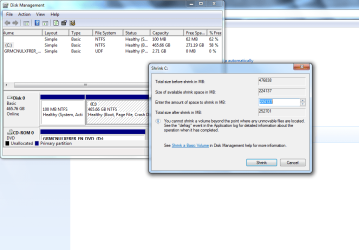
You will need to create a new partition for the dual boot. In Disk Managment, Shrink the C partition as much as you can. In the newly freed space, create a new, Primary partition. Then install onto that partition.

If you can't shrink more than about 20GB, let us know, and we can see what we can do.
 

My Computer My Computer

At a glance

Windows 7 Professional x64Intel i7 2600K OC'd @ 4620 MHz16GB GSkill Sniper 2133 Mhz (4x4GB)EVGA GeForce GTX 480 SuperClocked+
Computer Manufacturer/Model Number
Custom
OS
Windows 7 Professional x64
CPU
Intel i7 2600K OC'd @ 4620 MHz
Motherboard
Asus P8Z68-V Pro
Memory
16GB GSkill Sniper 2133 Mhz (4x4GB)
Graphics Card(s)
EVGA GeForce GTX 480 SuperClocked+
Sound Card
Realtek High Definition Audio
Monitor(s) Displays
2x Acer S273HLbmii 27"
Screen Resolution
2 x 1920x1080
Hard Drives
64GB Crucial M4 SSD

Storage: Hitachi 1TB 5400RPM, Samsung 1.5TB 5400RPM
PSU
Corsair HW Series 750w (modular)
Case
Cooler Master HAF 932 Advanced Blue Edition
Cooling
CM Hyper 212+ CPU cooler, 3x 230mm + 1x 140mm case fans
Keyboard
Logitech MK320 (wireless)
Mouse
Logitech MK320 (wireless)
Internet Speed
30 Mb/s : 2 Mb/s
You will need to create a new partition for the dual boot. In Disk Managment, Shrink the C partition as much as you can. In the newly freed space, create a new, Primary partition. Then install onto that partition.

If you can't shrink more than about 20GB, let us know, and we can see what we can do.

ok this is what i am looking at
 

Attachments

  • Snippit.PNG
    Snippit.PNG
    44.8 KB · Views: 12

My Computer My Computer

At a glance

Windows 7 UltimateAMD Athlon (tm) 64x2 Dual Core Processor 5000...2.00 GB RAMATI Radeon HD 4650
Computer Manufacturer/Model Number
ECS A740GM-M
OS
Windows 7 Ultimate
CPU
AMD Athlon (tm) 64x2 Dual Core Processor 5000+ 2.60GHz
Memory
2.00 GB RAM
Graphics Card(s)
ATI Radeon HD 4650
Monitor(s) Displays
1
Screen Resolution
1440x900
Hard Drives
1
Case
Custom
Keyboard
Rosewill USB Rk-7300
Mouse
Rosewill Optical Usb Rm 2210
Internet Speed
TW Cable Turbo Charged
Other Info
Network Adapter L2 Fast Ethernet 10/100Base-t Controller
Not bad. Shrink it, and hopefully that will be enough.
 

My Computer My Computer

At a glance

Windows 7 Professional x64Intel i7 2600K OC'd @ 4620 MHz16GB GSkill Sniper 2133 Mhz (4x4GB)EVGA GeForce GTX 480 SuperClocked+
Computer Manufacturer/Model Number
Custom
OS
Windows 7 Professional x64
CPU
Intel i7 2600K OC'd @ 4620 MHz
Motherboard
Asus P8Z68-V Pro
Memory
16GB GSkill Sniper 2133 Mhz (4x4GB)
Graphics Card(s)
EVGA GeForce GTX 480 SuperClocked+
Sound Card
Realtek High Definition Audio
Monitor(s) Displays
2x Acer S273HLbmii 27"
Screen Resolution
2 x 1920x1080
Hard Drives
64GB Crucial M4 SSD

Storage: Hitachi 1TB 5400RPM, Samsung 1.5TB 5400RPM
PSU
Corsair HW Series 750w (modular)
Case
Cooler Master HAF 932 Advanced Blue Edition
Cooling
CM Hyper 212+ CPU cooler, 3x 230mm + 1x 140mm case fans
Keyboard
Logitech MK320 (wireless)
Mouse
Logitech MK320 (wireless)
Internet Speed
30 Mb/s : 2 Mb/s

My Computer My Computer

At a glance

Windows 7 UltimateAMD Athlon (tm) 64x2 Dual Core Processor 5000...2.00 GB RAMATI Radeon HD 4650
Computer Manufacturer/Model Number
ECS A740GM-M
OS
Windows 7 Ultimate
CPU
AMD Athlon (tm) 64x2 Dual Core Processor 5000+ 2.60GHz
Memory
2.00 GB RAM
Graphics Card(s)
ATI Radeon HD 4650
Monitor(s) Displays
1
Screen Resolution
1440x900
Hard Drives
1
Case
Custom
Keyboard
Rosewill USB Rk-7300
Mouse
Rosewill Optical Usb Rm 2210
Internet Speed
TW Cable Turbo Charged
Other Info
Network Adapter L2 Fast Ethernet 10/100Base-t Controller
Create a new primary partition in that space. Right-click on the free space and select Create New Volume.

Forgot to mention, it must be formatted as NTFS.
 

My Computer My Computer

At a glance

Windows 7 Professional x64Intel i7 2600K OC'd @ 4620 MHz16GB GSkill Sniper 2133 Mhz (4x4GB)EVGA GeForce GTX 480 SuperClocked+
Computer Manufacturer/Model Number
Custom
OS
Windows 7 Professional x64
CPU
Intel i7 2600K OC'd @ 4620 MHz
Motherboard
Asus P8Z68-V Pro
Memory
16GB GSkill Sniper 2133 Mhz (4x4GB)
Graphics Card(s)
EVGA GeForce GTX 480 SuperClocked+
Sound Card
Realtek High Definition Audio
Monitor(s) Displays
2x Acer S273HLbmii 27"
Screen Resolution
2 x 1920x1080
Hard Drives
64GB Crucial M4 SSD

Storage: Hitachi 1TB 5400RPM, Samsung 1.5TB 5400RPM
PSU
Corsair HW Series 750w (modular)
Case
Cooler Master HAF 932 Advanced Blue Edition
Cooling
CM Hyper 212+ CPU cooler, 3x 230mm + 1x 140mm case fans
Keyboard
Logitech MK320 (wireless)
Mouse
Logitech MK320 (wireless)
Internet Speed
30 Mb/s : 2 Mb/s
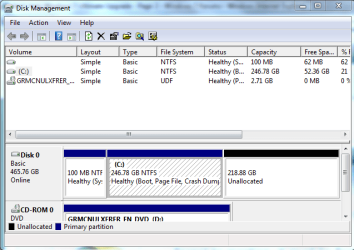
Like this?

i think i did this right idk?
 

Attachments

  • snippit 2.PNG
    snippit 2.PNG
    20.3 KB · Views: 8

My Computer My Computer

At a glance

Windows 7 UltimateAMD Athlon (tm) 64x2 Dual Core Processor 5000...2.00 GB RAMATI Radeon HD 4650
Computer Manufacturer/Model Number
ECS A740GM-M
OS
Windows 7 Ultimate
CPU
AMD Athlon (tm) 64x2 Dual Core Processor 5000+ 2.60GHz
Memory
2.00 GB RAM
Graphics Card(s)
ATI Radeon HD 4650
Monitor(s) Displays
1
Screen Resolution
1440x900
Hard Drives
1
Case
Custom
Keyboard
Rosewill USB Rk-7300
Mouse
Rosewill Optical Usb Rm 2210
Internet Speed
TW Cable Turbo Charged
Other Info
Network Adapter L2 Fast Ethernet 10/100Base-t Controller
Yes, now right-click on the Unallocated space and create a new partition/volume formatted with NTFS.
 

My Computer My Computer

At a glance

Windows 7 Professional x64Intel i7 2600K OC'd @ 4620 MHz16GB GSkill Sniper 2133 Mhz (4x4GB)EVGA GeForce GTX 480 SuperClocked+
Computer Manufacturer/Model Number
Custom
OS
Windows 7 Professional x64
CPU
Intel i7 2600K OC'd @ 4620 MHz
Motherboard
Asus P8Z68-V Pro
Memory
16GB GSkill Sniper 2133 Mhz (4x4GB)
Graphics Card(s)
EVGA GeForce GTX 480 SuperClocked+
Sound Card
Realtek High Definition Audio
Monitor(s) Displays
2x Acer S273HLbmii 27"
Screen Resolution
2 x 1920x1080
Hard Drives
64GB Crucial M4 SSD

Storage: Hitachi 1TB 5400RPM, Samsung 1.5TB 5400RPM
PSU
Corsair HW Series 750w (modular)
Case
Cooler Master HAF 932 Advanced Blue Edition
Cooling
CM Hyper 212+ CPU cooler, 3x 230mm + 1x 140mm case fans
Keyboard
Logitech MK320 (wireless)
Mouse
Logitech MK320 (wireless)
Internet Speed
30 Mb/s : 2 Mb/s
Like this??

Yes, now right-click on the Unallocated space and create a new partition/volume formatted with NTFS.

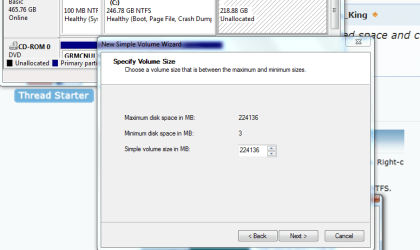
simple volume is the only one i am able to do
 

Attachments

  • snippit 3.PNG
    snippit 3.PNG
    42.9 KB · Views: 5
  • Snippit 4.PNG
    Snippit 4.PNG
    24.1 KB · Views: 4

My Computer My Computer

At a glance

Windows 7 UltimateAMD Athlon (tm) 64x2 Dual Core Processor 5000...2.00 GB RAMATI Radeon HD 4650
Computer Manufacturer/Model Number
ECS A740GM-M
OS
Windows 7 Ultimate
CPU
AMD Athlon (tm) 64x2 Dual Core Processor 5000+ 2.60GHz
Memory
2.00 GB RAM
Graphics Card(s)
ATI Radeon HD 4650
Monitor(s) Displays
1
Screen Resolution
1440x900
Hard Drives
1
Case
Custom
Keyboard
Rosewill USB Rk-7300
Mouse
Rosewill Optical Usb Rm 2210
Internet Speed
TW Cable Turbo Charged
Other Info
Network Adapter L2 Fast Ethernet 10/100Base-t Controller
Sorry for the delay, I am not at home now. Go ahead and create the Simple volume and format it with NTFS. If it give you an option, select Quick format.
 

My Computer My Computer

At a glance

Windows 7 Professional x64Intel i7 2600K OC'd @ 4620 MHz16GB GSkill Sniper 2133 Mhz (4x4GB)EVGA GeForce GTX 480 SuperClocked+
Computer Manufacturer/Model Number
Custom
OS
Windows 7 Professional x64
CPU
Intel i7 2600K OC'd @ 4620 MHz
Motherboard
Asus P8Z68-V Pro
Memory
16GB GSkill Sniper 2133 Mhz (4x4GB)
Graphics Card(s)
EVGA GeForce GTX 480 SuperClocked+
Sound Card
Realtek High Definition Audio
Monitor(s) Displays
2x Acer S273HLbmii 27"
Screen Resolution
2 x 1920x1080
Hard Drives
64GB Crucial M4 SSD

Storage: Hitachi 1TB 5400RPM, Samsung 1.5TB 5400RPM
PSU
Corsair HW Series 750w (modular)
Case
Cooler Master HAF 932 Advanced Blue Edition
Cooling
CM Hyper 212+ CPU cooler, 3x 230mm + 1x 140mm case fans
Keyboard
Logitech MK320 (wireless)
Mouse
Logitech MK320 (wireless)
Internet Speed
30 Mb/s : 2 Mb/s
Back
Top