UimBus and Uim_IM Drivers

squid13

New member
Member
VIP
Local time
1:10 PM
Messages
215
Location
Cantonment, Florida
I have in my event viewer the following drivers failed to start UimBus and Uim_IM and from what I've read they belonged to Paragon. I had it installed once and removed it. Is this left overs and if so how do I remove them. Any help would be greatly appreciated. I'm using Windows 7Pro 64 bit.
 

My Computer My Computer

At a glance

Windows 7 Professional SP1 64 bitIntel(R)Core(TM)2Quad procQ9550(2.83GHZ)8 GB768MB NVIDIA GEFORCE GT610
Computer type
PC/Desktop
Computer Manufacturer/Model Number
HP Pavilion Elite d5200t ATX PC
OS
Windows 7 Professional SP1 64 bit
CPU
Intel(R)Core(TM)2Quad procQ9550(2.83GHZ)
Motherboard
Pegatron
Memory
8 GB
Graphics Card(s)
768MB NVIDIA GEFORCE GT610
Sound Card
Creative Sound Blaster X-Fi Xtreme
Monitor(s) Displays
Samsung S24D300
Screen Resolution
1440x900
Hard Drives
640GB 7200RPM Sata 3Gb/s
PSU
HP
Case
HP
Cooling
2 Fans
Keyboard
Microsoft Internet Keyboard
Mouse
MicroSoft IntelliMouse Optical
Internet Speed
Cox Cable
Antivirus
Norton
Browser
FireFox

My Computer My Computer

At a glance

Windows 10 Pro x64, Arch LinuxIntel Core 2 Quad Q8200 OC'd 3.08GHz8GB DDR2 900MhzMSI GT730 2GB GDDR5 (Kepler)
Computer type
PC/Desktop
Computer Manufacturer/Model Number
Custom Build
OS
Windows 10 Pro x64, Arch Linux
CPU
Intel Core 2 Quad Q8200 OC'd 3.08GHz
Motherboard
Asus Rampage formula LGA775
Memory
8GB DDR2 900Mhz
Graphics Card(s)
MSI GT730 2GB GDDR5 (Kepler)
Sound Card
Supreme FX2
Monitor(s) Displays
Samsung LS22F350 LED
Screen Resolution
1080P
Hard Drives
Kingston SSDNow UV400 120GB, 500GB Hitachi, 2TB Samsung, 500GB Seagate FreeAgent, 640GB Samsung, 160GB Toshiba (Arch)
PSU
AeroCool 500W Bronze
Cooling
Cooler Master V6 + 3X fans
Keyboard
Prolink keyboard
Mouse
Logitech M705
Internet Speed
1MiB/s
Browser
Chrome Beta
in case anybody else experiences this problem:

i've just found out that i'm getting these uimbus/uim_im (universal image mounter) errors too.

so i downloaded revo unistaller, but of course there aren't any paragon entries there, as i uninstalled it a while back while testing.

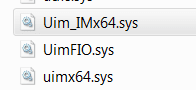
i didn't feel like installing paragon again, then force uninstalling it, so i did some snooping around and found three files in windows/system32/drivers:

uim.PNG

then i cranked up regedit, searched for uim, found some entries in HKLM\system\controlset\services (and HKLM\system\controlset001\services) and deleted them.

crossed my fingers, rebooted, and problem solved :thumbsup:
 

My Computer My Computer

At a glance

ultimate 64 sp1i5 2500K [email protected]8 gigs GSkill Ripjaws 1600amd hd6950
Computer Manufacturer/Model Number
mickey megabyte 1234
OS
ultimate 64 sp1
CPU
i5 2500K [email protected]
Motherboard
MSI P67A-GD53
Memory
8 gigs GSkill Ripjaws 1600
Graphics Card(s)
amd hd6950
Sound Card
creative x-fi gamer
Monitor(s) Displays
samsung 24"
Screen Resolution
1920x1080
Hard Drives
ocz vertex 2e 60 gig, samsung f3 1tb, buffalo 2tb ext
PSU
antec 550
Case
antec three hundred
Cooling
i'm a cooling fan
Keyboard
saitek eclipse ii
Mouse
logitech g3
Internet Speed
about 4 Mbps
Other Info
i love win7
Just wanted to say thanks! ;)

I had the same problem - with UimBus and Uim_IM - and your solution works.
 

My Computer My Computer

At a glance

Windows 7 Professional x64
Computer Manufacturer/Model Number
Dell Studio XPS 8100
OS
Windows 7 Professional x64
Thanks!! I just ran into the same issue.
 

My Computer My Computer

At a glance

Windows 7 Pro 32-bitIntel I-7 2nd gen8GB
OS
Windows 7 Pro 32-bit
CPU
Intel I-7 2nd gen
Memory
8GB
thanks for the thanks!

makes helping more worthwhile. :)
 

My Computer My Computer

At a glance

ultimate 64 sp1i5 2500K [email protected]8 gigs GSkill Ripjaws 1600amd hd6950
Computer Manufacturer/Model Number
mickey megabyte 1234
OS
ultimate 64 sp1
CPU
i5 2500K [email protected]
Motherboard
MSI P67A-GD53
Memory
8 gigs GSkill Ripjaws 1600
Graphics Card(s)
amd hd6950
Sound Card
creative x-fi gamer
Monitor(s) Displays
samsung 24"
Screen Resolution
1920x1080
Hard Drives
ocz vertex 2e 60 gig, samsung f3 1tb, buffalo 2tb ext
PSU
antec 550
Case
antec three hundred
Cooling
i'm a cooling fan
Keyboard
saitek eclipse ii
Mouse
logitech g3
Internet Speed
about 4 Mbps
Other Info
i love win7
Thanks - I had the same problem
 

My Computer My Computer

At a glance

Win 7 64 Profi7 93024 gig 1333HIS ATI Radeon HD 6850
Computer Manufacturer/Model Number
Desktop made to order - Asus P6x58D Premium
OS
Win 7 64 Prof
CPU
i7 930
Motherboard
Asus P6x58D Premium
Memory
24 gig 1333
Graphics Card(s)
HIS ATI Radeon HD 6850
Sound Card
Creative
Monitor(s) Displays
NEC Multisync P241W
Screen Resolution
1920 x 1200
Hard Drives
2 WD 1tb each black caviar
1 WD black caviar 2tb
1 Plextor SSD SATA 6 256 gig
1 Intel generation 2 SSD 160 gig
PSU
i7 930
Case
Antec 183 (?)
Cooling
Zalman fan and heat pipe
Keyboard
Goldtouch
Mouse
Logitech G 700 used wirelessly
Internet Speed
19.6 Mbps up and 2.00 Mbps down
Other Info
5 usb 3 hard drives used for backup. Until recently also backed up with Crashplan but discovered it was the cause of endless VSS errors and open programs stopping responding. HP Laserjet and large Epson inkjet for photography. Very old Epson Scanner. Cyberpower UPS.
is it necessary to delete the registry entries? i made the files in in windows/system32/drivers ...sys.bak-files shouldn't that do the trick?
 

My Computer My Computer

At a glance

Windows 7 Pro x64
Computer type
PC/Desktop
OS
Windows 7 Pro x64
Antivirus
F-Secure, MBAM, Trojan Remover, Spybot S&D
Browser
Firefox, IE11
furthermore .. its the currentcontrolset
 

My Computer My Computer

At a glance

Windows 7 Pro x64
Computer type
PC/Desktop
OS
Windows 7 Pro x64
Antivirus
F-Secure, MBAM, Trojan Remover, Spybot S&D
Browser
Firefox, IE11
Back
Top