UKASH Virus .....again :(

darrenj1471,

Let's use HitmanPro.Kickstart to access your computer, scan it for malware, and remove this infection. The program targets this ransomware.

Also, you may want to print these instructions, so they are available to follow.

Now, load a USB flash drive with HitmanPro.Kickstart as follows...
Note: the contents of the USB flash drive are erased during this process!

Use a clean (non-infected) computer, and download:
HitmanPro.Kickstart - Anti ransomware, politievirus, bundestrojaner, Reveton, BKA, GVU - SurfRight

Under Download (on the right) select the program applicable to the system: 64-bit

When HitmanPro opens, click the KickStart icon at the bottom of the screen.

>>Plug in the USB flash drive.

When the USB flash drive is detected, a selection screen is presented.
Select the USB flash drive from the choices, and press: Install Kickstart
A warning that all contents of the selected flash drive will erase is presented.
Press: Yes

As the HitmanPro.Kickstart files are loaded, a progress indicator is shown on the screen.
Once the process is completed a screen is presented with the contents of HitmanPro.Kickstart

Remove the USB flash drive from the clean computer and press: Close


Now, with the ransomed computer shut down, plug the USB flash drive into a USB port, and turn on the power.

When the computer starts, press the key that brings up the Boot Menu. (On some machines its F12, F10, or F2)
From there, select to boot from the USB drive. (It may say 'Removable Drive' in the options.)
Info: How to Remove Ransomware - Select Real Security

Once you select the USB flash drive to boot from, press: Enter

A Kickstart prompt with USB boot options appears.
Select: 1 (Bypass the Master Boot Record (Default))

The system continues to boot from the hard drive and starts Windows.
If you get a message stating that Windows failed to start, etc., just select: Start Windows Normally

When Windows boots, you either get a logon screen, or the Desktop is started.
If you see a logon screen with your User name, logon with it.

In the next prompt that appears, to start the program without installing to the local hard disk, select the option to do a one-time scan to check the computer.

To start scanning for malware press: Next

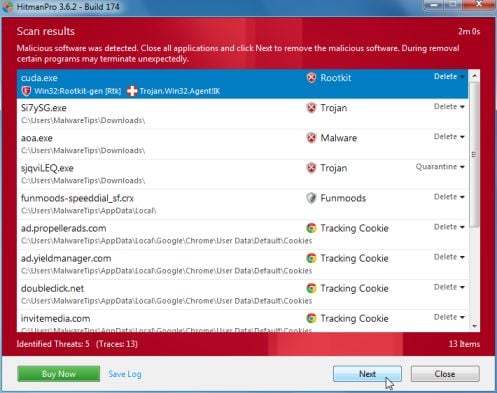
If malware is detected, the program shows what malware is present on the system using a red framed screen.
hitmanpro-scan-results.jpg

Select Next to quarantine the malware into a secure storage where it can no longer start.

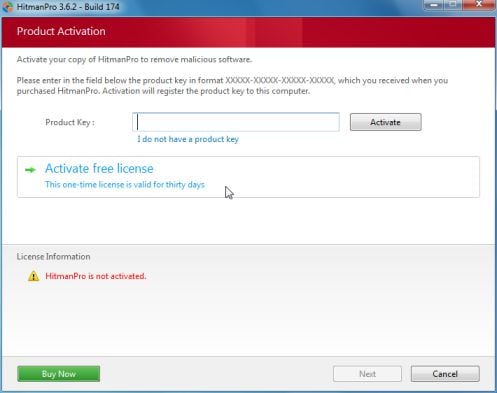
At the next screen, activate the 30-day free license.
hitmanpro-activation.jpg

After successful activation (30 days), press: Next

A screen indicating that the malware was successfully disabled or removed is presented.
Press: Next

To obtain a report of the scan results, press: Save log
>>Save the Notepad log to the Desktop<<
It has a name such as: HitmanPro_xxxxxxxx_xxxx

Remove the USB drive, and press: Reboot
If no malware is found, press: Close

After HitmanPro.Kickstart is done, you should be back into normal Windows.

Please post the HitmanPro log in your reply.


~~~~
To remove any remnant malicious files of the ransomware...

Download RogueKiller:
Tlcharger RogueKiller (Site Officiel)

When you get to the website, go to where it says:
(Download link) Lien de téléchargement:
rendu2.png


Select the version that applies to your system: x64
Click the dark-blue button to download.
Save to the Desktop.

Close all windows and browsers.
Right-click and select: Run as Administrator

At the program console, wait for the prescan to finish. (Under Status, it says: Prescan finished.)

Press: SCAN

When done, a report opens on the Desktop: RKreport.txt

Please provide the RKreport.txt (Mode: Scan) in your reply.

 

My Computer

Computer type
PC/Desktop
Computer Manufacturer/Model Number
An ol' eMachines
OS
Windows 7 Home Premium
Internet Speed
Fine for me...I'm retired!
Darren

you are in good hands here .

His specs say he has a x64-bit OS .
 

My Computer

Computer Manufacturer/Model Number
Custom Built
OS
Windows 7 Ultimate 32-Bit & Windows 7 Ultimate 64-Bit
CPU
Intel Core i7 CPU 950 @ 3.07GHz
Motherboard
ASUS P6T DELUXE V2
Memory
OCZ 6GB (3 x 2GB) 240-Pin DDR3 SDRAM DDR3 1600 OCZ3X1600R2
Graphics Card(s)
ATI Radeon HD 5700 Series
Sound Card
OnBoard
Hard Drives
WD6400AACS-00M3B0 (640GB SATA )
PSU
CORSAIR 850w
Case
NZXT LEXA
Cooling
Intel Stock Heatsink Fan
Keyboard
Microsoft Wireless Laser Keyboard 7000
Mouse
Microsoft Wireless Laser Mouse 7000
thanks I will give this a go....as soon as I can get hold of a usb pen drive as all I have is my external hard drive and I do not want to wipe whats on there. Sadly no stores are open today but thanks thus far
 

My Computer

OS
windows 7 64 bit
For quicker alternative, check if you can boot to safe mode with networking. Some versions of ukash virus will allow just that, and it is enough to run the scan or stop it from launching on normal reboot.
 

My Computer

OS
Windows 7 64 / Windows 8 64
Ive done the steps outlined and......YOU RULE. I can boot my infected laptop. Below is the Hitman pro log:

Code:
HitmanPro 3.7.3.192
[URL="http://www.hitmanpro.com"]www.hitmanpro.com[/URL]
   Computer name . . . . : DARREN-PC
   Windows . . . . . . . : 6.1.1.7601.X64/4
   User name . . . . . . : NT AUTHORITY\SYSTEM
   UAC . . . . . . . . . : Disabled
   License . . . . . . . : Trial (30 days left)
   Scan date . . . . . . : 2013-03-31 20:14:14
   Scan mode . . . . . . : Normal
   Scan duration . . . . : 8m 13s
   Disk access mode  . . : Direct disk access (SRB)
   Cloud . . . . . . . . : Internet
   Reboot  . . . . . . . : Yes
   Threats . . . . . . . : 2
   Traces  . . . . . . . : 3
   Objects scanned . . . : 2,106,709
   Files scanned . . . . : 32,506
   Remnants scanned  . . : 396,254 files / 1,677,949 keys
Malware _____________________________________________________________________
   C:\Users\darren\AppData\Local\Temp\taskmanger.exe -> Quarantined
      Size . . . . . . . : 94,208 bytes
      Age  . . . . . . . : 1.0 days (2013-03-30 20:57:53)
      Entropy  . . . . . : 6.6
      SHA-256  . . . . . : DFCC5DEEF13154F3CA4D11D2D98A26A980E593A4E9C2CB0230E4DB1A209BAB7C
    > G Data . . . . . . : Trojan.Generic.KDZ.12441 (Engine A)
      Fuzzy  . . . . . . : 108.0
   C:\Users\darren\AppData\Roaming\skype.dat -> Quarantined
      Size . . . . . . . : 94,208 bytes
      Age  . . . . . . . : 1.0 days (2013-03-30 20:58:06)
      Entropy  . . . . . : 6.6
      SHA-256  . . . . . : DFCC5DEEF13154F3CA4D11D2D98A26A980E593A4E9C2CB0230E4DB1A209BAB7C
    > G Data . . . . . . : Trojan.Generic.KDZ.12441 (Engine A)
      Fuzzy  . . . . . . : 154.0
         One or more antivirus vendors have indicated that the file is malicious.
         Substitutes Explorer.exe as the default shell. Malware tends to start this way.
         This file was most recently added as automatic startup.
         The file name extension of this program is not common.
         Authors name is missing in version info. This is not common to most programs.
         Version control is missing. This file is probably created by an individual. This is not typical for most programs.
         Program starts automatically without user intervention.
         Time indicates that the file appeared recently on this computer.
      Startup
         HKU\S-1-5-21-3471356370-426161678-982001811-1001\SOFTWARE\Microsoft\Windows NT\CurrentVersion\Winlogon\Shell
 

My Computer

OS
windows 7 64 bit
Found it :) Report below:

RogueKiller V8.5.4 _x64_ [Mar 18 2013] by Tigzy
mail : tigzyRK<at>gmail<dot>com
Feedback : RogueKiller - Geeks to Go Forums
Website : Download RogueKiller (Official website)
Blog : tigzy-RK
Operating System : Windows 7 (6.1.7601 Service Pack 1) 64 bits version
Started in : Normal mode
User : darren [Admin rights]
Mode : Scan -- Date : 03/31/2013 20:40:54
| ARK || FAK || MBR |
¤¤¤ Bad processes : 0 ¤¤¤
¤¤¤ Registry Entries : 4 ¤¤¤
[TASK][SUSP PATH] ROC_REG_JAN_DELETE.job : C:\ProgramData\AVG January 2013 Campaign\ROC.exe /DELETE_FROM_SYSTEM=1 [7] -> FOUND
[TASK][SUSP PATH] ROC_REG_JAN_DELETE : C:\ProgramData\AVG January 2013 Campaign\ROC.exe /DELETE_FROM_SYSTEM=1 [7] -> FOUND
[HJ DESK] HKLM\[...]\NewStartPanel : {59031a47-3f72-44a7-89c5-5595fe6b30ee} (1) -> FOUND
[HJ DESK] HKLM\[...]\NewStartPanel : {20D04FE0-3AEA-1069-A2D8-08002B30309D} (1) -> FOUND
¤¤¤ Particular Files / Folders: ¤¤¤
¤¤¤ Driver : [NOT LOADED] ¤¤¤
¤¤¤ HOSTS File: ¤¤¤
--> C:\windows\system32\drivers\etc\hosts

¤¤¤ MBR Check: ¤¤¤
+++++ PhysicalDrive0: Hitachi HTS543232A7A384 +++++
--- User ---
[MBR] ab024c489fd8af2cec7a6456c3a19adf
[BSP] 9b4c2391edd45ea6bfd8c60ec31c089c : KIWI Image system MBR Code
Partition table:
0 - [ACTIVE] NTFS (0x07) [VISIBLE] Offset (sectors): 2048 | Size: 100 Mo
1 - [XXXXXX] NTFS (0x07) [VISIBLE] Offset (sectors): 206848 | Size: 113664 Mo
2 - [XXXXXX] EXTEN-LBA (0x0f) [VISIBLE] Offset (sectors): 232990720 | Size: 169800 Mo
3 - [XXXXXX] ACER (0x27) [VISIBLE] Offset (sectors): 580741120 | Size: 21678 Mo
User = LL1 ... OK!
User = LL2 ... OK!
Finished : << RKreport[1]_S_03312013_02d2040.txt >>
RKreport[1]_S_03312013_02d2040.txt
 

My Computer

OS
windows 7 64 bit
The entries showing on RogueKiller are of no consequence.

Let's take an additional step...you never know what else comes along with ransomware.


Please download Malwarebytes : Malwarebytes Anti-Rootkit

Save to the Desktop (easy to find)

Right-click the file and select: Extract here... (to the Desktop)


Run the program and follow ithe Usage Instructions on the website from Step 3 to Step 6.
For now, please stop at Step 6.


When the program is done, two reports are created in the mbar folder:
1. system-log.txt
2. mbar-log-2013-02-18 (20-13-32).txt (corresponds to mbar-log-year-month-day (hour-minute-second).txt)


Please provide the mbar-log containing information on what was detected and removed.
 

My Computer

Computer type
PC/Desktop
Computer Manufacturer/Model Number
An ol' eMachines
OS
Windows 7 Home Premium
Internet Speed
Fine for me...I'm retired!
Darren,

sorry to hear of your problems, I hope you can get it sorted.

Would you mind telling me how you picked up this virus, it's just to satisfy my curiosity.

Andy
 

My Computer

Computer type
PC/Desktop
Computer Manufacturer/Model Number
Titan 8900i Plasma MK II built by Overclockersuk
OS
Windows 7 Home Premium 64bit
CPU
Intel Core i5 3570K @ 3.40GHz
Motherboard
Gigabyte Z77-D3H (Intel Core i5-3570K CPU @ 3.40ghz
Memory
16.0 GB Dual-Channel DDR3 @ 762MHz (11-11-11-28)
Graphics Card(s)
NVIDIA GeForce GTX 670
Sound Card
ASUS Xonar DG
Monitor(s) Displays
Acer P246H
Screen Resolution
1920x1080@60Hz
Hard Drives
112GB INTEL SSDSC2CT120A3 ATA Device (SSD)
932GB Seagate ST1000DM003-1CH162 ATA Device (SATA)
1TB Seagate external HDD.
PSU
Corsair GS 600w PSU
Case
Antec 302 Three Hundred Two Ultimate Gaming Case
Cooling
Alpenfohn K2 Mount Doom CPU Cooler
Keyboard
Microsoft Sidewinder X4
Mouse
Anker 8000dpi gaming mouse
Internet Speed
12mb
Antivirus
Bitdefender Internet Security 2014
Browser
Chrome and IE11
Other Info
Malwarebytes, ADWCleaner, CCleaner, SUPERAntispyware Pro, Revo Uninstaller Pro

Adobe Photoshop CS6/Lightroom 5.3/NIK Software/Keyword Perfect
Not to be a pest or pain, but I too would like to know any information as to how you picked this one up? o.O
 

My Computer

Computer type
PC/Desktop
Computer Manufacturer/Model Number
Custom Built
OS
Windows 10 Pro x64 (UPGRADED - 10/20/2016)
CPU
AMD FX 8350 (OC: 4.48GHz)
Motherboard
ASUS Crosshair V Formula-Z AM3+
Memory
14GB DDR3 Corsair Vengeance
Graphics Card(s)
Asus AMD Radeon R9 280X 3GB
Sound Card
N/A
Monitor(s) Displays
BenQ G2420HD
Screen Resolution
1920x1080
Hard Drives
Internal: 1x 500GB WD Blue SSD | 1TB WD Caviar Black | 3x 500GB WD Caviar Green
External: 500GB Seagate
PSU
Corsair AX1200i
Case
CoolerMaster HAF X
Cooling
Corsair Hydro H90 Water Cooling
Keyboard
Microsoft SideWinder X6 Keyboard
Mouse
Microsoft SideWinder X8 Mouse
Antivirus
MSE / Malwarebytes Anti-Malware
Browser
Mozilla Firefox + Google Chrome

My Computer

Computer type
PC/Desktop
Computer Manufacturer/Model Number
Home Built Desktop By DataTech
OS
Windows 7 Ultimate X64 SP1
CPU
Intel i5-2550K, Differing ~4.4-4.8GHz No built in GPU
Motherboard
ASUS P8Z68-V PRO/GEN3
Memory
16GB G.Skill Sniper 1866MHz @ 2133MHz 2x8GB
Graphics Card(s)
ASUS GTX650TIB-DC2OC-2GD5, (650TI Boost)
Sound Card
Onboard Realtek 5-1
Monitor(s) Displays
Samsung P2570HD
Screen Resolution
1920x1080
Hard Drives
Samsung 840 Pro 256GB SSD for OS, 500GB Seagate Constellation (Enterprise drive) for Data
PSU
Corsair HX650W
Case
Inwin Dragon Rider
Cooling
Hyper 212 EVO w/two Noctua fans, push-pull, @1300 RPM
Keyboard
E-Z Eyes, bright yellow keys with large characters
Mouse
steelseries SENSEI Laser Pro Gaming
Internet Speed
48-51Mbs Mbs down, 11 Mbs up Xfinity Cable
Antivirus
Norton Internet Security 2013
Browser
IE 10, Opera, Pale Moon if needed
Other Info
4 case fans, LG BluRay-RE, ASUS DVD-RW, Mr. Fusion power supply, 1.21 gigawatts.
AdwCleaner is a good program, and is used to remove malware remnants if the system is not locked by the ransomware. I am sure our Jacee's (whom I have known and worked with for years) recommendation was in this type of scenario.

In darrenj1471's predicament, with the computer locked by the ransomware, it is another story.

There are some bootable CDs used to remove the locked ransomware.
Some that come to mind are:

HitmanPro.Kickstart
Kaspersky WindowsUnlocker
Dr.Web® LiveCD

Have personally experienced success with HitmanPro.Kickstart, however, have not tried the Kaspersky's bootable CD above. HitmanPro.Kickstart marketing has focused on ransomware removal.

There are also other methods such as going into Safe Mode with Networking, and launching MSConfig, but sometimes the ransomware takes over in Safe Mode also.

These infections are sometimes a bear to get rid of.


From Wiki-Security: Method of Infection

There are many ways your computer could get infected with Ukash Virus. Ukash Virus can come bundled with shareware or other downloadable software.

Another method of distributing Ukash Virus involves tricking you by displaying deceptive pop-up ads that may appear as regular Windows notifications with links which look like buttons reading Yes and No. No matter which "button" that you click on, a download starts, installing Ukash Virus on your system.

Ukash Virus installs on your computer through a trojan and may infect your system without your knowledge or consent.

Have also seen reported where an email with certain content has gotten some Users infected.
 

My Computer

Computer type
PC/Desktop
Computer Manufacturer/Model Number
An ol' eMachines
OS
Windows 7 Home Premium
Internet Speed
Fine for me...I'm retired!
We could go through the registry if you would like
 

My Computer

Computer Manufacturer/Model Number
Custom Built
OS
Windows 7 Ultimate 32-Bit & Windows 7 Ultimate 64-Bit
CPU
Intel Core i7 CPU 950 @ 3.07GHz
Motherboard
ASUS P6T DELUXE V2
Memory
OCZ 6GB (3 x 2GB) 240-Pin DDR3 SDRAM DDR3 1600 OCZ3X1600R2
Graphics Card(s)
ATI Radeon HD 5700 Series
Sound Card
OnBoard
Hard Drives
WD6400AACS-00M3B0 (640GB SATA )
PSU
CORSAIR 850w
Case
NZXT LEXA
Cooling
Intel Stock Heatsink Fan
Keyboard
Microsoft Wireless Laser Keyboard 7000
Mouse
Microsoft Wireless Laser Mouse 7000
If the computer is locked, it won't be thru Start > Run, type in: regedit :D
 

My Computer

Computer type
PC/Desktop
Computer Manufacturer/Model Number
An ol' eMachines
OS
Windows 7 Home Premium
Internet Speed
Fine for me...I'm retired!
Yes I kno it will be from the installation DVD ;)
 

My Computer

Computer Manufacturer/Model Number
Custom Built
OS
Windows 7 Ultimate 32-Bit & Windows 7 Ultimate 64-Bit
CPU
Intel Core i7 CPU 950 @ 3.07GHz
Motherboard
ASUS P6T DELUXE V2
Memory
OCZ 6GB (3 x 2GB) 240-Pin DDR3 SDRAM DDR3 1600 OCZ3X1600R2
Graphics Card(s)
ATI Radeon HD 5700 Series
Sound Card
OnBoard
Hard Drives
WD6400AACS-00M3B0 (640GB SATA )
PSU
CORSAIR 850w
Case
NZXT LEXA
Cooling
Intel Stock Heatsink Fan
Keyboard
Microsoft Wireless Laser Keyboard 7000
Mouse
Microsoft Wireless Laser Mouse 7000
Errr I have it AGAIN, and I followed your advice again ie went and got another copy of Hitman Pro kickstart and booted pc from USB device but this time my infected pc says 'Your Licence for Hitman Pro has expired' ???? and wont let me remove malware found ?? Please help :)

As for how Im contracting it , I dont fully know but suspect its from a site which streams sports events
 

My Computer

OS
windows 7 64 bit
What AntiVirus program are you using? Is it not picking up this infection when you go to its source?

Three times infected with the same thing is not good.


Please go to the Farbar Recovery Scan Tool Download page.
Select the 64-bit download.
Save the program to a USB pendrive, or an external hard drive.

Next, plug the drive into the problem computer.


>>>Restart
  • As soon as the BIOS is loaded begin tapping the F8 key until the Advanced Boot Options menu appears.
  • Use the arrow keys to select the Repair your computer menu item.
  • Select your language settings, and click: Next
  • Select your User account and click: OK (If you did not set a password, leave blank.)
On the System Recovery Options menu you get the following options:
  • Startup Repair
    [*]System Restore
    [*]Windows Complete PC Restore
    [*]Windows Memory Diagnostic Tool
    [*]Scan your computer's memory for errors.
    [*]Command Prompt
Select Command Prompt
  • In the Command window, at the bliking cursor type notepad and press: Enter
  • In Notepad, under the File menu select: Open
  • Double-click Computer, find the flash drive letter, remember what letter it is, click on it, and press: Open
  • Close out of Notepad.
  • Click the Command Prompt window
  • Type g:\frst64.exe, and press: Enter
    Note: Replace the drive letter g with the drive letter of your flash drive!
  • The tool starts and prepares to run. Follow the prompts.
  • Click Yes to the disclaimer.
  • Press: Scan
When done scanning, the program saves a FRST.txt report on the flash drive.


Close Notepad, then, click the Command prompt window, and type exit, and press: Enter
Remove the USB drive.
Back at the System Recovery Options, press: Shutdown


Please provide the FRST.txt in your reply.
It is located in the USB drive.

Note: If you have any older copy of FRST on the external drive, please remove it, as this program is updated very frequently. You need the newest version.
 

My Computer

Computer type
PC/Desktop
Computer Manufacturer/Model Number
An ol' eMachines
OS
Windows 7 Home Premium
Internet Speed
Fine for me...I'm retired!
Ok think ive followed the steps and attached is the txt file output

Look forward to next steps :)

Im using AVG fyi
 

Attachments

My Computer

OS
windows 7 64 bit
Back
Top