Unable to access internet in Normal Boot mode

DarcyL

New member
Local time
12:06 PM
Messages
21
I am unable to access the Internet on my computer in Normal Boot mode. This started immediately after I had a Microsoft support technician connect remotely to my computer in an attempt to resolve an issue with Windows Explorer crashing repeatedly. I don't remember what scans he performed or settings he changed but, in the end, he didn't solve the original issue and also caused the no internet problem.
My Internet comes through a wired Ethernet connection. The network connection icon in the system tray indicates there is an active Internet connection, but I am unable to load any webpages or send/receive emails. I have tried using USB data tethering with my phone, but that doesn't work either.
I have tried disabling non-Microsoft services and Startup items, as well as some Microsoft services I concluded were non-essential.
I have run scans using Malwarebytes, RogueKiller, HitmanPro, and SuperAntispyware.
I've disabled Windows Firewall as well as Microsoft Security Essentials.
That probably covers most of what I've tried.
Without fail, as soon as I boot into Safe Boot mode I get Internet access!! The regular Ethernet connection works, as well as the USB data tethering connection.

I'm open to suggestions of anything else to try.
 

My Computer My Computer

Computer type
PC/Desktop
Computer Manufacturer/Model Number
Custom build
OS
Windows 7 Home Premium x64
CPU
Intel Core i7-4790 3.6GHz
Motherboard
ASUS H97-PLUS
Memory
Kingston 16GB
Graphics Card(s)
NVIDIA GeForce GTX 750 Ti
Monitor(s) Displays
ViewSonic VP2250wb
Screen Resolution
1680x1050
Keyboard
Logitech MK300
Mouse
Logitech G700s
Antivirus
Microsoft Security Essentials
Browser
Mozilla Firefox
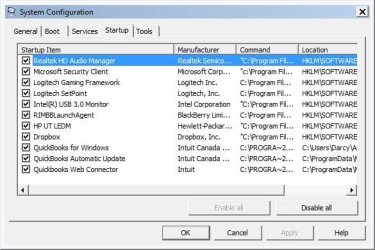
Welcome to the forum. Open a cmd prompt type ipconfig /all post results then type tracert 194.119.131.66 post results open msconfig and tell us what's running at start
 

My Computer My Computer

Computer type
PC/Desktop
OS
win 8 32 bit
Sorry for the slow response. It's my work computer that's having issues, and I was away for the weekend.
Here are the results from the scans requested:

Microsoft Windows [Version 6.1.7601]
Copyright (c) 2009 Microsoft Corporation. All rights reserved.

C:\Users\Darcy>ipconfig /all

Windows IP Configuration

Host Name . . . . . . . . . . . . : Darcy-PC
Primary Dns Suffix . . . . . . . :
Node Type . . . . . . . . . . . . : Broadcast
IP Routing Enabled. . . . . . . . : No
WINS Proxy Enabled. . . . . . . . : No
DNS Suffix Search List. . . . . . : gateway.pace.com

Ethernet adapter Local Area Connection 3:

Connection-specific DNS Suffix . : gateway.pace.com
Description . . . . . . . . . . . : Realtek PCIe GBE Family Controller
Physical Address. . . . . . . . . : 08-62-66-47-50-9D
DHCP Enabled. . . . . . . . . . . : Yes
Autoconfiguration Enabled . . . . : Yes
Link-local IPv6 Address . . . . . : fe80::79a3:1ded:c59f:cfc9%18(Preferred)
IPv4 Address. . . . . . . . . . . : 172.16.1.72(Preferred)
Subnet Mask . . . . . . . . . . . : 255.255.255.0
Lease Obtained. . . . . . . . . . : November-13-17 2:13:49 PM
Lease Expires . . . . . . . . . . : November-14-17 2:13:49 PM
Default Gateway . . . . . . . . . : 172.16.1.254
DHCP Server . . . . . . . . . . . : 172.16.1.254
DHCPv6 IAID . . . . . . . . . . . : 386425446
DHCPv6 Client DUID. . . . . . . . : 00-01-00-01-21-97-9A-2D-5A-B3-10-B6-66-1A

DNS Servers . . . . . . . . . . . : 172.16.1.254
NetBIOS over Tcpip. . . . . . . . : Enabled

Tunnel adapter isatap.gateway.pace.com:

Media State . . . . . . . . . . . : Media disconnected
Connection-specific DNS Suffix . :
Description . . . . . . . . . . . : Microsoft ISATAP Adapter
Physical Address. . . . . . . . . : 00-00-00-00-00-00-00-E0
DHCP Enabled. . . . . . . . . . . : No
Autoconfiguration Enabled . . . . : Yes

Microsoft Windows [Version 6.1.7601]
Copyright (c) 2009 Microsoft Corporation. All rights reserved.
Microsoft Windows [Version 6.1.7601]
Copyright (c) 2009 Microsoft Corporation. All rights reserved.

C:\Users\Darcy>tracert 194.119.131.66

Tracing route to cns1.uk.vianw.net [194.119.131.66]
over a maximum of 30 hops:

1 <1 ms <1 ms 1 ms homeportal [172.16.1.254]
2 * * * Request timed out.
3 12 ms 15 ms 16 ms 207.47.190.137
4 50 ms 52 ms 50 ms 142.165.0.114
5 58 ms 52 ms 48 ms v511.core1.tor1.he.net [216.66.0.13]
6 60 ms 54 ms 54 ms 100ge14-2.core1.nyc4.he.net [184.105.80.9]
7 122 ms 125 ms 145 ms 100ge7-2.core1.lon2.he.net [72.52.92.165]
8 124 ms 123 ms 123 ms 10ge8-4.core1.lon1.he.net [72.52.92.221]
9 * * * Request timed out.
10 120 ms 123 ms 123 ms tengige0-0-1-0-t6-ar14.router.uk.clara.net [195.
157.3.106]
11 120 ms 121 ms 121 ms tengige0-0-1-0-t6-ar14.router.uk.clara.net [195.
157.3.106]
12 123 ms 123 ms 123 ms cns1.uk.vianw.net [194.119.131.66]

Trace complete.

C:\Users\Darcy>
 

Attachments

  • Startup items.JPG
    Startup items.JPG
    51.8 KB · Views: 40

My Computer My Computer

Computer type
PC/Desktop
Computer Manufacturer/Model Number
Custom build
OS
Windows 7 Home Premium x64
CPU
Intel Core i7-4790 3.6GHz
Motherboard
ASUS H97-PLUS
Memory
Kingston 16GB
Graphics Card(s)
NVIDIA GeForce GTX 750 Ti
Monitor(s) Displays
ViewSonic VP2250wb
Screen Resolution
1680x1050
Keyboard
Logitech MK300
Mouse
Logitech G700s
Antivirus
Microsoft Security Essentials
Browser
Mozilla Firefox
The tracert shows you get out on the internet with no problems. Disable ms security in ms confic check all browsers are NOT set to use a proxy when you connect with a browser what error do you get?
 

My Computer My Computer

Computer type
PC/Desktop
OS
win 8 32 bit
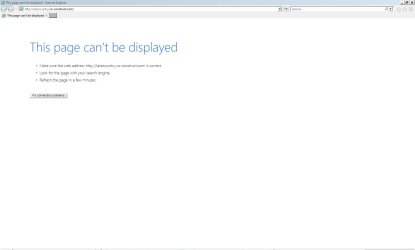
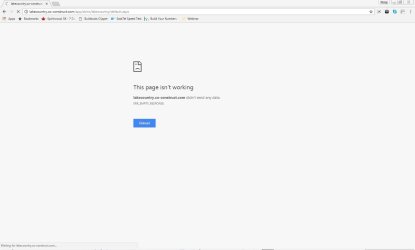
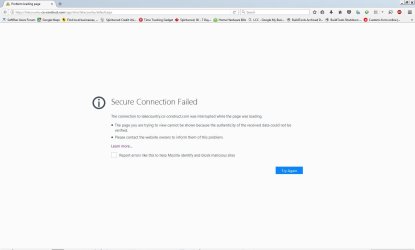
I disabled Microsoft Security Client in the Startup list and checked that all browsers are not set to use a proxy. Attached are screenshots from the three browsers I have installed showing errors when trying to load a webpage.
 

Attachments

  • IE error.JPG
    IE error.JPG
    41.2 KB · Views: 1
  • Chrome error.JPG
    Chrome error.JPG
    39.2 KB · Views: 0
  • Firefox error.JPG
    Firefox error.JPG
    60.2 KB · Views: 0

My Computer My Computer

Computer type
PC/Desktop
Computer Manufacturer/Model Number
Custom build
OS
Windows 7 Home Premium x64
CPU
Intel Core i7-4790 3.6GHz
Motherboard
ASUS H97-PLUS
Memory
Kingston 16GB
Graphics Card(s)
NVIDIA GeForce GTX 750 Ti
Monitor(s) Displays
ViewSonic VP2250wb
Screen Resolution
1680x1050
Keyboard
Logitech MK300
Mouse
Logitech G700s
Antivirus
Microsoft Security Essentials
Browser
Mozilla Firefox
Go to https://www.linuxmint.com/download.php and download the 64-bit version of xfce. Create a Linux DVD, and boot your computer with that DVD. This will put you into a Linux Mint session. Double-click on Firefox, and see if you can access the internet that way. If so, then the problem is with Windows or with a driver, not with your hardware.

Doing the above will not install anything on your computer.
 

My Computer My Computer

Computer type
PC/Desktop
Computer Manufacturer/Model Number
Dell
OS
Linux Mint 18.2 xfce 64-bit (VMWare host) / Windows 8.1 Pro 32-bit (VMWare guest)
CPU
Haswell
Memory
4 GB
Monitor(s) Displays
Acer 23"
Screen Resolution
1920 x 1080
Hard Drives
Two hard drives, 1TB each: One for Linux, one for my data.
Keyboard
IBM Model M
Antivirus
Sophos (Linux), Trend Micro (Windows)
Browser
Firefox, Opera
Other Info
I use Samba to share my data drive with the other computers at my house and with my guest session in VMWare Workstation Player.
I tried your suggestion, mrjimphelps. I am able to access the Internet through Linux Mint.
 

My Computer My Computer

Computer type
PC/Desktop
Computer Manufacturer/Model Number
Custom build
OS
Windows 7 Home Premium x64
CPU
Intel Core i7-4790 3.6GHz
Motherboard
ASUS H97-PLUS
Memory
Kingston 16GB
Graphics Card(s)
NVIDIA GeForce GTX 750 Ti
Monitor(s) Displays
ViewSonic VP2250wb
Screen Resolution
1680x1050
Keyboard
Logitech MK300
Mouse
Logitech G700s
Antivirus
Microsoft Security Essentials
Browser
Mozilla Firefox
Find cmd.exe right click choose run as admin then type these cmds one y one press return on each on then reboot

netsh advfirewall reset
netsh advfirewall set allprofiles state ON
ipconfig /flushdns
netsh winsock reset catalog
netsh int ip reset c:\resetlog.txt
ipconfig /release
ipconfig /renew
netsh int ipv4 reset
netsh int ipv6 reset
 

My Computer My Computer

Computer type
PC/Desktop
OS
win 8 32 bit
I still have no internet access after performing all those cmds and rebooting.
 

My Computer My Computer

Computer type
PC/Desktop
Computer Manufacturer/Model Number
Custom build
OS
Windows 7 Home Premium x64
CPU
Intel Core i7-4790 3.6GHz
Motherboard
ASUS H97-PLUS
Memory
Kingston 16GB
Graphics Card(s)
NVIDIA GeForce GTX 750 Ti
Monitor(s) Displays
ViewSonic VP2250wb
Screen Resolution
1680x1050
Keyboard
Logitech MK300
Mouse
Logitech G700s
Antivirus
Microsoft Security Essentials
Browser
Mozilla Firefox
Reboot into Safe Mode with Networking. See if you can get online there. If not, then try uninstalling and reinstalling the Ethernet driver.

Go to Device Manager. Right click on the Ethernet device, and uninstall it. Then right-click on the very top item in the right pane and choose "scan for hardware changes" or something like that. Hopefully it will reinstall the Ethernet driver and get you connected.

If that doesn't work, then reboot with the Linux disk, get online, and download the Windows 7 driver for your Ethernet card. Then reboot into Windows and install the driver.
 

My Computer My Computer

Computer type
PC/Desktop
Computer Manufacturer/Model Number
Dell
OS
Linux Mint 18.2 xfce 64-bit (VMWare host) / Windows 8.1 Pro 32-bit (VMWare guest)
CPU
Haswell
Memory
4 GB
Monitor(s) Displays
Acer 23"
Screen Resolution
1920 x 1080
Hard Drives
Two hard drives, 1TB each: One for Linux, one for my data.
Keyboard
IBM Model M
Antivirus
Sophos (Linux), Trend Micro (Windows)
Browser
Firefox, Opera
Other Info
I use Samba to share my data drive with the other computers at my house and with my guest session in VMWare Workstation Player.
As stated in my original post, I have Internet access when I boot into Safe Mode.
 

My Computer My Computer

Computer type
PC/Desktop
Computer Manufacturer/Model Number
Custom build
OS
Windows 7 Home Premium x64
CPU
Intel Core i7-4790 3.6GHz
Motherboard
ASUS H97-PLUS
Memory
Kingston 16GB
Graphics Card(s)
NVIDIA GeForce GTX 750 Ti
Monitor(s) Displays
ViewSonic VP2250wb
Screen Resolution
1680x1050
Keyboard
Logitech MK300
Mouse
Logitech G700s
Antivirus
Microsoft Security Essentials
Browser
Mozilla Firefox
Look on the DVD/CD that came with the motherboard and pick the need driver for the internet/Ethernet .


Jack
 

My Computer My Computer

Computer type
PC/Desktop
Computer Manufacturer/Model Number
Home made Desktop
OS
Windows 10 Pro. 64/ version 1709 Windows 7 Pro/64
CPU
Intel i7-6800K @ 4.3
Motherboard
ASUS X-99 Deluxe II
Memory
Corsair Platinum 16 gig @2400
Graphics Card(s)
EVGA GTX 1070 OC
Monitor(s) Displays
Asus 27" LED LCD/VE278Q
Screen Resolution
1920-1080 or 1280-720 HDMI
Hard Drives
INTEL SSD 730-240 Gb Sata 3.0/
PSU
EVGA Platium 1200W
Case
Phanteks Luxe Tempered Glass 8 fans/ one radiator
Cooling
XSPC/ Water Cooled CPU
Keyboard
Das 4 Professional
Mouse
Logitech M705/MX Anywhere 2-S
Internet Speed
100 mbits
Antivirus
Microsoft Security Essentials/ Malwarebytes Premium 3.0/ SAS
Browser
I.E. 11 default/Firefox/ ISP Time Warner Cable/Spectrum
Other Info
LG BluRay Burner/
Sound system-KLipsch-THX/
Icy Dock ssd Hot Swap bays.
Following mrjimphelps' instructions, I uninstalled the Ethernet driver through Device Manager, then reinstalled them using the 'Scan for hardware changes' tool. Would it be better to install it from the motherboard CD/DVD?
 

My Computer My Computer

Computer type
PC/Desktop
Computer Manufacturer/Model Number
Custom build
OS
Windows 7 Home Premium x64
CPU
Intel Core i7-4790 3.6GHz
Motherboard
ASUS H97-PLUS
Memory
Kingston 16GB
Graphics Card(s)
NVIDIA GeForce GTX 750 Ti
Monitor(s) Displays
ViewSonic VP2250wb
Screen Resolution
1680x1050
Keyboard
Logitech MK300
Mouse
Logitech G700s
Antivirus
Microsoft Security Essentials
Browser
Mozilla Firefox
If it successfully installs from "Scan for hardware changes", then you're done. If not, then install the one from the DVD.

It doesn't matter which one you go with, as long as it works.
 

My Computer My Computer

Computer type
PC/Desktop
Computer Manufacturer/Model Number
Dell
OS
Linux Mint 18.2 xfce 64-bit (VMWare host) / Windows 8.1 Pro 32-bit (VMWare guest)
CPU
Haswell
Memory
4 GB
Monitor(s) Displays
Acer 23"
Screen Resolution
1920 x 1080
Hard Drives
Two hard drives, 1TB each: One for Linux, one for my data.
Keyboard
IBM Model M
Antivirus
Sophos (Linux), Trend Micro (Windows)
Browser
Firefox, Opera
Other Info
I use Samba to share my data drive with the other computers at my house and with my guest session in VMWare Workstation Player.
The point is the tracert proved he has internet so network card etc is all working so problem must be firewall or browser is the network set to home not public
 

My Computer My Computer

Computer type
PC/Desktop
OS
win 8 32 bit
Very good point samuria.

I don't believe MSE or the Windows 7 firewall would do such a thing. Not Public is a great idea.

Jack
 

My Computer My Computer

Computer type
PC/Desktop
Computer Manufacturer/Model Number
Home made Desktop
OS
Windows 10 Pro. 64/ version 1709 Windows 7 Pro/64
CPU
Intel i7-6800K @ 4.3
Motherboard
ASUS X-99 Deluxe II
Memory
Corsair Platinum 16 gig @2400
Graphics Card(s)
EVGA GTX 1070 OC
Monitor(s) Displays
Asus 27" LED LCD/VE278Q
Screen Resolution
1920-1080 or 1280-720 HDMI
Hard Drives
INTEL SSD 730-240 Gb Sata 3.0/
PSU
EVGA Platium 1200W
Case
Phanteks Luxe Tempered Glass 8 fans/ one radiator
Cooling
XSPC/ Water Cooled CPU
Keyboard
Das 4 Professional
Mouse
Logitech M705/MX Anywhere 2-S
Internet Speed
100 mbits
Antivirus
Microsoft Security Essentials/ Malwarebytes Premium 3.0/ SAS
Browser
I.E. 11 default/Firefox/ ISP Time Warner Cable/Spectrum
Other Info
LG BluRay Burner/
Sound system-KLipsch-THX/
Icy Dock ssd Hot Swap bays.
Network is set to Work.
 

My Computer My Computer

Computer type
PC/Desktop
Computer Manufacturer/Model Number
Custom build
OS
Windows 7 Home Premium x64
CPU
Intel Core i7-4790 3.6GHz
Motherboard
ASUS H97-PLUS
Memory
Kingston 16GB
Graphics Card(s)
NVIDIA GeForce GTX 750 Ti
Monitor(s) Displays
ViewSonic VP2250wb
Screen Resolution
1680x1050
Keyboard
Logitech MK300
Mouse
Logitech G700s
Antivirus
Microsoft Security Essentials
Browser
Mozilla Firefox
Would it be helpful if I provided a list of current Windows Firewall Inbound & Outbound rules?
 

My Computer My Computer

Computer type
PC/Desktop
Computer Manufacturer/Model Number
Custom build
OS
Windows 7 Home Premium x64
CPU
Intel Core i7-4790 3.6GHz
Motherboard
ASUS H97-PLUS
Memory
Kingston 16GB
Graphics Card(s)
NVIDIA GeForce GTX 750 Ti
Monitor(s) Displays
ViewSonic VP2250wb
Screen Resolution
1680x1050
Keyboard
Logitech MK300
Mouse
Logitech G700s
Antivirus
Microsoft Security Essentials
Browser
Mozilla Firefox
FYI, I just tried disabling Windows Firewall on private and public networks, and disabling real-time protection in MSE. This did not help. Or do I need to reboot with these two items disabled before testing Internet connectivity?
 

My Computer My Computer

Computer type
PC/Desktop
Computer Manufacturer/Model Number
Custom build
OS
Windows 7 Home Premium x64
CPU
Intel Core i7-4790 3.6GHz
Motherboard
ASUS H97-PLUS
Memory
Kingston 16GB
Graphics Card(s)
NVIDIA GeForce GTX 750 Ti
Monitor(s) Displays
ViewSonic VP2250wb
Screen Resolution
1680x1050
Keyboard
Logitech MK300
Mouse
Logitech G700s
Antivirus
Microsoft Security Essentials
Browser
Mozilla Firefox
Network should be set to home
 

My Computer My Computer

Computer type
PC/Desktop
OS
win 8 32 bit
Back
Top