
johnsumner
New member
- Local time
- 9:15 PM
- Messages
- 7
Hi, A while ago I updated my PC from XP (where I was using outlook express) to windows 7 and office 2007.
To migrate the personal folders I had to move them from outlook express to outlook (XP). Then using windows transfer installed the folders on office outlook 2007.
I now need to do a clean install of windows 7 and outlook, so I wanted to make sure the files were copied before going further.
In outlook I went to file-open-outlook data file, double clicked outlook.pst and up poped the outlook today calender??
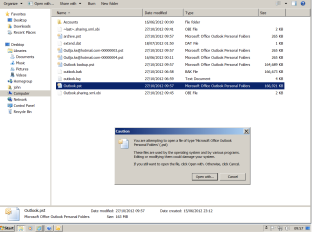
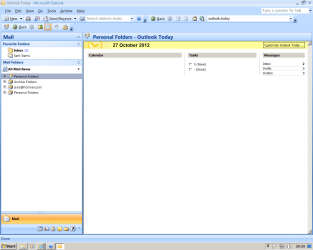
So I tried selecting: file-datafile manager - select personal folder outlook.pst - click open folder. Outlook.pst is displayed as per screen shot the file is there but I am unable to open it. The file is not read only. and I am signed on as administrator. I do not want to use windows tranfer as I have also noticed I have two sets of all folders as per screen shot.
Hope this makes sense.
Can Anyone help
John.
View attachment 238623
View attachment 238624
To migrate the personal folders I had to move them from outlook express to outlook (XP). Then using windows transfer installed the folders on office outlook 2007.
I now need to do a clean install of windows 7 and outlook, so I wanted to make sure the files were copied before going further.
In outlook I went to file-open-outlook data file, double clicked outlook.pst and up poped the outlook today calender??
So I tried selecting: file-datafile manager - select personal folder outlook.pst - click open folder. Outlook.pst is displayed as per screen shot the file is there but I am unable to open it. The file is not read only. and I am signed on as administrator. I do not want to use windows tranfer as I have also noticed I have two sets of all folders as per screen shot.
Hope this makes sense.
Can Anyone help
John.
View attachment 238623
View attachment 238624
Attachments
My Computer
At a glance
windows ultimate 64 bit
- OS
- windows ultimate 64 bit


