Commander Turk
New member
- Local time
- 5:25 PM
- Messages
- 5
I recently got my pc up and running again with a new MB and CPU i had installed Ultimate 64 from my USB stick as usual installed fine booted to windows no problem
untill i tried to do a chsk dsk on the main drive which then restarted my pc showed me the OS boot information but didn't show the usual chkdsk screen it hanged so i rebooted and decided to re-install
this is where more problems occured, i formated an clean installed again to restart an be greeted with "Reboot and select proper boot device/media and press any key"
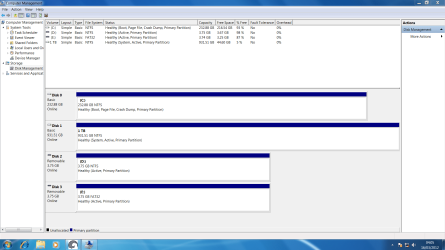
i ran the install again to notice that it doesn't make a system reserved partition this is where the boot files are, i have tried three diffrent ISO's with three diffrent USB sticks an also tried on a laptop and everytime it does not make a system reserved partition
i've used the Windows 7 DVD To USB Tool and the CMD guide to making a bootable windows USB like i've done in the past again same results
i'm hoping that my seagate 250GB barracuda isn't becoming faulty could this be the case? i had also updated the BIOS on the MB but it was working fine after that so i don't think that is the issue
Can anyone shed some light on this for me?
untill i tried to do a chsk dsk on the main drive which then restarted my pc showed me the OS boot information but didn't show the usual chkdsk screen it hanged so i rebooted and decided to re-install
this is where more problems occured, i formated an clean installed again to restart an be greeted with "Reboot and select proper boot device/media and press any key"
i ran the install again to notice that it doesn't make a system reserved partition this is where the boot files are, i have tried three diffrent ISO's with three diffrent USB sticks an also tried on a laptop and everytime it does not make a system reserved partition
i've used the Windows 7 DVD To USB Tool and the CMD guide to making a bootable windows USB like i've done in the past again same results
i'm hoping that my seagate 250GB barracuda isn't becoming faulty could this be the case? i had also updated the BIOS on the MB but it was working fine after that so i don't think that is the issue
Can anyone shed some light on this for me?
My Computer
At a glance
Windows 7 Ultimate x64AMD PHENON x IIGALAXY GEFORCE 8600GT 512MB
- OS
- Windows 7 Ultimate x64
- CPU
- AMD PHENON x II
- Motherboard
- ASUS M4A785TD-V EVO
- Graphics Card(s)
- GALAXY GEFORCE 8600GT 512MB
- Sound Card
- CREATIVE X-FI
- Monitor(s) Displays
- SAMSUNG 32inch HDTV
- Screen Resolution
- 1920 x 1080
- PSU
- 800 ATX Generic
- Cooling
- Standard