
Unable to boot into windows

superstar

New member
Local time
5:27 AM
Messages
47
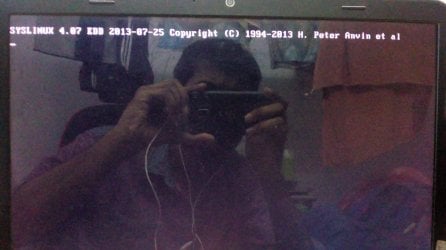
Hey guys, I really don't know what happened earlier I was trying to create a bootable usb for Linux and I think I created bootable Linux using my hard disk itself when I restarted my laptop I can't get into windows and I am stuck at this screen. Can anyone have a clue how can I boot into windows now?
 

Attachments
  • 1500291990062738130734.jpg
    1500291990062738130734.jpg
    537 KB · Views: 1

My Computer

Computer type
Laptop
Computer Manufacturer/Model Number
Dell
OS
Microsoft Windows 7 Ultimate 64-bit 7601 Multiprocessor Free Service Pack 1
CPU
Intel(R) Core(TM) i7-2670QM CPU @ 2.20GHz
Motherboard
Dell Inc. 0MY6GN
Memory
8.00 GB
Graphics Card(s)
(1) NVIDIA GeForce GT 540M (2) Intel(R) HD Graphics Family
Sound Card
(1) Realtek High Definition Audio (2) Intel(R) Display Aud
Screen Resolution
1920 x 1080 x 32 bits (4294967296 colors) @ 60 Hz
Hard Drives
WDC WD7500BPKT-75PK4T0 ATA Device
PSU
19.5 voltage; Current: 6.7 amps 130 watts
Cooling
P11F003
Mouse
Hp Mouse X500 Wired
Internet Speed
1.38Mbps Download and 1.36Mbps Upload
Antivirus
Microsoft Security Essentials
Browser
Google chrome,Mozilla,Internet explorer
Hi Peter,

Certainly looks like that,
you must have selected C instead of the USB drive letter.
part of the set up is format drive - :(

You could try the Dell restore/recovery option IF its in your Bios set-up,
Dont hold out much hope for that tho

Think your looking at a clean install, BOOT via cd/dvd.

Roy
 

My Computer

Computer type
PC/Desktop
Computer Manufacturer/Model Number
medionl/Aspire 6930G/acer x55a
OS
W7 home premium 32bit/W7HP 64bit/w10 tp insider ring
CPU
E5300 dual core
Motherboard
medion MS7366
Memory
3gb
Graphics Card(s)
Nvidia Geforce 7100 Nforce 630i
Monitor(s) Displays
avixc
Internet Speed
n (isp resticted to 72)
Antivirus
mse/pands
Browser
palemoon
Other Info
Belkin Fd7050 n USB using Railink RT2870 drivers, more upto date
Do i have to install windows again? Is there any other alternative man? Do i need to format both the drives? I got 2 drives Os in Local Disk C and stuff in Local Disk D. I am getting boot load fail when i try to install windows using usb
 

My Computer

Computer type
Laptop
Computer Manufacturer/Model Number
Dell
OS
Microsoft Windows 7 Ultimate 64-bit 7601 Multiprocessor Free Service Pack 1
CPU
Intel(R) Core(TM) i7-2670QM CPU @ 2.20GHz
Motherboard
Dell Inc. 0MY6GN
Memory
8.00 GB
Graphics Card(s)
(1) NVIDIA GeForce GT 540M (2) Intel(R) HD Graphics Family
Sound Card
(1) Realtek High Definition Audio (2) Intel(R) Display Aud
Screen Resolution
1920 x 1080 x 32 bits (4294967296 colors) @ 60 Hz
Hard Drives
WDC WD7500BPKT-75PK4T0 ATA Device
PSU
19.5 voltage; Current: 6.7 amps 130 watts
Cooling
P11F003
Mouse
Hp Mouse X500 Wired
Internet Speed
1.38Mbps Download and 1.36Mbps Upload
Antivirus
Microsoft Security Essentials
Browser
Google chrome,Mozilla,Internet explorer
Peter,

what do you get when you boot, (no USB), that first picture or is that with the USB IN.

are C & D on the same hard disk

Do you have an Image.


Roy
 

My Computer

Computer type
PC/Desktop
Computer Manufacturer/Model Number
medionl/Aspire 6930G/acer x55a
OS
W7 home premium 32bit/W7HP 64bit/w10 tp insider ring
CPU
E5300 dual core
Motherboard
medion MS7366
Memory
3gb
Graphics Card(s)
Nvidia Geforce 7100 Nforce 630i
Monitor(s) Displays
avixc
Internet Speed
n (isp resticted to 72)
Antivirus
mse/pands
Browser
palemoon
Other Info
Belkin Fd7050 n USB using Railink RT2870 drivers, more upto date
Hey dude, The first picture is with no usb. When i changed the boot option to boot from usb device, I inserted a windows 7 booted usb after restarting it gave me an error of boot load fail and something like this boot: _(blank space). yes in my laptop i have 1 tb hard disk which is seperated into two disks C and D. What image you asking for?
 

My Computer

Computer type
Laptop
Computer Manufacturer/Model Number
Dell
OS
Microsoft Windows 7 Ultimate 64-bit 7601 Multiprocessor Free Service Pack 1
CPU
Intel(R) Core(TM) i7-2670QM CPU @ 2.20GHz
Motherboard
Dell Inc. 0MY6GN
Memory
8.00 GB
Graphics Card(s)
(1) NVIDIA GeForce GT 540M (2) Intel(R) HD Graphics Family
Sound Card
(1) Realtek High Definition Audio (2) Intel(R) Display Aud
Screen Resolution
1920 x 1080 x 32 bits (4294967296 colors) @ 60 Hz
Hard Drives
WDC WD7500BPKT-75PK4T0 ATA Device
PSU
19.5 voltage; Current: 6.7 amps 130 watts
Cooling
P11F003
Mouse
Hp Mouse X500 Wired
Internet Speed
1.38Mbps Download and 1.36Mbps Upload
Antivirus
Microsoft Security Essentials
Browser
Google chrome,Mozilla,Internet explorer
A Disk image is what you create and store on another or partition.

I take it you never did that.

Did you even back up your data ?

You should have unplugged your Windows drive before attempting this.

Now all you Windows restore points have been wiped out.
 

My Computer

Computer type
PC/Desktop
Computer Manufacturer/Model Number
Skylake Special #666
OS
Windows 10 Pro x64
CPU
Intel Core i7 6700K
Motherboard
Asus Sabertooth Z170 Mark 1
Memory
GSkill TridentZ RGB 16GB 3600 16-16-16-36
Graphics Card(s)
EVGA GTX 980 Ti SC x2
Sound Card
Realtek High Definition
Monitor(s) Displays
AOC G2460PG
Screen Resolution
1920 x 1080 144Hz
Hard Drives
Samsung 860 Pro 256GB, Seagate Barracuda 4TB x2
PSU
EVGA 1000 P2, EVGA White Custom Braided Cables
Case
Corsair Vengeance C70 Gunmetal Black
Cooling
Corsair H100i v2, Corsair ML120 x2, Thermal Grizzly Kryonaut
Keyboard
Logitech G910 Orion Spectrum
Mouse
Logitech G700s
Internet Speed
Verizon Fios Quantum Gateway 75/75
Antivirus
Windows Defender, Malwarebytes Free 3.8.3
Browser
Chrome
Other Info
Corsair SP120 x4, LG Blu-ray Drive, Durabrand HT-395 100 Watt Dolby Digital Amp, Corsair H2100 Wireless 7.1 Headset
No i didn't create a disk image and also never backed up my data too. Am i going to lose all the data? I have windows OS in C disk and all the data is in disk D. I tired to boot through cd drive using windows 7 cd but still its giving me the same error as the first pic. can any one please help me i need this done by tomorrow.
 

My Computer

Computer type
Laptop
Computer Manufacturer/Model Number
Dell
OS
Microsoft Windows 7 Ultimate 64-bit 7601 Multiprocessor Free Service Pack 1
CPU
Intel(R) Core(TM) i7-2670QM CPU @ 2.20GHz
Motherboard
Dell Inc. 0MY6GN
Memory
8.00 GB
Graphics Card(s)
(1) NVIDIA GeForce GT 540M (2) Intel(R) HD Graphics Family
Sound Card
(1) Realtek High Definition Audio (2) Intel(R) Display Aud
Screen Resolution
1920 x 1080 x 32 bits (4294967296 colors) @ 60 Hz
Hard Drives
WDC WD7500BPKT-75PK4T0 ATA Device
PSU
19.5 voltage; Current: 6.7 amps 130 watts
Cooling
P11F003
Mouse
Hp Mouse X500 Wired
Internet Speed
1.38Mbps Download and 1.36Mbps Upload
Antivirus
Microsoft Security Essentials
Browser
Google chrome,Mozilla,Internet explorer
Did you try to boot from win 7 installation disk and go to boot repair?

You can use the win 7 installation disk and open a CMD window and then try dir c: to see if there is a c: drive.
Diskpart is also another cmd that can list the partitions. DiskPart Command-Line Options
Use it with extreme care or you can erase ALL your disk.
 

My Computers

System One System Two

  • Computer type
    PC/Desktop
    Computer Manufacturer/Model Number
    custom build
    OS
    Windows 7 HP 64
    CPU
    i5 6600K - 800MHz to 4200MHz
    Motherboard
    GA-Z170-HD3P
    Memory
    4+4G GSkill DDR4 3000
    Graphics Card(s)
    IG - Intel 530
    Monitor(s) Displays
    Samsung 226BW
    Screen Resolution
    1680x1050
    Hard Drives
    (1) -1 SM951 – 128GB M.2 AHCI PCIe SSD drive for Windows 7 and Lubuntu
    (2) -1 WD SATA 3 - 1T for Data
    (3) -1 WD SATA 3 - 1T for backup
    PSU
    Thermaltake 450W TR2 gold
    Keyboard
    Old and good Chicony mechanical keyboard
    Mouse
    Logitech mX performance - 9 buttons (had to disable some)
    Internet Speed
    500Mb/s
    Browser
    Firefox 64
    Other Info
    TinyWall firewall
  • Computer type
    Laptop
    System Manufacturer/Model Number
    Asus Q550LF
    OS
    Windows 7 Pro
    CPU
    i7-4500U 800MHz to 3.0GHz
    Motherboard
    Asus Q550LF
    Memory
    (4+4)G DDR3 1600
    Graphics Card(s)
    IG intel 4400 + NVIDIA GeForce GT 745M
    Sound Card
    Realtek
    Monitor(s) Displays
    LG Display LP156WF4-SPH1
    Screen Resolution
    1920 x 1080
    Hard Drives
    BX500 120G SSD for Windows and programs +
    1T HDD for data
    Internet Speed
    500 Mb/s
    Browser
    Firefox
    Other Info
    TinyWall firewall
I tried to install windows on Local disk C I don't know what happened but the disk which has all my files and data is now looking as Os C and my previous Local Disk C is now Local Disk E. Is there any way i can install new windows without losing all my data? Yes I tried boot repair it searched for sometime and restarted nothing changed with that.
 

My Computer

Computer type
Laptop
Computer Manufacturer/Model Number
Dell
OS
Microsoft Windows 7 Ultimate 64-bit 7601 Multiprocessor Free Service Pack 1
CPU
Intel(R) Core(TM) i7-2670QM CPU @ 2.20GHz
Motherboard
Dell Inc. 0MY6GN
Memory
8.00 GB
Graphics Card(s)
(1) NVIDIA GeForce GT 540M (2) Intel(R) HD Graphics Family
Sound Card
(1) Realtek High Definition Audio (2) Intel(R) Display Aud
Screen Resolution
1920 x 1080 x 32 bits (4294967296 colors) @ 60 Hz
Hard Drives
WDC WD7500BPKT-75PK4T0 ATA Device
PSU
19.5 voltage; Current: 6.7 amps 130 watts
Cooling
P11F003
Mouse
Hp Mouse X500 Wired
Internet Speed
1.38Mbps Download and 1.36Mbps Upload
Antivirus
Microsoft Security Essentials
Browser
Google chrome,Mozilla,Internet explorer

My Computers

System One System Two

  • Computer type
    PC/Desktop
    Computer Manufacturer/Model Number
    custom build
    OS
    Windows 7 HP 64
    CPU
    i5 6600K - 800MHz to 4200MHz
    Motherboard
    GA-Z170-HD3P
    Memory
    4+4G GSkill DDR4 3000
    Graphics Card(s)
    IG - Intel 530
    Monitor(s) Displays
    Samsung 226BW
    Screen Resolution
    1680x1050
    Hard Drives
    (1) -1 SM951 – 128GB M.2 AHCI PCIe SSD drive for Windows 7 and Lubuntu
    (2) -1 WD SATA 3 - 1T for Data
    (3) -1 WD SATA 3 - 1T for backup
    PSU
    Thermaltake 450W TR2 gold
    Keyboard
    Old and good Chicony mechanical keyboard
    Mouse
    Logitech mX performance - 9 buttons (had to disable some)
    Internet Speed
    500Mb/s
    Browser
    Firefox 64
    Other Info
    TinyWall firewall
  • Computer type
    Laptop
    System Manufacturer/Model Number
    Asus Q550LF
    OS
    Windows 7 Pro
    CPU
    i7-4500U 800MHz to 3.0GHz
    Motherboard
    Asus Q550LF
    Memory
    (4+4)G DDR3 1600
    Graphics Card(s)
    IG intel 4400 + NVIDIA GeForce GT 745M
    Sound Card
    Realtek
    Monitor(s) Displays
    LG Display LP156WF4-SPH1
    Screen Resolution
    1920 x 1080
    Hard Drives
    BX500 120G SSD for Windows and programs +
    1T HDD for data
    Internet Speed
    500 Mb/s
    Browser
    Firefox
    Other Info
    TinyWall firewall
Back
Top