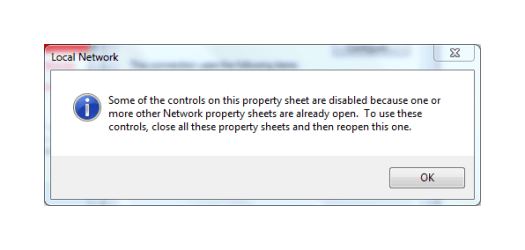
Y yousaf465 New member Member VIP Local time 8:35 AM Messages 194 Jun 18, 2014 #1 I'm unable to change access ip address and DNS setting and this happen very often. Instead I get this dialogue box. After sometime it starts responding on it own. Attachments Screenshot.png 8.9 KB · Views: 21 My Computer Computer Manufacturer/Model NumberDell Inspiron 6000OSWindows 7 Ultimate x32bitMemory1GbHard Drives60Gb InternalMouseDell
I'm unable to change access ip address and DNS setting and this happen very often. Instead I get this dialogue box. After sometime it starts responding on it own.
T technoFrank New member Member Local time 8:35 AM Messages 14 Jun 19, 2014 #2 Hi, Try Log in as administrator or disable your network adapter before changing your dns. And also try, ipconfig /flushdns in command prompt. My Computer Computer typePC/DesktopOSWindows 7 Professional x64CPUIntel Core i5-3340 CPU @3.10 GHz 3.30GHzMotherboardGigabyte Technology Co. LTD. H61M-S2PTMemory4 GB DDR3Graphics Card(s)Intel HD GraphicsAntivirusESET Endpoint Antivirus
Hi, Try Log in as administrator or disable your network adapter before changing your dns. And also try, ipconfig /flushdns in command prompt.
Y yousaf465 New member Member VIP Thread Starter Local time 8:35 AM Messages 194 Jun 19, 2014 #3 Already logged in as administrator. Will try the ipconfig /flushdns My Computer Computer Manufacturer/Model NumberDell Inspiron 6000OSWindows 7 Ultimate x32bitMemory1GbHard Drives60Gb InternalMouseDell