
Hello,
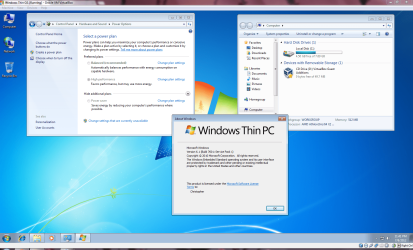
I have decided to test out Windows Thin PC, as I heard that it's a lightweight version of Windows based on W7. I have run into a problem however, and that is that I am unable to change the power plan from the system tray. I installed this twice; Once on a virtual machine (Oracle VM Virtualbox) and once on a Samsung R60+ laptop. The annoyance is that when I click on the battery, the available power plans are grayed out with the message 'Some settings are managed by your system administrator'.
In order to change power plan settings, I have to go to 'Power settings' in the control panel and select 'Change settings that are currently unavailable'. This is the only way I can change the plan.
I followed the steps in the following guide to no avail:
http://www.sevenforums.com/tutorials/197908-power-plan-specify-default-all-users.html
The accounts on both machines are members of the local administrators group.
The machines are not on a domain.
The Samsung laptop has no power management software installed.
If you want any more info, feel free to let me know.
Sorry if I put this in the wrong area.
Thanks in advance.
I have decided to test out Windows Thin PC, as I heard that it's a lightweight version of Windows based on W7. I have run into a problem however, and that is that I am unable to change the power plan from the system tray. I installed this twice; Once on a virtual machine (Oracle VM Virtualbox) and once on a Samsung R60+ laptop. The annoyance is that when I click on the battery, the available power plans are grayed out with the message 'Some settings are managed by your system administrator'.
In order to change power plan settings, I have to go to 'Power settings' in the control panel and select 'Change settings that are currently unavailable'. This is the only way I can change the plan.
I followed the steps in the following guide to no avail:
http://www.sevenforums.com/tutorials/197908-power-plan-specify-default-all-users.html
The accounts on both machines are members of the local administrators group.
The machines are not on a domain.
The Samsung laptop has no power management software installed.
If you want any more info, feel free to let me know.
Sorry if I put this in the wrong area.
Thanks in advance.
Attachments
My Computer
At a glance
Windows 7 Ultimate x64AMD Athlon X2 Dual Core 5000+ 2.60GHz6.0 GB
- Computer Manufacturer/Model Number
- HP Pavilion A6130n
- OS
- Windows 7 Ultimate x64
- CPU
- AMD Athlon X2 Dual Core 5000+ 2.60GHz
- Motherboard
- MCP61PM-HM (Nettle2)
- Memory
- 6.0 GB
- Sound Card
- Integrated
- Monitor(s) Displays
- HP w2207 LCD Monitor
- Screen Resolution
- 1680X1050
- Hard Drives
- Western Digital 400GB hdd
- Case
- Stock
- Cooling
- N/A
- Keyboard
- Stock
- Mouse
- Some Logitech Mouse


