Unable to connect to network shares

anec

New member
Local time
7:17 AM
Messages
1
Win7 install went perfect. Loving it so far.

Came home and hooked up to wireless network. I can see my server and the 5 shared folders available. But I am unable to connect to any of them. Each time it says
"Windows cannot access \\server\storage"
"You do not have permission to access \\server.....

Any ideas?

FYI Yes I have network discovery on etc etc. These ARE password protected folders, but it's not even prompting me for a user/pass. When I attempt to Create a network drive and use different credential which is an account on that machine it says "it's currently mapped using a different username and password"

Thank you
--Anec
 

My Computer My Computer

At a glance

Ultimate x86
OS
Ultimate x86
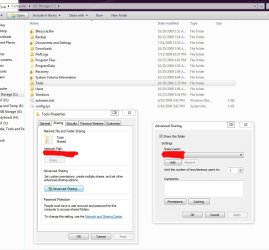
Check permissions on the remote machine for the folders that can not be accessed. Give permissions to "everyone." Click permissions as in my screenshot.

Map the drives using an admin account's user/pass from remote machine, by choosing to connect with different credentials as you've said.

Reboot the remote machine if you're still having problems. It will rid of that currently mapped error. If it doesn't, go on remote machine and allow more users to connect to the remote folders. For each one. Same place where you grant "everyone" permission.
 

Attachments

  • Capture.JPG
    Capture.JPG
    106.6 KB · Views: 305

My Computer My Computer

At a glance

7600.20510 x86P4 550 3.4 GHz HT running at 3.5 GHzOCZ 2 GB(2x1GB) DDR400mHz running @ 414 mHzHIS Radeon HD 3850 IceQ 3 Turbo HDMI Dual DL-...
Computer Manufacturer/Model Number
self built
OS
7600.20510 x86
CPU
P4 550 3.4 GHz HT running at 3.5 GHz
Motherboard
MSI PM8M3-V (MS-7211 v1.x) Micro-ATX mainboard
Memory
OCZ 2 GB(2x1GB) DDR400mHz running @ 414 mHz
Graphics Card(s)
HIS Radeon HD 3850 IceQ 3 Turbo HDMI Dual DL-DVI AGP
Sound Card
MOTU Traveler firewire studio interface 192 kHz 24 bit
Monitor(s) Displays
22" widescreen Acer X223W LCD, 17" Compaq P75 CRT
Screen Resolution
1680x1050 and 1280x1024
Hard Drives
SATA I x2 WD, 400 GB and 120 GB, SATA 2 WD Caviar Black 1 TB
PSU
350W generic
Case
Cybertronpc, it glows blue
Cooling
stock cpu fan, Ice-Q 3 gpu and system, many case fans
Keyboard
Logitch Classical Keyboard 200
Mouse
Logitech Mediaplay cordless
Internet Speed
1792/448 kbits/sec
Other Info
SATA II PCI fake RAID adapter, 1 GB Readyboost, original ATI Remote Wonder (even works with WMC perfectly), Logitech Rumblepad 2 game controller x2
If you're still having troubles after that:

On sharing machine, you could also try turning off simple file sharing. To do so, open Computer (Windows Explorer.) Click Organize, top left. Then folder and search options. View tab. In advanced settings pane, scroll to the bottom. There is a check box for "use sharing wizard (recommended.)" Uncheck that and hit ok.
 

My Computer My Computer

At a glance

7600.20510 x86P4 550 3.4 GHz HT running at 3.5 GHzOCZ 2 GB(2x1GB) DDR400mHz running @ 414 mHzHIS Radeon HD 3850 IceQ 3 Turbo HDMI Dual DL-...
Computer Manufacturer/Model Number
self built
OS
7600.20510 x86
CPU
P4 550 3.4 GHz HT running at 3.5 GHz
Motherboard
MSI PM8M3-V (MS-7211 v1.x) Micro-ATX mainboard
Memory
OCZ 2 GB(2x1GB) DDR400mHz running @ 414 mHz
Graphics Card(s)
HIS Radeon HD 3850 IceQ 3 Turbo HDMI Dual DL-DVI AGP
Sound Card
MOTU Traveler firewire studio interface 192 kHz 24 bit
Monitor(s) Displays
22" widescreen Acer X223W LCD, 17" Compaq P75 CRT
Screen Resolution
1680x1050 and 1280x1024
Hard Drives
SATA I x2 WD, 400 GB and 120 GB, SATA 2 WD Caviar Black 1 TB
PSU
350W generic
Case
Cybertronpc, it glows blue
Cooling
stock cpu fan, Ice-Q 3 gpu and system, many case fans
Keyboard
Logitch Classical Keyboard 200
Mouse
Logitech Mediaplay cordless
Internet Speed
1792/448 kbits/sec
Other Info
SATA II PCI fake RAID adapter, 1 GB Readyboost, original ATI Remote Wonder (even works with WMC perfectly), Logitech Rumblepad 2 game controller x2
Back
Top