
I have a peculiar problem.
The other day, I took my laptop to my bro's house and tried to connect to his internet, I connected successfully but there was no internet. (Prior to this my internet was working fine on my home network). I did some troubleshooting and it was due to my firewall which is controlled by mcafee. I brushed it off thinking "Oh, its a foreign network, let me not stress it".
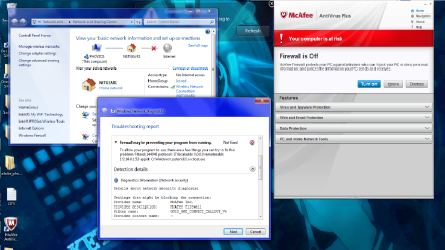
I returned home and reconnected my laptop to my wireless connection and the same thing happened, I was connected to the network, my signal was 5 bars, but I had no internet connection. Thats when i decided to do a little research into my problem and tried disabling my firewall. Then thats when i realized it wasnt a trivial problem. Even with my firewall disabled, troubleshooting still insisted that the problem was due to my firewall blocking all outgoing connections. I checked the firewall settings and it was set to Allow all outgoing connections.
I tried to restore my system but it turns out a system file by the name of svchost.exe is not working properly, and looking into the logistics of the troubleshooting i see the name of that file again. I tried chkdsk, but to nothing happened. I know my way around a computer.. but not that much to the point of system files and their uses/functions.
Can anyone help me solve this problem?
I am running Windows 7 (of course) 64 bit on a Dell inspiron laptop.
Here are some screenshots to help.
Every and Any bit of help would be appreciated, thanks.
The other day, I took my laptop to my bro's house and tried to connect to his internet, I connected successfully but there was no internet. (Prior to this my internet was working fine on my home network). I did some troubleshooting and it was due to my firewall which is controlled by mcafee. I brushed it off thinking "Oh, its a foreign network, let me not stress it".
I returned home and reconnected my laptop to my wireless connection and the same thing happened, I was connected to the network, my signal was 5 bars, but I had no internet connection. Thats when i decided to do a little research into my problem and tried disabling my firewall. Then thats when i realized it wasnt a trivial problem. Even with my firewall disabled, troubleshooting still insisted that the problem was due to my firewall blocking all outgoing connections. I checked the firewall settings and it was set to Allow all outgoing connections.
I tried to restore my system but it turns out a system file by the name of svchost.exe is not working properly, and looking into the logistics of the troubleshooting i see the name of that file again. I tried chkdsk, but to nothing happened. I know my way around a computer.. but not that much to the point of system files and their uses/functions.
Can anyone help me solve this problem?
I am running Windows 7 (of course) 64 bit on a Dell inspiron laptop.
Here are some screenshots to help.
Every and Any bit of help would be appreciated, thanks.
Attachments


Last edited:
My Computer
At a glance
64
- OS
- 64

