Solved Unable to connect to wired connection on clean W7 install

ChocolateMiwk

New member
Local time
5:44 PM
Messages
12
Hey everyone,

I recently upgraded my computer and decided to do a clean install of Windows 7 (64 bit)
My build is:
CPU: Intel i5 3470
MOBO: Asrock B75 Pro3-M
RAM: G.Skill 8GB (2x4GB) DDR3-1333
GPU: Nvidia GTX 670
SSD: Plextor M5S 256GB
HDD: Samsung F3 1TB (OLD)
PSU: Corsair HX-850 (OLD)
CASE: Case: CM 690 II Advanced (OLD)
ODD: LiteOn (OLD)

I installed all the drivers from the AsRock wesite: ASRock > B75 Pro3-M

My modem setup is:
Modem: Netgear DM111Pv2
Router: Asus RT-N16

I have several computers connected to the internet so I do not believe it is the router's problem.

I ran Ubuntu using their live CD and internet worked so I do not believe it is the motherboard's problem.

Code:
C:\Users\Nick>ipconfig/all

Windows IP Configuration

   Host Name . . . . . . . . . . . . : Nick-PC
   Primary Dns Suffix  . . . . . . . :
   Node Type . . . . . . . . . . . . : Hybrid
   IP Routing Enabled. . . . . . . . : No
   WINS Proxy Enabled. . . . . . . . : No

Ethernet adapter Local Area Connection:

   Media State . . . . . . . . . . . : Media disconnected
   Connection-specific DNS Suffix  . :
   Description . . . . . . . . . . . : Realtek PCIe GBE Family Controller
   Physical Address. . . . . . . . . : BC-5F-F4-66-DB-C9
   DHCP Enabled. . . . . . . . . . . : Yes
   Autoconfiguration Enabled . . . . : Yes

Tunnel adapter isatap.{E0F7FA2A-018D-4482-BB4F-EF83692D04CF}:

   Media State . . . . . . . . . . . : Media disconnected
   Connection-specific DNS Suffix  . :
   Description . . . . . . . . . . . : Microsoft ISATAP Adapter
   Physical Address. . . . . . . . . : 00-00-00-00-00-00-00-E0
   DHCP Enabled. . . . . . . . . . . : No
   Autoconfiguration Enabled . . . . : Yes

Tunnel adapter Teredo Tunneling Pseudo-Interface:

   Media State . . . . . . . . . . . : Media disconnected
   Connection-specific DNS Suffix  . :
   Description . . . . . . . . . . . : Teredo Tunneling Pseudo-Interface
   Physical Address. . . . . . . . . : 00-00-00-00-00-00-00-E0
   DHCP Enabled. . . . . . . . . . . : No
   Autoconfiguration Enabled . . . . : Yes

How can I make it work?

If there is any more information needed, please ask.

- Nick
 

My Computer My Computer

At a glance

Windows 7 Ultimate x64
OS
Windows 7 Ultimate x64
Are you sure you have installed all the drivers for you mobo? You need the LAN driver, it's usually by itself as a stand alone driver but sometimes it's included with the chipset driver.
 

My Computer My Computer

At a glance

Windows 7 Ultimate 64 bitAMD Phenom II X4 965 Black EditionGSkill 4 X 2 GB PC 8500XFX Radeon HD 6790 D
Computer Manufacturer/Model Number
Custom built
OS
Windows 7 Ultimate 64 bit
CPU
AMD Phenom II X4 965 Black Edition
Motherboard
Gigabyte GA-MA790X-DS4
Memory
GSkill 4 X 2 GB PC 8500
Graphics Card(s)
XFX Radeon HD 6790 D
Sound Card
On board RealTek HD
Monitor(s) Displays
Dual monitors:Samsung SyncMaster S20B300
Screen Resolution
1600 X 900
Hard Drives
Seagate Barracuda 1TB (primary)
Seagate Barracuda 2 X 320 GB
PSU
Ultra X4 750 watt fully modular
Case
Thermaltake Overseer RX 1 full tower
Cooling
Core-Contact 92 mm CPU Cooler
Keyboard
Logitech G510
Mouse
Razor DeathAdder
Internet Speed
50/5 Mbps UL/DL
Other Info
Optical: Super Muliti DVD burner w/lightscribe, Hauppauge WinTV HVR-1800
Are you sure you have installed all the drivers for you mobo? You need the LAN driver, it's usually by itself as a stand alone driver but sometimes it's included with the chipset driver.

Yes I am sure. From the link I provided, I dowloaded and installed all the drivers including the LAN driver: Realtek Lan driver ver:7048
 

My Computer My Computer

At a glance

Windows 7 Ultimate x64
OS
Windows 7 Ultimate x64
OK...great. Now are there any problems showing up in your device manager?
 

My Computer My Computer

At a glance

Windows 7 Ultimate 64 bitAMD Phenom II X4 965 Black EditionGSkill 4 X 2 GB PC 8500XFX Radeon HD 6790 D
Computer Manufacturer/Model Number
Custom built
OS
Windows 7 Ultimate 64 bit
CPU
AMD Phenom II X4 965 Black Edition
Motherboard
Gigabyte GA-MA790X-DS4
Memory
GSkill 4 X 2 GB PC 8500
Graphics Card(s)
XFX Radeon HD 6790 D
Sound Card
On board RealTek HD
Monitor(s) Displays
Dual monitors:Samsung SyncMaster S20B300
Screen Resolution
1600 X 900
Hard Drives
Seagate Barracuda 1TB (primary)
Seagate Barracuda 2 X 320 GB
PSU
Ultra X4 750 watt fully modular
Case
Thermaltake Overseer RX 1 full tower
Cooling
Core-Contact 92 mm CPU Cooler
Keyboard
Logitech G510
Mouse
Razor DeathAdder
Internet Speed
50/5 Mbps UL/DL
Other Info
Optical: Super Muliti DVD burner w/lightscribe, Hauppauge WinTV HVR-1800

Attachments

  • Capture4.PNG
    Capture4.PNG
    19.5 KB · Views: 12

My Computer My Computer

At a glance

Windows 7 Ultimate x64
OS
Windows 7 Ultimate x64
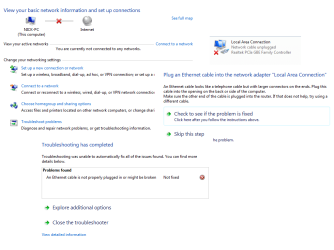
More Information:

I turned off the firewall and that doesn't seem to fix it.
I tried a different ethernet cable and that didn't work.
I am not sure what the problem is.

Can anyone help?
 

Attachments

  • Internet Problem.PNG
    Internet Problem.PNG
    28.5 KB · Views: 10

My Computer My Computer

At a glance

Windows 7 Ultimate x64
OS
Windows 7 Ultimate x64
Check the cable or the actual physical connection jack.
 

My Computer My Computer

At a glance

Windows 7 Pro 64bit build 7601 SP1Intel Core I5 3570K 3.4Ghz w/ Zalman CNPS9900...G.Skill F3-12800CL9D-8GbXL ; 4Gx2EVGA Geforce GTX 770 Superclocked
Computer type
PC/Desktop
Computer Manufacturer/Model Number
Custom Build
OS
Windows 7 Pro 64bit build 7601 SP1
CPU
Intel Core I5 3570K 3.4Ghz w/ Zalman CNPS9900NT RT
Motherboard
MSI Z77A-G45 Gaming
Memory
G.Skill F3-12800CL9D-8GbXL ; 4Gx2
Graphics Card(s)
EVGA Geforce GTX 770 Superclocked
Sound Card
Creative Sound Blaster Z
Monitor(s) Displays
Dual ViewSonic VX2770Smh-LED Black 27"IPS-Panel
Screen Resolution
1920x1080
Hard Drives
Kingston Hyper X 240GB SSD Win8 Pro 64bit 6GB/s Sata III
Intel 335 Series SSD 240GB Win8 Storage 6GB/s Sata III
Intel 320 Series SSD 600GB Storage 3GB/s Sata II
Western Digital Scorpio Black 1TB - Docked via Esata
PSU
Coolermaster GX 750W
Case
Corsair Vengence C70
Cooling
Coolermaster 120mm and Enermax 140mm
Keyboard
Corsair Vengence K70
Mouse
Logitech G500
Internet Speed
22mbps+
Browser
Firefox, Chrome, IE
Other Info
Swan M50W 2.1 speakers
APC UPS
Thermaltake BlacX HDD Dock
Samsung BD Optical Drive
Netgear WNDR4500
Check the cable or the actual physical connection jack.

Thanks for the suggestion.
Ok I looked at it with a torch and it looks fine. I don't think that is problem because Ubuntu works.
 

My Computer My Computer

At a glance

Windows 7 Ultimate x64
OS
Windows 7 Ultimate x64
Have you tried reinstalling the driver?
 

My Computer My Computer

At a glance

Windows 7 Pro 64bit build 7601 SP1Intel Core I5 3570K 3.4Ghz w/ Zalman CNPS9900...G.Skill F3-12800CL9D-8GbXL ; 4Gx2EVGA Geforce GTX 770 Superclocked
Computer type
PC/Desktop
Computer Manufacturer/Model Number
Custom Build
OS
Windows 7 Pro 64bit build 7601 SP1
CPU
Intel Core I5 3570K 3.4Ghz w/ Zalman CNPS9900NT RT
Motherboard
MSI Z77A-G45 Gaming
Memory
G.Skill F3-12800CL9D-8GbXL ; 4Gx2
Graphics Card(s)
EVGA Geforce GTX 770 Superclocked
Sound Card
Creative Sound Blaster Z
Monitor(s) Displays
Dual ViewSonic VX2770Smh-LED Black 27"IPS-Panel
Screen Resolution
1920x1080
Hard Drives
Kingston Hyper X 240GB SSD Win8 Pro 64bit 6GB/s Sata III
Intel 335 Series SSD 240GB Win8 Storage 6GB/s Sata III
Intel 320 Series SSD 600GB Storage 3GB/s Sata II
Western Digital Scorpio Black 1TB - Docked via Esata
PSU
Coolermaster GX 750W
Case
Corsair Vengence C70
Cooling
Coolermaster 120mm and Enermax 140mm
Keyboard
Corsair Vengence K70
Mouse
Logitech G500
Internet Speed
22mbps+
Browser
Firefox, Chrome, IE
Other Info
Swan M50W 2.1 speakers
APC UPS
Thermaltake BlacX HDD Dock
Samsung BD Optical Drive
Netgear WNDR4500
Have you tried reinstalling the driver?

Yes.
I went into device manager and uninstalled it from there and then install the LAN driver again. I also downloaded the file several times to make sure it wasn't corrupt.
 

My Computer My Computer

At a glance

Windows 7 Ultimate x64
OS
Windows 7 Ultimate x64
Did you install the mb utility suite from ASRock? If so are there any network config utility. If it does try turning that off.

Or if you don't have it installed I see on the ASRock website they have a separate utility just for the LAN. Maybe try installing that?

Or alternatively you can try another venders drivers for the realtek drivers.

http://support.asus.com/Download.aspx?SLanguage=en&m=P8Z77-V+LK&p=1&s=39
 

My Computer My Computer

At a glance

Windows 7 Pro 64bit build 7601 SP1Intel Core I5 3570K 3.4Ghz w/ Zalman CNPS9900...G.Skill F3-12800CL9D-8GbXL ; 4Gx2EVGA Geforce GTX 770 Superclocked
Computer type
PC/Desktop
Computer Manufacturer/Model Number
Custom Build
OS
Windows 7 Pro 64bit build 7601 SP1
CPU
Intel Core I5 3570K 3.4Ghz w/ Zalman CNPS9900NT RT
Motherboard
MSI Z77A-G45 Gaming
Memory
G.Skill F3-12800CL9D-8GbXL ; 4Gx2
Graphics Card(s)
EVGA Geforce GTX 770 Superclocked
Sound Card
Creative Sound Blaster Z
Monitor(s) Displays
Dual ViewSonic VX2770Smh-LED Black 27"IPS-Panel
Screen Resolution
1920x1080
Hard Drives
Kingston Hyper X 240GB SSD Win8 Pro 64bit 6GB/s Sata III
Intel 335 Series SSD 240GB Win8 Storage 6GB/s Sata III
Intel 320 Series SSD 600GB Storage 3GB/s Sata II
Western Digital Scorpio Black 1TB - Docked via Esata
PSU
Coolermaster GX 750W
Case
Corsair Vengence C70
Cooling
Coolermaster 120mm and Enermax 140mm
Keyboard
Corsair Vengence K70
Mouse
Logitech G500
Internet Speed
22mbps+
Browser
Firefox, Chrome, IE
Other Info
Swan M50W 2.1 speakers
APC UPS
Thermaltake BlacX HDD Dock
Samsung BD Optical Drive
Netgear WNDR4500
Did you install the mb utility suite from ASRock?

No I did not install this. I do not think AsRock offers a mb utility suite.

Or if you don't have it installed I see on the ASRock website they have a separate utility just for the LAN. Maybe try installing that?

That is the thing that I did install.

Or alternatively you can try another venders drivers for the realtek drivers.

I did a clean install again and here is what happened:
After the clean install finished, the yellow indicator light for the ethernet port was on.
The first thing I did was then install the LAN driver from the ASUS website.
After the LAN driver installed, the yellow indicator light turned off.
I restarted the computer planning to do another clean install.
I missed the initial post to change boot options and ended up booting into windows.
To my surprise, the internet was working.
I thought this was too good to be true so I restarted the computer.
After that, I could no longer get internet no matter how many times I restarted..

What am I doing wrong?

Both hard drives are reformatted and completely empty.
Bios is up to date.
Ethernet cables are working fine (I tested them with my laptop just then)
Internet works on Ubuntu live CD (not sure about stable but I was able to browse google and facebook)
I downloaded the latest drives from the AsRock website.

Please help gurus

- Nick
 

My Computer My Computer

At a glance

Windows 7 Ultimate x64
OS
Windows 7 Ultimate x64
That's weird. Try installing the asus driver in safe mode. Sorry this is a slow process but such is the nature of trouble-shooting via a forum.
 

My Computer My Computer

At a glance

Windows 7 Pro 64bit build 7601 SP1Intel Core I5 3570K 3.4Ghz w/ Zalman CNPS9900...G.Skill F3-12800CL9D-8GbXL ; 4Gx2EVGA Geforce GTX 770 Superclocked
Computer type
PC/Desktop
Computer Manufacturer/Model Number
Custom Build
OS
Windows 7 Pro 64bit build 7601 SP1
CPU
Intel Core I5 3570K 3.4Ghz w/ Zalman CNPS9900NT RT
Motherboard
MSI Z77A-G45 Gaming
Memory
G.Skill F3-12800CL9D-8GbXL ; 4Gx2
Graphics Card(s)
EVGA Geforce GTX 770 Superclocked
Sound Card
Creative Sound Blaster Z
Monitor(s) Displays
Dual ViewSonic VX2770Smh-LED Black 27"IPS-Panel
Screen Resolution
1920x1080
Hard Drives
Kingston Hyper X 240GB SSD Win8 Pro 64bit 6GB/s Sata III
Intel 335 Series SSD 240GB Win8 Storage 6GB/s Sata III
Intel 320 Series SSD 600GB Storage 3GB/s Sata II
Western Digital Scorpio Black 1TB - Docked via Esata
PSU
Coolermaster GX 750W
Case
Corsair Vengence C70
Cooling
Coolermaster 120mm and Enermax 140mm
Keyboard
Corsair Vengence K70
Mouse
Logitech G500
Internet Speed
22mbps+
Browser
Firefox, Chrome, IE
Other Info
Swan M50W 2.1 speakers
APC UPS
Thermaltake BlacX HDD Dock
Samsung BD Optical Drive
Netgear WNDR4500
That's weird. Try installing the asus driver in safe mode.

Ok. So I did another clean install and booted into safe mode to install the driver. Good news is that the yellow light stayed on throughout the installation but when I booted it into normal windows, the light turned off again and I no longer had internet connection.

Sorry this is a slow process but such is the nature of trouble-shooting via a forum.

Yea no worries. I appreciate all the help.

EDIT: Should I be installing all the drivers or just the LAN driver?
 

My Computer My Computer

At a glance

Windows 7 Ultimate x64
OS
Windows 7 Ultimate x64
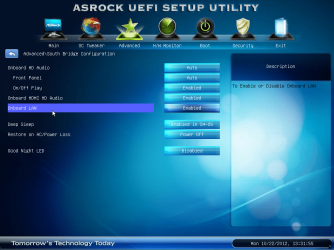
Could this problem have anything to do with the SSD drive?

EDIT:
 

Attachments

  • qQTlm.png
    qQTlm.png
    236.8 KB · Views: 7
  • mSRtJ.png
    mSRtJ.png
    226.2 KB · Views: 8
Last edited:

My Computer My Computer

At a glance

Windows 7 Ultimate x64
OS
Windows 7 Ultimate x64
That's weird. Try installing the asus driver in safe mode.

Ok. So I did another clean install and booted into safe mode to install the driver. Good news is that the yellow light stayed on throughout the installation but when I booted it into normal windows, the light turned off again and I no longer had internet connection.

Sorry this is a slow process but such is the nature of trouble-shooting via a forum.

Yea no worries. I appreciate all the help.

EDIT: Should I be installing all the drivers or just the LAN driver?

Well for now let's just work with the LAN drivers. I don't think the SSD itself would be the culprit. Maybe activate your windows copy and see if there are any windows updates for the lan.
 

My Computer My Computer

At a glance

Windows 7 Pro 64bit build 7601 SP1Intel Core I5 3570K 3.4Ghz w/ Zalman CNPS9900...G.Skill F3-12800CL9D-8GbXL ; 4Gx2EVGA Geforce GTX 770 Superclocked
Computer type
PC/Desktop
Computer Manufacturer/Model Number
Custom Build
OS
Windows 7 Pro 64bit build 7601 SP1
CPU
Intel Core I5 3570K 3.4Ghz w/ Zalman CNPS9900NT RT
Motherboard
MSI Z77A-G45 Gaming
Memory
G.Skill F3-12800CL9D-8GbXL ; 4Gx2
Graphics Card(s)
EVGA Geforce GTX 770 Superclocked
Sound Card
Creative Sound Blaster Z
Monitor(s) Displays
Dual ViewSonic VX2770Smh-LED Black 27"IPS-Panel
Screen Resolution
1920x1080
Hard Drives
Kingston Hyper X 240GB SSD Win8 Pro 64bit 6GB/s Sata III
Intel 335 Series SSD 240GB Win8 Storage 6GB/s Sata III
Intel 320 Series SSD 600GB Storage 3GB/s Sata II
Western Digital Scorpio Black 1TB - Docked via Esata
PSU
Coolermaster GX 750W
Case
Corsair Vengence C70
Cooling
Coolermaster 120mm and Enermax 140mm
Keyboard
Corsair Vengence K70
Mouse
Logitech G500
Internet Speed
22mbps+
Browser
Firefox, Chrome, IE
Other Info
Swan M50W 2.1 speakers
APC UPS
Thermaltake BlacX HDD Dock
Samsung BD Optical Drive
Netgear WNDR4500
Sometimes just clearing the cmos will get those onboard network adaptors working again.
 

My Computer My Computer

At a glance

Windows 7 Ult, Windows 8.1 Pro,Q9650-4.275GHz, E8600 4.5GHz, E6750-3.8GHzG.Skill PC2 9600 1200Mhz 5 5 5 15 2TGTX480
Computer type
PC/Desktop
Computer Manufacturer/Model Number
Home built
OS
Windows 7 Ult, Windows 8.1 Pro,
CPU
Q9650-4.275GHz, E8600 4.5GHz, E6750-3.8GHz
Motherboard
Evga 780i FTW
Memory
G.Skill PC2 9600 1200Mhz 5 5 5 15 2T
Graphics Card(s)
GTX480
Sound Card
Asus Xonar D2
Monitor(s) Displays
HannsG
Screen Resolution
1680X1050
Hard Drives
GSkill Phoenix Pro 120GB SSD
PSU
ThermalTake Toughpower 1000Watt modular
Case
ThermalTake XaserV
Cooling
Xigmatek S1283
Keyboard
Logitech G15
Mouse
Logitech G9
Internet Speed
T1
Yay I fixed it! I am not sure why or how it worked but here is what I did:

  1. Disconnected all the SATA drives from the motherboard except for the SSD.
  2. I connected the USB with the windows install and did a clean install.
  3. Once windows booted up, I restarted the computer into safe mode.
  4. I disconnected all the USBs before the computer restarted.
  5. I plugged in another USB with all the drivers for the motherboard which were downloaded from my laptop.
  6. I installed the LAN driver than the audio driver and restarted the computer when prompted.
  7. I rebooted into standard windows and LAN was working.
  8. After several more reboots, LAN still works and so I installed the rest of the drivers in safe mode.

Thank you everyone for your help!

I will mark this as solved but if anyone has any idea why this worked please let me know.

- Nick
 

My Computer My Computer

At a glance

Windows 7 Ultimate x64
OS
Windows 7 Ultimate x64
That's good to hear. I wonder what might have been causing it though.
 

My Computer My Computer

At a glance

Windows 7 Pro 64bit build 7601 SP1Intel Core I5 3570K 3.4Ghz w/ Zalman CNPS9900...G.Skill F3-12800CL9D-8GbXL ; 4Gx2EVGA Geforce GTX 770 Superclocked
Computer type
PC/Desktop
Computer Manufacturer/Model Number
Custom Build
OS
Windows 7 Pro 64bit build 7601 SP1
CPU
Intel Core I5 3570K 3.4Ghz w/ Zalman CNPS9900NT RT
Motherboard
MSI Z77A-G45 Gaming
Memory
G.Skill F3-12800CL9D-8GbXL ; 4Gx2
Graphics Card(s)
EVGA Geforce GTX 770 Superclocked
Sound Card
Creative Sound Blaster Z
Monitor(s) Displays
Dual ViewSonic VX2770Smh-LED Black 27"IPS-Panel
Screen Resolution
1920x1080
Hard Drives
Kingston Hyper X 240GB SSD Win8 Pro 64bit 6GB/s Sata III
Intel 335 Series SSD 240GB Win8 Storage 6GB/s Sata III
Intel 320 Series SSD 600GB Storage 3GB/s Sata II
Western Digital Scorpio Black 1TB - Docked via Esata
PSU
Coolermaster GX 750W
Case
Corsair Vengence C70
Cooling
Coolermaster 120mm and Enermax 140mm
Keyboard
Corsair Vengence K70
Mouse
Logitech G500
Internet Speed
22mbps+
Browser
Firefox, Chrome, IE
Other Info
Swan M50W 2.1 speakers
APC UPS
Thermaltake BlacX HDD Dock
Samsung BD Optical Drive
Netgear WNDR4500
Back
Top