unable to cut a file and paste it to windows 7 desktop

sylvestre

New member
Local time
5:20 AM
Messages
14
Hi,


I cannot cut a file from a folder and paste it to the desktop. The cut works but when I paste to the desktop nothing happens. The same cut operation works from a folder to any other folder, but not to the desktop.


I have Windows 7 Family on a Toshiba Satellite P500 laptop.


Thank you for your help


Cheers

Chris
 

My Computer My Computer

At a glance

Windows 7 64 bits Familyi5 2.3 Ghz4GbIntel HD Graphics 3000
Computer type
Laptop
Computer Manufacturer/Model Number
Lenovo L520
OS
Windows 7 64 bits Family
CPU
i5 2.3 Ghz
Memory
4Gb
Graphics Card(s)
Intel HD Graphics 3000
Hard Drives
1 HD of 464Gb
Antivirus
None
Browser
Firefox
If you press F5 on your keyboard while on the desktop does it show up?
 

My Computer My Computer

At a glance

Windows 7 Ultimate x64
OS
Windows 7 Ultimate x64
No, nothing happens.
 

My Computer My Computer

At a glance

Windows 7 64 bits Familyi5 2.3 Ghz4GbIntel HD Graphics 3000
Computer type
Laptop
Computer Manufacturer/Model Number
Lenovo L520
OS
Windows 7 64 bits Family
CPU
i5 2.3 Ghz
Memory
4Gb
Graphics Card(s)
Intel HD Graphics 3000
Hard Drives
1 HD of 464Gb
Antivirus
None
Browser
Firefox
Hello Sylvestre, welcome to the Seven Forums.

First, open both desktop folders <SYSTEMDRIVE>:\Users\Your_Username\Desktop and <SYSTEMDRIVE>:\Users\Public\Desktop to see if the file is there. For example if your Windows is as by default installed on C: and your username is Sylvestre, your personal desktop folder is at C:\Users\Sylvestre\Desktop, and the Public Desktop folder can be found at C:\Users\Public\Desktop.

If the file can be found in one of these Desktop folders but not on Desktop itself, there simply are only two explanations:
  1. If you have turned Desktop icons off :ar:
    Follow instructions on this tutorial to turn them on again: http://www.sevenforums.com/tutorials/3659-desktop-icons-hide-show.html
  2. If the file icon or shortcut is hidden under other elements of desktop :ar:
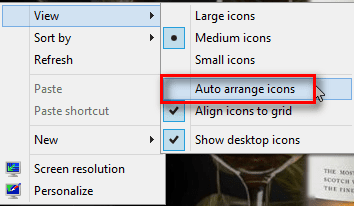
    Right click an empty spot on desktop to open Desktop Context menu, select View > Auto arrange icons. This arranges icons in even rows and columns and you should see your file. Also if you have some gadgests on desktop set to always stay on top, move them to see they are not covering your icons
    .
    2012-10-10_094934.png
Kari
 

My Computer My Computer

At a glance

Windows 10 Pro x64 EN-GB1.6 GHz Intel Core i7-720QM Processor6 GBATI Mobility Radeon HD 5850 Graphics
Computer type
Laptop
Computer Manufacturer/Model Number
HP ENVY 17-1150eg
OS
Windows 10 Pro x64 EN-GB
CPU
1.6 GHz Intel Core i7-720QM Processor
Memory
6 GB
Graphics Card(s)
ATI Mobility Radeon HD 5850 Graphics
Sound Card
Beats sound system with integrated subwoofer
Monitor(s) Displays
17" laptop display, 22" LED and 32" Full HD TV through HDMI
Screen Resolution
1600*900 (1), 1920*1080 (2&3)
Hard Drives
Internal: 2 x 500 GB SATA Hard Disk Drive 7200 rpm
External: 2TB for backups, 3TB USB3 network drive for media
Cooling
As Envy runs a bit warm, I have it on a Cooler Master pad
Keyboard
Logitech diNovo Media Desktop Laser (bluetooth)
Mouse
Logitech Performance Mouse MX
Internet Speed
50/10 Mbps VDSL
Antivirus
Windows Defender 4.3.9431.0
Browser
Maxthon 3.5.2., IE11
  • Like
Reactions: Arc
The file is not in the Desktop folder either.
 

My Computer My Computer

At a glance

Windows 7 64 bits Familyi5 2.3 Ghz4GbIntel HD Graphics 3000
Computer type
Laptop
Computer Manufacturer/Model Number
Lenovo L520
OS
Windows 7 64 bits Family
CPU
i5 2.3 Ghz
Memory
4Gb
Graphics Card(s)
Intel HD Graphics 3000
Hard Drives
1 HD of 464Gb
Antivirus
None
Browser
Firefox

My Computer My Computer

At a glance

Windows 10 Pro x64 EN-GB1.6 GHz Intel Core i7-720QM Processor6 GBATI Mobility Radeon HD 5850 Graphics
Computer type
Laptop
Computer Manufacturer/Model Number
HP ENVY 17-1150eg
OS
Windows 10 Pro x64 EN-GB
CPU
1.6 GHz Intel Core i7-720QM Processor
Memory
6 GB
Graphics Card(s)
ATI Mobility Radeon HD 5850 Graphics
Sound Card
Beats sound system with integrated subwoofer
Monitor(s) Displays
17" laptop display, 22" LED and 32" Full HD TV through HDMI
Screen Resolution
1600*900 (1), 1920*1080 (2&3)
Hard Drives
Internal: 2 x 500 GB SATA Hard Disk Drive 7200 rpm
External: 2TB for backups, 3TB USB3 network drive for media
Cooling
As Envy runs a bit warm, I have it on a Cooler Master pad
Keyboard
Logitech diNovo Media Desktop Laser (bluetooth)
Mouse
Logitech Performance Mouse MX
Internet Speed
50/10 Mbps VDSL
Antivirus
Windows Defender 4.3.9431.0
Browser
Maxthon 3.5.2., IE11
Yes both.
 

My Computer My Computer

At a glance

Windows 7 64 bits Familyi5 2.3 Ghz4GbIntel HD Graphics 3000
Computer type
Laptop
Computer Manufacturer/Model Number
Lenovo L520
OS
Windows 7 64 bits Family
CPU
i5 2.3 Ghz
Memory
4Gb
Graphics Card(s)
Intel HD Graphics 3000
Hard Drives
1 HD of 464Gb
Antivirus
None
Browser
Firefox
Open notepad, excel or any other windows porgram and save a file to <SYSTEMDRIVE>:\Users\Your_Username\Desktop
Works? Is it now in that location? Visible on desktop as well?
 

My Computer My Computer

At a glance

Microsoft Windows 7 Home Premium 64-bits 7601...Intel(R) Core(TM) i3 CPU M 370 @ 2.40GHz4,00 GBATI Mobility Radeon HD 5400 Series
Computer type
Laptop
Computer Manufacturer/Model Number
ACER ASPIRE 5742G
OS
Microsoft Windows 7 Home Premium 64-bits 7601 Multiprocessor Free Service Pack 1
CPU
Intel(R) Core(TM) i3 CPU M 370 @ 2.40GHz
Motherboard
Acer Aspire 5742G
Memory
4,00 GB
Graphics Card(s)
ATI Mobility Radeon HD 5400 Series
Sound Card
(1) AMD High Definition Audio Device (2) Realtek High Defi
Screen Resolution
1366 x 768 x 32 bits (4294967296 colors) @ 60 Hz
Hard Drives
WDC WD5000BEVT-22ZAT0
Open notepad, excel or any other windows porgram and save a file to <SYSTEMDRIVE>:\Users\Your_Username\Desktop
Works? Is it now in that location? Visible on desktop as well?
That's a good idea to test.

Remember, systemdrive is C: if you have installed Windows on default location.

Kari
 

My Computer My Computer

At a glance

Windows 10 Pro x64 EN-GB1.6 GHz Intel Core i7-720QM Processor6 GBATI Mobility Radeon HD 5850 Graphics
Computer type
Laptop
Computer Manufacturer/Model Number
HP ENVY 17-1150eg
OS
Windows 10 Pro x64 EN-GB
CPU
1.6 GHz Intel Core i7-720QM Processor
Memory
6 GB
Graphics Card(s)
ATI Mobility Radeon HD 5850 Graphics
Sound Card
Beats sound system with integrated subwoofer
Monitor(s) Displays
17" laptop display, 22" LED and 32" Full HD TV through HDMI
Screen Resolution
1600*900 (1), 1920*1080 (2&3)
Hard Drives
Internal: 2 x 500 GB SATA Hard Disk Drive 7200 rpm
External: 2TB for backups, 3TB USB3 network drive for media
Cooling
As Envy runs a bit warm, I have it on a Cooler Master pad
Keyboard
Logitech diNovo Media Desktop Laser (bluetooth)
Mouse
Logitech Performance Mouse MX
Internet Speed
50/10 Mbps VDSL
Antivirus
Windows Defender 4.3.9431.0
Browser
Maxthon 3.5.2., IE11
Yes, I can see it in that location and on the desktop.
 

My Computer My Computer

At a glance

Windows 7 64 bits Familyi5 2.3 Ghz4GbIntel HD Graphics 3000
Computer type
Laptop
Computer Manufacturer/Model Number
Lenovo L520
OS
Windows 7 64 bits Family
CPU
i5 2.3 Ghz
Memory
4Gb
Graphics Card(s)
Intel HD Graphics 3000
Hard Drives
1 HD of 464Gb
Antivirus
None
Browser
Firefox
This problem seems to go away the day after when I switch my computer on and then it's back again some time during the work day... It seems to be there randomly.
 

My Computer My Computer

At a glance

Windows 7 64 bits Familyi5 2.3 Ghz4GbIntel HD Graphics 3000
Computer type
Laptop
Computer Manufacturer/Model Number
Lenovo L520
OS
Windows 7 64 bits Family
CPU
i5 2.3 Ghz
Memory
4Gb
Graphics Card(s)
Intel HD Graphics 3000
Hard Drives
1 HD of 464Gb
Antivirus
None
Browser
Firefox
Back
Top