
Solved Unable to delete empty registry entry

calccrypto

New member
Member
VIP
Local time
6:01 AM
Messages
132
Location
Third Rock From the Sun
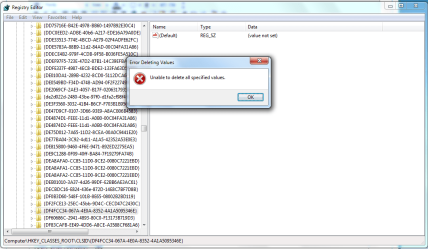
I ran Auslogics Registry Cleaner, and it found many errors, and deleted all but one of the registry entries. I ran it a few more times, and it was still unable to delete it. So, I went into the registry and tried to manually delete it. Regedit tells me that it is "Unable to delete all specific values". The value is like NULL string (not a NULL string pointer) or something (REG_SZ, no value set)

What else can I do to delete it?
 

My Computer

Computer Manufacturer/Model Number
Self Built, Lenovo T410
OS
7 Ultimate x64, Windows 7 Enterprise x64
CPU
Intel Q6600 @ 3.33 GHz, Intel i5 @ 2.53 GHz
Motherboard
ASUS P5Q Pro, Lenovo 2522DY1
Memory
OCZ Gold 800 4GB, Some sort of RAM 4GB
Graphics Card(s)
GeForce GT240, NVIDA NVS 3100M
Monitor(s) Displays
H213H
Screen Resolution
1900 x 1080, 1440 x 900
Hard Drives
Seagate 2 Tb
Seagate 160 Gb
WD 750 Gb, HITACHI 500GB
PSU
ISO-450
Case
Sunbeam ACIII-T Transparent Clear Acrylic ATX Mid Tower
Cooling
Spin Q
Mouse
Logitec G600, Ultranav
Other Info
EDIMAX EW-7811Un Wireless Nano Adapter
Please show scrn shot of the registry please . Showing what key you want to delete .
 

My Computer

Computer Manufacturer/Model Number
Custom Built
OS
Windows 7 Ultimate 32-Bit & Windows 7 Ultimate 64-Bit
CPU
Intel Core i7 CPU 950 @ 3.07GHz
Motherboard
ASUS P6T DELUXE V2
Memory
OCZ 6GB (3 x 2GB) 240-Pin DDR3 SDRAM DDR3 1600 OCZ3X1600R2
Graphics Card(s)
ATI Radeon HD 5700 Series
Sound Card
OnBoard
Hard Drives
WD6400AACS-00M3B0 (640GB SATA )
PSU
CORSAIR 850w
Case
NZXT LEXA
Cooling
Intel Stock Heatsink Fan
Keyboard
Microsoft Wireless Laser Keyboard 7000
Mouse
Microsoft Wireless Laser Mouse 7000
I am trying to delete key HKEY_CLASSES_ROOT\CLSID\{DF4FCC34-067A-4E0A-8352-4A1A5095346E}
 

Attachments

  • reg.png
    reg.png
    44.6 KB · Views: 32

My Computer

Computer Manufacturer/Model Number
Self Built, Lenovo T410
OS
7 Ultimate x64, Windows 7 Enterprise x64
CPU
Intel Q6600 @ 3.33 GHz, Intel i5 @ 2.53 GHz
Motherboard
ASUS P5Q Pro, Lenovo 2522DY1
Memory
OCZ Gold 800 4GB, Some sort of RAM 4GB
Graphics Card(s)
GeForce GT240, NVIDA NVS 3100M
Monitor(s) Displays
H213H
Screen Resolution
1900 x 1080, 1440 x 900
Hard Drives
Seagate 2 Tb
Seagate 160 Gb
WD 750 Gb, HITACHI 500GB
PSU
ISO-450
Case
Sunbeam ACIII-T Transparent Clear Acrylic ATX Mid Tower
Cooling
Spin Q
Mouse
Logitec G600, Ultranav
Other Info
EDIMAX EW-7811Un Wireless Nano Adapter
Why you trying to delete that key ?
 

My Computer

Computer Manufacturer/Model Number
Custom Built
OS
Windows 7 Ultimate 32-Bit & Windows 7 Ultimate 64-Bit
CPU
Intel Core i7 CPU 950 @ 3.07GHz
Motherboard
ASUS P6T DELUXE V2
Memory
OCZ 6GB (3 x 2GB) 240-Pin DDR3 SDRAM DDR3 1600 OCZ3X1600R2
Graphics Card(s)
ATI Radeon HD 5700 Series
Sound Card
OnBoard
Hard Drives
WD6400AACS-00M3B0 (640GB SATA )
PSU
CORSAIR 850w
Case
NZXT LEXA
Cooling
Intel Stock Heatsink Fan
Keyboard
Microsoft Wireless Laser Keyboard 7000
Mouse
Microsoft Wireless Laser Mouse 7000
I simply dont want to see something not "fixed"
 

My Computer

Computer Manufacturer/Model Number
Self Built, Lenovo T410
OS
7 Ultimate x64, Windows 7 Enterprise x64
CPU
Intel Q6600 @ 3.33 GHz, Intel i5 @ 2.53 GHz
Motherboard
ASUS P5Q Pro, Lenovo 2522DY1
Memory
OCZ Gold 800 4GB, Some sort of RAM 4GB
Graphics Card(s)
GeForce GT240, NVIDA NVS 3100M
Monitor(s) Displays
H213H
Screen Resolution
1900 x 1080, 1440 x 900
Hard Drives
Seagate 2 Tb
Seagate 160 Gb
WD 750 Gb, HITACHI 500GB
PSU
ISO-450
Case
Sunbeam ACIII-T Transparent Clear Acrylic ATX Mid Tower
Cooling
Spin Q
Mouse
Logitec G600, Ultranav
Other Info
EDIMAX EW-7811Un Wireless Nano Adapter
Id rather scan for viruses then manually try to delete a registry key .
 

My Computer

Computer Manufacturer/Model Number
Custom Built
OS
Windows 7 Ultimate 32-Bit & Windows 7 Ultimate 64-Bit
CPU
Intel Core i7 CPU 950 @ 3.07GHz
Motherboard
ASUS P6T DELUXE V2
Memory
OCZ 6GB (3 x 2GB) 240-Pin DDR3 SDRAM DDR3 1600 OCZ3X1600R2
Graphics Card(s)
ATI Radeon HD 5700 Series
Sound Card
OnBoard
Hard Drives
WD6400AACS-00M3B0 (640GB SATA )
PSU
CORSAIR 850w
Case
NZXT LEXA
Cooling
Intel Stock Heatsink Fan
Keyboard
Microsoft Wireless Laser Keyboard 7000
Mouse
Microsoft Wireless Laser Mouse 7000
It's been shown many times on this Forum that registry cleaners do more harm than good. Even Microsoft's Windows Live OneCare (which did have a Microsoft provided registry cleaner) was discontinued in October 2009 (when Windows 7 was released to consumers world-wide.)

Windows Live OneCare - Microsoft Windows

Microsoft also states:

Sometimes, settings that are no longer needed will remain in the registry in case they are ever needed again. There's nothing unusual about this, and this data, while unused, is small in size . . . We strongly recommend that you only change values in the registry that you understand or have been instructed to change by a source you trust, and that you back up the registry before making any changes.

Source

This Microsoft forum thread has more info about registry cleaners.

Is there a Microsoft licensed registry cleaner? I have heard - Microsoft Community
 

My Computer

Computer type
Laptop
Computer Manufacturer/Model Number
Sony Vaio VPCEB47GM Laptop
OS
Win 7 Pro 64-bit
CPU
Intel i5 2.4 Ghz
Memory
8GB DDR3
Graphics Card(s)
Intel HD 3000
Sound Card
IDT High Definition
Monitor(s) Displays
15.6 WGXA Anti-Glare LED
Screen Resolution
1280x800
Hard Drives
640Gb 7200rpm
Antivirus
MSE
Browser
Opera (primary) with IE9 backup
The key that you are wanting to delete should have this value under it:

IE-reg.png

Do you see that value?
 

My Computer

Computer type
Laptop
Computer Manufacturer/Model Number
Employer provided Dell Latitude
OS
W7 Pro SP1 64bit
CPU
i7
Memory
8GB
Graphics Card(s)
Intel HD Graphics
Hard Drives
crappy SSD
Antivirus
Employer mandated Symantec Endpoint Protection
Browser
Pale Moon 64bit, IE11 64bit & Chrome 64bit
Hello calccrypto,

You are unable to delete the key either because it is being used by some program or you don't have permissions to modify/delete that key. Some parts of the registry can't be modified/changed. That key is not gonna harm you anyway. Please leave that innocent key alone, it's just using a few bytes on your hard disk!

Hope this helps.
 
Last edited:
I ran Auslogics Registry Cleaner, and it found many errors, and deleted all but one of the registry entries. I ran it a few more times, and it was still unable to delete it. So, I went into the registry and tried to manually delete it. Regedit tells me that it is "Unable to delete all specific values". The value is like NULL string (not a NULL string pointer) or something (REG_SZ, no value set)

What else can I do to delete it?
I'd quit using Auslogics, it is aggressive and may bork your system and require a reinstall, however, proceed as you wish.
 

My Computer

Computer type
PC/Desktop
Computer Manufacturer/Model Number
Home Built Desktop By DataTech
OS
Windows 7 Ultimate X64 SP1
CPU
Intel i5-2550K, Differing ~4.4-4.8GHz No built in GPU
Motherboard
ASUS P8Z68-V PRO/GEN3
Memory
16GB G.Skill Sniper 1866MHz @ 2133MHz 2x8GB
Graphics Card(s)
ASUS GTX650TIB-DC2OC-2GD5, (650TI Boost)
Sound Card
Onboard Realtek 5-1
Monitor(s) Displays
Samsung P2570HD
Screen Resolution
1920x1080
Hard Drives
Samsung 840 Pro 256GB SSD for OS, 500GB Seagate Constellation (Enterprise drive) for Data
PSU
Corsair HX650W
Case
Inwin Dragon Rider
Cooling
Hyper 212 EVO w/two Noctua fans, push-pull, @1300 RPM
Keyboard
E-Z Eyes, bright yellow keys with large characters
Mouse
steelseries SENSEI Laser Pro Gaming
Internet Speed
48-51Mbs Mbs down, 11 Mbs up Xfinity Cable
Antivirus
Norton Internet Security 2013
Browser
IE 10, Opera, Pale Moon if needed
Other Info
4 case fans, LG BluRay-RE, ASUS DVD-RW, Mr. Fusion power supply, 1.21 gigawatts.
I ran Auslogics Registry Cleaner, and it found many errors, and deleted all but one of the registry entries. I ran it a few more times, and it was still unable to delete it. So, I went into the registry and tried to manually delete it. Regedit tells me that it is "Unable to delete all specific values". The value is like NULL string (not a NULL string pointer) or something (REG_SZ, no value set)

What else can I do to delete it?
I'd quit using Auslogics, it is aggressive and may bork your system and require a reinstall, however, proceed as you wish.


Yes, in my case, it totally killed my office installation. I couldn't even repair it, I had to re-install. So, dear OP, you are requested to stop using this particular tool cuz deleting a few registry keys will NOT speed up your system. Windows 7 is optimized enough to keep the registry in good condition.
 
Simple rule of the thumb.
If regedit says it can't delete a key leave it alone and go worry about something else like running anti virus and malware scans. If they find nothing and your system is working as it should be happy.
I also recommend getting rid of that Auslogics thing.
 

My Computer

Computer type
PC/Desktop
Computer Manufacturer/Model Number
Home made Desktop
OS
Windows 10 Pro. 64/ version 1709 Windows 7 Pro/64
CPU
Intel i7-6800K @ 4.3
Motherboard
ASUS X-99 Deluxe II
Memory
Corsair Platinum 16 gig @2400
Graphics Card(s)
EVGA GTX 1070 OC
Monitor(s) Displays
Asus 27" LED LCD/VE278Q
Screen Resolution
1920-1080 or 1280-720 HDMI
Hard Drives
INTEL SSD 730-240 Gb Sata 3.0/
PSU
EVGA Platium 1200W
Case
Phanteks Luxe Tempered Glass 8 fans/ one radiator
Cooling
XSPC/ Water Cooled CPU
Keyboard
Das 4 Professional
Mouse
Logitech M705/MX Anywhere 2-S
Internet Speed
100 mbits
Antivirus
Microsoft Security Essentials/ Malwarebytes Premium 3.0/ SAS
Browser
I.E. 11 default/Firefox/ ISP Time Warner Cable/Spectrum
Other Info
LG BluRay Burner/
Sound system-KLipsch-THX/
Icy Dock ssd Hot Swap bays.
...
I'd quit using Auslogics, it is aggressive and may bork your system and require a reinstall, however, proceed as you wish.
I decided to see what errors it would find on a fresh install (no 3rd party apps or drivers installed, just the fresh OS). It found 23 errors - but Uniblue found more than 200 errors on that same fresh OS, so Unitblue must be the better product..... NOT!

It is scary that Kaspersky was distributing this Uniblue crapware.

(not my video - you might want to mute the sound)


And while we are on the topic - "empty" registry keys are not useless. It might not be wise on a programmer's part to create/use just a key (with no data), but it is done. One user complained about repeatedly having to setup a program like it was the first time it had been run. We tracked it down to his use of a registry cleaner that was removing "empty" keys. If the program could not find that key, it started its setup wizard.
 

My Computer

Computer type
Laptop
Computer Manufacturer/Model Number
Employer provided Dell Latitude
OS
W7 Pro SP1 64bit
CPU
i7
Memory
8GB
Graphics Card(s)
Intel HD Graphics
Hard Drives
crappy SSD
Antivirus
Employer mandated Symantec Endpoint Protection
Browser
Pale Moon 64bit, IE11 64bit & Chrome 64bit
Oh-oh, I think at one time any mention of that "Blue" name was banned here. It is real crapware.
 

My Computer

Computer type
PC/Desktop
Computer Manufacturer/Model Number
Home Built Desktop By DataTech
OS
Windows 7 Ultimate X64 SP1
CPU
Intel i5-2550K, Differing ~4.4-4.8GHz No built in GPU
Motherboard
ASUS P8Z68-V PRO/GEN3
Memory
16GB G.Skill Sniper 1866MHz @ 2133MHz 2x8GB
Graphics Card(s)
ASUS GTX650TIB-DC2OC-2GD5, (650TI Boost)
Sound Card
Onboard Realtek 5-1
Monitor(s) Displays
Samsung P2570HD
Screen Resolution
1920x1080
Hard Drives
Samsung 840 Pro 256GB SSD for OS, 500GB Seagate Constellation (Enterprise drive) for Data
PSU
Corsair HX650W
Case
Inwin Dragon Rider
Cooling
Hyper 212 EVO w/two Noctua fans, push-pull, @1300 RPM
Keyboard
E-Z Eyes, bright yellow keys with large characters
Mouse
steelseries SENSEI Laser Pro Gaming
Internet Speed
48-51Mbs Mbs down, 11 Mbs up Xfinity Cable
Antivirus
Norton Internet Security 2013
Browser
IE 10, Opera, Pale Moon if needed
Other Info
4 case fans, LG BluRay-RE, ASUS DVD-RW, Mr. Fusion power supply, 1.21 gigawatts.
I have been using Auslogics Boostspeed for a couple years now with zero problems. Just today, 7/23/13, I got the exact same problem and never had it before.

The registry file is a read only and it will not let you change the settings(or it shows you did but immediately reverts back) so you cannot delete it.

To the person who had a value for this registry item: every computer is unique and just because you have a program that utilizes this registry key does not mean that every computer should have a value in it.

It is not a big deal at all. If you are concerned about it, update and run your antivirus/antimalware program(if you are ultra paranoid, run windows defender and Microsoft security essentials as well to ease your mind.) If nothing comes up, I would not give it a second thought unless you start to notice your computer seriously bogging down big time.

The bogging down big time is always my litmus test for if something is wrong but then again, I keep my laptop very well maintained. So much so that I do not use, or need, a constantly running antivirus.

I have had issues like this before and they almost always resolve themselves by the next time I run all the scans.


BTW, if you use Auslogics Boostspeed and you do not know how to fix computer problems than you should not mess around with anything labeled "advanced".

How about this, if you do not understand what a hard drive partition is and what they are used for, do not even install Boostspeed because you are not computer literate enough to be messing around with the things this program allows you to do.
 

My Computer

Computer type
Laptop
Computer Manufacturer/Model Number
Toshiba
OS
Windows 7 Home Premium 64bit
CPU
Intel i3-2350M
Memory
8GB
Browser
Chrome 28(check for updates daily, non-beta user)
Back
Top