
Solved Unable to download Java V8 U101

The J O

New member
Local time
6:14 AM
Messages
2
NOTE: This is about DOWNLOADING, not installation.

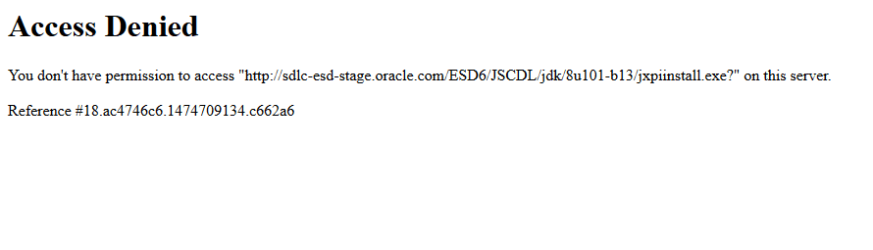
I'm trying to update to the latest version of Java, version 8 update 101, but I am unable to even download it, as I keep receiving this error:

Imgur: The most awesome images on the Internet

Oracle offers absolutely no help about this error, has no forums whatsoever (or keep it very well hidden), and the only tech support they offer requires me to pay $25 usd. The only help I could find using Google are threads about /installation/ problems. My problem is with /downloading/.

I am using:
Windows 7 Home Premium Service Pack 1 (up to date), being run as Administrator.
Mozilla Firefox 49.0.1 (current version)
Java Version 8 Update 92
Antivirus and Firewalls are disabled

EDIT: Problem has been solved, thank you all!
 

Attachments
  • Untitled.png
    Untitled.png
    8.7 KB · Views: 0
Last edited:

My Computer

Computer type
PC/Desktop
Computer Manufacturer/Model Number
Lenovo H530 series
OS
Windows 7 HP SP1 64bit
CPU
Intel Pentium G3220 3.0GHz, 3.0GHz
Memory
4.00 GB
Graphics Card(s)
EVGA Geforce GTX 750 Ti - 2GB GDDR5
Hard Drives
1TB HDD - ATA
Antivirus
AVG
Browser
Mozilla Firefox
Welcome.
Are you using this site?

JAVA
 

My Computer

Computer type
PC/Desktop
Computer Manufacturer/Model Number
Custom Built
OS
Windows 10 Pro x64, Windows 8.1 Pro x64, Windows 7 Ultimate x64 SP1,
CPU
INTEL i9-7920X LGA 2066
Motherboard
Gigabyte X299-WU8 F3
Memory
64 GB (4 X 16 GB) G-Skill V Series DDR4 3200 Quad Channel
Graphics Card(s)
EVGA GTX 1060 SC 3 GB
Sound Card
Realtek Onboard ALC1220
Monitor(s) Displays
2 x Samsung S27E310
Screen Resolution
1920x1080
Hard Drives
Samsung 2 x 970 EVO Plus 500 GB NVMe
1 x 6TB WD 6003FZBX SATA
1 x 6TB WD 60EFRX SATA
12 x 3TB WD 30EFRX SATA
PSU
Seasonic X-1050
Case
Thermaltake Armor+
Cooling
Corsair H80i V2 Liquid AOI Cooler
Keyboard
Logitech G510s
Mouse
Logitech MX Master 2S
Internet Speed
200 Mb/s
Antivirus
ESET NOD32 13.1
Browser
EDGE (Dev, Canary, Beta), Chrome
Other Info
ASUS RT-AC68U router
Malwarebytes 4.0.4

My Computer

Computer type
PC/Desktop
Computer Manufacturer/Model Number
Custom assembled by me :}
OS
Win-7-Pro64bit 7-H-Prem-64bit
CPU
i7-5930K 2nd i9-9940x both water blocked VRM's too
Motherboard
ASUS SABERTOOTH X99 2nd ASUS x299 Apex
Memory
Trident-z 3200C14 2nd Trident-z 3600C16
Graphics Card(s)
EVGA 1080ti ftw3 2nd Titan Xp both water blocked
Sound Card
Built-in Realtek
Monitor(s) Displays
1-AOC G2460PG 24"G-Sync 144Hz/ 2nd 1-ASUS VG248QE 24" 144Hz
Screen Resolution
1920 x 1080 144Hz
Hard Drives
2-Samsung M.2 Evo & Evo Plus
2-Samsung 850 EVO 500GB SSD's/ 3-2.5 W.D. Black 1tb-&3-1tb/3-3.5 WD Black 1tb hdd's
PSU
EVGA SuperNOVA 1000-P2 2nd 1200-P2
Case
2-Corsair Obsidian Series 450D Black ATX Mid Tower
Cooling
Custom water loops
Keyboard
Logitech G710+/ 2nd Logitech G910
Mouse
2-RedDragon M901 Perdition 16400 dpi Gaming mouse = wired
Internet Speed
Comcast Ping 19ms 89.31mbps download speed 6.12mbps upload
Antivirus
Malwarebytes Pro/ Superantispyware Pro
Browser
FireFox & Pale moon
Other Info
2nd ASUS X299 Apex/Intel i9-9940x with Custom water loop/7H-Prem-x64/Corsair 450D case/Ram Trident-z 3600C16 4x8gb / Samsung970Evo plus 500gb SSD/Dual ssd EZ swap evo/PSU EVGA SuperNova 1200w-P2 80+Platinum/GPU Titan Xp /8-ML-140 on push-pull on 2-280GTX rads
Found the very same issue here. The official download page (as pbcopter points) none of the links work. It's clear that their site has its download links broken. As the problem is within the Oracle website, there is nothing you can do about it, simply wait and try again latter.


Hi and welcome to SevenForums,
See if this update is installed,
KB3147071*connection to oracle fails
https://support.microsoft.com/en-us/kb/3147071

Might be caused by this security update
https://support.microsoft.com/en-us/kb/3126587

How is that even related to this issue?
 

My Computer

Computer type
Laptop
Computer Manufacturer/Model Number
Toshiba Sattelite A665-S6092
OS
Windows 7 Ultimate x64
CPU
Intel Core i7-740QM
Memory
8 GB DDR3
Graphics Card(s)
NVIDIA GeForce 330GT
Screen Resolution
1366x768
Hard Drives
Samsung 840 SSD 500GB
1TB USB3 external HD
Cooling
Coolermaster Notepal U3 notebook cooling pad
Internet Speed
3mbps ASDL
Antivirus
ClamWin 0.98.7
Browser
Opera 12.17 x86 (main), Firefox 38 (sec), IE11 (last resort)

My Computer

Computer type
PC/Desktop
Computer Manufacturer/Model Number
Custom Built
OS
Windows 10 Pro x64, Windows 8.1 Pro x64, Windows 7 Ultimate x64 SP1,
CPU
INTEL i9-7920X LGA 2066
Motherboard
Gigabyte X299-WU8 F3
Memory
64 GB (4 X 16 GB) G-Skill V Series DDR4 3200 Quad Channel
Graphics Card(s)
EVGA GTX 1060 SC 3 GB
Sound Card
Realtek Onboard ALC1220
Monitor(s) Displays
2 x Samsung S27E310
Screen Resolution
1920x1080
Hard Drives
Samsung 2 x 970 EVO Plus 500 GB NVMe
1 x 6TB WD 6003FZBX SATA
1 x 6TB WD 60EFRX SATA
12 x 3TB WD 30EFRX SATA
PSU
Seasonic X-1050
Case
Thermaltake Armor+
Cooling
Corsair H80i V2 Liquid AOI Cooler
Keyboard
Logitech G510s
Mouse
Logitech MX Master 2S
Internet Speed
200 Mb/s
Antivirus
ESET NOD32 13.1
Browser
EDGE (Dev, Canary, Beta), Chrome
Other Info
ASUS RT-AC68U router
Malwarebytes 4.0.4
Hi and welcome to SevenForums,
See if this update is installed,
KB3147071*connection to oracle fails
https://support.microsoft.com/en-us/kb/3147071

Might be caused by this security update
https://support.microsoft.com/en-us/kb/3126587

I've had this update installed since April 13th of this year.


This works for me, thank you. Thank you all for the replies!
 

My Computer

Computer type
PC/Desktop
Computer Manufacturer/Model Number
Lenovo H530 series
OS
Windows 7 HP SP1 64bit
CPU
Intel Pentium G3220 3.0GHz, 3.0GHz
Memory
4.00 GB
Graphics Card(s)
EVGA Geforce GTX 750 Ti - 2GB GDDR5
Hard Drives
1TB HDD - ATA
Antivirus
AVG
Browser
Mozilla Firefox
Back
Top