Unable to extend my C drive partition from unallocated space

fermanagh

New member
Local time
8:36 AM
Messages
5
Location
Paris, France
Hi All,

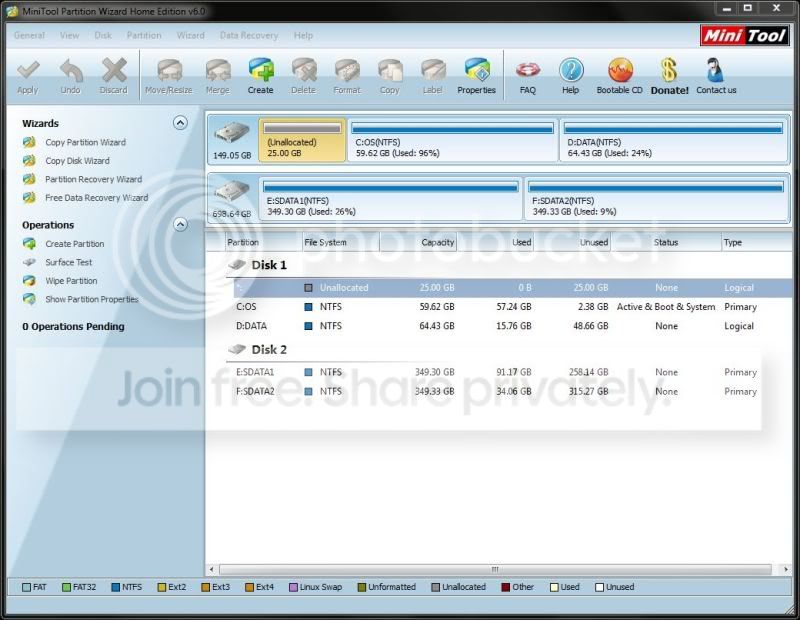
New to the forums and need some help here as I'm lost. I just got my new laptop and noticed that the C drive (O/S) was getting full and wanted to add more space. I deleted the recovery partition of 25GB so I could extend my C partition.

However, I do not have the option to expand my C drive, see the print screen link below:
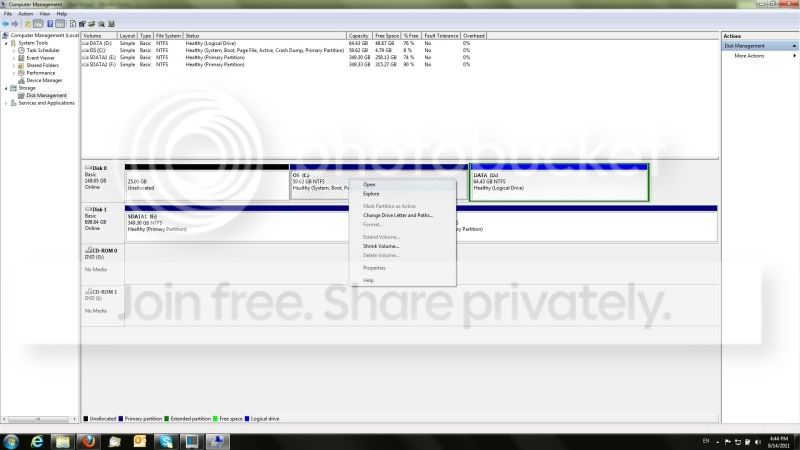
diskmanagement.jpg


I also tried using minitool partition wizard which looked to be successful but upon reboot I got an error.

For info, I have a 160GB SSD
 

My Computer My Computer

At a glance

Windows 7 Home Edition x64Intel Core i7-2630QM, 2.0Ghz16GBNvidia Geforce GTX 560M 3GB
Computer Manufacturer/Model Number
Asus G74SX-A2
OS
Windows 7 Home Edition x64
CPU
Intel Core i7-2630QM, 2.0Ghz
Memory
16GB
Graphics Card(s)
Nvidia Geforce GTX 560M 3GB
Hard Drives
750GB HDD + 160GB SSD
I had the same problem when I was trying to make room for my ubuntu partitions by shrinking my windows partition idk if this will work since your are trying to extend it and not shrink it but just give it a try. The problem is that you have unmovable files located at the end of your hard drive, so what you need to do is defragment and optimize your hard disk so that it moves those files towards the beginning of your hard drive. I recommend the program Smart Defraggler 2. It has the three options defrag, defrag and fast optimize and defrag and fully optimize. I recommend doing the defrag and fully optimize option at least twice.

Good luck!

Sent from my Gingerbread on Dream using Tapatalk
 

My Computer My Computer

At a glance

Windows 7 Home Premium 64bitIntel(R) Core i3 CPU M330 @2.13Ghz4GB RAMIntel(R) HD Graphics
Computer Manufacturer/Model Number
HP G62-144DX Notebook PC
OS
Windows 7 Home Premium 64bit
CPU
Intel(R) Core i3 CPU M330 @2.13Ghz
Memory
4GB RAM
Graphics Card(s)
Intel(R) HD Graphics
Screen Resolution
1366 x 768
Hard Drives
500 GB Hitachi HTS725050A9A3644
Hi fermanagh

You cant expand to the left using disk management in windows.Partition Wizard bootable Cd will do the job for you though. Download the Partition Wizard bootable ISO - http://www.partitionwizard.com/partition-wizard-bootable-cd.html and burn to a Cd whilst one of the partition experts is free to help you.

Danny
 

My Computer My Computer

At a glance

Windows 7 Home Premium x64 SP1intel(R)core(TM)2 duo CPU T6600 @ 2.20GHz3 gb ddr3ati radeon hd4570/512mb
Computer Manufacturer/Model Number
acer aspire 5935g
OS
Windows 7 Home Premium x64 SP1
CPU
intel(R)core(TM)2 duo CPU T6600 @ 2.20GHz
Motherboard
intel gm45/gm47 revision 07
Memory
3 gb ddr3
Graphics Card(s)
ati radeon hd4570/512mb
Monitor(s) Displays
lop156wh2-tle1 15.3 flat
Screen Resolution
1366x768
Hard Drives
OCZ-Agility3 60gig ssd
320gig external hdd
500gig external hdd
Mouse
Optical
Internet Speed
30Mbps Down/30Mbps Up

My Computer My Computer

At a glance

Microsoft Windows 10 Pro Insider Preview 64-bitIntel(R) Core(TM) i3-4130 CPU @ 3.40GHzCorsair Vengence 4GB x2 (8.00GB Dual-Channel ...2047MB GeForce GTS 450 (ZOTAC International)
Computer type
PC/Desktop
Computer Manufacturer/Model Number
Self Assembled
OS
Microsoft Windows 10 Pro Insider Preview 64-bit
CPU
Intel(R) Core(TM) i3-4130 CPU @ 3.40GHz
Motherboard
Gigabyte Technology Co., Ltd. B85M-D3H
Memory
Corsair Vengence 4GB x2 (8.00GB Dual-Channel DDR3 @ 798MHz)
Graphics Card(s)
2047MB GeForce GTS 450 (ZOTAC International)
Sound Card
Onboard (Realtek High Definition Audio)
Monitor(s) Displays
LG Flatron E2040T
Screen Resolution
1600x900
Hard Drives
Western Digital 1 TB
Seagate 500 GB
PSU
Corsair VS550
Case
Cooler Master K380
Cooling
Cooler Master Seidon 120V Plus
Keyboard
Logitech MK260r
Mouse
Logitech MK260r
Internet Speed
PMPL Broadband
Antivirus
Windows Defender + MBAM
Browser
Firefox
Other Info
Dell Studio 15" Laptop
You could free up at least that much space by removing detritus and saved pics\vids etc to your other drive. 135 Gb is quite a size for your OS partition.
I would expect around 100 Gb to be my max before I start clearing up.
 

My Computer My Computer

At a glance

Windows 7 home premium x64AMD FX-4100 AM3+ 3.6GHz 12MB Black EditionCrsair vengeance 12Gb DDR3 1600MHz CL9Asus GTX 560 1GB
Computer Manufacturer/Model Number
DIY
OS
Windows 7 home premium x64
CPU
AMD FX-4100 AM3+ 3.6GHz 12MB Black Edition
Motherboard
Asus M5A97 Pro
Memory
Crsair vengeance 12Gb DDR3 1600MHz CL9
Graphics Card(s)
Asus GTX 560 1GB
Sound Card
Realtek onboard
Monitor(s) Displays
Hanns G 1680x1050 native
Hard Drives
OCZ 128Gb Petrol ssd
2x500 Gb Samsung
PSU
OCZ StealthXstream II 500W
Internet Speed
8Mb or better
Hello fermanagh, welcome to Seven Forums!


Have a look at Step Three of this tutorial at the link below to see how to extend the left side of the C: partition into the unallocated space and be sure to post back with any further questions you may have and to keep us informed.


My Computer My Computer

At a glance

W 7 64-bit UltimateIntel Q9550 Yorkfield8GB Dominator 8500C5DATI : XFX 5870
Computer Manufacturer/Model Number
* BFK Customs *
OS
W 7 64-bit Ultimate
CPU
Intel Q9550 Yorkfield
Motherboard
ASUS P5Q Pro
Memory
8GB Dominator 8500C5D
Graphics Card(s)
ATI : XFX 5870
Sound Card
Realtek HD Audio 7-1
Monitor(s) Displays
1x 47" LCD HDMI & 3x 26" LCD HDMI
Screen Resolution
1920x1080P & 1920x1200
Hard Drives
1x 80GB Intel X25-M G2 SSD : 1x 500GB & 1x 640GB WD Caviar Black(s)
PSU
Corsair 620HX
Case
Cooler Master RC-690
Cooling
Tuniq Tower 120, 2x 140mm and 3x 120mm case fans
Keyboard
Microsoft 500
Mouse
Razer Diamondback 3G
Internet Speed
14 Mb/s
Other Info
1x Koutech 3Gb/s SATA HDD Hot Swap Rack
Hi,

@ Maxpayne: This is an SSD so defrag is not a option here ;)

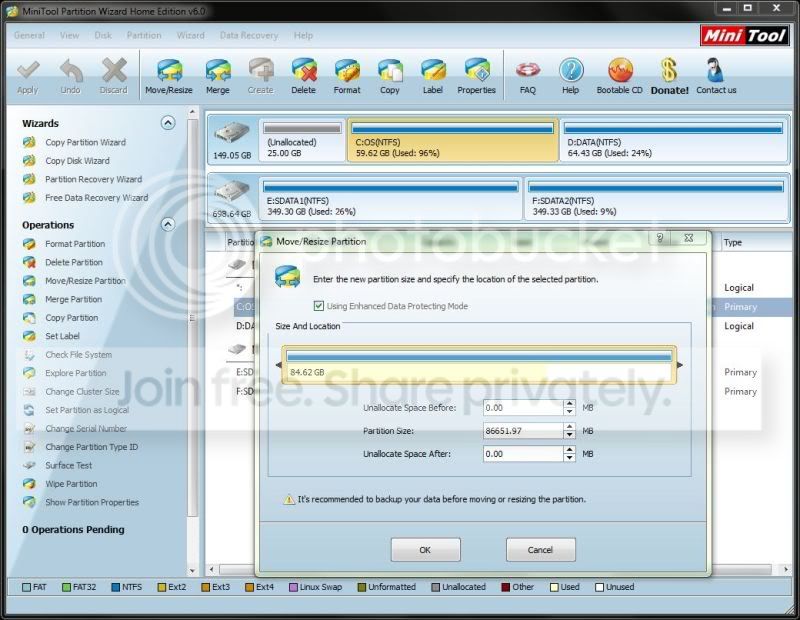
@ xxxdannyxxx: I've uploaded another screenshot using partition wizard and cannot expand my drive. As per my original message, you'll see that I tried this

partitionwizard.jpg


@ barefoot kid: as you can see in the screenshot below, i attempt to extend C:\ but upon reboot i get an error:

extendCdrive.jpg


The weird thing here is that the C partition where my O/S is installed only contains the Windows installation amongst other programs that were already installed when I got the laptop. I've emptied the temp folder and ran a cleanup on C:\ but it doesn't seem to clear much space...
 

My Computer My Computer

At a glance

Windows 7 Home Edition x64Intel Core i7-2630QM, 2.0Ghz16GBNvidia Geforce GTX 560M 3GB
Computer Manufacturer/Model Number
Asus G74SX-A2
OS
Windows 7 Home Edition x64
CPU
Intel Core i7-2630QM, 2.0Ghz
Memory
16GB
Graphics Card(s)
Nvidia Geforce GTX 560M 3GB
Hard Drives
750GB HDD + 160GB SSD
Hello again.


As good and reliable a program as Partition Wizard is, I would not trust the installed version for the operation you need, use the boot CD as suggested and be sure to post back with any further questions you may have and to keep us informed.

First download the Partition Wizard Bootable Disk (PWBD) ISO file to the desktop, be sure to get the PWBD and not the installed version; scroll down to see the download link for the Bootable CD ISO file at this link below.
Then use ImgBurn to burn the ISO to a CD, at no greater than 4x speed with a verify; it was designed for use and works best from a CD rather than a DVD; then boot the created CD to make the changes, it doesn't take any input from the user to setup, just relax and let it load.
 

My Computer My Computer

At a glance

W 7 64-bit UltimateIntel Q9550 Yorkfield8GB Dominator 8500C5DATI : XFX 5870
Computer Manufacturer/Model Number
* BFK Customs *
OS
W 7 64-bit Ultimate
CPU
Intel Q9550 Yorkfield
Motherboard
ASUS P5Q Pro
Memory
8GB Dominator 8500C5D
Graphics Card(s)
ATI : XFX 5870
Sound Card
Realtek HD Audio 7-1
Monitor(s) Displays
1x 47" LCD HDMI & 3x 26" LCD HDMI
Screen Resolution
1920x1080P & 1920x1200
Hard Drives
1x 80GB Intel X25-M G2 SSD : 1x 500GB & 1x 640GB WD Caviar Black(s)
PSU
Corsair 620HX
Case
Cooler Master RC-690
Cooling
Tuniq Tower 120, 2x 140mm and 3x 120mm case fans
Keyboard
Microsoft 500
Mouse
Razer Diamondback 3G
Internet Speed
14 Mb/s
Other Info
1x Koutech 3Gb/s SATA HDD Hot Swap Rack
  • Like
Reactions: JMH
Hi there,

I'll give that a go and see what happens. However, the last time I burned a DVD was a long time ago and I don't have any to hand. Will it work via a USB stick?
 

My Computer My Computer

At a glance

Windows 7 Home Edition x64Intel Core i7-2630QM, 2.0Ghz16GBNvidia Geforce GTX 560M 3GB
Computer Manufacturer/Model Number
Asus G74SX-A2
OS
Windows 7 Home Edition x64
CPU
Intel Core i7-2630QM, 2.0Ghz
Memory
16GB
Graphics Card(s)
Nvidia Geforce GTX 560M 3GB
Hard Drives
750GB HDD + 160GB SSD

My Computer My Computer

At a glance

W 7 64-bit UltimateIntel Q9550 Yorkfield8GB Dominator 8500C5DATI : XFX 5870
Computer Manufacturer/Model Number
* BFK Customs *
OS
W 7 64-bit Ultimate
CPU
Intel Q9550 Yorkfield
Motherboard
ASUS P5Q Pro
Memory
8GB Dominator 8500C5D
Graphics Card(s)
ATI : XFX 5870
Sound Card
Realtek HD Audio 7-1
Monitor(s) Displays
1x 47" LCD HDMI & 3x 26" LCD HDMI
Screen Resolution
1920x1080P & 1920x1200
Hard Drives
1x 80GB Intel X25-M G2 SSD : 1x 500GB & 1x 640GB WD Caviar Black(s)
PSU
Corsair 620HX
Case
Cooler Master RC-690
Cooling
Tuniq Tower 120, 2x 140mm and 3x 120mm case fans
Keyboard
Microsoft 500
Mouse
Razer Diamondback 3G
Internet Speed
14 Mb/s
Other Info
1x Koutech 3Gb/s SATA HDD Hot Swap Rack
No worries, I found a CD ROM and booted up.

I followed step 3 of your instructions but I still cannot delete the partition. Should I perform step 2 before and wipe it?

Thanks
 

My Computer My Computer

At a glance

Windows 7 Home Edition x64Intel Core i7-2630QM, 2.0Ghz16GBNvidia Geforce GTX 560M 3GB
Computer Manufacturer/Model Number
Asus G74SX-A2
OS
Windows 7 Home Edition x64
CPU
Intel Core i7-2630QM, 2.0Ghz
Memory
16GB
Graphics Card(s)
Nvidia Geforce GTX 560M 3GB
Hard Drives
750GB HDD + 160GB SSD
To update, I just wiped the partition and booted back into windows. I then tried step 3 and I still don't have the option to delete the partition.

Any ideas?

Many thanks
 

My Computer My Computer

At a glance

Windows 7 Home Edition x64Intel Core i7-2630QM, 2.0Ghz16GBNvidia Geforce GTX 560M 3GB
Computer Manufacturer/Model Number
Asus G74SX-A2
OS
Windows 7 Home Edition x64
CPU
Intel Core i7-2630QM, 2.0Ghz
Memory
16GB
Graphics Card(s)
Nvidia Geforce GTX 560M 3GB
Hard Drives
750GB HDD + 160GB SSD
I have found that when dealing with "awkward" systems it is best to perform each stage separately.
I would move the partitions to the left one at a time, (with reboots to check in between).

I have also found that the "Enhanced Data Protection" mode can prevent some operations from completing correctly, so you may wish to try with this option off, (ensure your Image/Backups are up to date to be safe)
 

My Computers My Computers

  • At a glance

    Windows 11 Pro x64 [Latest Release and Releas...Ryzen 9 5950X, 3.8 - 5.2 MHz64GB [2 x 32GB] DDR4 3200MHz4GB NVIDIA GEFORCE GTX 1650 Ti
    Computer type
    PC/Desktop
    Computer Manufacturer/Model Number
    ChillBlast - Custom to my design
    OS
    Windows 11 Pro x64 [Latest Release and Release Preview]
    CPU
    Ryzen 9 5950X, 3.8 - 5.2 MHz
    Motherboard
    Asus Prime X570-Pro
    Memory
    64GB [2 x 32GB] DDR4 3200MHz
    Graphics Card(s)
    4GB NVIDIA GEFORCE GTX 1650 Ti
    Sound Card
    On-board SPDIF to 5.1 System + HDMI [5.1 system]
    Monitor(s) Displays
    32" UHD 32 Bit HDR Monitor + 43" UHD 4K 32Bit HDR TV
    Screen Resolution
    2 x 3840 x 2160 @60Hz
    Hard Drives
    1TB M2 SSD OS, 500GB Fast Access SSD, 2 x 8TB Data + Various Externals from 1TB to 4TB, 10TB NAS
    PSU
    NZXT C750 80 PLUS Gold 750W Modular PSU
    Case
    Workstation Case [Matt Black]
    Cooling
    NZXT Kraken X63 280mm CPU Cooler +2x Quiet Case fans
    Keyboard
    Logitech Wireless MX Keys & K400 + others
    Mouse
    Logitech Wireless MX Master 3S
    Internet Speed
    920 MB Down 50 MB Up
    Antivirus
    BitDefender Total Security Pro
    Browser
    Chrome (always run latest Non-Beta)
    Other Info
    Also run ...
    Laptop - Quad 8GB - Windows 10 Pro x64
    Nexus 7 Android tablet x2
    Samsung 10.2" tablet
    Blackview TAB 8 4G Android Tablet c/w Keyboard
    Wacom Intuos Pro Medium Pen Pad
    Wacom Intuos Pro Small Pen Pad
    Wacom Expresskeys Remote
    Loopdeck+ Graphics Controller
    Shuttle Pro v2 Control
  • At a glance

    Windows 11 Pro x64 Latest RPIntel I7 10750H 5.0GHz32GB [2x16GB] DDR4 2933 MHznVidia GTX1650Ti 4 GB GDDR6
    Computer type
    Laptop
    System Manufacturer/Model Number
    Dell XPS 17 10750H
    OS
    Windows 11 Pro x64 Latest RP
    CPU
    Intel I7 10750H 5.0GHz
    Motherboard
    Dell XPS
    Memory
    32GB [2x16GB] DDR4 2933 MHz
    Graphics Card(s)
    nVidia GTX1650Ti 4 GB GDDR6
    Sound Card
    Stock [Realtek] 4 Speaker
    Monitor(s) Displays
    17" IPS UHD+ Infinity Edge Touchscreen
    Screen Resolution
    3840 x 2400
    Hard Drives
    2TB M2 NVMe, 4TB External + various 500GB & 1TB External NVMe (also have access to spinner HDD from
    PSU
    Stock
    Case
    Stock XPS Aluminium & Carbon Fibre
    Cooling
    Stock - Active Fan Control
    Keyboard
    Backlit + Various Logitech
    Mouse
    Stock Track Pad + Logitech MX Trackball
    Internet Speed
    72 MB Down 18MB Up
    Browser
    Chrome
    Other Info
    Also run ...
    Laptop - Quad 8GB - Windows 10 Pro x64
    Nexus 7 Android tablet x2
    10.2" tablet
    Sony Z3 Android Smartphone
    Wacom Intuos Pro Medium Pen Pad
    Wacom Intuos Pro Small Pen Pad
    Wacom Expresskeys Remote
    Loopdeck+ Graphics Controller
    Shuttle Pro v2 Control Pad
    10TB NAS
First, did you make a backup of your Disk 0?
Always a good idea, just in case.
If you don't have a Image backup program, try the free Macrium Reflect

Unallocated space is what you get when you delete a partition, it has already been deleted so you can't delete it again as there is nothing there.

From your snips everything looks correct.
After selecting the 'OK' on your second snip, are you clicking the Apply button?
It's the big green check mark in the upper left corner.

If you have already tried this, what if any error messages are you getting?
 

My Computer My Computer

At a glance

Windows 7 Ult x64 - SP1/ Windows 8 Pro x64Intel Core i5-3570K 4.6GHz8GB (2X4GB) DDR3 1600 Corsair Vengeance CL8 1.5vSapphire HD 7770 Vapor-X OC 1GB DDR5
Computer type
PC/Desktop
Computer Manufacturer/Model Number
76~2.0
OS
Windows 7 Ult x64 - SP1/ Windows 8 Pro x64
CPU
Intel Core i5-3570K 4.6GHz
Motherboard
Gigabyte GA-Z77X UD3H, f18
Memory
8GB (2X4GB) DDR3 1600 Corsair Vengeance CL8 1.5v
Graphics Card(s)
Sapphire HD 7770 Vapor-X OC 1GB DDR5
Sound Card
Onboard VIA VT2021
Monitor(s) Displays
22" LCD Dell
Screen Resolution
1680x1050
Hard Drives
Samsung 840Pro 128GB SSD,
Seagate Barracuda 500GB SATA2 7200rpm 32MB cache, Seagate Barracuda 1TB SATA2 7200rpm 32MB cache,
PSU
Corsair HX650W
Case
Cooler Master Storm Scout
Cooling
Corsair H80 2x12cm Noctua NF P12 , 2x14cm case fans
Keyboard
Logitech Wave
Mouse
CM Sentinel
Internet Speed
Dismal
Antivirus
Avast
Browser
Opera Next
Other Info
Haswell laptop: HP Envy 17t-j, i7-4700MQ, GeForce 740M 2GB DDR3, 17.3" Full HD 1920x1080, 16GB RAM, Samsung 840 Pro 128GB, 1TB Hitachi 7200 HDD,
Desktop: eSATA ports,
External eSATA Seagate 500GB SATA2 7200rpm,
External WD USB 500GB
Just to re-clarify :)

As Dave has said above the space is shown as unallocated so is in the state required, (there are only two partitions on the drive).

to extend either of the existing partitions you may need to first move one or both to the left and then extend the existing partition to the right, (into the unallocated space).

PW will allow you to extend to the left but the unallocated space must be adjacent to the partition to be extended
 

My Computers My Computers

  • At a glance

    Windows 11 Pro x64 [Latest Release and Releas...Ryzen 9 5950X, 3.8 - 5.2 MHz64GB [2 x 32GB] DDR4 3200MHz4GB NVIDIA GEFORCE GTX 1650 Ti
    Computer type
    PC/Desktop
    Computer Manufacturer/Model Number
    ChillBlast - Custom to my design
    OS
    Windows 11 Pro x64 [Latest Release and Release Preview]
    CPU
    Ryzen 9 5950X, 3.8 - 5.2 MHz
    Motherboard
    Asus Prime X570-Pro
    Memory
    64GB [2 x 32GB] DDR4 3200MHz
    Graphics Card(s)
    4GB NVIDIA GEFORCE GTX 1650 Ti
    Sound Card
    On-board SPDIF to 5.1 System + HDMI [5.1 system]
    Monitor(s) Displays
    32" UHD 32 Bit HDR Monitor + 43" UHD 4K 32Bit HDR TV
    Screen Resolution
    2 x 3840 x 2160 @60Hz
    Hard Drives
    1TB M2 SSD OS, 500GB Fast Access SSD, 2 x 8TB Data + Various Externals from 1TB to 4TB, 10TB NAS
    PSU
    NZXT C750 80 PLUS Gold 750W Modular PSU
    Case
    Workstation Case [Matt Black]
    Cooling
    NZXT Kraken X63 280mm CPU Cooler +2x Quiet Case fans
    Keyboard
    Logitech Wireless MX Keys & K400 + others
    Mouse
    Logitech Wireless MX Master 3S
    Internet Speed
    920 MB Down 50 MB Up
    Antivirus
    BitDefender Total Security Pro
    Browser
    Chrome (always run latest Non-Beta)
    Other Info
    Also run ...
    Laptop - Quad 8GB - Windows 10 Pro x64
    Nexus 7 Android tablet x2
    Samsung 10.2" tablet
    Blackview TAB 8 4G Android Tablet c/w Keyboard
    Wacom Intuos Pro Medium Pen Pad
    Wacom Intuos Pro Small Pen Pad
    Wacom Expresskeys Remote
    Loopdeck+ Graphics Controller
    Shuttle Pro v2 Control
  • At a glance

    Windows 11 Pro x64 Latest RPIntel I7 10750H 5.0GHz32GB [2x16GB] DDR4 2933 MHznVidia GTX1650Ti 4 GB GDDR6
    Computer type
    Laptop
    System Manufacturer/Model Number
    Dell XPS 17 10750H
    OS
    Windows 11 Pro x64 Latest RP
    CPU
    Intel I7 10750H 5.0GHz
    Motherboard
    Dell XPS
    Memory
    32GB [2x16GB] DDR4 2933 MHz
    Graphics Card(s)
    nVidia GTX1650Ti 4 GB GDDR6
    Sound Card
    Stock [Realtek] 4 Speaker
    Monitor(s) Displays
    17" IPS UHD+ Infinity Edge Touchscreen
    Screen Resolution
    3840 x 2400
    Hard Drives
    2TB M2 NVMe, 4TB External + various 500GB & 1TB External NVMe (also have access to spinner HDD from
    PSU
    Stock
    Case
    Stock XPS Aluminium & Carbon Fibre
    Cooling
    Stock - Active Fan Control
    Keyboard
    Backlit + Various Logitech
    Mouse
    Stock Track Pad + Logitech MX Trackball
    Internet Speed
    72 MB Down 18MB Up
    Browser
    Chrome
    Other Info
    Also run ...
    Laptop - Quad 8GB - Windows 10 Pro x64
    Nexus 7 Android tablet x2
    10.2" tablet
    Sony Z3 Android Smartphone
    Wacom Intuos Pro Medium Pen Pad
    Wacom Intuos Pro Small Pen Pad
    Wacom Expresskeys Remote
    Loopdeck+ Graphics Controller
    Shuttle Pro v2 Control Pad
    10TB NAS
To update, I just wiped the partition and booted back into windows. I then tried step 3 and I still don't have the option to delete the partition.

Any ideas?

Many thanks

Which partition are you trying to delete? The Unallocated Space is already deleted and ready for Resizing Win7 partition to the left using PW CD.

Boot PW CD, Rightclick Win7 partition, select Resize, drag left grey border all the way to the left side of HD, OK, Apply step.
 
Back
Top