
Solved unable to format local disk C

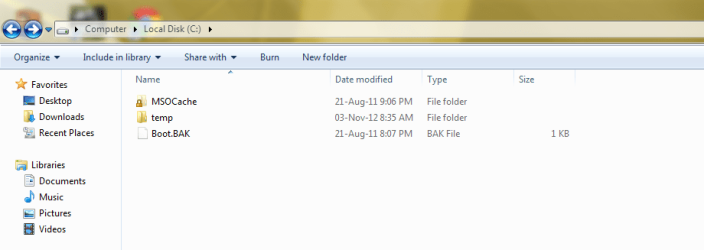
This is the image of hidden files in local disk C:(
 

Attachments

  • Capture.PNG
    Capture.PNG
    21.1 KB · Views: 17

My Computer My Computer

Computer Manufacturer/Model Number
H.P.
OS
genuine Windows 7 Ultimate 32 Bit
CPU
Dual core .... 3 Ghz
Motherboard
GIGABYTE GA - G41MT - S2P
Memory
2 GB DDR 3
Graphics Card(s)
INTEL G41 EXPRESS CHIPSET
Monitor(s) Displays
22'' LCD Flatron L.G
Hard Drives
500 GB SATA
Mouse
intex
Internet Speed
250 kbps to 4.8 mbps
MSOCACHE is something of ms office which version of ms office do you have?
 

My Computer My Computer

Computer type
Laptop
Computer Manufacturer/Model Number
ACER ASPIRE 5742G
OS
Microsoft Windows 7 Home Premium 64-bits 7601 Multiprocessor Free Service Pack 1
CPU
Intel(R) Core(TM) i3 CPU M 370 @ 2.40GHz
Motherboard
Acer Aspire 5742G
Memory
4,00 GB
Graphics Card(s)
ATI Mobility Radeon HD 5400 Series
Sound Card
(1) AMD High Definition Audio Device (2) Realtek High Defi
Screen Resolution
1366 x 768 x 32 bits (4294967296 colors) @ 60 Hz
Hard Drives
WDC WD5000BEVT-22ZAT0

My Computer My Computer

Computer Manufacturer/Model Number
H.P.
OS
genuine Windows 7 Ultimate 32 Bit
CPU
Dual core .... 3 Ghz
Motherboard
GIGABYTE GA - G41MT - S2P
Memory
2 GB DDR 3
Graphics Card(s)
INTEL G41 EXPRESS CHIPSET
Monitor(s) Displays
22'' LCD Flatron L.G
Hard Drives
500 GB SATA
Mouse
intex
Internet Speed
250 kbps to 4.8 mbps

My Computer My Computer

Computer type
Laptop
Computer Manufacturer/Model Number
ACER ASPIRE 5742G
OS
Microsoft Windows 7 Home Premium 64-bits 7601 Multiprocessor Free Service Pack 1
CPU
Intel(R) Core(TM) i3 CPU M 370 @ 2.40GHz
Motherboard
Acer Aspire 5742G
Memory
4,00 GB
Graphics Card(s)
ATI Mobility Radeon HD 5400 Series
Sound Card
(1) AMD High Definition Audio Device (2) Realtek High Defi
Screen Resolution
1366 x 768 x 32 bits (4294967296 colors) @ 60 Hz
Hard Drives
WDC WD5000BEVT-22ZAT0

My Computer My Computer

Computer type
Laptop
Computer Manufacturer/Model Number
ACER ASPIRE 5742G
OS
Microsoft Windows 7 Home Premium 64-bits 7601 Multiprocessor Free Service Pack 1
CPU
Intel(R) Core(TM) i3 CPU M 370 @ 2.40GHz
Motherboard
Acer Aspire 5742G
Memory
4,00 GB
Graphics Card(s)
ATI Mobility Radeon HD 5400 Series
Sound Card
(1) AMD High Definition Audio Device (2) Realtek High Defi
Screen Resolution
1366 x 768 x 32 bits (4294967296 colors) @ 60 Hz
Hard Drives
WDC WD5000BEVT-22ZAT0

My Computer My Computer

Computer Manufacturer/Model Number
H.P.
OS
genuine Windows 7 Ultimate 32 Bit
CPU
Dual core .... 3 Ghz
Motherboard
GIGABYTE GA - G41MT - S2P
Memory
2 GB DDR 3
Graphics Card(s)
INTEL G41 EXPRESS CHIPSET
Monitor(s) Displays
22'' LCD Flatron L.G
Hard Drives
500 GB SATA
Mouse
intex
Internet Speed
250 kbps to 4.8 mbps
Is D drive partition already type PRIMARY???????????!!! Do that first
 

My Computer My Computer

Computer type
Laptop
Computer Manufacturer/Model Number
ACER ASPIRE 5742G
OS
Microsoft Windows 7 Home Premium 64-bits 7601 Multiprocessor Free Service Pack 1
CPU
Intel(R) Core(TM) i3 CPU M 370 @ 2.40GHz
Motherboard
Acer Aspire 5742G
Memory
4,00 GB
Graphics Card(s)
ATI Mobility Radeon HD 5400 Series
Sound Card
(1) AMD High Definition Audio Device (2) Realtek High Defi
Screen Resolution
1366 x 768 x 32 bits (4294967296 colors) @ 60 Hz
Hard Drives
WDC WD5000BEVT-22ZAT0

My Computer My Computer

Computer Manufacturer/Model Number
H.P.
OS
genuine Windows 7 Ultimate 32 Bit
CPU
Dual core .... 3 Ghz
Motherboard
GIGABYTE GA - G41MT - S2P
Memory
2 GB DDR 3
Graphics Card(s)
INTEL G41 EXPRESS CHIPSET
Monitor(s) Displays
22'' LCD Flatron L.G
Hard Drives
500 GB SATA
Mouse
intex
Internet Speed
250 kbps to 4.8 mbps
Here is what you need to do:

1. Make the D partition 'Primary'. You can do that with Disk Management or with the bootable CD of Partition Wizard (last entry on the page).

Burn that to CD and boot with that CD. Highlight the D partition, go to the Partition tab > Modify.

2. Deactivate the C partition and then activate the D partition. Do that with the Partition Wizard CD.

3. Run Startup/repair 3 times to get the bootmgr on D. http://www.sevenforums.com/tutorials/105541-startup-repair-run-3-separate-times.html

4. Test whether your system boots - if yes, you can delete the old C.
 

My Computer My Computer

Computer Manufacturer/Model Number
HP, Dell, Gateway, Toshiba - 4 laptops and 2 desktops
OS
Vista, Windows7, Mint Mate, Zorin, Windows 8
CPU
from 1.6GHz Duo to i7
Monitor(s) Displays
2x HP w2207
Hard Drives
5x HDD, 7x SSD, 12x Externals
Keyboard
with trackball - no mices
Mouse
Trackball mice
Internet Speed
DSL 6000
Mark the win7 partition active, so that's the boot partition
How to Set Active/Inactive partition with partition magic? Partition Wizard Video Help.
But first make win7 partition primary
Video help on how to set partition as Primary or Logical.
now press apply so it does what it should do.
System won't boot succesfully afterwards.
Boot from win7 install dvd or system repair disc and do a startup repair 3 times with reboots in between.
http://www.sevenforums.com/tutorials/681-startup-repair.html
Now boot normally.
Now you can delete or format the partition within disk management.
 

My Computer My Computer

Computer type
Laptop
Computer Manufacturer/Model Number
ACER ASPIRE 5742G
OS
Microsoft Windows 7 Home Premium 64-bits 7601 Multiprocessor Free Service Pack 1
CPU
Intel(R) Core(TM) i3 CPU M 370 @ 2.40GHz
Motherboard
Acer Aspire 5742G
Memory
4,00 GB
Graphics Card(s)
ATI Mobility Radeon HD 5400 Series
Sound Card
(1) AMD High Definition Audio Device (2) Realtek High Defi
Screen Resolution
1366 x 768 x 32 bits (4294967296 colors) @ 60 Hz
Hard Drives
WDC WD5000BEVT-22ZAT0
Mark the win7 partition active, so that's the boot partition
How to Set Active/Inactive partition with partition magic? Partition Wizard Video Help.
But first make win7 partition primary
Video help on how to set partition as Primary or Logical.
now press apply so it does what it should do.
System won't boot succesfully afterwards.
Boot from win7 install dvd or system repair disc and do a startup repair 3 times with reboots in between.
http://www.sevenforums.com/tutorials/681-startup-repair.html
Now boot normally.
Now you can delete or format the partition within disk management.

HOW to mark it as active there is no option ...
 

My Computer My Computer

Computer Manufacturer/Model Number
H.P.
OS
genuine Windows 7 Ultimate 32 Bit
CPU
Dual core .... 3 Ghz
Motherboard
GIGABYTE GA - G41MT - S2P
Memory
2 GB DDR 3
Graphics Card(s)
INTEL G41 EXPRESS CHIPSET
Monitor(s) Displays
22'' LCD Flatron L.G
Hard Drives
500 GB SATA
Mouse
intex
Internet Speed
250 kbps to 4.8 mbps
You have to first mark the C partition inactive. There cannot be 2 active partitions on one disk. Do all that with the PW bootable disc. see above.
 

My Computer My Computer

Computer Manufacturer/Model Number
HP, Dell, Gateway, Toshiba - 4 laptops and 2 desktops
OS
Vista, Windows7, Mint Mate, Zorin, Windows 8
CPU
from 1.6GHz Duo to i7
Monitor(s) Displays
2x HP w2207
Hard Drives
5x HDD, 7x SSD, 12x Externals
Keyboard
with trackball - no mices
Mouse
Trackball mice
Internet Speed
DSL 6000
Mark the win7 partition active, so that's the boot partition
How to Set Active/Inactive partition with partition magic? Partition Wizard Video Help.
But first make win7 partition primary
Video help on how to set partition as Primary or Logical.
now press apply so it does what it should do.
System won't boot succesfully afterwards.
Boot from win7 install dvd or system repair disc and do a startup repair 3 times with reboots in between.
http://www.sevenforums.com/tutorials/681-startup-repair.html
Now boot normally.
Now you can delete or format the partition within disk management.

HOW to mark it as active there is no option ...
First make D PRIMARY
 

My Computer My Computer

Computer type
Laptop
Computer Manufacturer/Model Number
ACER ASPIRE 5742G
OS
Microsoft Windows 7 Home Premium 64-bits 7601 Multiprocessor Free Service Pack 1
CPU
Intel(R) Core(TM) i3 CPU M 370 @ 2.40GHz
Motherboard
Acer Aspire 5742G
Memory
4,00 GB
Graphics Card(s)
ATI Mobility Radeon HD 5400 Series
Sound Card
(1) AMD High Definition Audio Device (2) Realtek High Defi
Screen Resolution
1366 x 768 x 32 bits (4294967296 colors) @ 60 Hz
Hard Drives
WDC WD5000BEVT-22ZAT0
Mark the win7 partition active, so that's the boot partition
How to Set Active/Inactive partition with partition magic? Partition Wizard Video Help.
But first make win7 partition primary
Video help on how to set partition as Primary or Logical.
now press apply so it does what it should do.
System won't boot succesfully afterwards.
Boot from win7 install dvd or system repair disc and do a startup repair 3 times with reboots in between.
http://www.sevenforums.com/tutorials/681-startup-repair.html
Now boot normally.
Now you can delete or format the partition within disk management.

HOW to mark it as active there is no option ...

I have been monitoring this thread and believe it may be beneficial if you have a friend help you with this process. It can get confusing and usually two heads are better than one.

Just my .02 pennies.
 

My Computer My Computer

Computer type
PC/Desktop
Computer Manufacturer/Model Number
Custom Built
OS
Windows 7 Professional x64
CPU
Intel i5 quad processor
Motherboard
DP67BG
Memory
16 GB
Graphics Card(s)
Radeon HD 5770
Sound Card
Realtek High Definition Audio
Monitor(s) Displays
Samsung SyncMaster
Screen Resolution
1920X1080
Hard Drives
WD 2TB (SATA Internal)
WD 1TB (USB External)
PSU
Corsair GS800
Case
Tower (Generic)
Cooling
3 Internal Fans
Keyboard
MS Wireless
Mouse
MS Optical Wired
Internet Speed
54 mbps
Antivirus
Emsisoft
Browser
IE-Version 9, Palemoon-Version 24.2.0
Mark the win7 partition active, so that's the boot partition
How to Set Active/Inactive partition with partition magic? Partition Wizard Video Help.
But first make win7 partition primary
Video help on how to set partition as Primary or Logical.
now press apply so it does what it should do.
System won't boot succesfully afterwards.
Boot from win7 install dvd or system repair disc and do a startup repair 3 times with reboots in between.
http://www.sevenforums.com/tutorials/681-startup-repair.html
Now boot normally.
Now you can delete or format the partition within disk management.

HOW to mark it as active there is no option ...
First make D PRIMARY

I have inactivated c and i m going to active D
 

My Computer My Computer

Computer Manufacturer/Model Number
H.P.
OS
genuine Windows 7 Ultimate 32 Bit
CPU
Dual core .... 3 Ghz
Motherboard
GIGABYTE GA - G41MT - S2P
Memory
2 GB DDR 3
Graphics Card(s)
INTEL G41 EXPRESS CHIPSET
Monitor(s) Displays
22'' LCD Flatron L.G
Hard Drives
500 GB SATA
Mouse
intex
Internet Speed
250 kbps to 4.8 mbps
i m going to reboot
 

My Computer My Computer

Computer Manufacturer/Model Number
H.P.
OS
genuine Windows 7 Ultimate 32 Bit
CPU
Dual core .... 3 Ghz
Motherboard
GIGABYTE GA - G41MT - S2P
Memory
2 GB DDR 3
Graphics Card(s)
INTEL G41 EXPRESS CHIPSET
Monitor(s) Displays
22'' LCD Flatron L.G
Hard Drives
500 GB SATA
Mouse
intex
Internet Speed
250 kbps to 4.8 mbps
i m going to reboot
It won't boot now, because bootmgr and bootmenu are not on active boot partition! Do a startup repair 3 times, as told you a few posts before
 

My Computer My Computer

Computer type
Laptop
Computer Manufacturer/Model Number
ACER ASPIRE 5742G
OS
Microsoft Windows 7 Home Premium 64-bits 7601 Multiprocessor Free Service Pack 1
CPU
Intel(R) Core(TM) i3 CPU M 370 @ 2.40GHz
Motherboard
Acer Aspire 5742G
Memory
4,00 GB
Graphics Card(s)
ATI Mobility Radeon HD 5400 Series
Sound Card
(1) AMD High Definition Audio Device (2) Realtek High Defi
Screen Resolution
1366 x 768 x 32 bits (4294967296 colors) @ 60 Hz
Hard Drives
WDC WD5000BEVT-22ZAT0
  • Like
Reactions: whs
When i was using xp it was installed in C but after that i have installed 7 in D and formated XP which was in C .

You could not have formatted XP with the Win7 boot files residing there. It would have refused formatting due to the presence of boot files, or else 7 would not be able to boot and C would not have the System flag.

So you likely still have XP on C.

If you would like to have Win7 on C as most do, then I'd reinstall to C after moving any data off of the HD. During install delete it and and other partitions not needed, then repartition or let installer do it for you by clicking Next.

If you want to keep Win7 on D then convert to Primary, mark it Active, boot into WIn7 installer to run Startup Repair - Run up to 3 Separate Times.
How to set partition as Primary with partition manager? posted twice
How to Set Active/Inactive partition -Partition Wizard Video Help.

You can then delete C in Disk Mgmt which is how an OS is correctly removed, then either create a new Data partition there, or resize D into the space using Partition Wizard Move/Resize Partition Video Help.

Feel free to ask back any questions for clarification.
 
Thank You all for helping me i have done it successfully .. thank you very much :)
 

My Computer My Computer

Computer Manufacturer/Model Number
H.P.
OS
genuine Windows 7 Ultimate 32 Bit
CPU
Dual core .... 3 Ghz
Motherboard
GIGABYTE GA - G41MT - S2P
Memory
2 GB DDR 3
Graphics Card(s)
INTEL G41 EXPRESS CHIPSET
Monitor(s) Displays
22'' LCD Flatron L.G
Hard Drives
500 GB SATA
Mouse
intex
Internet Speed
250 kbps to 4.8 mbps
Back
Top