Solved unable to format local disk C

MRINAL KANT

New member
Local time
6:32 AM
Messages
24
Location
India
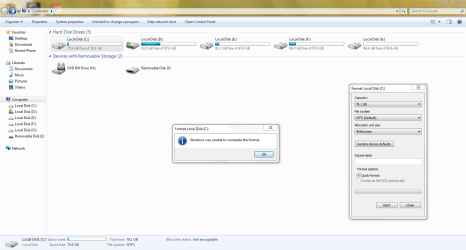
when i used to format my PC's local disk C then it always shows the message that windows is unable to complete the format .......
i have nothing installed or saved any thing in this drive not even a 1kb file ....
but it always shows 2.2 GB used space .
please tell what to do ...:cry:
 

Attachments

  • my computer.PNG
    my computer.PNG
    58.3 KB · Views: 73

My Computer

Computer Manufacturer/Model Number
H.P.
OS
genuine Windows 7 Ultimate 32 Bit
CPU
Dual core .... 3 Ghz
Motherboard
GIGABYTE GA - G41MT - S2P
Memory
2 GB DDR 3
Graphics Card(s)
INTEL G41 EXPRESS CHIPSET
Monitor(s) Displays
22'' LCD Flatron L.G
Hard Drives
500 GB SATA
Mouse
intex
Internet Speed
250 kbps to 4.8 mbps

My Computer

Computer type
PC/Desktop
Computer Manufacturer/Model Number
Golden Mk. I.4
OS
Windows 10 Pro x64 ; Xubuntu x64
CPU
Intel i7 860 @ 2.80 GHz O/C'ed to 4.0GHz
Motherboard
Gigabyte P55A-UD3R Rev.1. Award BIOS F13
Memory
16GB Corsair Vengance DDR3 @ 661 MHz Dual Channel (9-9-9-24)
Graphics Card(s)
EVGA NVidia GTX 560 1024MB
Sound Card
Realtek Integrated
Monitor(s) Displays
Dual Samsung SyncMaster 2494HS
Screen Resolution
1920*1080 and 1920*1080
Hard Drives
1*Samsung 840 EVO 120GB SSD;
1*OCZ Vertex 2 60GB SSD;
2*Samsung F3 SpinPoint 1TB in RAID0;
1*Samsung F1 SpinPoint 1TB;
2*Western Digital 1TB External USB 3.0
1*Western Digital 500GB External USB 3.0
1*Seagate 500GB External USB 2.0
PSU
Thermaltake ToughPower QFan 750W
Case
Thermaltake Element S VK60001W2Z
Cooling
Corsair H60 Water Cooling, 2*230mm and 2*80mm case fans
Keyboard
Logitech G110
Mouse
Logitech MX518
why i can't format it within windows ?
 

My Computer

Computer Manufacturer/Model Number
H.P.
OS
genuine Windows 7 Ultimate 32 Bit
CPU
Dual core .... 3 Ghz
Motherboard
GIGABYTE GA - G41MT - S2P
Memory
2 GB DDR 3
Graphics Card(s)
INTEL G41 EXPRESS CHIPSET
Monitor(s) Displays
22'' LCD Flatron L.G
Hard Drives
500 GB SATA
Mouse
intex
Internet Speed
250 kbps to 4.8 mbps
I have tried many other tools but nothing happens the problem continued :(
 

My Computer

Computer Manufacturer/Model Number
H.P.
OS
genuine Windows 7 Ultimate 32 Bit
CPU
Dual core .... 3 Ghz
Motherboard
GIGABYTE GA - G41MT - S2P
Memory
2 GB DDR 3
Graphics Card(s)
INTEL G41 EXPRESS CHIPSET
Monitor(s) Displays
22'' LCD Flatron L.G
Hard Drives
500 GB SATA
Mouse
intex
Internet Speed
250 kbps to 4.8 mbps
You cannot format the partition which is currently running Windows 7. How would it run to do this? :huh:

Are you planning to reinstall the OS? If so boot the Win7 installer, choose Custom Install, then use the Drive Options to format C before choosing it to reinstall. You can also delete any other partitions you don't want, even C, to repartition as desired.

If you'd post back a screenshot of your maximized Disk Mgmt drive map and listings, using the Snipping Tool in Start Menu, we can advise you how to do most anything you want to do with your partitions.
 
You cannot format the partition which is currently running Windows 7. How would it run to do this? :huh:

Are you planning to reinstall the OS? If so boot the Win7 installer, choose Custom Install, then use the Drive Options to format C before choosing it to reinstall. You can also delete any other partitions you don't want, even C, to repartition as desired.

If you'd post back a screenshot of your maximized Disk Mgmt drive map and listings, using the Snipping Tool in Start Menu, we can advise you how to do most anything you want to do with your partitions.

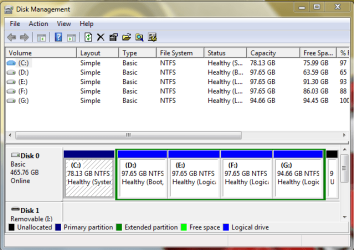
My windows 7 is installed in local disk D not in C ...
:huh:
 

Attachments

  • Capture.PNG
    Capture.PNG
    11 KB · Views: 8
  • Capture 1.PNG
    Capture 1.PNG
    4.3 KB · Views: 9

My Computer

Computer Manufacturer/Model Number
H.P.
OS
genuine Windows 7 Ultimate 32 Bit
CPU
Dual core .... 3 Ghz
Motherboard
GIGABYTE GA - G41MT - S2P
Memory
2 GB DDR 3
Graphics Card(s)
INTEL G41 EXPRESS CHIPSET
Monitor(s) Displays
22'' LCD Flatron L.G
Hard Drives
500 GB SATA
Mouse
intex
Internet Speed
250 kbps to 4.8 mbps
I have tried many other tools but nothing happens the problem continued :(

Have you tried Partition Wizard as suggested by Golden in post #2 in this thread?

HTH
 

My Computer

Computer type
PC/Desktop
Computer Manufacturer/Model Number
Custom Built
OS
Windows 7 Professional x64
CPU
Intel i5 quad processor
Motherboard
DP67BG
Memory
16 GB
Graphics Card(s)
Radeon HD 5770
Sound Card
Realtek High Definition Audio
Monitor(s) Displays
Samsung SyncMaster
Screen Resolution
1920X1080
Hard Drives
WD 2TB (SATA Internal)
WD 1TB (USB External)
PSU
Corsair GS800
Case
Tower (Generic)
Cooling
3 Internal Fans
Keyboard
MS Wireless
Mouse
MS Optical Wired
Internet Speed
54 mbps
Antivirus
Emsisoft
Browser
IE-Version 9, Palemoon-Version 24.2.0

My Computer

Computer Manufacturer/Model Number
H.P.
OS
genuine Windows 7 Ultimate 32 Bit
CPU
Dual core .... 3 Ghz
Motherboard
GIGABYTE GA - G41MT - S2P
Memory
2 GB DDR 3
Graphics Card(s)
INTEL G41 EXPRESS CHIPSET
Monitor(s) Displays
22'' LCD Flatron L.G
Hard Drives
500 GB SATA
Mouse
intex
Internet Speed
250 kbps to 4.8 mbps
Can you post a picture of your Disk Management? Maybe we can see what's odd with the C partition.
 

My Computer

Computer Manufacturer/Model Number
HP, Dell, Gateway, Toshiba - 4 laptops and 2 desktops
OS
Vista, Windows7, Mint Mate, Zorin, Windows 8
CPU
from 1.6GHz Duo to i7
Monitor(s) Displays
2x HP w2207
Hard Drives
5x HDD, 7x SSD, 12x Externals
Keyboard
with trackball - no mices
Mouse
Trackball mice
Internet Speed
DSL 6000
Can you post a picture of your Disk Management? Maybe we can see what's odd with the C partition.

yes why not ... but please wait
 

My Computer

Computer Manufacturer/Model Number
H.P.
OS
genuine Windows 7 Ultimate 32 Bit
CPU
Dual core .... 3 Ghz
Motherboard
GIGABYTE GA - G41MT - S2P
Memory
2 GB DDR 3
Graphics Card(s)
INTEL G41 EXPRESS CHIPSET
Monitor(s) Displays
22'' LCD Flatron L.G
Hard Drives
500 GB SATA
Mouse
intex
Internet Speed
250 kbps to 4.8 mbps
there it is :(
 

Attachments

  • seven.PNG
    seven.PNG
    19.3 KB · Views: 28

My Computer

Computer Manufacturer/Model Number
H.P.
OS
genuine Windows 7 Ultimate 32 Bit
CPU
Dual core .... 3 Ghz
Motherboard
GIGABYTE GA - G41MT - S2P
Memory
2 GB DDR 3
Graphics Card(s)
INTEL G41 EXPRESS CHIPSET
Monitor(s) Displays
22'' LCD Flatron L.G
Hard Drives
500 GB SATA
Mouse
intex
Internet Speed
250 kbps to 4.8 mbps
It is hard to tell because you did not expand the upper field called "Status". But it looks like your C partition is the System partition which contains the bootmgr.

Please check that. Expand the field "Status" and see whether it says "System" and "Active". If that is the case, deleting the partition would make your system unbootable. Post back and we'll tell you what you need to do.
 

My Computer

Computer Manufacturer/Model Number
HP, Dell, Gateway, Toshiba - 4 laptops and 2 desktops
OS
Vista, Windows7, Mint Mate, Zorin, Windows 8
CPU
from 1.6GHz Duo to i7
Monitor(s) Displays
2x HP w2207
Hard Drives
5x HDD, 7x SSD, 12x Externals
Keyboard
with trackball - no mices
Mouse
Trackball mice
Internet Speed
DSL 6000
Please post back a screenshot of your maximized Disk Management drive map and listings:

1. Type Disk Management in Start Search box.
2. Open Disk Mgmt. window and maximize it.
3. Type Snipping Tool in Start Search box.
4. Open Snipping Tool, choose Rectangular Snip, click New, draw a box around full drive map and all listings.
5, Save Snip, attach using paper clip in Reply Box.

Tell us what is on each partition.

Were you not aware you are to boot the WIn7 installer to install it? If you're installed on D it is because you incorrectly ran the installer from another OS. Do you still have another OS on C?
 
Greg, there is a screenshot 3 posts ahead. But you can't see much because he did not expand the status field. But since the C partition is the only primary partition (judging by the color), I assume it contains the bootmgr.
 

My Computer

Computer Manufacturer/Model Number
HP, Dell, Gateway, Toshiba - 4 laptops and 2 desktops
OS
Vista, Windows7, Mint Mate, Zorin, Windows 8
CPU
from 1.6GHz Duo to i7
Monitor(s) Displays
2x HP w2207
Hard Drives
5x HDD, 7x SSD, 12x Externals
Keyboard
with trackball - no mices
Mouse
Trackball mice
Internet Speed
DSL 6000
Righto Wolfgang - just asking for the fuller DM screenshot to confirm all the flags..

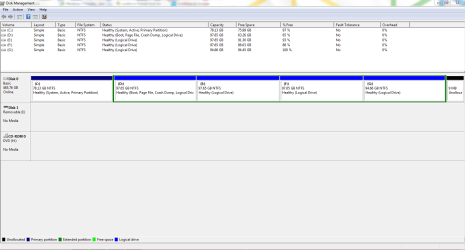
C is clearly System holding the boot files, which is why it won't format and likely had/has an OS he ran WIn7 installer from.

D has Win7 as signified by boot flag but can't host boot files since it's Logical. So he can either convert D to Primary to claim the Win7 boot files allowing C to be formatted, or leave the C boot partition as it is having a data partition host the boot files.

I would myself either reinstall WIn7 to C or if he wants Win8 install it there which itself would take care of the 7 boot files by configuring a Dual Boot.
 
It is hard to tell because you did not expand the upper field called "Status". But it looks like your C partition is the System partition which contains the bootmgr.

Please check that. Expand the field "Status" and see whether it says "System" and "Active". If that is the case, deleting the partition would make your system unbootable. Post back and we'll tell you what you need to do.
this is enlarged image .:confused:
 

Attachments

  • Capture.PNG
    Capture.PNG
    26.2 KB · Views: 21

My Computer

Computer Manufacturer/Model Number
H.P.
OS
genuine Windows 7 Ultimate 32 Bit
CPU
Dual core .... 3 Ghz
Motherboard
GIGABYTE GA - G41MT - S2P
Memory
2 GB DDR 3
Graphics Card(s)
INTEL G41 EXPRESS CHIPSET
Monitor(s) Displays
22'' LCD Flatron L.G
Hard Drives
500 GB SATA
Mouse
intex
Internet Speed
250 kbps to 4.8 mbps
Your bootmgr and bootmenu are on C!! How did you install WIN7?? It looks drive letter C was already in use when installing win7. So not done by booting by win7 install DVD. Did you install WIN7 when booted in another win7/vista/winxp?

As greg told you ... first convert D (your win7 partition) to PRIMARY with partition wizard.
How to set partition as Primary with partition manager?
Post screenshot of disk managment afterwards
 

My Computer

Computer type
Laptop
Computer Manufacturer/Model Number
ACER ASPIRE 5742G
OS
Microsoft Windows 7 Home Premium 64-bits 7601 Multiprocessor Free Service Pack 1
CPU
Intel(R) Core(TM) i3 CPU M 370 @ 2.40GHz
Motherboard
Acer Aspire 5742G
Memory
4,00 GB
Graphics Card(s)
ATI Mobility Radeon HD 5400 Series
Sound Card
(1) AMD High Definition Audio Device (2) Realtek High Defi
Screen Resolution
1366 x 768 x 32 bits (4294967296 colors) @ 60 Hz
Hard Drives
WDC WD5000BEVT-22ZAT0
BTW why do you want to delete C? Do you want to add that space to D?
 

My Computer

Computer type
Laptop
Computer Manufacturer/Model Number
ACER ASPIRE 5742G
OS
Microsoft Windows 7 Home Premium 64-bits 7601 Multiprocessor Free Service Pack 1
CPU
Intel(R) Core(TM) i3 CPU M 370 @ 2.40GHz
Motherboard
Acer Aspire 5742G
Memory
4,00 GB
Graphics Card(s)
ATI Mobility Radeon HD 5400 Series
Sound Card
(1) AMD High Definition Audio Device (2) Realtek High Defi
Screen Resolution
1366 x 768 x 32 bits (4294967296 colors) @ 60 Hz
Hard Drives
WDC WD5000BEVT-22ZAT0
Your bootmgr and bootmenu are on C!! How did you install WIN7?? It looks drive letter C was already in use when installing win7. So not done by booting by win7 install DVD. Did you install WIN7 when booted in another win7/vista/winxp?

As greg told you ... first convert D (your win7 partition) to PRIMARY with partition wizard.
How to set partition as Primary with partition manager?
Post screenshot of disk managment afterwards

When i was using xp it was installed in C but after that i have installed 7 in D and formated XP which was in C .
 

My Computer

Computer Manufacturer/Model Number
H.P.
OS
genuine Windows 7 Ultimate 32 Bit
CPU
Dual core .... 3 Ghz
Motherboard
GIGABYTE GA - G41MT - S2P
Memory
2 GB DDR 3
Graphics Card(s)
INTEL G41 EXPRESS CHIPSET
Monitor(s) Displays
22'' LCD Flatron L.G
Hard Drives
500 GB SATA
Mouse
intex
Internet Speed
250 kbps to 4.8 mbps
Your bootmgr and bootmenu are on C!! How did you install WIN7?? It looks drive letter C was already in use when installing win7. So not done by booting by win7 install DVD. Did you install WIN7 when booted in another win7/vista/winxp?

As greg told you ... first convert D (your win7 partition) to PRIMARY with partition wizard.
How to set partition as Primary with partition manager?
Post screenshot of disk managment afterwards

When i was using xp it was installed in C but after that i have installed 7 in D and formated XP which was in C .
So you installed win7 from within winxp (which already has C assigned).

Not a real problem. Except the fact that most tutorials point to C drive in explanation. And some bad written scripts reference to C.
 

My Computer

Computer type
Laptop
Computer Manufacturer/Model Number
ACER ASPIRE 5742G
OS
Microsoft Windows 7 Home Premium 64-bits 7601 Multiprocessor Free Service Pack 1
CPU
Intel(R) Core(TM) i3 CPU M 370 @ 2.40GHz
Motherboard
Acer Aspire 5742G
Memory
4,00 GB
Graphics Card(s)
ATI Mobility Radeon HD 5400 Series
Sound Card
(1) AMD High Definition Audio Device (2) Realtek High Defi
Screen Resolution
1366 x 768 x 32 bits (4294967296 colors) @ 60 Hz
Hard Drives
WDC WD5000BEVT-22ZAT0
Back
Top