I have had the same problem when I was using Hotmail and now that I have switched to Outlook.com I am still unable to open or activate links in e-mails which are sent to me.
IE 9 ( not 64 bit) is the default browser and Windows Live Mail is the default e-mail on my computer.
I suspect that I have clicked or changed something on my PC which I should'nt have done.
Can anybody help me out on this one?
Potchboy
My Computer
At a glance
Windows 7 Home Premium 64 bitIntel Core i3 2nd generation4 Gigabyte DDR3 1333 Mhz
OS
Windows 7 Home Premium 64 bit
CPU
Intel Core i3 2nd generation
Motherboard
Foxconn H61 M
Memory
4 Gigabyte DDR3 1333 Mhz
Monitor(s) Displays
Samsung 20 inch LED
Hard Drives
Seagate 500GB 7200rpm SATA
Samsung DVDRW Internal SATA
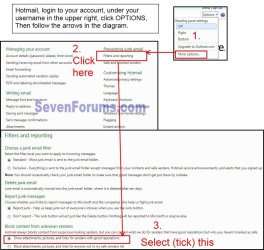
Outlook and Hotmail will by default block links in emails. This is to protect the system. There should be a warning shown for you to allow blocked content.
My Computer
At a glance
Windows 7 Ultimate X64 SP1Intel i5-2550K, Differing ~4.4-4.8GHz No buil...16GB G.Skill Sniper 1866MHz @ 2133MHz 2x8GBASUS GTX650TIB-DC2OC-2GD5, (650TI Boost)
Computer type
PC/Desktop
Computer Manufacturer/Model Number
Home Built Desktop By DataTech
OS
Windows 7 Ultimate X64 SP1
CPU
Intel i5-2550K, Differing ~4.4-4.8GHz No built in GPU
Motherboard
ASUS P8Z68-V PRO/GEN3
Memory
16GB G.Skill Sniper 1866MHz @ 2133MHz 2x8GB
Graphics Card(s)
ASUS GTX650TIB-DC2OC-2GD5, (650TI Boost)
Sound Card
Onboard Realtek 5-1
Monitor(s) Displays
Samsung P2570HD
Screen Resolution
1920x1080
Hard Drives
Samsung 840 Pro 256GB SSD for OS, 500GB Seagate Constellation (Enterprise drive) for Data
PSU
Corsair HX650W
Case
Inwin Dragon Rider
Cooling
Hyper 212 EVO w/two Noctua fans, push-pull, @1300 RPM
Keyboard
E-Z Eyes, bright yellow keys with large characters
Mouse
steelseries SENSEI Laser Pro Gaming
Internet Speed
48-51Mbs Mbs down, 11 Mbs up Xfinity Cable
Antivirus
Norton Internet Security 2013
Browser
IE 10, Opera, Pale Moon if needed
Other Info
4 case fans, LG BluRay-RE, ASUS DVD-RW, Mr. Fusion power supply, 1.21 gigawatts.
Thank you for this info. I have not noticed any request to allow blocked content when I click on the links?
Is there a command that I can set to select this option for all incoming mail?
My Computer
At a glance
Windows 7 Home Premium 64 bitIntel Core i3 2nd generation4 Gigabyte DDR3 1333 Mhz
OS
Windows 7 Home Premium 64 bit
CPU
Intel Core i3 2nd generation
Motherboard
Foxconn H61 M
Memory
4 Gigabyte DDR3 1333 Mhz
Monitor(s) Displays
Samsung 20 inch LED
Hard Drives
Seagate 500GB 7200rpm SATA
Samsung DVDRW Internal SATA
Go to Start and select Default Programs. At the top you will see (Set your DefaultPrograms). Use that to select I.E. and Live Mail as your default programs. Reboot. Check and see if your hyper links will work in your emails.
My Computer
At a glance
Windows 10 Pro. 64/ version 1709 Windows 7 Pr...Intel i7-6800K @ 4.3Corsair Platinum 16 gig @2400EVGA GTX 1070 OC
Computer type
PC/Desktop
Computer Manufacturer/Model Number
Home made Desktop
OS
Windows 10 Pro. 64/ version 1709 Windows 7 Pro/64
CPU
Intel i7-6800K @ 4.3
Motherboard
ASUS X-99 Deluxe II
Memory
Corsair Platinum 16 gig @2400
Graphics Card(s)
EVGA GTX 1070 OC
Monitor(s) Displays
Asus 27" LED LCD/VE278Q
Screen Resolution
1920-1080 or 1280-720 HDMI
Hard Drives
INTEL SSD 730-240 Gb Sata 3.0/
PSU
EVGA Platium 1200W
Case
Phanteks Luxe Tempered Glass 8 fans/ one radiator
Cooling
XSPC/ Water Cooled CPU
Keyboard
Das 4 Professional
Mouse
Logitech M705/MX Anywhere 2-S
Internet Speed
100 mbits
Antivirus
Microsoft Security Essentials/ Malwarebytes Premium 3.0/ SAS
Browser
I.E. 11 default/Firefox/ ISP Time Warner Cable/Spectrum
Other Info
LG BluRay Burner/
Sound system-KLipsch-THX/
Icy Dock ssd Hot Swap bays.