Unable to open F: drive, "Application Not Found" error

JROC

New member
Local time
12:09 AM
Messages
2
Recently, I've been unable to access my F: drive. When I double click on the drive I get en error that says "Application Not Found". I can, however right click on the drive and open it that way, it's just extremely annoying. It doesn't matter what device is set as the F: drive, be it a UBS drive, a virtual drive, or a CD/DVD drive, it gives me the same error. At first I thought maybe there was something wrong with my USB drive, but if I use the same USB drive as E:, G:, H: etc. it works perfectly fine. The problem seems to lie specifically with F: drive itself. I've run all my virus scans (Norton and Malwarebytes) as well as PC Tools Registry Mechanic and found nothing. I even restored my system to about a week ago with no results. Any help would be appreciated.
 

My Computer

OS
Windows 7 Home Premuim x64
CPU
Intel Core i5 750
Motherboard
Gigabyte P55A-UD3
Memory
8GB Corsair XMS3
Graphics Card(s)
Nvidia GTX460
Hard Drives
1TB Western Digital Caviar Black
Hi JROC, Welcome to Seven Forums.

Connect your drive to the pc directly, open Disk Management, look for the drive, right click it and uninstall then reboot with it still connected.
 

My Computer

Computer Manufacturer/Model Number
Look in my Signature.
OS
Win7 H.Prem. 32bit+SP1
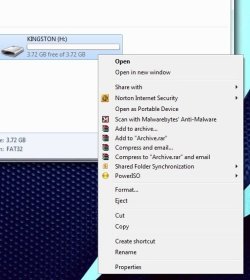
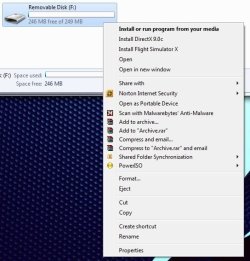
I did come across something interesting though. I previously installed Flight Simulator X using either MagicISO or PowerISO as a virtual drive. At that time, I believe that I installed it using the F: drive as the virtual drive. Im going to attach a couple pics, one is of a USB drive as any random drive, and the other is a UBS drive as the F: drive. When I right click, my options are different. With the F: drive, the default action is "install or run a program from your media", as well as install direct X and install flight simulator. Could the fact that I installed flight simulator on the F: drive be messing it up? keep in mind all of my virtual drives are unmounted. How do I change the default action on the F: drive back to "open" like the other drives?
 

Attachments

  • pic 1.jpg
    pic 1.jpg
    33.6 KB · Views: 23
  • pic 2.jpg
    pic 2.jpg
    42.9 KB · Views: 20

My Computer

OS
Windows 7 Home Premuim x64
CPU
Intel Core i5 750
Motherboard
Gigabyte P55A-UD3
Memory
8GB Corsair XMS3
Graphics Card(s)
Nvidia GTX460
Hard Drives
1TB Western Digital Caviar Black
Well, first of all, I know nothing about virtual drives. Can Flight Simulator be installed in the normal way onto your pc. If it can, why not do it. Then format the USB in NTFS format.
 

My Computer

Computer Manufacturer/Model Number
Look in my Signature.
OS
Win7 H.Prem. 32bit+SP1
i am able to boot from boot-able disc but within OS windows 7 it is unable to read any kind of CD or DVD please suggest any solution if any registry value need to be change please suggest
 

My Computer

OS
windows 7 Ultimate 32bit
Back
Top