Unable to Partition C Drive

malaiselvan

New member
Local time
11:40 PM
Messages
6
Hi,

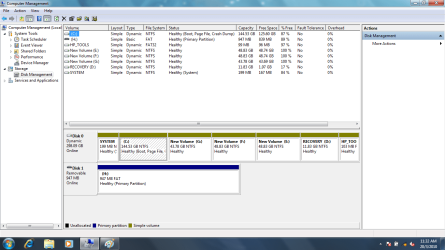
I bought a laptop with 320 GB space in Windows 7 32 bit os. I tried to create multiple 50GB partitions. I tried to shrink the c drive an I created 3 partitions. Now the C drive is having 144GB. I am not able to partition this 144GB.

Any ideas how can i partition this?

Regards
Malai
 

My Computer My Computer

At a glance

Windows 7Pentium
Computer Manufacturer/Model Number
HP
OS
Windows 7
CPU
Pentium

My Computers My Computers

  • At a glance

    7 X64i5 84002x8gb 3200mhz
    Computer type
    PC/Desktop
    OS
    7 X64
    CPU
    i5 8400
    Motherboard
    gigabyte b365m ds3h
    Memory
    2x8gb 3200mhz
    Hard Drives
    various
    PSU
    pure power 11 400w cm
    Case
    Coolermaster
    Cooling
    cryorig m9i
  • At a glance

    7x64g54008gb ddr4 2400
    Computer type
    PC/Desktop
    OS
    7x64
    CPU
    g5400
    Motherboard
    ga b365m ds3h
    Memory
    8gb ddr4 2400
    PSU
    xfx pro 450w
cm.png
 

My Computer My Computer

At a glance

Windows 7Pentium
Computer Manufacturer/Model Number
HP
OS
Windows 7
CPU
Pentium
You are stuck in a mess of dynamic disks. You probably kept creating partitions after you already had 4 primaries. The next step then gets you into dynamics. You should have stopped at 3 primaries and then created an extended partition under which you could have created more partitions. But that is too late. Now you have to get rid of those dynamics. Here is how: Change a dynamic disk back to a basic disk: Storage Services; Local File Systems
 

My Computer My Computer

At a glance

Vista, Windows7, Mint Mate, Zorin, Windows 8from 1.6GHz Duo to i7
Computer Manufacturer/Model Number
HP, Dell, Gateway, Toshiba - 4 laptops and 2 desktops
OS
Vista, Windows7, Mint Mate, Zorin, Windows 8
CPU
from 1.6GHz Duo to i7
Monitor(s) Displays
2x HP w2207
Hard Drives
5x HDD, 7x SSD, 12x Externals
Keyboard
with trackball - no mices
Mouse
Trackball mice
Internet Speed
DSL 6000
Last edited:

My Computers My Computers

  • At a glance

    7 X64i5 84002x8gb 3200mhz
    Computer type
    PC/Desktop
    OS
    7 X64
    CPU
    i5 8400
    Motherboard
    gigabyte b365m ds3h
    Memory
    2x8gb 3200mhz
    Hard Drives
    various
    PSU
    pure power 11 400w cm
    Case
    Coolermaster
    Cooling
    cryorig m9i
  • At a glance

    7x64g54008gb ddr4 2400
    Computer type
    PC/Desktop
    OS
    7x64
    CPU
    g5400
    Motherboard
    ga b365m ds3h
    Memory
    8gb ddr4 2400
    PSU
    xfx pro 450w
Thanks for your fast reply

cm.png

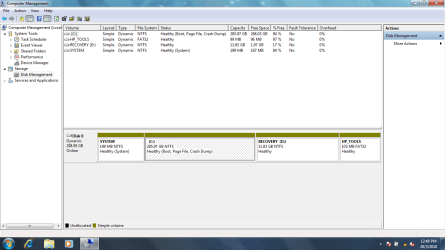
I changed back to the actual settings.

Can you guide me how to create 5 partitions (50GB each)
 

My Computer My Computer

At a glance

Windows 7Pentium
Computer Manufacturer/Model Number
HP
OS
Windows 7
CPU
Pentium
Any updates... I really stuck here
 

My Computer My Computer

At a glance

Windows 7Pentium
Computer Manufacturer/Model Number
HP
OS
Windows 7
CPU
Pentium
I suggest you convert it into a Basic Disk.

Partition Wizard will do it.


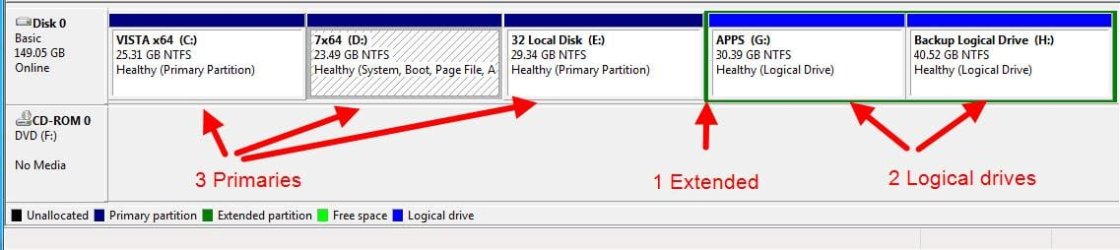
You can only have 4 partitions on an mbr hard drive.

You can have more than 4 volumes.

You do that by having 4 Primary partitions and one Extended partition.

You can create volumes inside the extended partition.

Like this:

Partitions-20032010_221443.jpg

If you move or resize the oem Recovery and Tools partitions, you may have trouble accesing them.
 
Last edited:

My Computers My Computers

  • At a glance

    7 X64i5 84002x8gb 3200mhz
    Computer type
    PC/Desktop
    OS
    7 X64
    CPU
    i5 8400
    Motherboard
    gigabyte b365m ds3h
    Memory
    2x8gb 3200mhz
    Hard Drives
    various
    PSU
    pure power 11 400w cm
    Case
    Coolermaster
    Cooling
    cryorig m9i
  • At a glance

    7x64g54008gb ddr4 2400
    Computer type
    PC/Desktop
    OS
    7x64
    CPU
    g5400
    Motherboard
    ga b365m ds3h
    Memory
    8gb ddr4 2400
    PSU
    xfx pro 450w
  • Like
Reactions: whs
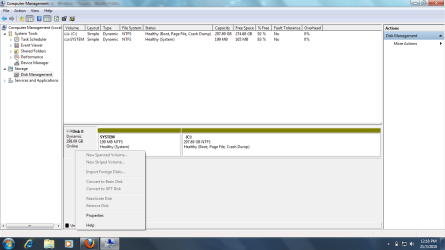
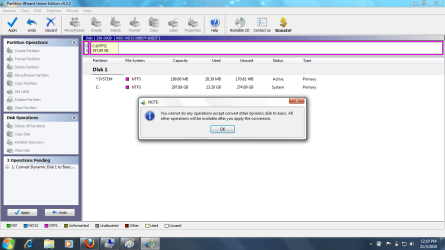
Thanks for your valuable reply. I dont find any way to convert my dynamic disc to basic dist.

How can I do that? Following are the screenshots are for your reference. Its not allowing me to convert to basic.

1.png

2.png
 

My Computer My Computer

At a glance

Windows 7Pentium
Computer Manufacturer/Model Number
HP
OS
Windows 7
CPU
Pentium
I found this post. Maybe it can help you. The referred program works in Vista, so one might assume it will work in Win7 too.
 

My Computer My Computer

At a glance

Vista, Windows7, Mint Mate, Zorin, Windows 8from 1.6GHz Duo to i7
Computer Manufacturer/Model Number
HP, Dell, Gateway, Toshiba - 4 laptops and 2 desktops
OS
Vista, Windows7, Mint Mate, Zorin, Windows 8
CPU
from 1.6GHz Duo to i7
Monitor(s) Displays
2x HP w2207
Hard Drives
5x HDD, 7x SSD, 12x Externals
Keyboard
with trackball - no mices
Mouse
Trackball mice
Internet Speed
DSL 6000
Hi malesailvan,

That is what it should say.

It is telling you to go ahead and convert to Basic. Then after that you can perform other operations.

Click OK.

Then click Apply in the bottom left window.
 

My Computers My Computers

  • At a glance

    7 X64i5 84002x8gb 3200mhz
    Computer type
    PC/Desktop
    OS
    7 X64
    CPU
    i5 8400
    Motherboard
    gigabyte b365m ds3h
    Memory
    2x8gb 3200mhz
    Hard Drives
    various
    PSU
    pure power 11 400w cm
    Case
    Coolermaster
    Cooling
    cryorig m9i
  • At a glance

    7x64g54008gb ddr4 2400
    Computer type
    PC/Desktop
    OS
    7x64
    CPU
    g5400
    Motherboard
    ga b365m ds3h
    Memory
    8gb ddr4 2400
    PSU
    xfx pro 450w
Back
Top