Unable to recognize USB flash drives (All)

Did I not answer your query by providing the screenshot of the information you were looking for? The screenshot should show you the information you asked unless I missed something?

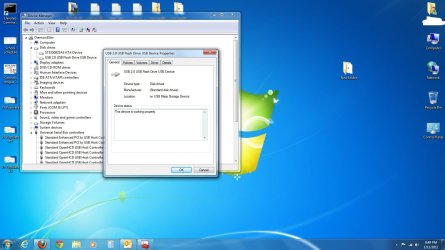
EDIT: Ah, I provided the screenshot from a different location. I followed the path you asked for and received the same result. Screenshot attached.

I can go to Micro Center tomorrow and get it looked at. Maybe they'll exchange it out for a 3.0 stick since it's less than what I paid for the 2.0 originally. Although I don't have a 3.0 port, it'd still be nice to have for when I do. :)
 

Attachments

  • 7F USB Properties.jpg
    7F USB Properties.jpg
    123.7 KB · Views: 81
Last edited:

My Computer My Computer

OS
Windows 7 Professional 64-bit SP1
CPU
AMD Athlon X4 3.0 GHz
Motherboard
MSi
Memory
8 GB DDR2
Graphics Card(s)
Nvidia GeForce 9800 GTX+
Sound Card
On board HQ
Monitor(s) Displays
Acer 21" @ 16x9
Hard Drives
Sata II 250GB
PSU
650W
Case
Thermaltake
Cooling
6 fans
Keyboard
Logitech K800 laser LED illuminated
Mouse
Logitech Performance MX -Darkfield-
Internet Speed
Currently wireless...2.0 MB/s+
Thanks for the screenshot. It says the device is working properly and there is no error code. Still it refuses to populate.

If there was an error code I would have suggested to look for the upper, lower filters in the registry and delete them. Now I do not think that will help. I have to give up.:)

Let us know what goes with Micro Center.
 

My Computer My Computer

OS
Windows 7 Home Premium 32 bit
Will do. Thank you for all of your help. I will post results after I get out there tomorrow morning.
 

My Computer My Computer

OS
Windows 7 Professional 64-bit SP1
CPU
AMD Athlon X4 3.0 GHz
Motherboard
MSi
Memory
8 GB DDR2
Graphics Card(s)
Nvidia GeForce 9800 GTX+
Sound Card
On board HQ
Monitor(s) Displays
Acer 21" @ 16x9
Hard Drives
Sata II 250GB
PSU
650W
Case
Thermaltake
Cooling
6 fans
Keyboard
Logitech K800 laser LED illuminated
Mouse
Logitech Performance MX -Darkfield-
Internet Speed
Currently wireless...2.0 MB/s+
I received a new flash drive from Micro Center (for no charge), and my Win7 PC recognizes the drive. All seems to be well thus far. Thank you to everyone for attempting to help me.
 

My Computer My Computer

OS
Windows 7 Professional 64-bit SP1
CPU
AMD Athlon X4 3.0 GHz
Motherboard
MSi
Memory
8 GB DDR2
Graphics Card(s)
Nvidia GeForce 9800 GTX+
Sound Card
On board HQ
Monitor(s) Displays
Acer 21" @ 16x9
Hard Drives
Sata II 250GB
PSU
650W
Case
Thermaltake
Cooling
6 fans
Keyboard
Logitech K800 laser LED illuminated
Mouse
Logitech Performance MX -Darkfield-
Internet Speed
Currently wireless...2.0 MB/s+
All is well that ends well.:)

That said, why Windows alone woulldn't recognise the pendrive and refuse to do anything with it will still remain a mystery.
 

My Computer My Computer

OS
Windows 7 Home Premium 32 bit
That said, why Windows alone woulldn't recognise the pendrive and refuse to do anything with it will still remain a mystery.

Not so sure about that. What the OP didn't make clear was that he had been loading the memory stick with files from an OS/X or other Mac, and could have even reformatted it to a non-Windows file system - which would explain things all too readily... :zip:
 

My Computer My Computer

Computer Manufacturer/Model Number
Custom built machine
OS
W7 x64
CPU
Intel Q9300 2.5Ghz Quad LGA775 (Would like Q9650)
Motherboard
Gigabyte GA-EP45T-UD3R (F6 Bios)
Memory
4Gb OCZ Gold 1,333Mhz
Graphics Card(s)
Palit HD4850 O/C Sonic 512Mb DDR3, Dual DViD's
Sound Card
Azalia to twin Samson 50w Studio Monitors
Monitor(s) Displays
Twin Dell (E-IPS) U2311H 23.6" Screens
Screen Resolution
1920 x 1080 @ 60Hz
Hard Drives
Crucial M4 SSD, archives on twin Western Digital Caviar Black WD2002FAEX, 2TB, 7200rpm HDD's, Samsung Ritemaster CD/DVD Burner...
PSU
OCZ 600w
Case
Lian-Li PC8 acoustifoamed' aluminium tower
Cooling
Scythe 140mm Zipang
Keyboard
Cherry PS/2 custom model
Mouse
Lenovo USB laser "Thinkpad" Mouse
Internet Speed
ADSL2+ @14Mbps downstream & Cat6 Gigabit Ethernet
Antivirus
NOD32
Browser
Opera
Other Info
Silicon Dust HD Homerun Dual FTA (Ethernet) TV Tuners, Dray Tek Vigor 2850Vn router and 8x HP Gigabit Switch. Lian-Li CR26 Card Reader, Canon MF4430 iSensys laser printer/scanner.
^ My question now is this:

The pendrive is seen in Disk Management by Windows. Only the capacity is shown. No file system. It neither shows the partition as RAW nor unallocated.

Given this situation, how does one format it to NTFS or even FAT32 to be readable by Windows? Is there no way to do it? (OP says he formatted it to FAT32 on the Mac and tried on Windows and the pendrive still cannot be used)

In other words, even assuming that the OP had formatted it in some other file system, can it not be reformatted to NTFS/FAT32 by any means to make it readable by Windows?

(Well, I did not suggest to try formatting it by running a formatting/partitioning software from a bootable CD or even a bootable DOS disk though it was there at the back of my mind. I really do not know whether it would have worked but since the OP said he has the Micro Center nearby, that was easy to get it replaced, rather than trying do to all this circus with unpredictable results.)
 
Last edited:

My Computer My Computer

OS
Windows 7 Home Premium 32 bit
EDIT: Put correct person in the quote.

Qdos said:
Not so sure about that. What the OP didn't make clear was that he had been loading the memory stick with files from an OS/X or other Mac, and could have even reformatted it to a non-Windows file system - which would explain things all too readily... :zip:

I thought that I had explained this in an earlier post. My apologies if I didn't. The only way the iMac was involved was to pull the files off of the flash drive and to format. The flash drive was used entirely on my PC (Win 7 Pro 64) through all of its ownership all associated files, file system, etc were based on Windows compatible formats. It was ONLY after I formatted my hard drive and reinstalled Windows that I could not read the drive.

The iMac successfully formatted the drive and I was still unable to read it on my PC. However, the new 32GB flash drive I received from Micro Center works great and is recognized by my PC. I'm able to read/write to it without any issues.
 
Last edited:

My Computer My Computer

OS
Windows 7 Professional 64-bit SP1
CPU
AMD Athlon X4 3.0 GHz
Motherboard
MSi
Memory
8 GB DDR2
Graphics Card(s)
Nvidia GeForce 9800 GTX+
Sound Card
On board HQ
Monitor(s) Displays
Acer 21" @ 16x9
Hard Drives
Sata II 250GB
PSU
650W
Case
Thermaltake
Cooling
6 fans
Keyboard
Logitech K800 laser LED illuminated
Mouse
Logitech Performance MX -Darkfield-
Internet Speed
Currently wireless...2.0 MB/s+
^ What appears in the quote box in the post above is not what I stated but what Qdos had stated - I think you have messed up in putting up the quote.:) You should have quoted Qdos's post only deleting my Quote in it and it should appear like this:

Not so sure about that. What the OP didn't make clear was that he had been loading the memory stick with files from an OS/X or other Mac, and could have even reformatted it to a non-Windows file system - which would explain things all too readily... :zip:

One way to learn is to preview it [Preview Post button] before you submit the post. Then you can make necessary modifications.
 
Last edited:

My Computer My Computer

OS
Windows 7 Home Premium 32 bit
I am surprised that no steps were tried through Diskpart as problems with drives not being accessible or changeable in Disk Manager are often solved through Diskpart. For instance, I cannot access my Recovery drive or assign it a driver letter in Disk Manager, but I can through Diskpart. See steps 1-8 of post #6 in http://www.sevenforums.com/hardware-devices/203415-all-your-dvd-cd-drives-set-disabled.html

And I am not saying that the troubleshooting steps in this thread were not good. I followed them, and they were all good/great suggestions. I was just surprised that Diskpart was omitted.
 

My Computer My Computer

Computer Manufacturer/Model Number
HP Pavilion e9110t
OS
Windows 7 Home Premium 64 Bit
CPU
Intel(R) Core(TM)2 Quad CPU Q9550 @ 2.83GHz
Motherboard
Pegatron IPIEL-LA3
Memory
6.00 GB Hundai HMT125U6BFR8C-H9
Graphics Card(s)
ATI Radeon HD 4850
Sound Card
Realtek High Definition Audio/ATI High Definition Audio
Monitor(s) Displays
Acer AL2216W
Screen Resolution
1680x1050
Hard Drives
Hitachi HDP725050GLA360 ATA Device 500 GB
PSU
Unknown/installed by HP
Case
HP generic case
Cooling
Intel Stock Cooling
Keyboard
HP Keyboard
Mouse
HP Mouse
Internet Speed
Download: 19.15 Mbps Upload: 1.67 Mbps
Other Info
Network Adapter Realtek RTL8168D/8111D Family PCI-E Gigabit Ethernet NIC (NDIS 6.20)
Network Adapter 802.11n Wireless PCI Express Card LAN Adapter
writhziden - That may have helped my problem and I appreciate your additional input in the thread.

jumanji - I updated the quote above...sorry about that. :)
 

My Computer My Computer

OS
Windows 7 Professional 64-bit SP1
CPU
AMD Athlon X4 3.0 GHz
Motherboard
MSi
Memory
8 GB DDR2
Graphics Card(s)
Nvidia GeForce 9800 GTX+
Sound Card
On board HQ
Monitor(s) Displays
Acer 21" @ 16x9
Hard Drives
Sata II 250GB
PSU
650W
Case
Thermaltake
Cooling
6 fans
Keyboard
Logitech K800 laser LED illuminated
Mouse
Logitech Performance MX -Darkfield-
Internet Speed
Currently wireless...2.0 MB/s+
Go to device manager and uninstal the usb drive shown under U S B Controllers.After completion just scan for hardware changes the drive will be recognised
 

My Computer My Computer

OS
win7 32bit
Back
Top