tidybear12
New member
- Local time
- 8:56 AM
- Messages
- 37
Hi all! I'm new here.
I am trying to remove the data that is always attached to images (and WORD files!!!) before uploading them. Normally, having the image in Windows Photo Viewer and right clicking to Properties should give you the option to remove everything that's removable.
However, I seem not to have the necessary permission to do that.
You have a tutorial here that MIGHT fix that. It's here: Take Ownership Shortcut - Windows 7 Help Forums
BUT I am always extremely nervous about making changes like that, so before I even try to do this I have 2 questions.
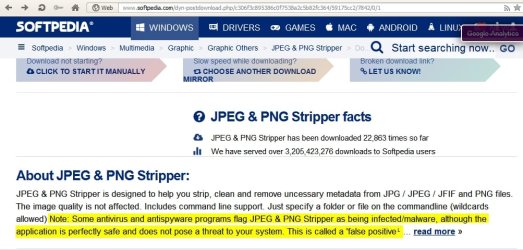
1. Is there a SAFE tool I can use to scrub the data? I googled this (actually I duck duck go'ed it), and at least one tool that came up (JPG stripper) seems to have been compromised. Readers warned the writer that it is infected with a virus.
2. Is your tutorial above going to allow me to remove the file data or only the meta data generated by the image?
In my searches everybody seems to be concerned about the Exif data, mostly because if the image is from your smartphone it is likely to contain GPS data etc. unless you deny the camera access to your location which, frankly, why would you allow it?
Anyway, IF the Exif data doesn't reveal your location, there are still things to worry about, namely the stuff Windows attaches, like the owner's name (yes, that's you, take a look!), and the path of the file. I totally and utterly hate that. I want to remove all of this file stuff, and I'm afraid the strategy laid out in your tutorial about ownership isn't going to let me do that either. It might be somehow baked in and has nothing to do with admin rights or whatever.
So, those are my 2 questions. Thanks for reading, sorry it's long.
I am trying to remove the data that is always attached to images (and WORD files!!!) before uploading them. Normally, having the image in Windows Photo Viewer and right clicking to Properties should give you the option to remove everything that's removable.
However, I seem not to have the necessary permission to do that.
You have a tutorial here that MIGHT fix that. It's here: Take Ownership Shortcut - Windows 7 Help Forums
BUT I am always extremely nervous about making changes like that, so before I even try to do this I have 2 questions.
1. Is there a SAFE tool I can use to scrub the data? I googled this (actually I duck duck go'ed it), and at least one tool that came up (JPG stripper) seems to have been compromised. Readers warned the writer that it is infected with a virus.
2. Is your tutorial above going to allow me to remove the file data or only the meta data generated by the image?
In my searches everybody seems to be concerned about the Exif data, mostly because if the image is from your smartphone it is likely to contain GPS data etc. unless you deny the camera access to your location which, frankly, why would you allow it?
Anyway, IF the Exif data doesn't reveal your location, there are still things to worry about, namely the stuff Windows attaches, like the owner's name (yes, that's you, take a look!), and the path of the file. I totally and utterly hate that. I want to remove all of this file stuff, and I'm afraid the strategy laid out in your tutorial about ownership isn't going to let me do that either. It might be somehow baked in and has nothing to do with admin rights or whatever.
So, those are my 2 questions. Thanks for reading, sorry it's long.
My Computer
- Computer type
- Laptop
- Computer Manufacturer/Model Number
- HP
- OS
- Windows 7 Home x64
- Browser
- Firefox