Solved Unable to start Windows Firewall

Thank you Balon! Had never heard of these problems before a friend brought me his laptop and asked if I could fix it. It had a "legion" of trojans and malware, and the problems described here. Your posts - and others here -- made it possible for me to get him going again. Like someone else said -- I had to register just to say thanks!
 

My Computer

OS
Vista 32 bit @home, Win7 Enterprise 32 bit @work
Not sure if thread is still open but I was able to make the registry changes and get the BFE started however when I go to start the firewall I get the error message "Windows could not start the Windows Firewall on Local Computer. For more information review the System Event Log. If this is a non-microsoft service, contact the service vendor, and refer to service-specific error code 5. " Any suggestions? I saw some posts of other people needing to give additional permissions for Windows 7??? I also saw another registry download entitled
0677.mpssvc.reg???? Any help would be FANTASTIC!!!!

I had this problem tonight. Don't know about the reg file you mentioned, but if you Google "Windows Firewall error 5 Fixit" you'll see a link to a Microsoft site where there is a "Fixit" utility you can run to fix this. You can download the portable "Fixit" package on a different computer and put it on a flash drive or cd, too.

I see this is a few weeks old and you probably have resolved this already, but others may be helped by it, I hope.
 

My Computer

OS
Vista 32 bit @home, Win7 Enterprise 32 bit @work
Hello all,

I had this problem and I followed Balon's walkthrough and got the firewall entry back in services, like Layla mentioned though i cannot start it. i get the windows could not start the windows firewall error code 5 message. I ran the fixit application, and it found the problems but couldnt fix it either. I am starting to get very frustrated. This is a very challenging problem for me.
 

My Computer

OS
windows 7 home premium 64 bit
When all else fails

I had the same infection/trojan but followed a slightly different path to resolution. That being said, my McAfee firewall would not turn on. On the phone for 3 hours with them, turns out Windows Firewall service was missing. They (McAfee) ran a patch and the result was unable to connect to the internet with that error 5.

I had to set up an appointment for 2 days later for someone that knew what they were doing (why didn't they check this forum?). I was very angry - at least I had internet before they messed with it.

After sleeping on it, I decided to do a restore - which happened to be a few hours before I stupidly clicked on that Flash update popup. All is fine now. Firewalls working and scan clean as a whistle.

That was one nasty infection. Hope this helps someone.
 

My Computer

Computer Manufacturer/Model Number
sony vpc ej28fx b
OS
Win 7 Home Premium
CPU
Intel Core i5
Memory
8 gb
Graphics Card(s)
Intel HD Graphics 3000
Monitor(s) Displays
17.3 in Backlit LED Display
Error 1068: The dependency service or group failed to start.

Hi, Balon,

This is a great thread. I almost got it working, but stuck at this point:

It all went well until when I tried to start firewall, I got the error:
Error 1068: The dependency service or group failed to start.

Balcon, are you able to figure out a solution for this problem?

Thank you very much!
 

My Computer

OS
Windows 7 Ultimate x64
Balon,

I cannot thank you enough!! You are a life saver! The instructions worked for me and my firewall is running. I was having trouble installing my Cisco VPN client because my firewall was corrupted. Thanks to you I am good to go now.

Cheers,


Hi there, my name is Balon and I am pretty sure I have the way to fix your problem.

IT IS SUGGESTED YOU BACKUP YOUR REGISTRY BEFORE PROCEEDING

Backing Up Your Registry
  1. Go Here and download ERUNT
    (ERUNT (Emergency Recovery Utility NT) is a free program that allows you to keep a complete backup of your registry and restore it when needed.)
  2. Install ERUNT by following the prompts
    (use the default install settings but say no to the portion that asks you to add ERUNT to the start-up folder, if you like you can enable this option later)
  3. Start ERUNT
    (either by double clicking on the desktop icon or choosing to start the program at the end of the setup)
  4. Choose a location for the backup
    (the default location is C:\WINDOWS\ERDNT which is acceptable).
  5. Make sure that at least the first two check boxes are ticked
  6. Press OK
  7. Press YES to create the folder.
Registry Modifications


Download both the registry files

bfe.reg

firewall.reg

Launch and import them to registry

Restart your PC

Now,open RUN and type

regedit and click ok

go to

HKEY_LOCAL_MACHINE\SYSTEM\CurrentControlSet\services\BFE

Right click on it-permissions

Click on ADD and type

Everyone and click ok

Now Click on Everyone

Below you have permission for users

Select full control and click ok

Now,open RUN and type

services.msc and click ok

start base filtering engine service and then windows firewall service

For further assistance contact me here, I will be checking this thread every few hours, this worked for me and it should work for you too.

 

My Computer

OS
Windows 7 Professional 64 bit
Hi Balon i've tried your solution and success to start the BFE.

i got problem in the last step which is starting the firewall service

i got this message:

Code:
---------------------------
Services
---------------------------
Windows could not start the Windows Firewall on Local Computer. For more  information, review the System Event Log. If this is a non-Microsoft  service, contact the service vendor, and refer to service-specific error  code 5.
---------------------------
OK   
---------------------------

do you have any idea what happen here??

thanks for your assistance :):)
 

My Computer

OS
Windows 7 Home Premium x64
I am having this problem too !! I cannot install my printer HP C7280 to use wireless connectivity as it says my firewall isn't enabled and pointing to this service !
I cannot install the firewall.reg file as I keep getting the following error message
Can someone help me please !

https://www.sugarsync.com/pf/D8932115_67700784_933518
 

Attachments

  • Capture.PNG
    Capture.PNG
    46.9 KB · Views: 36

My Computer

Computer Manufacturer/Model Number
GENERIC
OS
Windows 7 7600 x65 Ultimate Signature Edition
Screen Resolution
1920 * 1200
Balon!!!!

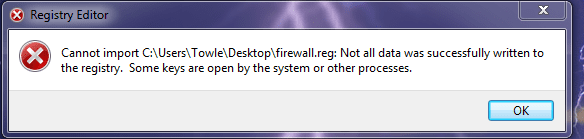
I need your help. I tried to follow your instructions, but it seems that I can't edit "firewall.reg". The System pops up an error and says that I "can't import firewall.reg. Some registry keys are open by the system or other procedures."

What can I do??

I have installed Avira Free Antivirus. I know that the free version doesn't have Firewall, but I don't know if it can give any problems activating Window's Firewall.

Thanks in advance,
 

My Computer

Computer Manufacturer/Model Number
AMD
OS
windows 7 ultimate 64 bit build 7601 (service pack 1)
CPU
AMD Phenom II x4 945
Motherboard
ASUS M4A785TD-M EVO
Memory
OCZ DDR3 2GB 1333 (X2)
Graphics Card(s)
ATI RADEON HD4870 1GB
Sound Card
comes with the motherboard
Monitor(s) Displays
Samsung 19" LCD
Hard Drives
WESTERN DIGITAL 1 TERA GREEN
Case
THERMALTAKE MARVELOUS VJ400G1N2Z
Cooling
THERMALTAKE PUREPOWER 600W
OMG OMG OMG It worked :D
Someone else on this site helped me with Windows Defender and Security Center. All those and the following were gone.
I didn't have Windows Firewall, BFE service could not be started and my Network and Sharing Center were not working either. Now everything works. HOURRAY. Thank you so much. I registered here just so I could thank you. :). Confession: I'm running Vista Home Premium on this computer (the problem computer) but I read a post that this Win 7 fix would work. BRAVO :D

Hi there, my name is Balon and I am pretty sure I have the way to fix your problem.

IT IS SUGGESTED YOU BACKUP YOUR REGISTRY BEFORE PROCEEDING

Backing Up Your Registry
  1. Go Here and download ERUNT
    (ERUNT (Emergency Recovery Utility NT) is a free program that allows you to keep a complete backup of your registry and restore it when needed.)
  2. Install ERUNT by following the prompts
    (use the default install settings but say no to the portion that asks you to add ERUNT to the start-up folder, if you like you can enable this option later)
  3. Start ERUNT
    (either by double clicking on the desktop icon or choosing to start the program at the end of the setup)
  4. Choose a location for the backup
    (the default location is C:\WINDOWS\ERDNT which is acceptable).
  5. Make sure that at least the first two check boxes are ticked
  6. Press OK
  7. Press YES to create the folder.
Registry Modifications


Download both the registry files

bfe.reg

firewall.reg

Launch and import them to registry

Restart your PC

Now,open RUN and type

regedit and click ok

go to

HKEY_LOCAL_MACHINE\SYSTEM\CurrentControlSet\services\BFE

Right click on it-permissions

Click on ADD and type

Everyone and click ok

Now Click on Everyone

Below you have permission for users

Select full control and click ok

Now,open RUN and type

services.msc and click ok

start base filtering engine service and then windows firewall service

For further assistance contact me here, I will be checking this thread every few hours, this worked for me and it should work for you too.
 

My Computer

OS
windows 7 home premium 64 bit
mine is solved.

okey so i had this issue.

i tried EVERYTHING in this and every other post i could find which refers to the issue of not being able to activate win firewall (i couldn't activate the service at all as described by the op)

after now 8+- hours trying everything in the book (properly used 1-2 on finding out where exactly the problem where lying) i finally stumbled over this:
Windows Firewall damaged by 'Windows 7 antivirus 2012'

and now it just worked perfectly... (i havent had any vira so i didnt even give it a thought, my issue lied in the inability to activate the services so i could change the settings to allow people to ping me on the network)

i can't believe i used 8+-hours on trying EVERYTHING when all it took was the use of this one fix file....

i strongly recommand people trying that out as the very first thing before using mindless hours on everything.

best regards
Me
 

My Computer

OS
win7 64
hello i am new to this forum and had some but not all the same issues. I keep getting the following errors:
when i try turning on windows firewall via the control panel i get "windows can't change some of your settings error code 0x8007042c"
when i try to start windows firewall via services.msc i get "Windows could not start the Windows Firewall service on local computer Error 1068: The dependency service or group failed to start" i have tryed the above instructions but when i tryed to import firewall.reg its says " Cannot import C:\Users\Robert\Desktop\firewall.reg: Not all data was sucessfully written to the registry. Some keys are open by the system." I used malwarebytes to remove any of the malware that could of caused this problem. i also tryed CCleaner. please help me this problem it has been going on for months.
 

My Computer

Computer Manufacturer/Model Number
Dell inspiron 1545
OS
Windows 7 Home Premium 64 bit
CPU
Pentium Dual Core t4200 @2.00 GHZ
Memory
3.00GB ddr2
Graphics Card(s)
Mobile Intel(R) 4 Series Express Chipset Family
Sound Card
IDT High Definition Audio CODEC
Monitor(s) Displays
Generic PnP monitor
Hard Drives
WDC WD3200BEVT-75CT2
Case
laptop
Not sure if thread is still open but I was able to make the registry changes and get the BFE started however when I go to start the firewall I get the error message "Windows could not start the Windows Firewall on Local Computer. For more information review the System Event Log. If this is a non-microsoft service, contact the service vendor, and refer to service-specific error code 5. " Any suggestions? I saw some posts of other people needing to give additional permissions for Windows 7??? I also saw another registry download entitled
0677.mpssvc.reg???? Any help would be FANTASTIC!!!!

I have the same problem as you. Did you find a solution?

I have tried all the methods suggested in this thread but to luck. However, my BFE is started, Windows Firewall shown in the Services.msc

anyone has more ideas?
 

My Computer

OS
Win7 Home Premium
Hi there, my name is Balon and I am pretty sure I have the way to fix your problem.

IT IS SUGGESTED YOU BACKUP YOUR REGISTRY BEFORE PROCEEDING

Backing Up Your Registry
  1. Go Here and download ERUNT
    (ERUNT (Emergency Recovery Utility NT) is a free program that allows you to keep a complete backup of your registry and restore it when needed.)
  2. Install ERUNT by following the prompts
    (use the default install settings but say no to the portion that asks you to add ERUNT to the start-up folder, if you like you can enable this option later)
  3. Start ERUNT
    (either by double clicking on the desktop icon or choosing to start the program at the end of the setup)
  4. Choose a location for the backup
    (the default location is C:\WINDOWS\ERDNT which is acceptable).
  5. Make sure that at least the first two check boxes are ticked
  6. Press OK
  7. Press YES to create the folder.
Registry Modifications


Download both the registry files

bfe.reg

firewall.reg

Launch and import them to registry

Restart your PC

Now,open RUN and type

regedit and click ok

go to

HKEY_LOCAL_MACHINE\SYSTEM\CurrentControlSet\services\BFE

Right click on it-permissions

Click on ADD and type

Everyone and click ok

Now Click on Everyone

Below you have permission for users

Select full control and click ok

Now,open RUN and type

services.msc and click ok

start base filtering engine service and then windows firewall service

For further assistance contact me here, I will be checking this thread every few hours, this worked for me and it should work for you too.

This worked great. It fixed the problem. Thanks a lot Balon :)
 

My Computer

OS
Windows 7 Ultimate x64
Hey guys, im having a problem with my firewall, it seems that it wont allow me to set any allow programs through it. It also shows me a blank list, when i know for a fact there should be a list there. How do i restore it?

It just says " Windows Firewall cannot add (service name) to the list of exceptions. HELP PLEASE?
 

My Computer

OS
Windows 7 Home Premium 64bit
Thank you Balon. Your fix solved first of two problems (BFE) I had. I was able to make the registry changes and get the BFE started.
However when I go to start the firewall in Services I get the error message "Windows could not start the Windows Firewall on Local Computer. For more information review the System Event Log. If this is a non-microsoft service, contact the service vendor, and refer to service-specific error code 5. "
I solved that problem by following narenxp's advice here
(scroll down to his post from Wednesday, December 14, 2011 11:49 PM)
 

My Computer

Computer type
PC/Desktop
OS
Windows 7 Ultimate x64
CPU
Intel(R) Xeon(R) CPU E3-1231 v3 @ 3.40GHz
Motherboard
ASUSTeK COMPUTER INC. Z97-A Rev 1.xx
Memory
16 GB
Graphics Card(s)
AMD Radeon (TM) R9 390 Series
Sound Card
(1) AMD High Definition Audio Device (2) Realtek High Defi
Hi there, my name is Balon and I am pretty sure I have the way to fix your problem.

IT IS SUGGESTED YOU BACKUP YOUR REGISTRY BEFORE PROCEEDING


Backing Up Your Registry
  1. Go Here and download ERUNT
    (ERUNT (Emergency Recovery Utility NT) is a free program that allows you to keep a complete backup of your registry and restore it when needed.)
  2. Install ERUNT by following the prompts
    (use the default install settings but say no to the portion that asks you to add ERUNT to the start-up folder, if you like you can enable this option later)
  3. Start ERUNT
    (either by double clicking on the desktop icon or choosing to start the program at the end of the setup)
  4. Choose a location for the backup
    (the default location is C:\WINDOWS\ERDNT which is acceptable).
  5. Make sure that at least the first two check boxes are ticked
  6. Press OK
  7. Press YES to create the folder.
Registry Modifications


Download both the registry files

bfe.reg

firewall.reg

Launch and import them to registry

Restart your PC

Now,open RUN and type

regedit and click ok

go to

HKEY_LOCAL_MACHINE\SYSTEM\CurrentControlSet\services\BFE

Right click on it-permissions

Click on ADD and type

Everyone and click ok

Now Click on Everyone

Below you have permission for users

Select full control and click ok

Now,open RUN and type

services.msc and click ok

start base filtering engine service and then windows firewall service

For further assistance contact me here, I will be checking this thread every few hours, this worked for me and it should work for you too.


You good sir, are the man! Instantly fixed all my issues with no hiccups. Thanks for your expertise :D

Ditto here! tryed many,many other routes before,this solved all my firewall and file sharing problems!THanks!!!
 

My Computer

Computer Manufacturer/Model Number
Dell Studio XPS9100
OS
Windows 7 Ultimate x64
CPU
i7 X990 @3.47GHZ
Memory
12 Gigs
Graphics Card(s)
Radeon HD 5800 series
Sound Card
Creative SB X-Fi
Monitor(s) Displays
ViewSonic 27" LED
Hard Drives
SAMSUNG HD103SJ
ST32000641AS
WD My Book 1140 USB
Case
Full Size
Cooling
Fans
Back
Top