Unable to update drivers

BoardsOfCanada

New member
Local time
6:29 PM
Messages
19
For some time now, I've noticed that I have been unable to update drivers.

Before it gave me the option to update a driver, but now it seems to have been disabled.

I don't know why this is, I've purchased a new monitor which should be on it's way now and I'm a bit concerned my PC won't recognise it.

Is this a common problem, and how can it be fixed?

I included a picture to show the problem of how 'update driver' is no longer available.

Anyone can help me out I would appreciate it greatly.

Kind regards-

BOC
 

Attachments

  • Drivers.png
    Drivers.png
    13.2 KB · Views: 26

My Computer

OS
Windows 7 64 bit
Hi Board.

Before getting proper help, I would ask about what is your account type? is it administrator or power user (standar user), or guest.
The screenshot shown above usually happen to user without administrator privilege.

Kevin
 

My Computers

System One System Two

  • Computer type
    PC/Desktop
    Computer Manufacturer/Model Number
    MSI
    OS
    Windows 11 Prerelease
    CPU
    CORE i5 10400
    Motherboard
    MSI H510M Pro
    Memory
    16GB
    Graphics Card(s)
    GTX 750Ti
    Sound Card
    Realtek HD Integrated
    Monitor(s) Displays
    Samsung Curved 24"; Samsung TV 50"
    Screen Resolution
    1920 x 1080
    Hard Drives
    Vi-Gen NVMe 256GB
    WD 3 TB
    Seagate 2 TB
    Seagate 4TB
    PSU
    Power Striker
    Case
    VBR
    Cooling
    Conventional
    Keyboard
    Logitech Wireless
    Mouse
    Logitech Wireless
    Internet Speed
    2MBPs
  • Computer type
    Laptop
    System Manufacturer/Model Number
    Apple MacBook
    OS
    BigSur
    CPU
    Core i5
    Memory
    8 GB
    Monitor(s) Displays
    13 "
    Screen Resolution
    1366 x 768
    Hard Drives
    SSD 256 GB
To be honest, I'm not so sure. I don't think it's the ability to run as an admin. Is there anyway to fix this?

Thanks for the feedback, by the way. Before it was fine, I just noticed this recently, I really don't know what's going here, I've had a few other problems lately, which is why I may need to reinstall windows which I can't really do on my own as it's a custom built PC. If it was a laptop, it wouldn't be a problem.

I'm just wondering if there's another way to fix this and run as admin.
 

My Computer

OS
Windows 7 64 bit
If you're not sure it is user issue
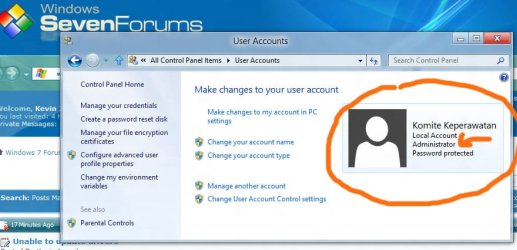
You can find it out by opening [Control Panel] --> [manage account] or any other way around to get this screen, and see the user privilege.

user.jpg

If it is said as Administrator then there could probably other issue is preventing you from having access to driver update.

Kevin
 

My Computers

System One System Two

  • Computer type
    PC/Desktop
    Computer Manufacturer/Model Number
    MSI
    OS
    Windows 11 Prerelease
    CPU
    CORE i5 10400
    Motherboard
    MSI H510M Pro
    Memory
    16GB
    Graphics Card(s)
    GTX 750Ti
    Sound Card
    Realtek HD Integrated
    Monitor(s) Displays
    Samsung Curved 24"; Samsung TV 50"
    Screen Resolution
    1920 x 1080
    Hard Drives
    Vi-Gen NVMe 256GB
    WD 3 TB
    Seagate 2 TB
    Seagate 4TB
    PSU
    Power Striker
    Case
    VBR
    Cooling
    Conventional
    Keyboard
    Logitech Wireless
    Mouse
    Logitech Wireless
    Internet Speed
    2MBPs
  • Computer type
    Laptop
    System Manufacturer/Model Number
    Apple MacBook
    OS
    BigSur
    CPU
    Core i5
    Memory
    8 GB
    Monitor(s) Displays
    13 "
    Screen Resolution
    1366 x 768
    Hard Drives
    SSD 256 GB
Hi, thanks, yes it's actually showing up as myself as administrator.

Any other way of to fix this?
 

My Computer

OS
Windows 7 64 bit
Is it happen only to this monitor or to all installed driver on other hardware?
As when it is only happens to this monitor, then your new coming monitor will have its own driver page expectedly updateable.

Somebody will come up with help as I can't come up with further idea on what is the origin of your issue.

Kevin

Edit: Or try this. Open Control panel --> view it by small or large icons -> Right click on Device manager --> run as administrator. Then go to your monitor driver, is it the update driver still faded?
 

My Computers

System One System Two

  • Computer type
    PC/Desktop
    Computer Manufacturer/Model Number
    MSI
    OS
    Windows 11 Prerelease
    CPU
    CORE i5 10400
    Motherboard
    MSI H510M Pro
    Memory
    16GB
    Graphics Card(s)
    GTX 750Ti
    Sound Card
    Realtek HD Integrated
    Monitor(s) Displays
    Samsung Curved 24"; Samsung TV 50"
    Screen Resolution
    1920 x 1080
    Hard Drives
    Vi-Gen NVMe 256GB
    WD 3 TB
    Seagate 2 TB
    Seagate 4TB
    PSU
    Power Striker
    Case
    VBR
    Cooling
    Conventional
    Keyboard
    Logitech Wireless
    Mouse
    Logitech Wireless
    Internet Speed
    2MBPs
  • Computer type
    Laptop
    System Manufacturer/Model Number
    Apple MacBook
    OS
    BigSur
    CPU
    Core i5
    Memory
    8 GB
    Monitor(s) Displays
    13 "
    Screen Resolution
    1366 x 768
    Hard Drives
    SSD 256 GB
Is it happen only to this monitor or to all installed driver on other hardware?
As when it is only happens to this monitor, then your new coming monitor will have its own driver page expectedly updateable.

Somebody will come up with help as I can't come up with further idea on what is the origin of your issue.

Kevin

Edit: Or try this. Open Control panel --> view it by small or large icons -> Right click on Device manager --> run as administrator. Then go to your monitor driver, is it the update driver still faded?

Aha, thanks, that's resolved the issue, but only partially.

It shows up in device manager as being able to update driver, but in devices and printers, the option still doesn't show up. I've no idea why this has happened, but it still seems manageable in device manager, so I should think (or at least hope) there isn't/should be a problem.

As for it not showing up, in devices and printers, the ability to 'update driver' doesn't show up for all devices.

I've had previous versions of windows 7, so I'm not sure whether or not this is down to a few bugs in windows 7 64 bit.
 

My Computer

OS
Windows 7 64 bit
I won't say it's a bug. I worked with 64-bit OS and programs for years, they are good from my personal view of point. But there were just things that I haven't been able to comprehend as to my limited knowledge. Your issue I think partially about user privilege setting.

Well then for the time being you already got your stick to beat. Just go through the only available way that proven work. Don't update from device and printer.

Another way worth to try is creating another new user under administrator privilege, and see if it gives you another possibility to work those driver things out.

Glad it helped you partially. :)

Kevin.
 

My Computers

System One System Two

  • Computer type
    PC/Desktop
    Computer Manufacturer/Model Number
    MSI
    OS
    Windows 11 Prerelease
    CPU
    CORE i5 10400
    Motherboard
    MSI H510M Pro
    Memory
    16GB
    Graphics Card(s)
    GTX 750Ti
    Sound Card
    Realtek HD Integrated
    Monitor(s) Displays
    Samsung Curved 24"; Samsung TV 50"
    Screen Resolution
    1920 x 1080
    Hard Drives
    Vi-Gen NVMe 256GB
    WD 3 TB
    Seagate 2 TB
    Seagate 4TB
    PSU
    Power Striker
    Case
    VBR
    Cooling
    Conventional
    Keyboard
    Logitech Wireless
    Mouse
    Logitech Wireless
    Internet Speed
    2MBPs
  • Computer type
    Laptop
    System Manufacturer/Model Number
    Apple MacBook
    OS
    BigSur
    CPU
    Core i5
    Memory
    8 GB
    Monitor(s) Displays
    13 "
    Screen Resolution
    1366 x 768
    Hard Drives
    SSD 256 GB
Thanks for helping out Kevin, I really appreciate that. Yes I'll try to use a new admin account and see if that works. :)

Kind regards-

J.
 

My Computer

OS
Windows 7 64 bit
You're most Welcome J

Let me know if you come up with something. Btw, you may fill your system spec on your user profile. It may be useful to us in providing you any assistance in the future. :)

Kevin
 

My Computers

System One System Two

  • Computer type
    PC/Desktop
    Computer Manufacturer/Model Number
    MSI
    OS
    Windows 11 Prerelease
    CPU
    CORE i5 10400
    Motherboard
    MSI H510M Pro
    Memory
    16GB
    Graphics Card(s)
    GTX 750Ti
    Sound Card
    Realtek HD Integrated
    Monitor(s) Displays
    Samsung Curved 24"; Samsung TV 50"
    Screen Resolution
    1920 x 1080
    Hard Drives
    Vi-Gen NVMe 256GB
    WD 3 TB
    Seagate 2 TB
    Seagate 4TB
    PSU
    Power Striker
    Case
    VBR
    Cooling
    Conventional
    Keyboard
    Logitech Wireless
    Mouse
    Logitech Wireless
    Internet Speed
    2MBPs
  • Computer type
    Laptop
    System Manufacturer/Model Number
    Apple MacBook
    OS
    BigSur
    CPU
    Core i5
    Memory
    8 GB
    Monitor(s) Displays
    13 "
    Screen Resolution
    1366 x 768
    Hard Drives
    SSD 256 GB
Back
Top