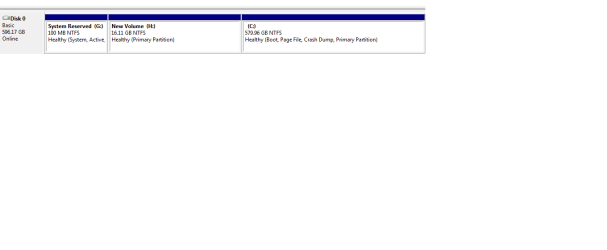
T thisiswasif New member Local time 5:21 PM Messages 1 Mar 6, 2012 #1 Hi, Windows 7, Professional Edition How to Extend partition, if unallocated space is on left, e.g in this case i want to combine partition C and partition H, without loosing contents of C drive... Attachments Untitled.png 4.5 KB · Views: 244 My Computer My Computer At a glance 64OS64
Hi, Windows 7, Professional Edition How to Extend partition, if unallocated space is on left, e.g in this case i want to combine partition C and partition H, without loosing contents of C drive...
S seavixen32 New member Local time 11:21 PM Messages 7,693 Location Peterborough, England Mar 6, 2012 #2 Welcome to Windows Seven Forums. Partition Wizard is what you want, as this tutorial explains. http://www.sevenforums.com/tutorials/93322-partition-wizard-use-bootable-cd.html You need to download the Partition Wizard ISO and burn it to a blank disc then boot into it to carry out your partition changes. Apply the changes, wait for Partition Wizard to complete the task, and then boot back into Windows when you're done. My Computer My Computer At a glance Windows 7 Ultimate SP1 64-BitIntel Core i7 870 @ 2.93GHz8Gb Dual-Channel DDR3 @ 664MHznVidia GeForce GTX 460 1024MB dedicated RAMComputer Manufacturer/Model NumberHP Pavilion Elite 495UKOSWindows 7 Ultimate SP1 64-BitCPUIntel Core i7 870 @ 2.93GHzMotherboardMSI 2A9C (CPU1)Memory8Gb Dual-Channel DDR3 @ 664MHzGraphics Card(s)nVidia GeForce GTX 460 1024MB dedicated RAMSound CardRealtek HD AudioMonitor(s) DisplaysHP2310iScreen Resolution1920 x 1080Hard Drives1x1954GB Hitachi HDS22020ALA 330 (RAID), 1x1954GB Hitachi External for backup and storagePSU460WCaseHP EliteCoolingAir cooledKeyboardLogitech K750 solar-powered keyboardMouseLogitech Wireless M180 mouseInternet Speed2MbOther InfoPure Avanti Flow Internet Radio with iPod Dock, 64Gb iPod, HP USB Speakers, Sony MDR-V500 Headphones, Sony Vaio F-Series Laptop
Welcome to Windows Seven Forums. Partition Wizard is what you want, as this tutorial explains. http://www.sevenforums.com/tutorials/93322-partition-wizard-use-bootable-cd.html You need to download the Partition Wizard ISO and burn it to a blank disc then boot into it to carry out your partition changes. Apply the changes, wait for Partition Wizard to complete the task, and then boot back into Windows when you're done.