Unexpected Shutdown especially when turning on games

taiyo

New member
Local time
2:21 PM
Messages
11
My computer randomly shuts down and reboots by itself. It's usually unpredictable but inevitable if I turn on a video game. I don't see any BSOD errors but just to be sure I decided to follow the instructions here and post. I hope someone can help me find the reason behind the shutdowns. I'm willing to bet on a faulty power supply but I need to be sure before investing in a new one. Btw, Event log shows the EventID 6008, as in "The previous shutdown at *time* was unexpected". I need to fix this problem urgently so please help me. Thank you.
 

Attachments

My Computer My Computer

Computer type
PC/Desktop
Computer Manufacturer/Model Number
Custom Build
OS
Windows 7 Ultimate x64
CPU
Intel Core i7-4790k
Motherboard
Gigabyte Z97X-SOCFORCE
Memory
2 X 4 GB DDR3 RAM
Graphics Card(s)
ATI RADEON HD 7850
PSU
Gigabyte Superb E720 GE-E720A-C3
Cooling
Stock
Welcome to the forum taiyo

You think it might be a power supply problem but yet you don't list your power supply in your System Specs. It would be helpful if we knew what power supply you are using.

Take a look at my specs and it will give you a idea of useful information.

It would also be helpful if we knew what cooling your system has and what temps the cpu has with a load on it.
 

My Computer My Computer

Computer type
PC/Desktop
Computer Manufacturer/Model Number
Home made Desktop
OS
Windows 10 Pro. 64/ version 1709 Windows 7 Pro/64
CPU
Intel i7-6800K @ 4.3
Motherboard
ASUS X-99 Deluxe II
Memory
Corsair Platinum 16 gig @2400
Graphics Card(s)
EVGA GTX 1070 OC
Monitor(s) Displays
Asus 27" LED LCD/VE278Q
Screen Resolution
1920-1080 or 1280-720 HDMI
Hard Drives
INTEL SSD 730-240 Gb Sata 3.0/
PSU
EVGA Platium 1200W
Case
Phanteks Luxe Tempered Glass 8 fans/ one radiator
Cooling
XSPC/ Water Cooled CPU
Keyboard
Das 4 Professional
Mouse
Logitech M705/MX Anywhere 2-S
Internet Speed
100 mbits
Antivirus
Microsoft Security Essentials/ Malwarebytes Premium 3.0/ SAS
Browser
I.E. 11 default/Firefox/ ISP Time Warner Cable/Spectrum
Other Info
LG BluRay Burner/
Sound system-KLipsch-THX/
Icy Dock ssd Hot Swap bays.
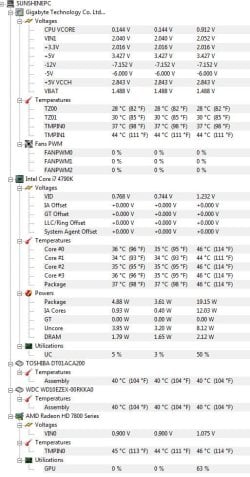
Here's a screenshot of HWMonitor.
 

Attachments

  • specs.JPG
    specs.JPG
    88.2 KB · Views: 3

My Computer My Computer

Computer type
PC/Desktop
Computer Manufacturer/Model Number
Custom Build
OS
Windows 7 Ultimate x64
CPU
Intel Core i7-4790k
Motherboard
Gigabyte Z97X-SOCFORCE
Memory
2 X 4 GB DDR3 RAM
Graphics Card(s)
ATI RADEON HD 7850
PSU
Gigabyte Superb E720 GE-E720A-C3
Cooling
Stock
I use a Gigabyte Superb E720 GE-E720A-C3 PSU. As for cooling I use stock coolers with cpu and gpu and one fan that came with cheap Delux casing right under PSU.
 

My Computer My Computer

Computer type
PC/Desktop
Computer Manufacturer/Model Number
Custom Build
OS
Windows 7 Ultimate x64
CPU
Intel Core i7-4790k
Motherboard
Gigabyte Z97X-SOCFORCE
Memory
2 X 4 GB DDR3 RAM
Graphics Card(s)
ATI RADEON HD 7850
PSU
Gigabyte Superb E720 GE-E720A-C3
Cooling
Stock
Your picture show some poor voltages from the power supply.

Could you go into your bios and list these in your next post.

+12V ?
+5V ?
+3.3V ?

Also another picture of HWMonitor showing those voltages.

I'm not understanding a fan under the power supply.

Could you post a picture of the case with the power mounted or a website showing the case you are using.

The power supply should mount with it's own intake and exhaust ports. No other fans should be needed for the power supply other than what it came with. If their is anything blocking the intake or exhaust air flow for the power supply it will over heat.
 

My Computer My Computer

Computer type
PC/Desktop
Computer Manufacturer/Model Number
Home made Desktop
OS
Windows 10 Pro. 64/ version 1709 Windows 7 Pro/64
CPU
Intel i7-6800K @ 4.3
Motherboard
ASUS X-99 Deluxe II
Memory
Corsair Platinum 16 gig @2400
Graphics Card(s)
EVGA GTX 1070 OC
Monitor(s) Displays
Asus 27" LED LCD/VE278Q
Screen Resolution
1920-1080 or 1280-720 HDMI
Hard Drives
INTEL SSD 730-240 Gb Sata 3.0/
PSU
EVGA Platium 1200W
Case
Phanteks Luxe Tempered Glass 8 fans/ one radiator
Cooling
XSPC/ Water Cooled CPU
Keyboard
Das 4 Professional
Mouse
Logitech M705/MX Anywhere 2-S
Internet Speed
100 mbits
Antivirus
Microsoft Security Essentials/ Malwarebytes Premium 3.0/ SAS
Browser
I.E. 11 default/Firefox/ ISP Time Warner Cable/Spectrum
Other Info
LG BluRay Burner/
Sound system-KLipsch-THX/
Icy Dock ssd Hot Swap bays.
I meant the fan at the back of the casing. Sorry I'm a major noob at these things. :/
 

My Computer My Computer

Computer type
PC/Desktop
Computer Manufacturer/Model Number
Custom Build
OS
Windows 7 Ultimate x64
CPU
Intel Core i7-4790k
Motherboard
Gigabyte Z97X-SOCFORCE
Memory
2 X 4 GB DDR3 RAM
Graphics Card(s)
ATI RADEON HD 7850
PSU
Gigabyte Superb E720 GE-E720A-C3
Cooling
Stock
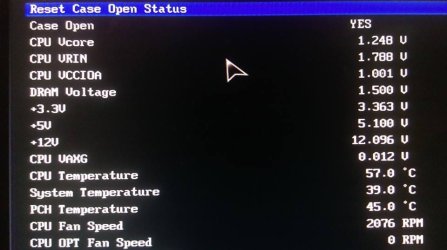
Here's a picture of the BIOS PC Health Screen (I hope I got the right one?).
 

Attachments

  • 11027988_10206086391502596_8959584934988105606_n.jpg
    11027988_10206086391502596_8959584934988105606_n.jpg
    45.9 KB · Views: 0

My Computer My Computer

Computer type
PC/Desktop
Computer Manufacturer/Model Number
Custom Build
OS
Windows 7 Ultimate x64
CPU
Intel Core i7-4790k
Motherboard
Gigabyte Z97X-SOCFORCE
Memory
2 X 4 GB DDR3 RAM
Graphics Card(s)
ATI RADEON HD 7850
PSU
Gigabyte Superb E720 GE-E720A-C3
Cooling
Stock
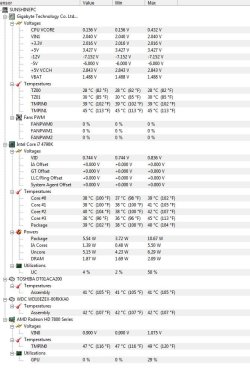
Here's another screenshot of HWMonitor.
 

Attachments

  • specs2.JPG
    specs2.JPG
    92.6 KB · Views: 1

My Computer My Computer

Computer type
PC/Desktop
Computer Manufacturer/Model Number
Custom Build
OS
Windows 7 Ultimate x64
CPU
Intel Core i7-4790k
Motherboard
Gigabyte Z97X-SOCFORCE
Memory
2 X 4 GB DDR3 RAM
Graphics Card(s)
ATI RADEON HD 7850
PSU
Gigabyte Superb E720 GE-E720A-C3
Cooling
Stock
Bump
 

My Computer My Computer

Computer type
PC/Desktop
Computer Manufacturer/Model Number
Custom Build
OS
Windows 7 Ultimate x64
CPU
Intel Core i7-4790k
Motherboard
Gigabyte Z97X-SOCFORCE
Memory
2 X 4 GB DDR3 RAM
Graphics Card(s)
ATI RADEON HD 7850
PSU
Gigabyte Superb E720 GE-E720A-C3
Cooling
Stock
Suggest you remove your Graphics card,clean out the motherboard slot,use a clean pencil eraser to clean the card contacts,then a lint free cloth dipped in methylated spirits to wipe over the card contacts.If the card has a cooling fan attached,clean the dirt from the intake and exhaust louvres and the fan also.confirm the fan works by blowing on it.Inspect the card for any discolouration caused by heat,in particular the capacitors,(large cylindrical objects) for any deformation,no lumps or bumps.This might help.
 

My Computer My Computer

Computer type
PC/Desktop
Computer Manufacturer/Model Number
Home made
OS
Windows 7 Home Premium 32bit
CPU
Intel core 2 duo E6420
Motherboard
Gigabyte GA-965P-S3 Rev 3.3
Memory
4gb DDR2
Graphics Card(s)
Asus EN7600GT
Hard Drives
Seagate Barracuda 3.5in ST500DM002
Antivirus
Microsoft Security Essentials
Browser
IE 10
Do you think this is because of high temperatures? I never see the temps higher than 57-ish
 

My Computer My Computer

Computer type
PC/Desktop
Computer Manufacturer/Model Number
Custom Build
OS
Windows 7 Ultimate x64
CPU
Intel Core i7-4790k
Motherboard
Gigabyte Z97X-SOCFORCE
Memory
2 X 4 GB DDR3 RAM
Graphics Card(s)
ATI RADEON HD 7850
PSU
Gigabyte Superb E720 GE-E720A-C3
Cooling
Stock
Temps in the mid 50C is not a problem.
 

My Computer My Computer

Computer type
PC/Desktop
Computer Manufacturer/Model Number
Home made Desktop
OS
Windows 10 Pro. 64/ version 1709 Windows 7 Pro/64
CPU
Intel i7-6800K @ 4.3
Motherboard
ASUS X-99 Deluxe II
Memory
Corsair Platinum 16 gig @2400
Graphics Card(s)
EVGA GTX 1070 OC
Monitor(s) Displays
Asus 27" LED LCD/VE278Q
Screen Resolution
1920-1080 or 1280-720 HDMI
Hard Drives
INTEL SSD 730-240 Gb Sata 3.0/
PSU
EVGA Platium 1200W
Case
Phanteks Luxe Tempered Glass 8 fans/ one radiator
Cooling
XSPC/ Water Cooled CPU
Keyboard
Das 4 Professional
Mouse
Logitech M705/MX Anywhere 2-S
Internet Speed
100 mbits
Antivirus
Microsoft Security Essentials/ Malwarebytes Premium 3.0/ SAS
Browser
I.E. 11 default/Firefox/ ISP Time Warner Cable/Spectrum
Other Info
LG BluRay Burner/
Sound system-KLipsch-THX/
Icy Dock ssd Hot Swap bays.
Suggest you remove your Graphics card,clean out the motherboard slot,use a clean pencil eraser to clean the card contacts,then a lint free cloth dipped in methylated spirits to wipe over the card contacts.If the card has a cooling fan attached,clean the dirt from the intake and exhaust louvres and the fan also.confirm the fan works by blowing on it.Inspect the card for any discolouration caused by heat,in particular the capacitors,(large cylindrical objects) for any deformation,no lumps or bumps.This might help.

Do you think this is because of high temperatures? I never see the temps higher than 57-ish

I asked because of joeandmarg0's suggestion. If I'm not wrong the method he described implies heating issues.
 

My Computer My Computer

Computer type
PC/Desktop
Computer Manufacturer/Model Number
Custom Build
OS
Windows 7 Ultimate x64
CPU
Intel Core i7-4790k
Motherboard
Gigabyte Z97X-SOCFORCE
Memory
2 X 4 GB DDR3 RAM
Graphics Card(s)
ATI RADEON HD 7850
PSU
Gigabyte Superb E720 GE-E720A-C3
Cooling
Stock
Your picture show some poor voltages from the power supply.

Could you go into your bios and list these in your next post.

+12V ?
+5V ?
+3.3V ?

Also another picture of HWMonitor showing those voltages.

I'm not understanding a fan under the power supply.

Could you post a picture of the case with the power mounted or a website showing the case you are using.

The power supply should mount with it's own intake and exhaust ports. No other fans should be needed for the power supply other than what it came with. If their is anything blocking the intake or exhaust air flow for the power supply it will over heat.

Here's a picture of the BIOS PC Health Screen (I hope I got the right one?).

Here's another screenshot of HWMonitor.

I tried to get the information you asked for. Do you still have any idea what might be the problem?
 

My Computer My Computer

Computer type
PC/Desktop
Computer Manufacturer/Model Number
Custom Build
OS
Windows 7 Ultimate x64
CPU
Intel Core i7-4790k
Motherboard
Gigabyte Z97X-SOCFORCE
Memory
2 X 4 GB DDR3 RAM
Graphics Card(s)
ATI RADEON HD 7850
PSU
Gigabyte Superb E720 GE-E720A-C3
Cooling
Stock

My Computer My Computer

Computer type
PC/Desktop
Computer Manufacturer/Model Number
Home made Desktop
OS
Windows 10 Pro. 64/ version 1709 Windows 7 Pro/64
CPU
Intel i7-6800K @ 4.3
Motherboard
ASUS X-99 Deluxe II
Memory
Corsair Platinum 16 gig @2400
Graphics Card(s)
EVGA GTX 1070 OC
Monitor(s) Displays
Asus 27" LED LCD/VE278Q
Screen Resolution
1920-1080 or 1280-720 HDMI
Hard Drives
INTEL SSD 730-240 Gb Sata 3.0/
PSU
EVGA Platium 1200W
Case
Phanteks Luxe Tempered Glass 8 fans/ one radiator
Cooling
XSPC/ Water Cooled CPU
Keyboard
Das 4 Professional
Mouse
Logitech M705/MX Anywhere 2-S
Internet Speed
100 mbits
Antivirus
Microsoft Security Essentials/ Malwarebytes Premium 3.0/ SAS
Browser
I.E. 11 default/Firefox/ ISP Time Warner Cable/Spectrum
Other Info
LG BluRay Burner/
Sound system-KLipsch-THX/
Icy Dock ssd Hot Swap bays.

My Computer My Computer

Computer type
PC/Desktop
Computer Manufacturer/Model Number
Custom Build
OS
Windows 7 Ultimate x64
CPU
Intel Core i7-4790k
Motherboard
Gigabyte Z97X-SOCFORCE
Memory
2 X 4 GB DDR3 RAM
Graphics Card(s)
ATI RADEON HD 7850
PSU
Gigabyte Superb E720 GE-E720A-C3
Cooling
Stock
Yes it could be only the card is having problems and it is often overlooked.The capacitors are the weak link in all electronics and their failure is not always heat related,which is why a quick check of the card is a good idea.At the worst it might not prove anything,at best it can pinpoint a fault,all it takes is time.
 

My Computer My Computer

Computer type
PC/Desktop
Computer Manufacturer/Model Number
Home made
OS
Windows 7 Home Premium 32bit
CPU
Intel core 2 duo E6420
Motherboard
Gigabyte GA-965P-S3 Rev 3.3
Memory
4gb DDR2
Graphics Card(s)
Asus EN7600GT
Hard Drives
Seagate Barracuda 3.5in ST500DM002
Antivirus
Microsoft Security Essentials
Browser
IE 10
Back
Top