Solved Unexplainable very high memory usage

  • Thread starter Thread starter Koper
  • Start date Start date
K

Koper

Guest
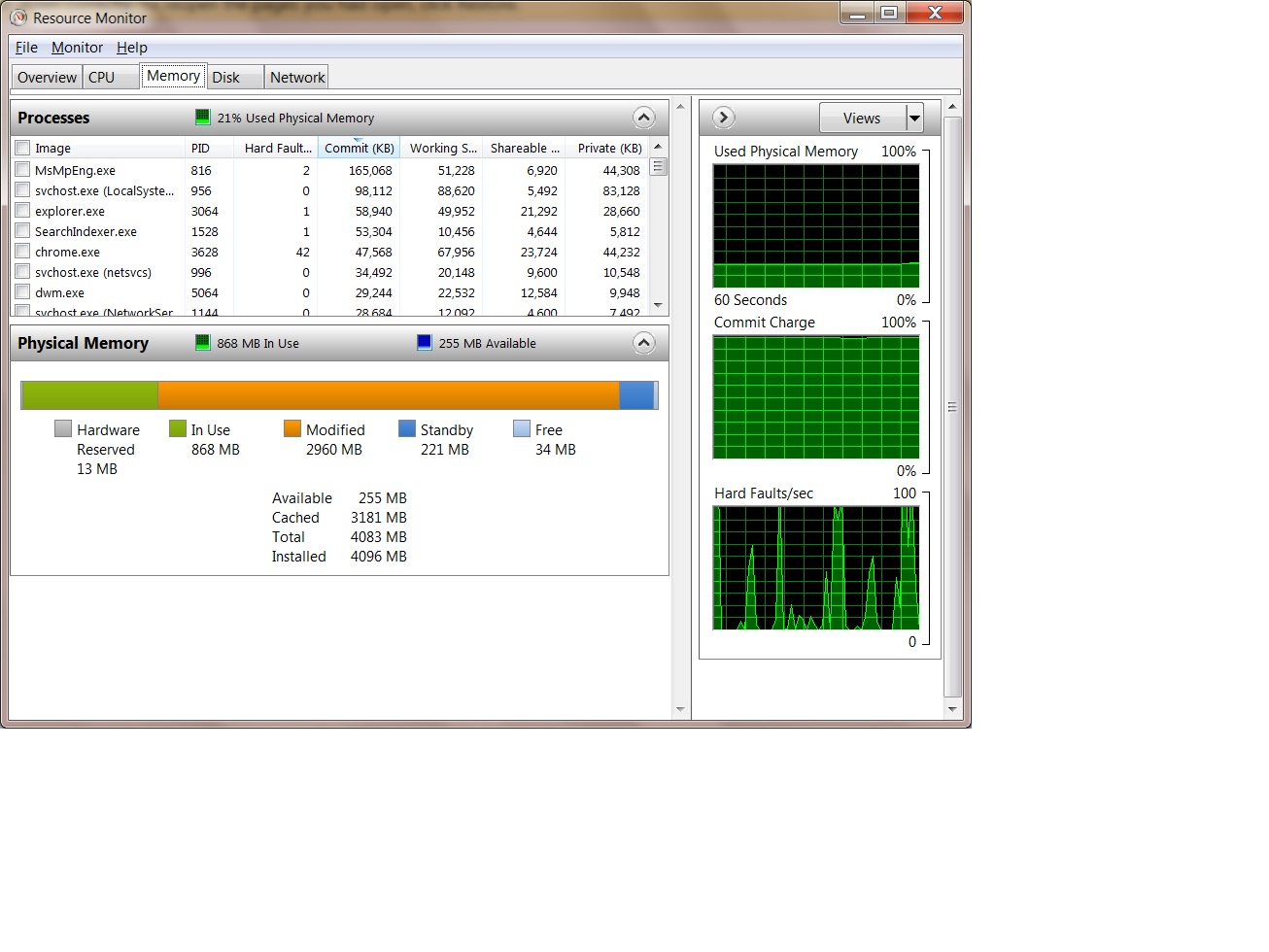
A picture is worth a thousand words: http://img266.imageshack.us/img266/669/memoryo.png

As you can see from the screenshots I have 4 GB of ram. My current opened processes use approximately 500 MB of that.

Inexplicably, though, the memory in use is 1303 GB. What's using 700 MB?!?!

Additionally, why is my "Modified" memory always so high? Note that in that particular screenshot it's actually low, it fluctuates between 400 and 800 MB. I've never seen it lower than 400 MB. Do note that modified memory is not available to other programs (unlike the standby memory, which will be overwritten if necessary).

This leaves me with only 2 GB of ram free for my games, which routinely run oom. 1 GB is magically unavailable. What's using it ?!
 
You memory usage is perfectly fine. Windows Vista and 7 have a lot more efficient memory managers then Windows XP. And no, you are not left with only 2 GB of free memory. At the tip of a hat almost the entire block of memory can be cleared and given away to those memory hungry applications.

Btw, Modified is: Memory whose contents must be to disk before it can be used for another purpose.
 

My Computer

Computer type
PC/Desktop
Computer Manufacturer/Model Number
Alienware Aurora ALX R4
OS
Windows 10 Pro (x64)
CPU
Intel Core i7-3930K (3.2GHz - 4.5GHz)
Motherboard
Alienware Aurora-R4 x79
Memory
4x Samsung 4GB PC3-12800 DDR3 (16GB 1600MHz)
Graphics Card(s)
Nvidia Geforce GTX 690
Sound Card
SteelSeries Siberia Elite
Monitor(s) Displays
Dell UltraSharp U3011
Screen Resolution
2560x1600
Hard Drives
Samsung 850 Pro 256 GB, Seagate 1TB Desktop Hybrid HDD, 2x Western Digital 4TB Green HDD
PSU
875W Some Dell PSU <.<
Case
Alienware Aurora ALX
Cooling
Custom Liquid Cooling (EK CPU & GPU blocks) dual EK 480RAD
Keyboard
Logitech G710+ Mechanical
Mouse
Logitech G700s
Internet Speed
Verizon Fios (50 mbps average)
Other Info
Server: Intel NUC D54250WYK: i5-4250U, 16GB, 256 GB mSATA, Windows Server 2012 R2
You memory usage is perfectly fine. Windows Vista and 7 have a lot more efficient memory managers then Windows XP. And no, you are not left with only 2 GB of free memory. At the tip of a hat almost the entire block of memory can be cleared and given away to those memory hungry applications.

No it is not cleared.

int megabytes = 0;
while (malloc(1024 * 1024)) ++megabytes;
printf("%d mb", megabytes);

Result was 2212 megabytes, so, like I said, the memory in use and Modified are not available.

You are confusing with the blue bar (the standby memory); that one is overwritten. But only that one.
 
No, everything is cleared. Every background task is cleared when more and more and more memory is allocated to those processes. But you have to understand one thing. 32bit applications have a max ceiling of 2 to 3 GB. While 64 bit application can go up to 7 to 8 TB.
 

My Computer

Computer type
PC/Desktop
Computer Manufacturer/Model Number
Alienware Aurora ALX R4
OS
Windows 10 Pro (x64)
CPU
Intel Core i7-3930K (3.2GHz - 4.5GHz)
Motherboard
Alienware Aurora-R4 x79
Memory
4x Samsung 4GB PC3-12800 DDR3 (16GB 1600MHz)
Graphics Card(s)
Nvidia Geforce GTX 690
Sound Card
SteelSeries Siberia Elite
Monitor(s) Displays
Dell UltraSharp U3011
Screen Resolution
2560x1600
Hard Drives
Samsung 850 Pro 256 GB, Seagate 1TB Desktop Hybrid HDD, 2x Western Digital 4TB Green HDD
PSU
875W Some Dell PSU <.<
Case
Alienware Aurora ALX
Cooling
Custom Liquid Cooling (EK CPU & GPU blocks) dual EK 480RAD
Keyboard
Logitech G710+ Mechanical
Mouse
Logitech G700s
Internet Speed
Verizon Fios (50 mbps average)
Other Info
Server: Intel NUC D54250WYK: i5-4250U, 16GB, 256 GB mSATA, Windows Server 2012 R2
No, everything is cleared. Every background task is cleared when more and more and more memory is allocated to those processes. But you have to understand one thing. 32bit applications have a max ceiling of 2 to 3 GB. While 64 bit application can go up to 7 to 8 TB.

It depends how they were compiled; if they are large address aware 32 bit applications can reach 3 GB (4 GB if the OS is x64 like mine). Anyway it's irrelevant, like I said the memory in use and modified is not released when the system is full of memory, I just tried just to make sure.

Do I need to post a screenshot as proof?
 
Then how do you explain why when I play Crysis on my crappy 2 GB laptop it get pretty much all of it? I have no modified or tweaked Windows 7 in anyway. I constently am using +30% of my RAM all the time. Yet Crysis manages to get almost all of it (about +1,900 MB).
 

My Computer

Computer type
PC/Desktop
Computer Manufacturer/Model Number
Alienware Aurora ALX R4
OS
Windows 10 Pro (x64)
CPU
Intel Core i7-3930K (3.2GHz - 4.5GHz)
Motherboard
Alienware Aurora-R4 x79
Memory
4x Samsung 4GB PC3-12800 DDR3 (16GB 1600MHz)
Graphics Card(s)
Nvidia Geforce GTX 690
Sound Card
SteelSeries Siberia Elite
Monitor(s) Displays
Dell UltraSharp U3011
Screen Resolution
2560x1600
Hard Drives
Samsung 850 Pro 256 GB, Seagate 1TB Desktop Hybrid HDD, 2x Western Digital 4TB Green HDD
PSU
875W Some Dell PSU <.<
Case
Alienware Aurora ALX
Cooling
Custom Liquid Cooling (EK CPU & GPU blocks) dual EK 480RAD
Keyboard
Logitech G710+ Mechanical
Mouse
Logitech G700s
Internet Speed
Verizon Fios (50 mbps average)
Other Info
Server: Intel NUC D54250WYK: i5-4250U, 16GB, 256 GB mSATA, Windows Server 2012 R2
I would "clean up" the PC a little Go to Start > Run, and type msconfig, Uncheck all entries except for your anti-virus software, spyware detector, and personal fire wall if you have one.

If you're;re an experienced user........Go to Start > Run and type services.msc. Look over the list and stop or disable things you know you don't need
 

My Computer

Computer Manufacturer/Model Number
Cheap $399.00 E-Machine
OS
Windows 7 Pro & Vista Home Premium
CPU
Athlon 64 3800+ (Orleans) 2.40GHz
Motherboard
Winfast
Memory
2GB DDR2 RAM DIMM
Graphics Card(s)
NVIDIA GeForce 8500 GT 512 MB memory HDMI out
Sound Card
creative X-Fi Exteme 7..1 channel
Monitor(s) Displays
Acer V223W 22" widescreen DVI
Screen Resolution
1680x1050
Hard Drives
WDC WD5 500GB
WDC WD25 250GB
PSU
OCZ 550 watt
Case
Gateway
Cooling
2 fans
Keyboard
Dell
Mouse
Sony Vaio
Internet Speed
18MB/s down - .72MB /s up
The “missing” stuff could be drivers, and such, the snapshot your posting looks like a regular 4gig system to me.Win7 will suck up as much as possible, can you easily add some more memory?


Take a look at what was covered in these 2 threads,
http://www.sevenforums.com/performance-maintenance/40369-35-60-my-memory-mia-help-me-find.html
http://www.sevenforums.com/performance-maintenance/30118-svchost-exe-consuming-200mb-ram.html
and see if any of that stuff helps, if not , post the results in your thread, and we can see what else there is to try.
 

My Computer

OS
win 7, R2
CPU
4x 885
Motherboard
uniwide
Memory
64gb
Graphics Card(s)
generic pny 9500gt
Sound Card
road7
Monitor(s) Displays
generic
Screen Resolution
80 columns
Hard Drives
4x 300gb raid0
PSU
3x500w , hot swap
Case
, nut
Cooling
, very
Keyboard
qwerty
Mouse
, eak, a!
Internet Speed
70 baud
Excessive memory usage as well: Youll see.

I read the posts and wanted to add my two cents. I have 6GB of ram, a fresh install of Win7 x64, and the screenshot shows what happens after leaving my PC on for a couple days. (3782+MB being used by modified memory ATM).

http://wow.deconstruct.me/images/ExcessiveMemory.jpg

Any ideas on this?
 

My Computer

Computer Manufacturer/Model Number
??
OS
Win 7 x64
CPU
Phenom II x3
Motherboard
DFI Lanparty DK 790GX
Memory
6GB
Graphics Card(s)
Radeon X4830
Sound Card
AC97 Built in
Monitor(s) Displays
20" wide HD (1680x1050), 19" wide (1440x900)
Hard Drives
4x OEM 36GB WD Raptors+ 2xBlack Edition 80GB single platter caviar in Raid0, 320GB WD.
PSU
BFG 650watt PSU - Lifetime Warranty
Case
Generic
Cooling
Air - 10 fans, 6 heat spreaders/sinks.
Bump.

I'm having the same problem all of a sudden. Getting a little tired of losing 3 GB of system memory.

Win7, 64-bit. 4GB RAM.

rKCj3.jpg


Thanks!

Nick
 

My Computer

Computer Manufacturer/Model Number
Dell Laititude E6400
OS
Windows 7 Ultimate 64 bit
CPU
Duo Core 2
Memory
4 GB
Something is very wrong with what is displayed on the resource monitor.
The graphs only show %21 usage, but the totals for Modified exceed what an idle system should have. What size is your swap file?
Have you tried disabling Forefront Client Security Assessment Service?
Try running mpcmdrun –trace and see if it is getting stuck on any files.
Do you have ICS enabled / firewall enabled on your pc?

Also check and see if there are there are any antivirus programs that might be causing conflicts.
 

My Computer

OS
win 7, R2
CPU
4x 885
Motherboard
uniwide
Memory
64gb
Graphics Card(s)
generic pny 9500gt
Sound Card
road7
Monitor(s) Displays
generic
Screen Resolution
80 columns
Hard Drives
4x 300gb raid0
PSU
3x500w , hot swap
Case
, nut
Cooling
, very
Keyboard
qwerty
Mouse
, eak, a!
Internet Speed
70 baud
Here is what I have gathered:

MpCMDRUn -trace returns "Tracing could not be started: error 0x80070005" (damn...turns out I was running it as my unprivelaged user I normally use (for web browsing, etc.) I'll try this again from the Administrator account next time the error pops up)

Page file is 12251 MB. After reboot it's 4081 MB. Computer manages it. Hmm..

No ICS.

No Forefront.

Running Microsoft Security Essentials only.


Now, a couple suspicions I have:

I've began using Google Chrome recently. However, I didn't use it this time and the problem presented itself again.

I use TrueCrypt. But it has been on my laptop since late March when I purchased the laptop. However, this problem is new for the past two weeks.

The behavior may or may not be related to the laptop being hibernated at night.

Thanks for your help so far. Really appreciated. : )

This is more of a nuisance than anything, but as a computer tech I would love to get to the bottom of it if you will continue to work with me on it.

-Nick
 

My Computer

Computer Manufacturer/Model Number
Dell Laititude E6400
OS
Windows 7 Ultimate 64 bit
CPU
Duo Core 2
Memory
4 GB
What power plan are you running?
What files are encrypted?
 

My Computer

OS
win 7, R2
CPU
4x 885
Motherboard
uniwide
Memory
64gb
Graphics Card(s)
generic pny 9500gt
Sound Card
road7
Monitor(s) Displays
generic
Screen Resolution
80 columns
Hard Drives
4x 300gb raid0
PSU
3x500w , hot swap
Case
, nut
Cooling
, very
Keyboard
qwerty
Mouse
, eak, a!
Internet Speed
70 baud
Hi Everyone,

I nailed it down today. It was a result of processes running as part of iBackup.com that I use for online backup. As soon as I ended the three processes associated with iBackup, the modified memory fell from 2200 MB to 61 MB this morning.
 

My Computer

Computer Manufacturer/Model Number
Dell Laititude E6400
OS
Windows 7 Ultimate 64 bit
CPU
Duo Core 2
Memory
4 GB
yeah ,modified should not get that high. I believe this is an example of poorly written software = memory leaks. wltray.exe is one I just ran in to.

try openin gup task manager and adding the memory faults column. look for something that's extremely high after one day of being on. e.g, wltray was 500k+. it grew since boot up until machine crashed never releasing the memory.
 

My Computer

OS
windows 7
Back
Top