"Unidentified Network" only when WIRED into the router!!!

redpandafire

New member
Local time
12:29 PM
Messages
7
I hate starting threads this way, but believe me I've tried a plethora of solutions and lost half the hair on my head.

Here's the situation:

1) Router: Linksys WRT54GL - works excellent.
2) ISP: excellent connection.
3) Wi-Fi to router: excellent connection.
4) Wired connection: does not connect.

I'm on the internet using my Wi-Fi connection right now. What happened to bone my connection so hard? I switched routers of course. I went from a newer LinkSys router (WRT310N) to my older one because the newer one was actually causing major issues. Now that I switched routers, windows absolutely refuses to delete all recollection of the WRT310N in order to refresh all its doo-dads and tables.

What random commands have I tried? These:

1) Open cmd.exe - Run as Administrator.
2) typed: ipconfig /flushdns - No result.
3) typed: netsh winsock reset - Rebooted. No result.
4) typed: route delete 0.0.0.0 - No result.
5) typed: route delete 192.168.1.0 - No result.
6) typed: netsh int ip reset c:\resetlog.txt - Rebooted. No result.
7) typed: I will give you free bacon if you just work!!! - Result: I became hungry. No internet though.
8) I quit the homegroup. - No result.
9) I restarted the homegroup. - No result.
10) I reinstalled ethernet drivers, every version, build, shape, and color. - No result.
11) Disabled the bloody thing, and turned on my Wi-Fi adapter - Result: YAY internet!

I'm going insane. I'm actually contemplating chewing through my ethernet cable in rage.
 

My Computer My Computer

OS
Windows 7 Professional 64-bit
CPU
Intel Xeon X3440 3.2 Ghz
Motherboard
EVGA P55 Micro SLi
Memory
4x2GB G.Skill DDR3
Graphics Card(s)
EVGA GTX 460
Monitor(s) Displays
2x Dell Ultrasharp 2209WA
Hard Drives
OCZ Vertex 60GB
2x Western Digital Caviar Black 640GB
PSU
Seasonic 520W Bronze
Case
Antec 300 Black
Cooling
Scythe and Collermaster 120mm fans
Keyboard
Logitech Wireless Pro
Mouse
Microsoft Sidewinder X5
Internet Speed
10 Mbps Cable
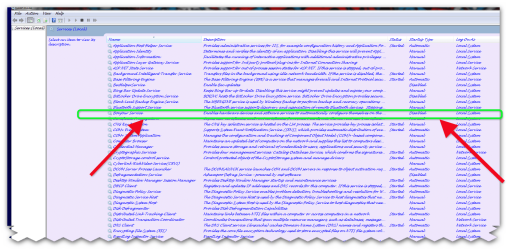
have you tried this Check to see if you have this little devil in your services list (as in the pic) bonjour service.

If you do, stop it and disable it. It is actually the Bonjour DNS Responder Service, and I believe it is the cause of the "Unidentified Network."
 

Attachments

  • Brys snap ?05 ?June ?2011 00h51m15s 01.png
    Brys snap ?05 ?June ?2011 00h51m15s 01.png
    160.9 KB · Views: 608
  • Brys snap ?05 ?June ?2011 01h08m36s 02.png
    Brys snap ?05 ?June ?2011 01h08m36s 02.png
    17.8 KB · Views: 165

My Computer My Computer

Computer Manufacturer/Model Number
packard bell IXTREME M5722
OS
Operating System : Windows 7 Home Premium Edition 6.01.7600 SP1 (x64)
CPU
Processor : Intel Core 2 Quad Q8300 @ 2500 MHz
Motherboard
Mainboard : Packard Bell (Acer EG43M )
Memory
Physical Memory :8GB Corsair4x 2GB 800MHz C5 DDR2
Graphics Card(s)
Video Card : XFX 6700 AMD
Monitor(s) Displays
Maestro 234DL - BenQ V2220 - BenQ VW2420H
Screen Resolution
Current Display :1920x1080p pixels at 60 Hz in HD LED
Hard Drives
Hard Disks : WDC (1000 GB)
Drive C: (Hard Disk) : 428 GB available on 491 GB
Drive D: (Hard Disk) : 426 GB available on 492 GB
SAMSUNG spinpoint HD103SJ 1000.2 GB
(X 2) KINGSTON SSD NOW V 30GB
PSU
XFX ProSeries 550W PSU
Case
PACKARD BELL IXTREME
Cooling
System Blower Current: 150mA Air Flow16CFM ;Akasa 90mm rear
Keyboard
Gigabyte Aivia K8100
Mouse
TRUST-Wireless Laser Mouse - Carbon edition MI-7770C
Internet Speed
TP-LINK > TL-WN951N / AV500 Gigabit Powerline Adapters
Browser
chrome dev
Other Info
EXTRA COOLING>(FAN CONTROLLER) PC Bay Cooler 3 x 40mm fans; Akasa AK-HD-BL Blue hard drive cooler 2 x 40 mm fan 4500 rpm 29.7 dBA
Bios> American Megatrends Inc.
Version : P01-A1
Date : 08/31/2009
I tried looking for it, but couldn't. My computer is in french, so it could be named something else (though it would be ridiculous if it was). So I don't think this is the problem either. :(
 

Attachments

  • services.png
    services.png
    16.8 KB · Views: 48

My Computer My Computer

OS
Windows 7 Professional 64-bit
CPU
Intel Xeon X3440 3.2 Ghz
Motherboard
EVGA P55 Micro SLi
Memory
4x2GB G.Skill DDR3
Graphics Card(s)
EVGA GTX 460
Monitor(s) Displays
2x Dell Ultrasharp 2209WA
Hard Drives
OCZ Vertex 60GB
2x Western Digital Caviar Black 640GB
PSU
Seasonic 520W Bronze
Case
Antec 300 Black
Cooling
Scythe and Collermaster 120mm fans
Keyboard
Logitech Wireless Pro
Mouse
Microsoft Sidewinder X5
Internet Speed
10 Mbps Cable
this is worth reading >>> http://en.wikipedia.org/wiki/Bonjour_(software)


Microsoft Windows implementation

Bonjour version 2.0, released on February 24, 2010, works with Windows 2000, 2003, XP, Vista, and Windows 7.[5] Systems use it primarily to facilitate the installation, configuration, and use of network printers, and thus it runs from startup. When Bonjour is fully implemented on MS Windows some features such as iChat allow for communication between the Mac OS and MS Windows. Bonjour for Windows also adds Zeroconf capabilities to Internet Explorer, and provides a Zeroconf implementation to Java VMs.[5][6]
Bonjour also comes bundled with some third-party applications, such as Adobe's Photoshop CS3 suite,[7] to take advantage of Zeroconf technology.
Installers on Windows systems normally place Bonjour files in a folder called "Bonjour" within the "Program Files" folder. It modifies Windows system-registry entries related to internal network configuration and operation. Bonjour runs as mDNSResponder.exe. Communications across the network take place over UDP port 5353, which may require reconfiguring some personal or corporate firewalls that block Bonjour packets. A full installation of Bonjour for Windows will include a plug-in for Internet Explorer, a printer wizard, and the network communication services. Not all components are included when installed as part of a third-party application or as a component of other Apple software such as iTunes.
Some VPN clients are configured so that local network services are unavailable to a computer when VPN software is active and connected.[5] In such a case no local Zeroconf services are available to Bonjour or any other Zeroconf implementation.
The open-source IM clients Pidgin and Kopete support the Bonjour IM protocol, as does the non-GPL Trillian client.
In September 2008 two security vulnerabilities were found in Bonjour for Windows.[8] Certain installations of Bonjour for Windows lack an uninstaller and do not display a human-readable entry in the Windows services listing.[9]

In 32 and 64 bit releases of Windows 7 the Bonjour service can disable all network connectivity by adding an entry of 0.0.0.0 as the default gateway.[10] The work around is to disable then enable the system NIC (ethernet card) in Windows' device manager but the only permanent solution is to disable the Bonjour service and remove the offending software.[11]
 

My Computer My Computer

Computer Manufacturer/Model Number
packard bell IXTREME M5722
OS
Operating System : Windows 7 Home Premium Edition 6.01.7600 SP1 (x64)
CPU
Processor : Intel Core 2 Quad Q8300 @ 2500 MHz
Motherboard
Mainboard : Packard Bell (Acer EG43M )
Memory
Physical Memory :8GB Corsair4x 2GB 800MHz C5 DDR2
Graphics Card(s)
Video Card : XFX 6700 AMD
Monitor(s) Displays
Maestro 234DL - BenQ V2220 - BenQ VW2420H
Screen Resolution
Current Display :1920x1080p pixels at 60 Hz in HD LED
Hard Drives
Hard Disks : WDC (1000 GB)
Drive C: (Hard Disk) : 428 GB available on 491 GB
Drive D: (Hard Disk) : 426 GB available on 492 GB
SAMSUNG spinpoint HD103SJ 1000.2 GB
(X 2) KINGSTON SSD NOW V 30GB
PSU
XFX ProSeries 550W PSU
Case
PACKARD BELL IXTREME
Cooling
System Blower Current: 150mA Air Flow16CFM ;Akasa 90mm rear
Keyboard
Gigabyte Aivia K8100
Mouse
TRUST-Wireless Laser Mouse - Carbon edition MI-7770C
Internet Speed
TP-LINK > TL-WN951N / AV500 Gigabit Powerline Adapters
Browser
chrome dev
Other Info
EXTRA COOLING>(FAN CONTROLLER) PC Bay Cooler 3 x 40mm fans; Akasa AK-HD-BL Blue hard drive cooler 2 x 40 mm fan 4500 rpm 29.7 dBA
Bios> American Megatrends Inc.
Version : P01-A1
Date : 08/31/2009
Here’s how to safely uninstall and remove the Bonjour service and files (mDNSResponder.exe and mdnsNSP.dll).

Just follow the few simple steps below to remove Bonjour from your computer.
Warning: iTunes and some other programs need Bonjour to function. In which case do not remove!
NOTE: Make sure you have administrator privileges before executing these commands. (You might have to delete the quotes and input them manually)
Go to [Start > Run] and type the following command and hit OK.
“%PROGRAMFILES%\Bonjour\mDNSResponder.exe” -remove
Go to [Start > Run] again and type the following command and hit OK.
regsvr32 /u “%PROGRAMFILES%\Bonjour\mdnsNSP.dll”
After you restart, you can safely delete the Bonjour folder without errors.
To know if you have actually uninstalled Bonjour. Open services.msc and see if there is a service similar to: “##Id_String2.6844F930_1628_4223_B5CC_5BB94B879762##”. If it is not there, then it has been uninstalled. But the folder and files remain in the program files folder. Just in case you want to install it again.
If you encountered problems after uninstalling or removing Bonjour, you can download and reinstall Bonjour http://go2.wordpress.com/?id=725X58...ce-and-files-mdnsresponderexe-and-mdnsnspdll/

more info here>>> Completly Uninstall and Remove Bonjour Service and Files (mDNSResponder.exe, mdnsNSP.dll) for Windows « Amarjeet Rai’s Blog
 

My Computer My Computer

Computer Manufacturer/Model Number
packard bell IXTREME M5722
OS
Operating System : Windows 7 Home Premium Edition 6.01.7600 SP1 (x64)
CPU
Processor : Intel Core 2 Quad Q8300 @ 2500 MHz
Motherboard
Mainboard : Packard Bell (Acer EG43M )
Memory
Physical Memory :8GB Corsair4x 2GB 800MHz C5 DDR2
Graphics Card(s)
Video Card : XFX 6700 AMD
Monitor(s) Displays
Maestro 234DL - BenQ V2220 - BenQ VW2420H
Screen Resolution
Current Display :1920x1080p pixels at 60 Hz in HD LED
Hard Drives
Hard Disks : WDC (1000 GB)
Drive C: (Hard Disk) : 428 GB available on 491 GB
Drive D: (Hard Disk) : 426 GB available on 492 GB
SAMSUNG spinpoint HD103SJ 1000.2 GB
(X 2) KINGSTON SSD NOW V 30GB
PSU
XFX ProSeries 550W PSU
Case
PACKARD BELL IXTREME
Cooling
System Blower Current: 150mA Air Flow16CFM ;Akasa 90mm rear
Keyboard
Gigabyte Aivia K8100
Mouse
TRUST-Wireless Laser Mouse - Carbon edition MI-7770C
Internet Speed
TP-LINK > TL-WN951N / AV500 Gigabit Powerline Adapters
Browser
chrome dev
Other Info
EXTRA COOLING>(FAN CONTROLLER) PC Bay Cooler 3 x 40mm fans; Akasa AK-HD-BL Blue hard drive cooler 2 x 40 mm fan 4500 rpm 29.7 dBA
Bios> American Megatrends Inc.
Version : P01-A1
Date : 08/31/2009
also this is worth a try it resets the cmos /motherboard

turn pc off
unplug from wall socket
pull pc plug out
press power button for 3-10 seconds
re-plug pc and wall socket
start pc
 

My Computer My Computer

Computer Manufacturer/Model Number
packard bell IXTREME M5722
OS
Operating System : Windows 7 Home Premium Edition 6.01.7600 SP1 (x64)
CPU
Processor : Intel Core 2 Quad Q8300 @ 2500 MHz
Motherboard
Mainboard : Packard Bell (Acer EG43M )
Memory
Physical Memory :8GB Corsair4x 2GB 800MHz C5 DDR2
Graphics Card(s)
Video Card : XFX 6700 AMD
Monitor(s) Displays
Maestro 234DL - BenQ V2220 - BenQ VW2420H
Screen Resolution
Current Display :1920x1080p pixels at 60 Hz in HD LED
Hard Drives
Hard Disks : WDC (1000 GB)
Drive C: (Hard Disk) : 428 GB available on 491 GB
Drive D: (Hard Disk) : 426 GB available on 492 GB
SAMSUNG spinpoint HD103SJ 1000.2 GB
(X 2) KINGSTON SSD NOW V 30GB
PSU
XFX ProSeries 550W PSU
Case
PACKARD BELL IXTREME
Cooling
System Blower Current: 150mA Air Flow16CFM ;Akasa 90mm rear
Keyboard
Gigabyte Aivia K8100
Mouse
TRUST-Wireless Laser Mouse - Carbon edition MI-7770C
Internet Speed
TP-LINK > TL-WN951N / AV500 Gigabit Powerline Adapters
Browser
chrome dev
Other Info
EXTRA COOLING>(FAN CONTROLLER) PC Bay Cooler 3 x 40mm fans; Akasa AK-HD-BL Blue hard drive cooler 2 x 40 mm fan 4500 rpm 29.7 dBA
Bios> American Megatrends Inc.
Version : P01-A1
Date : 08/31/2009
@brianzion You LEGEND! Tried everything and this actually worked!! :party:
 

My Computer My Computer

Computer type
PC/Desktop
OS
Win7
your welcome happy surfing 🏄
 

My Computer My Computer

Computer Manufacturer/Model Number
packard bell IXTREME M5722
OS
Operating System : Windows 7 Home Premium Edition 6.01.7600 SP1 (x64)
CPU
Processor : Intel Core 2 Quad Q8300 @ 2500 MHz
Motherboard
Mainboard : Packard Bell (Acer EG43M )
Memory
Physical Memory :8GB Corsair4x 2GB 800MHz C5 DDR2
Graphics Card(s)
Video Card : XFX 6700 AMD
Monitor(s) Displays
Maestro 234DL - BenQ V2220 - BenQ VW2420H
Screen Resolution
Current Display :1920x1080p pixels at 60 Hz in HD LED
Hard Drives
Hard Disks : WDC (1000 GB)
Drive C: (Hard Disk) : 428 GB available on 491 GB
Drive D: (Hard Disk) : 426 GB available on 492 GB
SAMSUNG spinpoint HD103SJ 1000.2 GB
(X 2) KINGSTON SSD NOW V 30GB
PSU
XFX ProSeries 550W PSU
Case
PACKARD BELL IXTREME
Cooling
System Blower Current: 150mA Air Flow16CFM ;Akasa 90mm rear
Keyboard
Gigabyte Aivia K8100
Mouse
TRUST-Wireless Laser Mouse - Carbon edition MI-7770C
Internet Speed
TP-LINK > TL-WN951N / AV500 Gigabit Powerline Adapters
Browser
chrome dev
Other Info
EXTRA COOLING>(FAN CONTROLLER) PC Bay Cooler 3 x 40mm fans; Akasa AK-HD-BL Blue hard drive cooler 2 x 40 mm fan 4500 rpm 29.7 dBA
Bios> American Megatrends Inc.
Version : P01-A1
Date : 08/31/2009
Back
Top