Unidentified Network, Windows 7

MissedTheToilet

New member
Local time
4:06 AM
Messages
10
I recently moved into a new place and I have a switch connected to the ethernet port of my wireless router. From that switch I have 3 computers running, all Windows 7 x64. Both of my laptops can access the network, however my desktop is unable to connect.

I've tried dozens of solutions to no avail, upon browsing for hours. Attached is my ipconfig -all log, if anyone could help me out I would appreciate that a lot.

aQTMj.png
 
Last edited:

My Computer My Computer

At a glance

Windows 7 Ultimate x64Intel Core 2 Quad CPU, Q6600 @ 2.4 GHz2.00 GBXFX 8600 GT XXX
OS
Windows 7 Ultimate x64
CPU
Intel Core 2 Quad CPU, Q6600 @ 2.4 GHz
Memory
2.00 GB
Graphics Card(s)
XFX 8600 GT XXX
Screen Resolution
1280x1024
It looks like you aren't getting anything from the router, no default gateway or IP nothing valid there at all.

Have you tried resetting your router yet? Have you tried to update the routers firmware?
Run these commands at your command prompt and see if anything changes.

netsh winsock reset catalog (reset winsock entries)
netsh int ip reset reset.log hit (reset TCP/IP stack)

Then ipconfig /release then ipconfig /renew
 

My Computer My Computer

At a glance

Windows 7 Ult, Windows 8.1 Pro,Q9650-4.275GHz, E8600 4.5GHz, E6750-3.8GHzG.Skill PC2 9600 1200Mhz 5 5 5 15 2TGTX480
Computer type
PC/Desktop
Computer Manufacturer/Model Number
Home built
OS
Windows 7 Ult, Windows 8.1 Pro,
CPU
Q9650-4.275GHz, E8600 4.5GHz, E6750-3.8GHz
Motherboard
Evga 780i FTW
Memory
G.Skill PC2 9600 1200Mhz 5 5 5 15 2T
Graphics Card(s)
GTX480
Sound Card
Asus Xonar D2
Monitor(s) Displays
HannsG
Screen Resolution
1680X1050
Hard Drives
GSkill Phoenix Pro 120GB SSD
PSU
ThermalTake Toughpower 1000Watt modular
Case
ThermalTake XaserV
Cooling
Xigmatek S1283
Keyboard
Logitech G15
Mouse
Logitech G9
Internet Speed
T1
Hi chev65, appreciate the quick response.

I have tried resetting the router (multiple times). The firmware should not be an issue if my other 2 computers (1 Windows 7 x64, 2nd W7 x86) are able to connect (the last computer that is unable to connect is also W7 x64) through the same switch. However I will try that right now.

Just tried your above commands and first 2 commands worked. Release and renew didn't work, @ release: "An error has occurred while releasing interface Local Area Connection : An address has not yet been associated with the network endpoint."

When I renew, "An error has occurred while renewing interface LAN : unable to connect your DHCP server. Request has timed out."

Again, I greatly appreciate your assistance.
 

My Computer My Computer

At a glance

Windows 7 Ultimate x64Intel Core 2 Quad CPU, Q6600 @ 2.4 GHz2.00 GBXFX 8600 GT XXX
OS
Windows 7 Ultimate x64
CPU
Intel Core 2 Quad CPU, Q6600 @ 2.4 GHz
Memory
2.00 GB
Graphics Card(s)
XFX 8600 GT XXX
Screen Resolution
1280x1024
It probably didn't release because there was no valid DNS servers on the list.

Do you have any manual entries at your IPv4 properties window?

It looks like something is blocking the machine from picking up DHCP from the router, maybe an A/V software or third party firewall?
 

My Computer My Computer

At a glance

Windows 7 Ult, Windows 8.1 Pro,Q9650-4.275GHz, E8600 4.5GHz, E6750-3.8GHzG.Skill PC2 9600 1200Mhz 5 5 5 15 2TGTX480
Computer type
PC/Desktop
Computer Manufacturer/Model Number
Home built
OS
Windows 7 Ult, Windows 8.1 Pro,
CPU
Q9650-4.275GHz, E8600 4.5GHz, E6750-3.8GHz
Motherboard
Evga 780i FTW
Memory
G.Skill PC2 9600 1200Mhz 5 5 5 15 2T
Graphics Card(s)
GTX480
Sound Card
Asus Xonar D2
Monitor(s) Displays
HannsG
Screen Resolution
1680X1050
Hard Drives
GSkill Phoenix Pro 120GB SSD
PSU
ThermalTake Toughpower 1000Watt modular
Case
ThermalTake XaserV
Cooling
Xigmatek S1283
Keyboard
Logitech G15
Mouse
Logitech G9
Internet Speed
T1
Not that I'm aware of... I've hard reset the router multiple times, and if my other W7 machines can get online that theory doesn't make much sense. Disabled Windows Firewall (only firewall on) and still not working.
 

My Computer My Computer

At a glance

Windows 7 Ultimate x64Intel Core 2 Quad CPU, Q6600 @ 2.4 GHz2.00 GBXFX 8600 GT XXX
OS
Windows 7 Ultimate x64
CPU
Intel Core 2 Quad CPU, Q6600 @ 2.4 GHz
Memory
2.00 GB
Graphics Card(s)
XFX 8600 GT XXX
Screen Resolution
1280x1024
If you can list your system specs it might help to look around for some more recent drivers for this system.

If you can find a more recent firmware for your router I would install it, the fact that this router works with other win7 machines doesn't mean much because they are all using different drivers and some work better than others with certain firmware.
 

My Computer My Computer

At a glance

Windows 7 Ult, Windows 8.1 Pro,Q9650-4.275GHz, E8600 4.5GHz, E6750-3.8GHzG.Skill PC2 9600 1200Mhz 5 5 5 15 2TGTX480
Computer type
PC/Desktop
Computer Manufacturer/Model Number
Home built
OS
Windows 7 Ult, Windows 8.1 Pro,
CPU
Q9650-4.275GHz, E8600 4.5GHz, E6750-3.8GHz
Motherboard
Evga 780i FTW
Memory
G.Skill PC2 9600 1200Mhz 5 5 5 15 2T
Graphics Card(s)
GTX480
Sound Card
Asus Xonar D2
Monitor(s) Displays
HannsG
Screen Resolution
1680X1050
Hard Drives
GSkill Phoenix Pro 120GB SSD
PSU
ThermalTake Toughpower 1000Watt modular
Case
ThermalTake XaserV
Cooling
Xigmatek S1283
Keyboard
Logitech G15
Mouse
Logitech G9
Internet Speed
T1
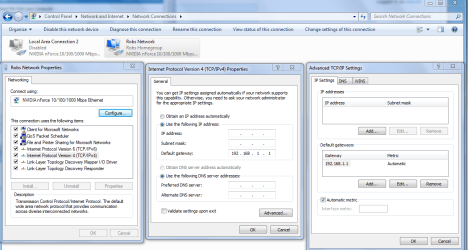
It appears the default gateway is not entered in ipv4...:cry:
 
Last edited:

My Computer My Computer

At a glance

Win7 Home Premium x64 W10Pro&HomeA12 9720p 4+8 TurionII M5206GB 8GBR7
Computer type
Laptop
Computer Manufacturer/Model Number
HP 17-ak0xx, dv7 3173nr
OS
Win7 Home Premium x64 W10Pro&Home
CPU
A12 9720p 4+8 TurionII M520
Motherboard
HP 3839
Memory
6GB 8GB
Graphics Card(s)
R7
Monitor(s) Displays
24" sa550
Screen Resolution
1600x900 1920x1080
Mouse
Logitechx2
Internet Speed
120Mb/s down 12up
There are more problems then just the default gateway, the DNS isn't correct, the IP isn't there, and the subnet mask is all wrong. Although it can sometimes help to enter the correct default gateway manually into the IPv4 properties window.

The problem is that I don't even know what default gateway the router is supposed to be using. So I would need to know the routers make model to figure that out.

What ever the default gateway is it would need to be entered manually where it says default gateway replacing 192.168.1.1 with the correct one.

We can get also this info from one of the other machines ipconfig /all, though it might not be enough to fix the problem.
 

Attachments

  • IPV4 properties manual default gateway entry.PNG
    IPV4 properties manual default gateway entry.PNG
    63.2 KB · Views: 76

My Computer My Computer

At a glance

Windows 7 Ult, Windows 8.1 Pro,Q9650-4.275GHz, E8600 4.5GHz, E6750-3.8GHzG.Skill PC2 9600 1200Mhz 5 5 5 15 2TGTX480
Computer type
PC/Desktop
Computer Manufacturer/Model Number
Home built
OS
Windows 7 Ult, Windows 8.1 Pro,
CPU
Q9650-4.275GHz, E8600 4.5GHz, E6750-3.8GHz
Motherboard
Evga 780i FTW
Memory
G.Skill PC2 9600 1200Mhz 5 5 5 15 2T
Graphics Card(s)
GTX480
Sound Card
Asus Xonar D2
Monitor(s) Displays
HannsG
Screen Resolution
1680X1050
Hard Drives
GSkill Phoenix Pro 120GB SSD
PSU
ThermalTake Toughpower 1000Watt modular
Case
ThermalTake XaserV
Cooling
Xigmatek S1283
Keyboard
Logitech G15
Mouse
Logitech G9
Internet Speed
T1

My Computer My Computer

At a glance

Windows 7 Ultimate x64Intel Core 2 Quad CPU, Q6600 @ 2.4 GHz2.00 GBXFX 8600 GT XXX
OS
Windows 7 Ultimate x64
CPU
Intel Core 2 Quad CPU, Q6600 @ 2.4 GHz
Memory
2.00 GB
Graphics Card(s)
XFX 8600 GT XXX
Screen Resolution
1280x1024
That particular router has lots of complaints, sometimes it works with Windows 7 other times not so well. Seems to depend on the firmware updates. There are about a dozen versions of that same router. Thinking that well if it works with one machine it should work with another doesn't fly because of compatiblity with certain drivers.

I would go with either the tomato firmware or the DDwrt firmware, but linksys may have a firmware that works also. You can find them by googling around a bit. You need to use firmware that is made for your routers version number so it's important you get the version number first. I've seen lots of problems fixed with this router by updating the firmware.
 
Last edited:

My Computer My Computer

At a glance

Windows 7 Ult, Windows 8.1 Pro,Q9650-4.275GHz, E8600 4.5GHz, E6750-3.8GHzG.Skill PC2 9600 1200Mhz 5 5 5 15 2TGTX480
Computer type
PC/Desktop
Computer Manufacturer/Model Number
Home built
OS
Windows 7 Ult, Windows 8.1 Pro,
CPU
Q9650-4.275GHz, E8600 4.5GHz, E6750-3.8GHz
Motherboard
Evga 780i FTW
Memory
G.Skill PC2 9600 1200Mhz 5 5 5 15 2T
Graphics Card(s)
GTX480
Sound Card
Asus Xonar D2
Monitor(s) Displays
HannsG
Screen Resolution
1680X1050
Hard Drives
GSkill Phoenix Pro 120GB SSD
PSU
ThermalTake Toughpower 1000Watt modular
Case
ThermalTake XaserV
Cooling
Xigmatek S1283
Keyboard
Logitech G15
Mouse
Logitech G9
Internet Speed
T1

My Computer My Computer

At a glance

Windows 7 Ultimate x64Intel Core 2 Quad CPU, Q6600 @ 2.4 GHz2.00 GBXFX 8600 GT XXX
OS
Windows 7 Ultimate x64
CPU
Intel Core 2 Quad CPU, Q6600 @ 2.4 GHz
Memory
2.00 GB
Graphics Card(s)
XFX 8600 GT XXX
Screen Resolution
1280x1024
Do you have anything from apple installed like iTunes or adobe photo suite?
 

My Computer My Computer

At a glance

Windows 7 Ult, Windows 8.1 Pro,Q9650-4.275GHz, E8600 4.5GHz, E6750-3.8GHzG.Skill PC2 9600 1200Mhz 5 5 5 15 2TGTX480
Computer type
PC/Desktop
Computer Manufacturer/Model Number
Home built
OS
Windows 7 Ult, Windows 8.1 Pro,
CPU
Q9650-4.275GHz, E8600 4.5GHz, E6750-3.8GHz
Motherboard
Evga 780i FTW
Memory
G.Skill PC2 9600 1200Mhz 5 5 5 15 2T
Graphics Card(s)
GTX480
Sound Card
Asus Xonar D2
Monitor(s) Displays
HannsG
Screen Resolution
1680X1050
Hard Drives
GSkill Phoenix Pro 120GB SSD
PSU
ThermalTake Toughpower 1000Watt modular
Case
ThermalTake XaserV
Cooling
Xigmatek S1283
Keyboard
Logitech G15
Mouse
Logitech G9
Internet Speed
T1
I do have Adobe Master Suite 5 installed.
 

My Computer My Computer

At a glance

Windows 7 Ultimate x64Intel Core 2 Quad CPU, Q6600 @ 2.4 GHz2.00 GBXFX 8600 GT XXX
OS
Windows 7 Ultimate x64
CPU
Intel Core 2 Quad CPU, Q6600 @ 2.4 GHz
Memory
2.00 GB
Graphics Card(s)
XFX 8600 GT XXX
Screen Resolution
1280x1024
That program usually has the bonjour service which tends to cause these sorts of problems. I mistakingly thought that everyone has heard about this problem by now.

Under the Services tab uncheck the service called "bonjour ##Id_String1.6844[... and then a bunch of numbers]" by Apple, disable the service. Reboot machine.

Then to get rid of the service.

1. Navigate to C:\Program Files\Bonjour
2. Rename the mdnsNSP.dll file in that folder to mdnsNSP.old
3. Restart your computer
4. Delete the Program Files\Bonjour folder
reboot and try to connect.
 

My Computer My Computer

At a glance

Windows 7 Ult, Windows 8.1 Pro,Q9650-4.275GHz, E8600 4.5GHz, E6750-3.8GHzG.Skill PC2 9600 1200Mhz 5 5 5 15 2TGTX480
Computer type
PC/Desktop
Computer Manufacturer/Model Number
Home built
OS
Windows 7 Ult, Windows 8.1 Pro,
CPU
Q9650-4.275GHz, E8600 4.5GHz, E6750-3.8GHz
Motherboard
Evga 780i FTW
Memory
G.Skill PC2 9600 1200Mhz 5 5 5 15 2T
Graphics Card(s)
GTX480
Sound Card
Asus Xonar D2
Monitor(s) Displays
HannsG
Screen Resolution
1680X1050
Hard Drives
GSkill Phoenix Pro 120GB SSD
PSU
ThermalTake Toughpower 1000Watt modular
Case
ThermalTake XaserV
Cooling
Xigmatek S1283
Keyboard
Logitech G15
Mouse
Logitech G9
Internet Speed
T1
I don't have Bonjour/iTunes installed.
 

My Computer My Computer

At a glance

Windows 7 Ultimate x64Intel Core 2 Quad CPU, Q6600 @ 2.4 GHz2.00 GBXFX 8600 GT XXX
OS
Windows 7 Ultimate x64
CPU
Intel Core 2 Quad CPU, Q6600 @ 2.4 GHz
Memory
2.00 GB
Graphics Card(s)
XFX 8600 GT XXX
Screen Resolution
1280x1024
If you installed Adobe CS5 then you also have the bonjour service. Google around if you don't believe me. There are complaints about the bonjour service causing this exact problem all over the internet. It's been going on for well over two years now.

In just the last month I have seen "and fixed" this problem no less than ten different times. There are also ways to remove the service by using the registry.
 

My Computer My Computer

At a glance

Windows 7 Ult, Windows 8.1 Pro,Q9650-4.275GHz, E8600 4.5GHz, E6750-3.8GHzG.Skill PC2 9600 1200Mhz 5 5 5 15 2TGTX480
Computer type
PC/Desktop
Computer Manufacturer/Model Number
Home built
OS
Windows 7 Ult, Windows 8.1 Pro,
CPU
Q9650-4.275GHz, E8600 4.5GHz, E6750-3.8GHz
Motherboard
Evga 780i FTW
Memory
G.Skill PC2 9600 1200Mhz 5 5 5 15 2T
Graphics Card(s)
GTX480
Sound Card
Asus Xonar D2
Monitor(s) Displays
HannsG
Screen Resolution
1680X1050
Hard Drives
GSkill Phoenix Pro 120GB SSD
PSU
ThermalTake Toughpower 1000Watt modular
Case
ThermalTake XaserV
Cooling
Xigmatek S1283
Keyboard
Logitech G15
Mouse
Logitech G9
Internet Speed
T1
Really? That's odd because I can't find any Bonjour registries associated to this machine. There is no Bonjour file under Program Files nor does it show up in the Services tab or the Control Panel list of installed programs. Are you sure about that? Maybe I am looking in the wrong places?
 

My Computer My Computer

At a glance

Windows 7 Ultimate x64Intel Core 2 Quad CPU, Q6600 @ 2.4 GHz2.00 GBXFX 8600 GT XXX
OS
Windows 7 Ultimate x64
CPU
Intel Core 2 Quad CPU, Q6600 @ 2.4 GHz
Memory
2.00 GB
Graphics Card(s)
XFX 8600 GT XXX
Screen Resolution
1280x1024
I see that you have 169 IP. Please follow these steps and let me know.

1) if you have windows 7 or vista run command prompt as an administrator. with windows xp just run it, once you in command prompt, type IPCONFIG /RELEASE, then type IPCONFIG /RENEW, Then type IPCONFIG /RELEASE again.

2) turn off your computer, when your computer is turning off, turn off your router and then modem. (WAIT FOR 5 MINS ATLEAST)

3) turn on your modem, wait for 3 mins, turn on your router, wait for 3 mins. turn on your computer. check your internet connection.
 

My Computer My Computer

At a glance

Windows 7 32 bitE 72004 GB512 MB NVIDIA (rocks)
Computer Manufacturer/Model Number
Asus
OS
Windows 7 32 bit
CPU
E 7200
Motherboard
Asus
Memory
4 GB
Graphics Card(s)
512 MB NVIDIA (rocks)
Sound Card
Realtek High definetion audio (on board)
Monitor(s) Displays
17 Inch stupid (HP)
Screen Resolution
1280 x 1024 (60Hz)
Hard Drives
500 GB Seagate, 140 GB Samsung.
PSU
Dont know but its the best/expensive one i could find.
Case
Local
Cooling
Air Cooling Fans
Keyboard
iball multimedia keyboard
Mouse
iball optical mouse
Internet Speed
512 kbs

My Computer My Computer

At a glance

Windows 7 Ult, Windows 8.1 Pro,Q9650-4.275GHz, E8600 4.5GHz, E6750-3.8GHzG.Skill PC2 9600 1200Mhz 5 5 5 15 2TGTX480
Computer type
PC/Desktop
Computer Manufacturer/Model Number
Home built
OS
Windows 7 Ult, Windows 8.1 Pro,
CPU
Q9650-4.275GHz, E8600 4.5GHz, E6750-3.8GHz
Motherboard
Evga 780i FTW
Memory
G.Skill PC2 9600 1200Mhz 5 5 5 15 2T
Graphics Card(s)
GTX480
Sound Card
Asus Xonar D2
Monitor(s) Displays
HannsG
Screen Resolution
1680X1050
Hard Drives
GSkill Phoenix Pro 120GB SSD
PSU
ThermalTake Toughpower 1000Watt modular
Case
ThermalTake XaserV
Cooling
Xigmatek S1283
Keyboard
Logitech G15
Mouse
Logitech G9
Internet Speed
T1
Really? That's odd because I can't find any Bonjour registries associated to this machine. There is no Bonjour file under Program Files nor does it show up in the Services tab or the Control Panel list of installed programs. Are you sure about that? Maybe I am looking in the wrong places?

Yes I'm sure but there is no telling where they hide the service these days. Google for Adobe CS5 and bonjour problems. There are ways to shut the service off using the registry. You may need to reset your TCP/IP stack afterwards.

This problem has been going on for a long time now. And about fifty more just like it.
http://www.sevenforums.com/network-...t-connectivity-after-reboot-4.html#post529667
 

My Computer My Computer

At a glance

Windows 7 Ult, Windows 8.1 Pro,Q9650-4.275GHz, E8600 4.5GHz, E6750-3.8GHzG.Skill PC2 9600 1200Mhz 5 5 5 15 2TGTX480
Computer type
PC/Desktop
Computer Manufacturer/Model Number
Home built
OS
Windows 7 Ult, Windows 8.1 Pro,
CPU
Q9650-4.275GHz, E8600 4.5GHz, E6750-3.8GHz
Motherboard
Evga 780i FTW
Memory
G.Skill PC2 9600 1200Mhz 5 5 5 15 2T
Graphics Card(s)
GTX480
Sound Card
Asus Xonar D2
Monitor(s) Displays
HannsG
Screen Resolution
1680X1050
Hard Drives
GSkill Phoenix Pro 120GB SSD
PSU
ThermalTake Toughpower 1000Watt modular
Case
ThermalTake XaserV
Cooling
Xigmatek S1283
Keyboard
Logitech G15
Mouse
Logitech G9
Internet Speed
T1
Back
Top