Solved Uninstall Nvidia display update from Windows Update

aagelos

New member
Local time
2:24 PM
Messages
9
Location
Greece
Hello guys.

Recently windows downloaded and updated Nvidia display drivers.
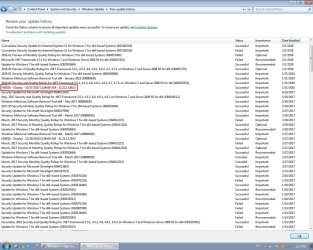
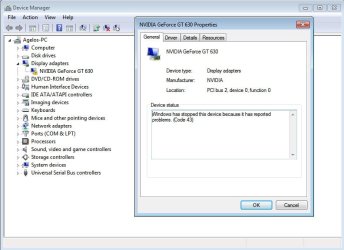
Until that moment, everything was fine here. After that, i have some problems regarding my graphic card, such as "hardware acceleration", "windows has stopped this device because it has reported problems. (Code 43)", i see a yellow exclamation mark next to my graphic card adapter in device manager, etc. I want to uninstall this update (Nvidia display - 23.21.13.8813), but until now i can't find a way do it.
I tried to uninstall Nvidia drivers and install them again, i downloaded the most recent drivers and tried them, but i had no luck.

This is the update i want to remove :
Microsoft Update Catalog


Does anyone has a clue how on earth i can uninstall that stupid update?
 

Attachments
  • screen 1.jpg
    screen 1.jpg
    54.8 KB · Views: 0
  • screen 2.jpg
    screen 2.jpg
    29.2 KB · Views: 29

My Computer

Computer type
PC/Desktop
Computer Manufacturer/Model Number
Custom build
OS
Windows 7 64 bit
CPU
AMD Athlon II X2 270, 3.4 Ghz
Motherboard
Gigabyte M68MT-S2
Memory
6 GB
Graphics Card(s)
Nvidia GeForce GT630
Hard Drives
Toshiba TR150
WDC WD25
Antivirus
Avast
Hi aagelos, welcome to he Forum.

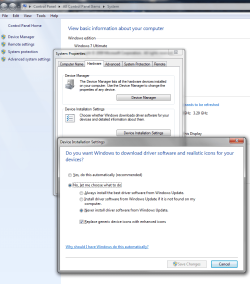
Have you tried Uninstalling the Driver from Device Manager. In your first screen shot click on the Driver Tab & see if the Roll Back button is available, if it is click on that & hopefully that will roll back to the previous one. If not Uninstall the Driver. You will have to reboot the computer to get either of these solutions to work.

I never use Windows Update for updating hardware on my computer. My computer has the NVIDIA GT610 installed & lately I have been getting driver updates regularly directly from NVIDIA. A notification comes through the internet, to download & install the latest driver.
 

My Computer

Computer type
PC/Desktop
Computer Manufacturer/Model Number
Self built using existing case
OS
Windows 7 Home Premium 64 bit sp1
CPU
Intel i5 3570 3.4Ghz Ivy Bridge SKT 1155 quad core
Motherboard
Gigabyte Z77-HD3 SKT 1155 2xSata 3, 4x USB 3.0
Memory
G-Skill Rip Jaws 16Gb (8x2) DDR3 -1600 PC3 12800 CL 10 red
Graphics Card(s)
Gigabyte NVIDIA GT610 1Gb DDR3 810/1200 PCI-E 2.0 Silent
Sound Card
NVIDIA High Definition & Realtech High Definition Audio
Monitor(s) Displays
2 x Philips 226V4L 16:9 aspect ratio
Screen Resolution
1920 x 1080 HD
Hard Drives
Samsung 840 Pro 256gb SSD, SATA 3.
Hitachi Touro Portable 1tb, USB 3.0 HDD used for image b/ups.
PSU
Corsair VS450
Case
Codeng
Cooling
PSU fan & CPU fan
Keyboard
Logitech
Mouse
Logitech Wireless trackball M570
Internet Speed
Wireless 3G. 3mg down & 550kb up.
Antivirus
Bitdefender Internet Security 2020
Browser
Opera (Current Version) & Firefox
Other Info
MS Office 2013 Pro. Davis weather station software. MGE Nova 600 avr UPS.
Hi aagelos, welcome to he Forum.

Have you tried Uninstalling the Driver from Device Manager. In your first screen shot click on the Driver Tab & see if the Roll Back button is available, if it is click on that & hopefully that will roll back to the previous one. If not Uninstall the Driver. You will have to reboot the computer to get either of these solutions to work.

Hello Ranger, thanx for your response!
Unfortunately i have tried both options you mentioned, but still none worked!
Roll back button is unavailable.
I also have tried to uninstall the driver, and install a newer one (using "clean installation option"), but this didn't help either!
 

My Computer

Computer type
PC/Desktop
Computer Manufacturer/Model Number
Custom build
OS
Windows 7 64 bit
CPU
AMD Athlon II X2 270, 3.4 Ghz
Motherboard
Gigabyte M68MT-S2
Memory
6 GB
Graphics Card(s)
Nvidia GeForce GT630
Hard Drives
Toshiba TR150
WDC WD25
Antivirus
Avast
Hi and welcome.
Here is the latest driver for the 630 from Nvidia.
Download and install and please tick the box to fresh install i.e. uninstall the old first.
Then ! right click Computer/left click Properties/left click Advanced system settings/click the Hardware tab/click Device Installation settings/select "No let me choose" and also" Never Install Driver Software from Windows Update"/Apply.
 

Attachments

  • Instruct.png
    Instruct.png
    52 KB · Views: 1

My Computer

Computer type
PC/Desktop
Computer Manufacturer/Model Number
Owner Builder
OS
Windows 7 Ultimate x64 SP1 OEM
CPU
Intel i7 3930K
Motherboard
Asus X79 Deluxe
Memory
Kingston Genesis KHX2133C11D3K4/32G
Graphics Card(s)
Asus RTX 2070 Ti Turbo fan series
Sound Card
Creative Sound Blaster ZXR
Monitor(s) Displays
Samsung U32J39 UHD
Screen Resolution
3840 x 2160
Hard Drives
Samsung 860 Pro 256 GB
OCZ Vertex 4 512GB
Western Digital Black 4TB
PSU
Corsair AX850
Case
Gigabyte
Cooling
Push - Pull 120 mm Noctua PWM, Scythe Big Shuriken 2 Rev. B
Keyboard
Logitech K800 Backlit
Mouse
Logitech MX2 Master
Internet Speed
NBN 25 Mbps
Antivirus
Kaspersky Internet Security
Browser
Mozilla FireFox
Other Info
TP-Link Archer VR600v
Sennheiser TR220 WiFi Head Phones.
Hi and welcome.
Here is the latest driver for the 630 from Nvidia.
Download and install and please tick the box to fresh install i.e. uninstall the old first.
Then ! right click Computer/left click Properties/left click Advanced system settings/click the Hardware tab/click Device Installation settings/select "No let me choose" and also" Never Install Driver Software from Windows Update"/Apply.


Heya MeOnMine...

I have tried everything you suggested, but still, this "code 43 error" is there!
I 'm going crazy! Do you guys think that i should format HDD and reinstall OS ?
 

My Computer

Computer type
PC/Desktop
Computer Manufacturer/Model Number
Custom build
OS
Windows 7 64 bit
CPU
AMD Athlon II X2 270, 3.4 Ghz
Motherboard
Gigabyte M68MT-S2
Memory
6 GB
Graphics Card(s)
Nvidia GeForce GT630
Hard Drives
Toshiba TR150
WDC WD25
Antivirus
Avast
Hi

please run this tool
Display Driver Uninstaller Download version 17.0.8.3

REBOOT

Your system will automatically pick up the built in windows driver (wddm 1.1)

run your system for a while with these. Thier not that bad either- newer version available
(or even keep it)

Then create a restore point
shoot over to Nvidea download the system check tool - let it choose then update

Roy
 

My Computer

Computer type
PC/Desktop
Computer Manufacturer/Model Number
medionl/Aspire 6930G/acer x55a
OS
W7 home premium 32bit/W7HP 64bit/w10 tp insider ring
CPU
E5300 dual core
Motherboard
medion MS7366
Memory
3gb
Graphics Card(s)
Nvidia Geforce 7100 Nforce 630i
Monitor(s) Displays
avixc
Internet Speed
n (isp resticted to 72)
Antivirus
mse/pands
Browser
palemoon
Other Info
Belkin Fd7050 n USB using Railink RT2870 drivers, more upto date
Hi

please run this tool
Display Driver Uninstaller Download version 17.0.8.3

REBOOT

Your system will automatically pick up the built in windows driver (wddm 1.1)

run your system for a while with these. Thier not that bad either- newer version available
(or even keep it)

Then create a restore point
shoot over to Nvidea download the system check tool - let it choose then update

Roy

Hey Roy.

I have tried this too, just a couple of hours ago...
I start in safe mode, and run DDU ver. 17.0.8.3 (the one you suggested) but the problem still persists!
Maybe i wasn't clear enough. I can, and i already have uninstalled Nvidia drivers (the one i have downloaded from Nvidia site) .
What i'm looking for is to uninstall the Nvidia drivers that Windows Update feature have automatically installed in my computer!

Just have a look at the screenshot, is marked in red!
 

Attachments

  • screen.jpg
    screen.jpg
    204.5 KB · Views: 0

My Computer

Computer type
PC/Desktop
Computer Manufacturer/Model Number
Custom build
OS
Windows 7 64 bit
CPU
AMD Athlon II X2 270, 3.4 Ghz
Motherboard
Gigabyte M68MT-S2
Memory
6 GB
Graphics Card(s)
Nvidia GeForce GT630
Hard Drives
Toshiba TR150
WDC WD25
Antivirus
Avast
Any update can be blocked - hidden -
set your update options to let me choose
highlight it
then RIGHT click on it -- HIDE.

note
when the next version is issued you will have to do it to the new one.


Roy
 

My Computer

Computer type
PC/Desktop
Computer Manufacturer/Model Number
medionl/Aspire 6930G/acer x55a
OS
W7 home premium 32bit/W7HP 64bit/w10 tp insider ring
CPU
E5300 dual core
Motherboard
medion MS7366
Memory
3gb
Graphics Card(s)
Nvidia Geforce 7100 Nforce 630i
Monitor(s) Displays
avixc
Internet Speed
n (isp resticted to 72)
Antivirus
mse/pands
Browser
palemoon
Other Info
Belkin Fd7050 n USB using Railink RT2870 drivers, more upto date
Any update can be blocked - hidden -
set your update options to let me choose
highlight it
then RIGHT click on it -- HIDE.

note
when the next version is issued you will have to do it to the new one.


Roy

Hmmm... not sure if i understood...
You mean update options in Windows Update Settings?
Or somewhere else?
 

My Computer

Computer type
PC/Desktop
Computer Manufacturer/Model Number
Custom build
OS
Windows 7 64 bit
CPU
AMD Athlon II X2 270, 3.4 Ghz
Motherboard
Gigabyte M68MT-S2
Memory
6 GB
Graphics Card(s)
Nvidia GeForce GT630
Hard Drives
Toshiba TR150
WDC WD25
Antivirus
Avast
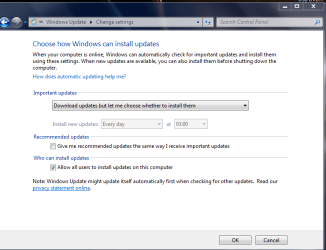
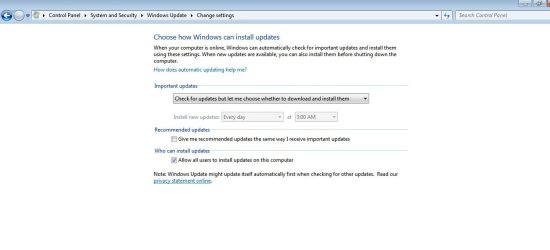
From the windows update GUI

Change settings (top left)

then as in screenshot

note
MeOnMine's settings should stop it beforehand,

Roy
 

Attachments

  • wuchoose.PNG
    wuchoose.PNG
    24.4 KB · Views: 19

My Computer

Computer type
PC/Desktop
Computer Manufacturer/Model Number
medionl/Aspire 6930G/acer x55a
OS
W7 home premium 32bit/W7HP 64bit/w10 tp insider ring
CPU
E5300 dual core
Motherboard
medion MS7366
Memory
3gb
Graphics Card(s)
Nvidia Geforce 7100 Nforce 630i
Monitor(s) Displays
avixc
Internet Speed
n (isp resticted to 72)
Antivirus
mse/pands
Browser
palemoon
Other Info
Belkin Fd7050 n USB using Railink RT2870 drivers, more upto date
Ok, i just did it. (in fact, these settings was set that way).

But, here's what's going on:

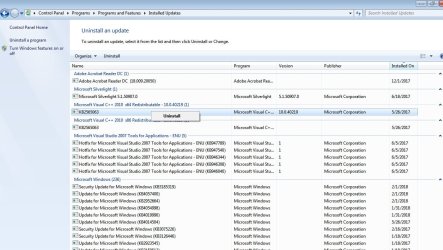
There's no option like "hide" or "uninstall" when i'm in "update history" tab and i left click on a driver.
On the other hand, when i'm in "installed updates" tab, i can use the uninstall option....

See the screenshots to understand better!
 

Attachments

  • screen 1.jpg
    screen 1.jpg
    60.8 KB · Views: 0
  • screen 2.jpg
    screen 2.jpg
    131 KB · Views: 1
  • screen 3.jpg
    screen 3.jpg
    138.2 KB · Views: 0

My Computer

Computer type
PC/Desktop
Computer Manufacturer/Model Number
Custom build
OS
Windows 7 64 bit
CPU
AMD Athlon II X2 270, 3.4 Ghz
Motherboard
Gigabyte M68MT-S2
Memory
6 GB
Graphics Card(s)
Nvidia GeForce GT630
Hard Drives
Toshiba TR150
WDC WD25
Antivirus
Avast
Thats coz its allready installed

is roll-back available in device manager

Roy
 

My Computer

Computer type
PC/Desktop
Computer Manufacturer/Model Number
medionl/Aspire 6930G/acer x55a
OS
W7 home premium 32bit/W7HP 64bit/w10 tp insider ring
CPU
E5300 dual core
Motherboard
medion MS7366
Memory
3gb
Graphics Card(s)
Nvidia Geforce 7100 Nforce 630i
Monitor(s) Displays
avixc
Internet Speed
n (isp resticted to 72)
Antivirus
mse/pands
Browser
palemoon
Other Info
Belkin Fd7050 n USB using Railink RT2870 drivers, more upto date

Attachments

  • screen.jpg
    screen.jpg
    118.9 KB · Views: 0

My Computer

Computer type
PC/Desktop
Computer Manufacturer/Model Number
Custom build
OS
Windows 7 64 bit
CPU
AMD Athlon II X2 270, 3.4 Ghz
Motherboard
Gigabyte M68MT-S2
Memory
6 GB
Graphics Card(s)
Nvidia GeForce GT630
Hard Drives
Toshiba TR150
WDC WD25
Antivirus
Avast
aagelos. Open Control Panel, then Programs & Features & scroll down to NVIDIA, then look for the driver that was installed on Jan 31, Right Click on it & select Change/Uninstall, then Uninstall the driver. Reboot the computer to effect the change. Then go to the NVIDIA website as mentioned in MeOnMine's Post#4 & install the correct driver.
 

My Computer

Computer type
PC/Desktop
Computer Manufacturer/Model Number
Self built using existing case
OS
Windows 7 Home Premium 64 bit sp1
CPU
Intel i5 3570 3.4Ghz Ivy Bridge SKT 1155 quad core
Motherboard
Gigabyte Z77-HD3 SKT 1155 2xSata 3, 4x USB 3.0
Memory
G-Skill Rip Jaws 16Gb (8x2) DDR3 -1600 PC3 12800 CL 10 red
Graphics Card(s)
Gigabyte NVIDIA GT610 1Gb DDR3 810/1200 PCI-E 2.0 Silent
Sound Card
NVIDIA High Definition & Realtech High Definition Audio
Monitor(s) Displays
2 x Philips 226V4L 16:9 aspect ratio
Screen Resolution
1920 x 1080 HD
Hard Drives
Samsung 840 Pro 256gb SSD, SATA 3.
Hitachi Touro Portable 1tb, USB 3.0 HDD used for image b/ups.
PSU
Corsair VS450
Case
Codeng
Cooling
PSU fan & CPU fan
Keyboard
Logitech
Mouse
Logitech Wireless trackball M570
Internet Speed
Wireless 3G. 3mg down & 550kb up.
Antivirus
Bitdefender Internet Security 2020
Browser
Opera (Current Version) & Firefox
Other Info
MS Office 2013 Pro. Davis weather station software. MGE Nova 600 avr UPS.
Hi again or the other method of what Ranger has suggested is to use the "Uninstall" button in Device Manager.
If you are asked to Uninstall software as well then click Yes.
Don't use the Scan for Changes method just re-boot.
Then install the latest Nvidia that you have downloaded.
The reason why you do not have the option to "Rollback Driver" is because you have no Driver to rollback to.
 

My Computer

Computer type
PC/Desktop
Computer Manufacturer/Model Number
Owner Builder
OS
Windows 7 Ultimate x64 SP1 OEM
CPU
Intel i7 3930K
Motherboard
Asus X79 Deluxe
Memory
Kingston Genesis KHX2133C11D3K4/32G
Graphics Card(s)
Asus RTX 2070 Ti Turbo fan series
Sound Card
Creative Sound Blaster ZXR
Monitor(s) Displays
Samsung U32J39 UHD
Screen Resolution
3840 x 2160
Hard Drives
Samsung 860 Pro 256 GB
OCZ Vertex 4 512GB
Western Digital Black 4TB
PSU
Corsair AX850
Case
Gigabyte
Cooling
Push - Pull 120 mm Noctua PWM, Scythe Big Shuriken 2 Rev. B
Keyboard
Logitech K800 Backlit
Mouse
Logitech MX2 Master
Internet Speed
NBN 25 Mbps
Antivirus
Kaspersky Internet Security
Browser
Mozilla FireFox
Other Info
TP-Link Archer VR600v
Sennheiser TR220 WiFi Head Phones.
Dunno what's happening you guys...
Maybe i'm doing something wrong, maybe there's something wrong with Nvidia card, but none of the above is working!
I think i'm gonna mess with registry, trying to remove everything regarding nvidia drivers.
If this doesn't work either, i'm gonna format my hard drive and re-install windows...

Wish me luck :p
 

My Computer

Computer type
PC/Desktop
Computer Manufacturer/Model Number
Custom build
OS
Windows 7 64 bit
CPU
AMD Athlon II X2 270, 3.4 Ghz
Motherboard
Gigabyte M68MT-S2
Memory
6 GB
Graphics Card(s)
Nvidia GeForce GT630
Hard Drives
Toshiba TR150
WDC WD25
Antivirus
Avast

My Computer

Computer type
PC/Desktop
Computer Manufacturer/Model Number
Self built using existing case
OS
Windows 7 Home Premium 64 bit sp1
CPU
Intel i5 3570 3.4Ghz Ivy Bridge SKT 1155 quad core
Motherboard
Gigabyte Z77-HD3 SKT 1155 2xSata 3, 4x USB 3.0
Memory
G-Skill Rip Jaws 16Gb (8x2) DDR3 -1600 PC3 12800 CL 10 red
Graphics Card(s)
Gigabyte NVIDIA GT610 1Gb DDR3 810/1200 PCI-E 2.0 Silent
Sound Card
NVIDIA High Definition & Realtech High Definition Audio
Monitor(s) Displays
2 x Philips 226V4L 16:9 aspect ratio
Screen Resolution
1920 x 1080 HD
Hard Drives
Samsung 840 Pro 256gb SSD, SATA 3.
Hitachi Touro Portable 1tb, USB 3.0 HDD used for image b/ups.
PSU
Corsair VS450
Case
Codeng
Cooling
PSU fan & CPU fan
Keyboard
Logitech
Mouse
Logitech Wireless trackball M570
Internet Speed
Wireless 3G. 3mg down & 550kb up.
Antivirus
Bitdefender Internet Security 2020
Browser
Opera (Current Version) & Firefox
Other Info
MS Office 2013 Pro. Davis weather station software. MGE Nova 600 avr UPS.
Well, i finally did a "hard" format to my drive... Installed again OS and stuff, but there was still this "code 43" error, despite the fact that i installed the latest driver for my card.
So i decided to disconnect Nvidia card from motherboard, and all out of nowhere, after i re-install it it works fine!
Thank you all for your assistance!
Have fun!
 

My Computer

Computer type
PC/Desktop
Computer Manufacturer/Model Number
Custom build
OS
Windows 7 64 bit
CPU
AMD Athlon II X2 270, 3.4 Ghz
Motherboard
Gigabyte M68MT-S2
Memory
6 GB
Graphics Card(s)
Nvidia GeForce GT630
Hard Drives
Toshiba TR150
WDC WD25
Antivirus
Avast
Back
Top