Uninstall programs not needed

Stevekir

New member
Member
VIP
Local time
9:57 AM
Messages
231
Following some recurring glitches I want to remove programs that are not needed (although I realise that a program not being used is unlikely to effect computer performance). **

Program Files:
Bonjour (Apple) is to connect Macs and PCs together. I am a stand-alone desktop. No network nor will ever need one. Bonjour Included in Control Panel’s list of uninstallable programs. UNINSTALL?

Program Files (x86):
Bonjour Included in Control Panel’s list of uninstallable programs. UNINSTALL?

Easeus Todo backup. Not included in Control Panel’s list of uninstallable programs. It has no uninstall program of its own. I already have a good backup program. UNINSTALL BY DELETING ALL ITS FILES?

VIA Wikipedia describes the company as “a Taiwanese American manufacturer of integrated circuits, mainly motherboard chipsets, CPUs, and memory, and is part of the Formosa Plastics Group. It is the world's largest independent manufacturer of motherboard chipsets. My motherboard is by Gigabyte, so perhaps it is connected with that, and therefore necessary. DON’T UNINSTALL?

What do you think?

** However, I believe that some powerful programs alter some parts of the operating system to suit themselves but which upset other programs even when the powerful one is not running.
 

My Computer

Computer type
PC/Desktop
Computer Manufacturer/Model Number
Gigabyte ATX case with 500 W power supply GZ-M1
OS
Windows 7 Home Premium 64bit
CPU
Intel Pentium Edition G3220 3.0 GHz
Motherboard
Gigabyte Socket 1150 MicroATX Mot Ultra Durable, GA-H81M-S2H
Memory
8 GB DDR3 1600 MHz DIMM
Graphics Card(s)
Not Known
Sound Card
Not known
Monitor(s) Displays
Samsung LS24D590 23.6"
Screen Resolution
1920 x 1080
Hard Drives
256 GB Solid State Drive (C: on which Windows 7 is installed)-
1 TB internal conventional HD (X:)-
Two WD "Elements" " 2TB USB drives as backups
PSU
500 W
Case
Gigabyte ATX case
Cooling
Several fans!
Keyboard
Accuratus 301 USB Compact, white.
Mouse
Microsoft Basic Optical Mouse v2.0, two-button, tethered
Internet Speed
10 to 12 Mb per second
Antivirus
Kaspersky Internet Security 2016, Malwarebytes (paid)
Browser
Firefox (ocassionally Safari)
Other Info
The 256 GB SSD (C:) also has Adobe Photoshop CS6 and InDesign CS6, MS Office, Adobe Lightroom, and other small programs.
Why bother - there is no gain.
 

My Computer

Computer Manufacturer/Model Number
HP, Dell, Gateway, Toshiba - 4 laptops and 2 desktops
OS
Vista, Windows7, Mint Mate, Zorin, Windows 8
CPU
from 1.6GHz Duo to i7
Monitor(s) Displays
2x HP w2207
Hard Drives
5x HDD, 7x SSD, 12x Externals
Keyboard
with trackball - no mices
Mouse
Trackball mice
Internet Speed
DSL 6000
You're better off finding the cause/s of the glitch.
 

My Computer

Computer type
Laptop
Computer Manufacturer/Model Number
ASUS N45SF
OS
Windows 7 Professional SP1 x64 (OEM)
CPU
Intel® Core™ i5 2430M/2410M Processor
Motherboard
Intel® HM65 Express Chipset
Memory
DDR3 1333 SODIMM (8GB)
Graphics Card(s)
NVIDIA® GeForce® GT 555M (2GB)
Sound Card
Realtek High Definition Audio
Monitor(s) Displays
14.0" LED Backlight
Screen Resolution
16:9 HD (1366x768)
Hard Drives
640GB Seagate (internal), 1TB Toshiba Canvio Portable, 2TB x 2 WD My Book Essential (external)
Antivirus
Malwarebytes Anti-Malware Home (Premium)
Browser
Waterfox
Other Info
Optical Drive: Slimtype DVD A DS8A5SH (Super-Multi DVD);
Audio: Bang & Olufsen ICEpower®, SonicMaster
Following some recurring glitches I want to remove programs that are not needed

Easeus Todo backup. Not included in Control Panel’s list of uninstallable programs. It has no uninstall program of its own. I already have a good backup program. UNINSTALL BY DELETING ALL ITS FILES?

You can't just delete that one.

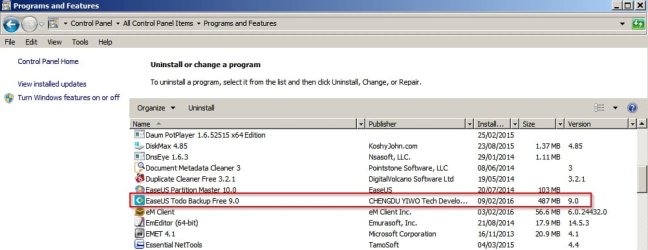
It should appear in Control Panel.

Easus 2.jpg

My suggestion is to download the installer again and run it, You should get the following option.

Easus 5.jpg

Choose the option to uninstall.

I installed the program just to test using software that monitors installations:

Easus.jpg

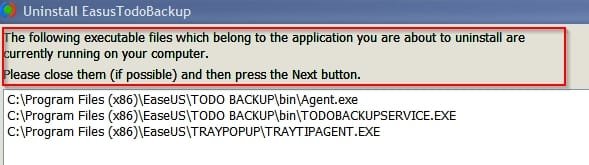
Running files needed to be closed before removal:

Easus 3.jpg

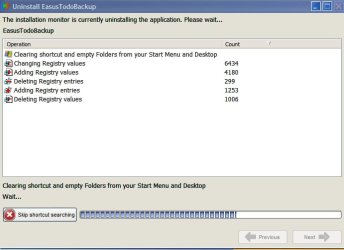
Numerous registry changes needed to be deleted or restored to their previous state:

Easus 4.jpg

Other changes included Environment Variables Path:

Code:
=======================================================
** Tuesday 09/02/2016 03:27:17 **
Command Handlers and Associations
Registry Key hkey_classes_root\*\shellex\contextmenuhandlers
Subkey SimpleShlExt has been added
=======================================================
** Tuesday 09/02/2016 03:27:39 **
Low-level Drivers and Services
Registry Key hkey_local_machine\system\ControlSet004\control\session manager\environment\path
Value path (S) wants to change from
C:\Windows\system32;C:\Windows;C:\Windows\system32\Wbem;C:\Windows\system32;C:\Windows;C:\Windows\System32\Wbem;C:\Windows\System32\WindowsPowerShell\v1.0\;C:\Program Files (x86)\Common Files\Adobe\AGL;C:\Program Files\Prio;C:\Program Files (x86)\Icecream Screen Recorder\bin\gstreamer\x86\bin;C:\Program Files\EmEditor
to
C:\Windows\system32;C:\Windows;C:\Windows\system32\Wbem;C:\Windows\system32;C:\Windows;C:\Windows\System32\Wbem;C:\Windows\System32\WindowsPowerShell\v1.0\;C:\Program Files (x86)\Common Files\Adobe\AGL;C:\Program Files\Prio;C:\Program Files (x86)\Icecream Screen Recorder\bin\gstreamer\x86\bin;C:\Program Files\EmEditor;C:\[B]Program Files (x86)\EaseUS\Todo Backup\bin[/B]
=======================================================
** Tuesday 09/02/2016 03:27:42 **
Change Accepted
=======================================================
** Tuesday 09/02/2016 03:27:42 **
Low-level Drivers and Services
Registry Key hkey_local_machine\system\CurrentControlSet\control\session manager\environment\path
Value path (S) wants to change from
C:\Windows\system32;C:\Windows;C:\Windows\system32\Wbem;C:\Windows\system32;C:\Windows;C:\Windows\System32\Wbem;C:\Windows\System32\WindowsPowerShell\v1.0\;C:\Program Files (x86)\Common Files\Adobe\AGL;C:\Program Files\Prio;C:\Program Files (x86)\Icecream Screen Recorder\bin\gstreamer\x86\bin;C:\Program Files\EmEditor
to
C:\Windows\system32;C:\Windows;C:\Windows\system32\Wbem;C:\Windows\system32;C:\Windows;C:\Windows\System32\Wbem;C:\Windows\System32\WindowsPowerShell\v1.0\;C:\Program Files (x86)\Common Files\Adobe\AGL;C:\Program Files\Prio;C:\Program Files (x86)\Icecream Screen Recorder\bin\gstreamer\x86\bin;C:\Program Files\EmEditor;[B]C:\Program Files (x86)\EaseUS\Todo Backup\bin[/B]
=======================================================
** Tuesday 09/02/2016 03:27:45 **
Change Accepted
=======================================================
** Tuesday 09/02/2016 03:27:48 **
Low-level Drivers and Services
Registry Key hkey_local_machine\system\ControlSet004\services
[B]Subkey EUBAKUP has been added
Subkey EUBKMON has been added
Subkey EUDSKACS has been added
Subkey EUFDDISK has been added[/B]
=======================================================
** Tuesday 09/02/2016 03:27:53 **
Low-level Drivers and Services
Registry Key hkey_local_machine\system\CurrentControlSet\services
[B]Subkey EUBAKUP has been added
Subkey EUBKMON has been added
Subkey EUDSKACS has been added
Subkey EUFDDISK has been added[/B]
=======================================================
** Tuesday 09/02/2016 03:27:58 **
Additional Security
Registry Key hkey_users\S-1-5-21-165181766-1597162493-719806621-1000\software\microsoft\windows\currentversion\explorer\advanced
Value SeparateProcess (N) wants to change from
0
to
1
=======================================================
** Tuesday 09/02/2016 03:28:00 **
Change Accepted
=======================================================
** Tuesday 09/02/2016 03:30:33 **
Low-level Drivers and Services
Registry Key hkey_local_machine\system\ControlSet004\services
[B]Subkey EaseUS Agent has been added[/B]
=======================================================
** Tuesday 09/02/2016 03:31:44 **
Low-level Drivers and Services
Registry Key hkey_local_machine\system\CurrentControlSet\services
[B]Subkey EaseUS Agent has been added[/B]
=======================================================
** Tuesday 09/02/2016 03:32:00 **
Launched [B]Agent.exe[/B][1184] « services.exe[632] « wininit.exe[536]
[B]TrayTipAgent.exe[/B][5884]
[B]TodoBackupService.exe[/B][6108] « [B]Agent.exe[/B][1184] « services.exe[632] « wininit.exe[536]
vds.exe[5172] « services.exe[632] « wininit.exe[536]
Run Keys and Startup Files
Registry Key hkey_local_machine\software\microsoft\windows\currentversion\run
Value EaseUS TB Tray Agent (S) will be a new value with data
"[B]C:\Program Files (x86)\EaseUS\TrayPopup\TrayTipAgent.exe[/B]"
=======================================================
** Tuesday 09/02/2016 03:32:03 **
Change Accepted
=======================================================
** Tuesday 09/02/2016 03:32:04 **
Run Keys and Startup Files
Registry Key hkey_local_machine\software\Wow6432Node\microsoft\windows\currentversion\run
Value EaseUS TB Tray Agent (S) will be a new value with data
"[B]C:\Program Files (x86)\EaseUS\TrayPopup\TrayTipAgent.exe[/B]"
=======================================================
** Tuesday 09/02/2016 03:32:05 **
Change Accepted
=======================================================

I can't comment on your other questions at the moment.
 
Last edited:

My Computer

Computer type
Laptop
Computer Manufacturer/Model Number
ASUS
OS
Microsoft Windows 7 Home Premium 64-bit 7601 Multiprocessor Free Service Pack 1
CPU
AMD C-60 APU with Radeon(tm) HD Graphics
Motherboard
ASUSTeK COMPUTER INC. X501U
Memory
4.00 GB
Graphics Card(s)
AMD Radeon HD 6290 Graphics
Sound Card
(1) AMD High Definition Audio Device (2) Realtek High Defi
Screen Resolution
1366 x 768 x 32 bits (4294967296 colors) @ 60 Hz
Hard Drives
Hitachi HTS545050A7E380 SATA Disk Device
Antivirus
Comodo CIS & FW, SecureAplus App Whitelisting, Threatfire
Browser
Cyberfox 64bit, Opera 64bit, Airfox
Other Info
Spy-The-Spy, HitmanPro.Alert, Norton Connect Safe, MJRegWatcher, BitDefender TrafficLight, Voodoo Shield, Zemana AntiMalware
You're better off finding the cause/s of the glitch.
Yes! Since the comp. was built for me last March (its a simple W7 machine, no frills), yesterday it has come back from the shop, for the third time, to get the ever-changing variety of glitches removed, which has been successful for a month or two before others arrive and it goes back. After 18 hours the machine is perfect. For how long?

So far I have tried to be patient. If it goes bad again I will need to send it to another computer place (after vetting them) to try to solve the problem.

To give you a flavour of the crazy behaviour, last week, on startup (the usual 2 to 3 tries needed by Windows) the desktop picture appeared but no icons. I could not get any response. It looked like Windows Explorer had failed (I had a couple of warning messages a few day earlier: "W. Explorer needs to restart"): Photoshop (on the SSD C: drive) started throwing "There is no disc in the drive", "Try again". I pressed Return and it loaded. Also, the USB sub unit on the front (USB socket and several card slots) has failed twice, now replaced again. The SSD has been checked for faults: no problem.

>> Are Gigabyte mother boards reliable?

All 9 of my Windows friends tell me that their machines (mainly laptops) give no trouble at all. I am clearly cursed.

I will leave the surplus programs alone.
 

My Computer

Computer type
PC/Desktop
Computer Manufacturer/Model Number
Gigabyte ATX case with 500 W power supply GZ-M1
OS
Windows 7 Home Premium 64bit
CPU
Intel Pentium Edition G3220 3.0 GHz
Motherboard
Gigabyte Socket 1150 MicroATX Mot Ultra Durable, GA-H81M-S2H
Memory
8 GB DDR3 1600 MHz DIMM
Graphics Card(s)
Not Known
Sound Card
Not known
Monitor(s) Displays
Samsung LS24D590 23.6"
Screen Resolution
1920 x 1080
Hard Drives
256 GB Solid State Drive (C: on which Windows 7 is installed)-
1 TB internal conventional HD (X:)-
Two WD "Elements" " 2TB USB drives as backups
PSU
500 W
Case
Gigabyte ATX case
Cooling
Several fans!
Keyboard
Accuratus 301 USB Compact, white.
Mouse
Microsoft Basic Optical Mouse v2.0, two-button, tethered
Internet Speed
10 to 12 Mb per second
Antivirus
Kaspersky Internet Security 2016, Malwarebytes (paid)
Browser
Firefox (ocassionally Safari)
Other Info
The 256 GB SSD (C:) also has Adobe Photoshop CS6 and InDesign CS6, MS Office, Adobe Lightroom, and other small programs.
Well Gigabyte is quite a strong brand for motherboards. Your problems are rather odd. You sure your hardware components are snuggly connected?
 

My Computer

Computer type
Laptop
Computer Manufacturer/Model Number
ASUS N45SF
OS
Windows 7 Professional SP1 x64 (OEM)
CPU
Intel® Core™ i5 2430M/2410M Processor
Motherboard
Intel® HM65 Express Chipset
Memory
DDR3 1333 SODIMM (8GB)
Graphics Card(s)
NVIDIA® GeForce® GT 555M (2GB)
Sound Card
Realtek High Definition Audio
Monitor(s) Displays
14.0" LED Backlight
Screen Resolution
16:9 HD (1366x768)
Hard Drives
640GB Seagate (internal), 1TB Toshiba Canvio Portable, 2TB x 2 WD My Book Essential (external)
Antivirus
Malwarebytes Anti-Malware Home (Premium)
Browser
Waterfox
Other Info
Optical Drive: Slimtype DVD A DS8A5SH (Super-Multi DVD);
Audio: Bang & Olufsen ICEpower®, SonicMaster
Well Gigabyte is quite a strong brand for motherboards. Your problems are rather odd. You sure your hardware components are snuggly connected?
I assume so. I leave the innards of the box to my computer shop. I will mention this but he will probably say "of course"! I have told him he must solve the problem (he built it!).
 

My Computer

Computer type
PC/Desktop
Computer Manufacturer/Model Number
Gigabyte ATX case with 500 W power supply GZ-M1
OS
Windows 7 Home Premium 64bit
CPU
Intel Pentium Edition G3220 3.0 GHz
Motherboard
Gigabyte Socket 1150 MicroATX Mot Ultra Durable, GA-H81M-S2H
Memory
8 GB DDR3 1600 MHz DIMM
Graphics Card(s)
Not Known
Sound Card
Not known
Monitor(s) Displays
Samsung LS24D590 23.6"
Screen Resolution
1920 x 1080
Hard Drives
256 GB Solid State Drive (C: on which Windows 7 is installed)-
1 TB internal conventional HD (X:)-
Two WD "Elements" " 2TB USB drives as backups
PSU
500 W
Case
Gigabyte ATX case
Cooling
Several fans!
Keyboard
Accuratus 301 USB Compact, white.
Mouse
Microsoft Basic Optical Mouse v2.0, two-button, tethered
Internet Speed
10 to 12 Mb per second
Antivirus
Kaspersky Internet Security 2016, Malwarebytes (paid)
Browser
Firefox (ocassionally Safari)
Other Info
The 256 GB SSD (C:) also has Adobe Photoshop CS6 and InDesign CS6, MS Office, Adobe Lightroom, and other small programs.
Following some recurring glitches I want to remove programs that are not needed

Easeus Todo backup. Not included in Control Panel’s list of uninstallable programs. It has no uninstall program of its own. I already have a good backup program. UNINSTALL BY DELETING ALL ITS FILES?

You can't just delete that one.

It should appear in Control Panel.


My suggestion is to download the installer again and run it, You should get the following option......
Thanks. Very helpful. I will try that.
 

My Computer

Computer type
PC/Desktop
Computer Manufacturer/Model Number
Gigabyte ATX case with 500 W power supply GZ-M1
OS
Windows 7 Home Premium 64bit
CPU
Intel Pentium Edition G3220 3.0 GHz
Motherboard
Gigabyte Socket 1150 MicroATX Mot Ultra Durable, GA-H81M-S2H
Memory
8 GB DDR3 1600 MHz DIMM
Graphics Card(s)
Not Known
Sound Card
Not known
Monitor(s) Displays
Samsung LS24D590 23.6"
Screen Resolution
1920 x 1080
Hard Drives
256 GB Solid State Drive (C: on which Windows 7 is installed)-
1 TB internal conventional HD (X:)-
Two WD "Elements" " 2TB USB drives as backups
PSU
500 W
Case
Gigabyte ATX case
Cooling
Several fans!
Keyboard
Accuratus 301 USB Compact, white.
Mouse
Microsoft Basic Optical Mouse v2.0, two-button, tethered
Internet Speed
10 to 12 Mb per second
Antivirus
Kaspersky Internet Security 2016, Malwarebytes (paid)
Browser
Firefox (ocassionally Safari)
Other Info
The 256 GB SSD (C:) also has Adobe Photoshop CS6 and InDesign CS6, MS Office, Adobe Lightroom, and other small programs.
Hi,
You might show us your uninstall a programs list
On the top right next to the question mark use the drop down menu to switch to List view so you can get all of them in 1 screen shot.

You can also use clean boot,
http://www.sevenforums.com/tutorial...ation-conflicts-performing-clean-startup.html
Click Start and type in the search box,
msconfig
Click on the suggestion on top or hit the Enter key,
Go to the Startup section and take some screen shots for a complete list,
Go to the Services section and on the bottom left Check the box to Hide All Microsoft services,
Repeat the screen shots,
See the links above my signature on how to take and upload screen shots here,
Cheers.
 

My Computer

Computer type
PC/Desktop
Computer Manufacturer/Model Number
Custom assembled by me :}
OS
Win-7-Pro64bit 7-H-Prem-64bit
CPU
i7-5930K 2nd i9-9940x both water blocked VRM's too
Motherboard
ASUS SABERTOOTH X99 2nd ASUS x299 Apex
Memory
Trident-z 3200C14 2nd Trident-z 3600C16
Graphics Card(s)
EVGA 1080ti ftw3 2nd Titan Xp both water blocked
Sound Card
Built-in Realtek
Monitor(s) Displays
1-AOC G2460PG 24"G-Sync 144Hz/ 2nd 1-ASUS VG248QE 24" 144Hz
Screen Resolution
1920 x 1080 144Hz
Hard Drives
2-Samsung M.2 Evo & Evo Plus
2-Samsung 850 EVO 500GB SSD's/ 3-2.5 W.D. Black 1tb-&3-1tb/3-3.5 WD Black 1tb hdd's
PSU
EVGA SuperNOVA 1000-P2 2nd 1200-P2
Case
2-Corsair Obsidian Series 450D Black ATX Mid Tower
Cooling
Custom water loops
Keyboard
Logitech G710+/ 2nd Logitech G910
Mouse
2-RedDragon M901 Perdition 16400 dpi Gaming mouse = wired
Internet Speed
Comcast Ping 19ms 89.31mbps download speed 6.12mbps upload
Antivirus
Malwarebytes Pro/ Superantispyware Pro
Browser
FireFox & Pale moon
Other Info
2nd ASUS X299 Apex/Intel i9-9940x with Custom water loop/7H-Prem-x64/Corsair 450D case/Ram Trident-z 3600C16 4x8gb / Samsung970Evo plus 500gb SSD/Dual ssd EZ swap evo/PSU EVGA SuperNova 1200w-P2 80+Platinum/GPU Titan Xp /8-ML-140 on push-pull on 2-280GTX rads
Hi,
You might show us your uninstall a programs list
On the top right next to the question mark use the drop down menu to switch to List view so you can get all of them in 1 screen shot.

You can also use clean boot,
http://www.sevenforums.com/tutorial...ation-conflicts-performing-clean-startup.html
Click Start and type in the search box,
msconfig
Click on the suggestion on top or hit the Enter key,
Go to the Startup section and take some screen shots for a complete list,
Go to the Services section and on the bottom left Check the box to Hide All Microsoft services,
Repeat the screen shots,
See the links above my signature on how to take and upload screen shots here,
Cheers.
Thanks for the help folks. Following my post about all the glitches that I was having, my computer shop called in my computer and re-installed Windows 7 (a clean install) and reinstalled my four premium programs and Kaspeskey and Malwarebytes. So I now have a minimalist computer and hopefully the glitches have gone. It certainly runs faster.
 

My Computer

Computer type
PC/Desktop
Computer Manufacturer/Model Number
Gigabyte ATX case with 500 W power supply GZ-M1
OS
Windows 7 Home Premium 64bit
CPU
Intel Pentium Edition G3220 3.0 GHz
Motherboard
Gigabyte Socket 1150 MicroATX Mot Ultra Durable, GA-H81M-S2H
Memory
8 GB DDR3 1600 MHz DIMM
Graphics Card(s)
Not Known
Sound Card
Not known
Monitor(s) Displays
Samsung LS24D590 23.6"
Screen Resolution
1920 x 1080
Hard Drives
256 GB Solid State Drive (C: on which Windows 7 is installed)-
1 TB internal conventional HD (X:)-
Two WD "Elements" " 2TB USB drives as backups
PSU
500 W
Case
Gigabyte ATX case
Cooling
Several fans!
Keyboard
Accuratus 301 USB Compact, white.
Mouse
Microsoft Basic Optical Mouse v2.0, two-button, tethered
Internet Speed
10 to 12 Mb per second
Antivirus
Kaspersky Internet Security 2016, Malwarebytes (paid)
Browser
Firefox (ocassionally Safari)
Other Info
The 256 GB SSD (C:) also has Adobe Photoshop CS6 and InDesign CS6, MS Office, Adobe Lightroom, and other small programs.
If at the end of the day it is running fine, create a restore point. Then on the first day it acts up, restore to the day before when it was operating correctly.

Of course, you could also make an image and use that to restore but then you'd need to do all the updates since the image was made.
 

My Computer

Computer type
PC/Desktop
Computer Manufacturer/Model Number
Dell, Acer, eMachine
OS
Home Premium and Pro 32 bit and 64 bit (4 computers)
Browser
Palemoon
If at the end of the day it is running fine, create a restore point. Then on the first day it acts up, restore to the day before when it was operating correctly.

Of course, you could also make an image and use that to restore but then you'd need to do all the updates since the image was made.
Thanks. I will be using Restore Points from now.
 

My Computer

Computer type
PC/Desktop
Computer Manufacturer/Model Number
Gigabyte ATX case with 500 W power supply GZ-M1
OS
Windows 7 Home Premium 64bit
CPU
Intel Pentium Edition G3220 3.0 GHz
Motherboard
Gigabyte Socket 1150 MicroATX Mot Ultra Durable, GA-H81M-S2H
Memory
8 GB DDR3 1600 MHz DIMM
Graphics Card(s)
Not Known
Sound Card
Not known
Monitor(s) Displays
Samsung LS24D590 23.6"
Screen Resolution
1920 x 1080
Hard Drives
256 GB Solid State Drive (C: on which Windows 7 is installed)-
1 TB internal conventional HD (X:)-
Two WD "Elements" " 2TB USB drives as backups
PSU
500 W
Case
Gigabyte ATX case
Cooling
Several fans!
Keyboard
Accuratus 301 USB Compact, white.
Mouse
Microsoft Basic Optical Mouse v2.0, two-button, tethered
Internet Speed
10 to 12 Mb per second
Antivirus
Kaspersky Internet Security 2016, Malwarebytes (paid)
Browser
Firefox (ocassionally Safari)
Other Info
The 256 GB SSD (C:) also has Adobe Photoshop CS6 and InDesign CS6, MS Office, Adobe Lightroom, and other small programs.
Back
Top