Uninstall Windows 7

thefollower

New member
Local time
3:01 PM
Messages
48
Hello

I recently installed windows 7 on to my SSD but now i have two Windows 7 OS installed. I'm wondering how do i uninstall windows 7 from my hard drive so I now only have Windows 7 on my SSD?

I removed the old drive from the boot file in MSconfig, but all the windows folders etc exist on the drive. Do i simply delete the folder or do i have to uninstall it properly ? I could not find an option with the install disc.

Hope you can help.
 

My Computer

Computer type
PC/Desktop
Computer Manufacturer/Model Number
custom build
OS
Windows 7 Ultimate 64Bit
CPU
Intel Core i7 4770k 3.5Ghz
Motherboard
ASUS Maximus Hero Vi
Memory
16GB
Graphics Card(s)
Nvidia 770 GTX
Monitor(s) Displays
Asus ProArt
Screen Resolution
1920 by 1200
Internet Speed
100MB/s
You simply format the older windows partition.

Did you have the hard drive unplugged when you installed windows on the SSD ?

If not then windows will not boot if you format the hard drive, post a shot of disk management before you do anything further, and backup your data.

http://www.sevenforums.com/tutorials/274797-disk-management-post-screen-capture-image.html

If that`s the case then unplug the hard drive and re install windows on the ssd, it only takes 15 minutes.

http://www.sevenforums.com/tutorials/113967-ssd-alignment.html

http://www.sevenforums.com/tutorials/91339-ssd-hdd-optimize-windows-reinstallation.html
 

My Computer

Computer type
PC/Desktop
Computer Manufacturer/Model Number
Skylake Special #666
OS
Windows 10 Pro x64
CPU
Intel Core i7 6700K
Motherboard
Asus Sabertooth Z170 Mark 1
Memory
GSkill TridentZ RGB 16GB 3600 16-16-16-36
Graphics Card(s)
EVGA GTX 980 Ti SC x2
Sound Card
Realtek High Definition
Monitor(s) Displays
AOC G2460PG
Screen Resolution
1920 x 1080 144Hz
Hard Drives
Samsung 860 Pro 256GB, Seagate Barracuda 4TB x2
PSU
EVGA 1000 P2, EVGA White Custom Braided Cables
Case
Corsair Vengeance C70 Gunmetal Black
Cooling
Corsair H100i v2, Corsair ML120 x2, Thermal Grizzly Kryonaut
Keyboard
Logitech G910 Orion Spectrum
Mouse
Logitech G700s
Internet Speed
Verizon Fios Quantum Gateway 75/75
Antivirus
Windows Defender, Malwarebytes Free 3.8.3
Browser
Chrome
Other Info
Corsair SP120 x4, LG Blu-ray Drive, Durabrand HT-395 100 Watt Dolby Digital Amp, Corsair H2100 Wireless 7.1 Headset
You simply format the drive or partition.

Well i don't want to format that will lose all my programs i have on it and my music which would be a pain. What does partition do ?
 

My Computer

Computer type
PC/Desktop
Computer Manufacturer/Model Number
custom build
OS
Windows 7 Ultimate 64Bit
CPU
Intel Core i7 4770k 3.5Ghz
Motherboard
ASUS Maximus Hero Vi
Memory
16GB
Graphics Card(s)
Nvidia 770 GTX
Monitor(s) Displays
Asus ProArt
Screen Resolution
1920 by 1200
Internet Speed
100MB/s
Post the shot please :)

Get your music backed up, start installing your programs on the ssd, when your happy with your new install on the ssd, then you can format the old windows partition.
 

My Computer

Computer type
PC/Desktop
Computer Manufacturer/Model Number
Skylake Special #666
OS
Windows 10 Pro x64
CPU
Intel Core i7 6700K
Motherboard
Asus Sabertooth Z170 Mark 1
Memory
GSkill TridentZ RGB 16GB 3600 16-16-16-36
Graphics Card(s)
EVGA GTX 980 Ti SC x2
Sound Card
Realtek High Definition
Monitor(s) Displays
AOC G2460PG
Screen Resolution
1920 x 1080 144Hz
Hard Drives
Samsung 860 Pro 256GB, Seagate Barracuda 4TB x2
PSU
EVGA 1000 P2, EVGA White Custom Braided Cables
Case
Corsair Vengeance C70 Gunmetal Black
Cooling
Corsair H100i v2, Corsair ML120 x2, Thermal Grizzly Kryonaut
Keyboard
Logitech G910 Orion Spectrum
Mouse
Logitech G700s
Internet Speed
Verizon Fios Quantum Gateway 75/75
Antivirus
Windows Defender, Malwarebytes Free 3.8.3
Browser
Chrome
Other Info
Corsair SP120 x4, LG Blu-ray Drive, Durabrand HT-395 100 Watt Dolby Digital Amp, Corsair H2100 Wireless 7.1 Headset
The correct way to uninstall an OS is always to delete its partition. But as Brian said, if you didn't unplug the old OS during install to the SSD you probably have the boot files for the SSD on the old HD. We need to see the screenshot to determine this for sure. Then we can give you the steps for how to make the SSD independently bootable as we have for thousands of others. You'll also be ready once you back up your files to another partition to delete the old Win7 partition. We can help you arrange this to make it easiest.
 
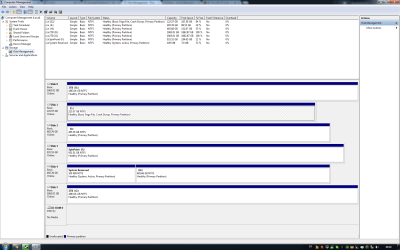
Okay here is the screenshot.
 

Attachments

  • dm.png
    dm.png
    56.6 KB · Views: 12

My Computer

Computer type
PC/Desktop
Computer Manufacturer/Model Number
custom build
OS
Windows 7 Ultimate 64Bit
CPU
Intel Core i7 4770k 3.5Ghz
Motherboard
ASUS Maximus Hero Vi
Memory
16GB
Graphics Card(s)
Nvidia 770 GTX
Monitor(s) Displays
Asus ProArt
Screen Resolution
1920 by 1200
Internet Speed
100MB/s
The system reserved partition is marked active and contains the system files to boot the hard drive. ( Totally normal )

But......If you ever removed the hard drive or formatted the entire hard drive or if it dies, then windows on the ssd would not boot.

This is why it`s best to unplug ALL the other hard drives when you install windows :)

How do you plan on activating your install on the ssd ?

Do you have a COA on the computer case somewhere ?

What did you use to install windows 7 on the ssd ? A retail copy of windows 7 Ultimate ?
 
Last edited:

My Computer

Computer type
PC/Desktop
Computer Manufacturer/Model Number
Skylake Special #666
OS
Windows 10 Pro x64
CPU
Intel Core i7 6700K
Motherboard
Asus Sabertooth Z170 Mark 1
Memory
GSkill TridentZ RGB 16GB 3600 16-16-16-36
Graphics Card(s)
EVGA GTX 980 Ti SC x2
Sound Card
Realtek High Definition
Monitor(s) Displays
AOC G2460PG
Screen Resolution
1920 x 1080 144Hz
Hard Drives
Samsung 860 Pro 256GB, Seagate Barracuda 4TB x2
PSU
EVGA 1000 P2, EVGA White Custom Braided Cables
Case
Corsair Vengeance C70 Gunmetal Black
Cooling
Corsair H100i v2, Corsair ML120 x2, Thermal Grizzly Kryonaut
Keyboard
Logitech G910 Orion Spectrum
Mouse
Logitech G700s
Internet Speed
Verizon Fios Quantum Gateway 75/75
Antivirus
Windows Defender, Malwarebytes Free 3.8.3
Browser
Chrome
Other Info
Corsair SP120 x4, LG Blu-ray Drive, Durabrand HT-395 100 Watt Dolby Digital Amp, Corsair H2100 Wireless 7.1 Headset
The system reserved partition is marked active and contains the system files to boot the hard drive. ( Totally normal )

If you ever removed the hard drive or formatted the entire hard drive, then windows on the ssd would not boot.

How do i fix it so it is all sorted?
 

My Computer

Computer type
PC/Desktop
Computer Manufacturer/Model Number
custom build
OS
Windows 7 Ultimate 64Bit
CPU
Intel Core i7 4770k 3.5Ghz
Motherboard
ASUS Maximus Hero Vi
Memory
16GB
Graphics Card(s)
Nvidia 770 GTX
Monitor(s) Displays
Asus ProArt
Screen Resolution
1920 by 1200
Internet Speed
100MB/s
C is not booting itself but is being booted by the old HD as signified by the System flag on the System Reserved partition.

If at all possible I would swap C and D cables to move the C drive to DISK0 position, because if you don't then Startup Repair or Reinstall could derail the System boot files to DISK0 as we see happen regularly. If you can't do that then I could convert D to a Logical data partition which cannot accept boot files: How to set partition as Primary or Logical with Partition Wizard.

Once you're ready to make C boot itself Mark C Partition Active

then move the Bootmgr - Move to C:\ with EasyBCD - Windows 7 Forums.

Reboot into BIOS setup to set C drive as first hard drive to boot in Boot Priority order, then Save changes and restart to see if C starts on its own and holds the System Active flags.

If the old hard drive interferes in any way then unplug it and do the repairs above again. If these fail then boot into the WIn7 DVD to run Startup Repair - Run up to 3 Separate Times until C starts and is System Active.

Then gradually move your files off of the old Win7 drive to another hard drive for storage, once you're sure they are all off of it I would wipe the old WIn7 drive with Diskpart Clean Command to get it cleanest so you can repartition it in Disk Management as desired: Partition or Volume - Create New
 
You can do all that, or unplug the other drives, put the ssd on sata port 1 on the motherboard, then re install windows on the ssd.

With all those hard drives, you shouldn`t be storing any data or anything important on your windows drive, there`s no reason to. ;)
 

My Computer

Computer type
PC/Desktop
Computer Manufacturer/Model Number
Skylake Special #666
OS
Windows 10 Pro x64
CPU
Intel Core i7 6700K
Motherboard
Asus Sabertooth Z170 Mark 1
Memory
GSkill TridentZ RGB 16GB 3600 16-16-16-36
Graphics Card(s)
EVGA GTX 980 Ti SC x2
Sound Card
Realtek High Definition
Monitor(s) Displays
AOC G2460PG
Screen Resolution
1920 x 1080 144Hz
Hard Drives
Samsung 860 Pro 256GB, Seagate Barracuda 4TB x2
PSU
EVGA 1000 P2, EVGA White Custom Braided Cables
Case
Corsair Vengeance C70 Gunmetal Black
Cooling
Corsair H100i v2, Corsair ML120 x2, Thermal Grizzly Kryonaut
Keyboard
Logitech G910 Orion Spectrum
Mouse
Logitech G700s
Internet Speed
Verizon Fios Quantum Gateway 75/75
Antivirus
Windows Defender, Malwarebytes Free 3.8.3
Browser
Chrome
Other Info
Corsair SP120 x4, LG Blu-ray Drive, Durabrand HT-395 100 Watt Dolby Digital Amp, Corsair H2100 Wireless 7.1 Headset
You can do all that, or unplug the other drives, put the ssd on sata port 1 on the motherboard, then re install windows on the ssd.

With all those hard drives, you shouldn`t be storing any data or anything important on your windows drive, there`s no reason to. ;)


Yeah theres nothing important on it as it is just my OS. I don't want re-install again takes too long doing all the windows updates etc so ill just use the steps above!

Thanks all for the help! :)
 

My Computer

Computer type
PC/Desktop
Computer Manufacturer/Model Number
custom build
OS
Windows 7 Ultimate 64Bit
CPU
Intel Core i7 4770k 3.5Ghz
Motherboard
ASUS Maximus Hero Vi
Memory
16GB
Graphics Card(s)
Nvidia 770 GTX
Monitor(s) Displays
Asus ProArt
Screen Resolution
1920 by 1200
Internet Speed
100MB/s
The system reserved partition is marked active and contains the system files to boot the hard drive. ( Totally normal )

But......If you ever removed the hard drive or formatted the entire hard drive or if it dies, then windows on the ssd would not boot.

This is why it`s best to unplug ALL the other hard drives when you install windows :)

How do you plan on activating your install on the ssd ?

Do you have a COA on the computer case somewhere ?

What did you use to install windows 7 on the ssd ? A retail copy of windows 7 Ultimate ?

It's already activated, its a developer version of W7 I've had since pretty much the beginning :)
 

My Computer

Computer type
PC/Desktop
Computer Manufacturer/Model Number
custom build
OS
Windows 7 Ultimate 64Bit
CPU
Intel Core i7 4770k 3.5Ghz
Motherboard
ASUS Maximus Hero Vi
Memory
16GB
Graphics Card(s)
Nvidia 770 GTX
Monitor(s) Displays
Asus ProArt
Screen Resolution
1920 by 1200
Internet Speed
100MB/s
Back
Top