Solved Uninstalled IE9, not reverting back to IE8

Joona

New member
Local time
11:52 PM
Messages
14
I uninstalled the IE9 update I had to have it automatically revert back to IE8. However, my Windows does not have IE8 in "Turn on Windows Features on or off" menu.

I'm using a Windows 7 Home Premium 64bit upgrade from Windows Vista (the key can't be used with a 'normal' install disc).
 

My Computer My Computer

At a glance

Windows 7 Home Premium 64bit
OS
Windows 7 Home Premium 64bit
Welcome to Seven Forums Joona. I take it you found IE9 on the list of installed updates? This should indicate you had IE8 originally, and it should indeed revert.

Try this:

Start> In search box type run> Enter> When run box opens type iexplore.exe> Enter

Does IE8 open? If not, you can try this Fix It to make sure IE9 was uninstalled correctly

http://support.microsoft.com/kb/2579295

A Guy
 

My Computer My Computer

At a glance

Windows 10 Home x64INTEL Core i5-750 Quad-Core 3.37GHzHyperX Fury Black Series 8GB (2 x 4GB) 1866MhzEVGA GeForce GTX 750 Superclocked 1GB 128-Bit...
Computer type
PC/Desktop
OS
Windows 10 Home x64
CPU
INTEL Core i5-750 Quad-Core 3.37GHz
Motherboard
ASUS P7P55D
Memory
HyperX Fury Black Series 8GB (2 x 4GB) 1866Mhz
Graphics Card(s)
EVGA GeForce GTX 750 Superclocked 1GB 128-Bit GDDR5
Monitor(s) Displays
LG 32MA68HY 32" IPS
Screen Resolution
1920 x 1080
Hard Drives
Samsung 840 Evo 120GB, SEAGATE 500GB Barracuda® 7200.12, SATA 3 Gb/s, 7200 RPM, 16MB cache
PSU
ANTEC TruePower New TP-550, 80 PLUS, 550W
Case
ANTEC Three Hundred Illusion
Cooling
COOLER MASTER Hyper 212 Plus, 4 x 120mm 1 x 140mm Noctua's
Internet Speed
85 + Mbps
Antivirus
Avast
Browser
Vivaldi
Welcome to Seven Forums Joona. I take it you found IE9 on the list of installed updates? This should indicate you had IE8 originally, and it should indeed revert.

Try this:

Start> In search box type run> Enter> When run box opens type iexplore.exe> Enter

Does IE8 open? If not, you can try this Fix It to make sure IE9 was uninstalled correctly

How to uninstall or remove Internet Explorer 9 when the standard uninstallation process does not work

A Guy


Hello, IE9 was indeed on the list of installed updates.

I tried searching for it, but it was simply not there. I also got an error from Netlimiter 2, I believe because it needs IE.

I'll try that, will edit this post in a moment!

Edit:

IE9 was successfully uninstalled with the Microsoft's tool, but IE8 still isn't there. I checked both "Turn Windows Features on or off" and by using the run function (returns error that it can not be found).
 

My Computer My Computer

At a glance

Windows 7 Home Premium 64bit
OS
Windows 7 Home Premium 64bit

My Computer My Computer

At a glance

Windows 10 Home x64INTEL Core i5-750 Quad-Core 3.37GHzHyperX Fury Black Series 8GB (2 x 4GB) 1866MhzEVGA GeForce GTX 750 Superclocked 1GB 128-Bit...
Computer type
PC/Desktop
OS
Windows 10 Home x64
CPU
INTEL Core i5-750 Quad-Core 3.37GHz
Motherboard
ASUS P7P55D
Memory
HyperX Fury Black Series 8GB (2 x 4GB) 1866Mhz
Graphics Card(s)
EVGA GeForce GTX 750 Superclocked 1GB 128-Bit GDDR5
Monitor(s) Displays
LG 32MA68HY 32" IPS
Screen Resolution
1920 x 1080
Hard Drives
Samsung 840 Evo 120GB, SEAGATE 500GB Barracuda® 7200.12, SATA 3 Gb/s, 7200 RPM, 16MB cache
PSU
ANTEC TruePower New TP-550, 80 PLUS, 550W
Case
ANTEC Three Hundred Illusion
Cooling
COOLER MASTER Hyper 212 Plus, 4 x 120mm 1 x 140mm Noctua's
Internet Speed
85 + Mbps
Antivirus
Avast
Browser
Vivaldi

My Computer My Computer

At a glance

Windows 7 Home Premium 64bit
OS
Windows 7 Home Premium 64bit
It would serve us better if you post the sfcdetails.txt only as mentioned in Option Three of the tutorial. A Guy
 

My Computer My Computer

At a glance

Windows 10 Home x64INTEL Core i5-750 Quad-Core 3.37GHzHyperX Fury Black Series 8GB (2 x 4GB) 1866MhzEVGA GeForce GTX 750 Superclocked 1GB 128-Bit...
Computer type
PC/Desktop
OS
Windows 10 Home x64
CPU
INTEL Core i5-750 Quad-Core 3.37GHz
Motherboard
ASUS P7P55D
Memory
HyperX Fury Black Series 8GB (2 x 4GB) 1866Mhz
Graphics Card(s)
EVGA GeForce GTX 750 Superclocked 1GB 128-Bit GDDR5
Monitor(s) Displays
LG 32MA68HY 32" IPS
Screen Resolution
1920 x 1080
Hard Drives
Samsung 840 Evo 120GB, SEAGATE 500GB Barracuda® 7200.12, SATA 3 Gb/s, 7200 RPM, 16MB cache
PSU
ANTEC TruePower New TP-550, 80 PLUS, 550W
Case
ANTEC Three Hundred Illusion
Cooling
COOLER MASTER Hyper 212 Plus, 4 x 120mm 1 x 140mm Noctua's
Internet Speed
85 + Mbps
Antivirus
Avast
Browser
Vivaldi
MS makes it hard to revert to previous browsers because they are critical security risks. A new browser has an entire new set of security safeguards, so to downgrade opens us to serious infection risk.
 
MS makes it hard to revert to previous browsers because they are critical security risks. A new browser has an entire new set of security safeguards, so to downgrade opens us to serious infection risk.

I know this very well, and I don't use IE as my main browser (in fact, I only wish to use it to play a game, which required IE8).
 

My Computer My Computer

At a glance

Windows 7 Home Premium 64bit
OS
Windows 7 Home Premium 64bit
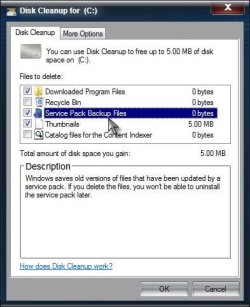
It's been supposed that if IE9 was installed before updating to SP1, then it can't be uninstalled without first uninstalling SP1, but if the SP1 backup files were removed, then SP1 cannot be uninstalled as well. Do you have SP1 installed? Do you know whether IE9 was installed before SP1? Did you ever run Disk Cleanup and remove Service Pack Backup Files?

SP1.jpg

This may explain why you cannot revert to IE8.

After all of this, did you try your game in IE9 in compatibility mode?

http://www.sevenforums.com/tutorials/1196-internet-explorer-compatibility-view-turn-off.html

A Guy
 

My Computer My Computer

At a glance

Windows 10 Home x64INTEL Core i5-750 Quad-Core 3.37GHzHyperX Fury Black Series 8GB (2 x 4GB) 1866MhzEVGA GeForce GTX 750 Superclocked 1GB 128-Bit...
Computer type
PC/Desktop
OS
Windows 10 Home x64
CPU
INTEL Core i5-750 Quad-Core 3.37GHz
Motherboard
ASUS P7P55D
Memory
HyperX Fury Black Series 8GB (2 x 4GB) 1866Mhz
Graphics Card(s)
EVGA GeForce GTX 750 Superclocked 1GB 128-Bit GDDR5
Monitor(s) Displays
LG 32MA68HY 32" IPS
Screen Resolution
1920 x 1080
Hard Drives
Samsung 840 Evo 120GB, SEAGATE 500GB Barracuda® 7200.12, SATA 3 Gb/s, 7200 RPM, 16MB cache
PSU
ANTEC TruePower New TP-550, 80 PLUS, 550W
Case
ANTEC Three Hundred Illusion
Cooling
COOLER MASTER Hyper 212 Plus, 4 x 120mm 1 x 140mm Noctua's
Internet Speed
85 + Mbps
Antivirus
Avast
Browser
Vivaldi
It's been supposed that if IE9 was installed before updating to SP1, then it can't be uninstalled without first uninstalling SP1, but if the SP1 backup files were removed, then SP1 cannot be uninstalled as well. Do you have SP1 installed? Do you know whether IE9 was installed before SP1? Did you ever run Disk Cleanup and remove Service Pack Backup Files?

View attachment 245178

This may explain why you cannot revert to IE8.

After all of this, did you try your game in IE9 in compatibility mode?

http://www.sevenforums.com/tutorials/1196-internet-explorer-compatibility-view-turn-off.html

A Guy


Yes, I have SP1 installed. IE9 was not installed before SP1. Yes, I did remove Service Pack Backup files. :(

I did try, sadly it does not work. Requires somehow different ActiveX. I'm running it through a VM though.

Thanks for the answers, this seems to be solved now.
 

My Computer My Computer

At a glance

Windows 7 Home Premium 64bit
OS
Windows 7 Home Premium 64bit
Well, sorry I couldn't fix it. Take care, A Guy
 

My Computer My Computer

At a glance

Windows 10 Home x64INTEL Core i5-750 Quad-Core 3.37GHzHyperX Fury Black Series 8GB (2 x 4GB) 1866MhzEVGA GeForce GTX 750 Superclocked 1GB 128-Bit...
Computer type
PC/Desktop
OS
Windows 10 Home x64
CPU
INTEL Core i5-750 Quad-Core 3.37GHz
Motherboard
ASUS P7P55D
Memory
HyperX Fury Black Series 8GB (2 x 4GB) 1866Mhz
Graphics Card(s)
EVGA GeForce GTX 750 Superclocked 1GB 128-Bit GDDR5
Monitor(s) Displays
LG 32MA68HY 32" IPS
Screen Resolution
1920 x 1080
Hard Drives
Samsung 840 Evo 120GB, SEAGATE 500GB Barracuda® 7200.12, SATA 3 Gb/s, 7200 RPM, 16MB cache
PSU
ANTEC TruePower New TP-550, 80 PLUS, 550W
Case
ANTEC Three Hundred Illusion
Cooling
COOLER MASTER Hyper 212 Plus, 4 x 120mm 1 x 140mm Noctua's
Internet Speed
85 + Mbps
Antivirus
Avast
Browser
Vivaldi
Back
Top