Unintended Creation of Files

Layke1123

New member
Local time
1:33 AM
Messages
1
Hey guys, I frequently like to pull Notepad up, jot down my thoughts kind of like a journal thing, and then store them in a special folder. There's no special organization yet, they literally are just kind of my random thoughts that I'd like to come back to without forgetting about them, and if they merit further attention, I come back to them. With that said, I noticed a peculiar bug that I think is part of the operating systems fault, not Notepad's.

The bug happened when I opened one of my thoughts I had written down, realized I needed to give the file a better name than just "thought" as well as correct a typo. First thing I did was fix the typo, did not save the file yet, right clicked on the file icon to rename it, changed the name, and once the file's name had been changed, I hit the exit button with my mouse. It prompted me to save changes, and so I clicked yes, even though it still had the old name as the file to save it as. Sure enough, Windows 7 decided that I needed a file with that name and created a new one for me, effectively give me the same file twice, one with the old name which had newly been created, and one with the name I changed it to.

While I'm guessing this could be an application error in how the programmer is making API calls to the underlying system, I think this is simply the operating system behaving in an unintended way and it should update any application running with the correct name because while my simple little case required duplication generated only a few bytes, imagine the same thing happening for massive files. I am assuming that Windows 7 allocated separate memory for this, which if it isn't, then my bad, but I would still call it a minor bug, even in that case. What do you guys think?
 

My Computer My Computer

At a glance

Windows 7 Home 32bit
OS
Windows 7 Home 32bit
When saving, use 'Save As' instead of 'Save'.

Lets you rename the file, change the save location etc.

There's no need to right-click on icons to change names.

As you have done it, the file with the NEW name will be the OLD file, and vice-versa.
 

My Computer My Computer

At a glance

Windows 7 Home Premium 64-biti7-2670QM @ 2.2/3.2 Ghz8 Gb DDR3Ge-Force GT555M 2 Gb
Computer Manufacturer/Model Number
Acer Aspire Ethos 8951G
OS
Windows 7 Home Premium 64-bit
CPU
i7-2670QM @ 2.2/3.2 Ghz
Motherboard
Acer
Memory
8 Gb DDR3
Graphics Card(s)
Ge-Force GT555M 2 Gb
Sound Card
Onboard w/Dolby 5/1
Hard Drives
2x750GB onboard. 640GB pocket drive, 1x2TB Seagate external, 1x500GB Seagate external.
You did create a new file ;) If you had right clicked the unopened files icon , and choosen rename. Then it would rename the file. But the method you used will indeed create a new file, and save it with the new name and changes. the original file will remain, without any changes. As Katanyavich mentioned, using his method would actually make the changes to the original file. A Guy
 

My Computer My Computer

At a glance

Windows 10 Home x64INTEL Core i5-750 Quad-Core 3.37GHzHyperX Fury Black Series 8GB (2 x 4GB) 1866MhzEVGA GeForce GTX 750 Superclocked 1GB 128-Bit...
Computer type
PC/Desktop
OS
Windows 10 Home x64
CPU
INTEL Core i5-750 Quad-Core 3.37GHz
Motherboard
ASUS P7P55D
Memory
HyperX Fury Black Series 8GB (2 x 4GB) 1866Mhz
Graphics Card(s)
EVGA GeForce GTX 750 Superclocked 1GB 128-Bit GDDR5
Monitor(s) Displays
LG 32MA68HY 32" IPS
Screen Resolution
1920 x 1080
Hard Drives
Samsung 840 Evo 120GB, SEAGATE 500GB Barracuda® 7200.12, SATA 3 Gb/s, 7200 RPM, 16MB cache
PSU
ANTEC TruePower New TP-550, 80 PLUS, 550W
Case
ANTEC Three Hundred Illusion
Cooling
COOLER MASTER Hyper 212 Plus, 4 x 120mm 1 x 140mm Noctua's
Internet Speed
85 + Mbps
Antivirus
Avast
Browser
Vivaldi
I don't know how long you have been doing this or using a computer. However, I have never seen what you are describing as the file system should work on any OS that I have used. Editing a file in some program, then go though Explore to rename it...does not ever effect the program. It either uses the old name on save, creates a new file with the old name on save, or errors out when it cannot find the file with the old name. I have never seen it work in the way you thought it did.

Even if Windows was to tell an application whether a file has changed its name or location would still be at the discretion of the application to make that happen. The application would have to be programmed to monitor the file in question for any changes. Windows itself, won't because that is not its job nor should it make assumptions of how an application is going to use a file.

tl;dr, Not a bug in Windows, not a bug in the application. By design...in every OS I have ever used.
 

My Computer My Computer

At a glance

Windows 10 Pro (x64)Intel Core i7-3930K (3.2GHz - 4.5GHz)4x Samsung 4GB PC3-12800 DDR3 (16GB 1600MHz)Nvidia Geforce GTX 690
Computer type
PC/Desktop
Computer Manufacturer/Model Number
Alienware Aurora ALX R4
OS
Windows 10 Pro (x64)
CPU
Intel Core i7-3930K (3.2GHz - 4.5GHz)
Motherboard
Alienware Aurora-R4 x79
Memory
4x Samsung 4GB PC3-12800 DDR3 (16GB 1600MHz)
Graphics Card(s)
Nvidia Geforce GTX 690
Sound Card
SteelSeries Siberia Elite
Monitor(s) Displays
Dell UltraSharp U3011
Screen Resolution
2560x1600
Hard Drives
Samsung 850 Pro 256 GB, Seagate 1TB Desktop Hybrid HDD, 2x Western Digital 4TB Green HDD
PSU
875W Some Dell PSU <.<
Case
Alienware Aurora ALX
Cooling
Custom Liquid Cooling (EK CPU & GPU blocks) dual EK 480RAD
Keyboard
Logitech G710+ Mechanical
Mouse
Logitech G700s
Internet Speed
Verizon Fios (50 mbps average)
Other Info
Server: Intel NUC D54250WYK: i5-4250U, 16GB, 256 GB mSATA, Windows Server 2012 R2
Hello Layke1123 and welcome to Seven Forums.

For what you do, have you considered using some editor other than Notepad?
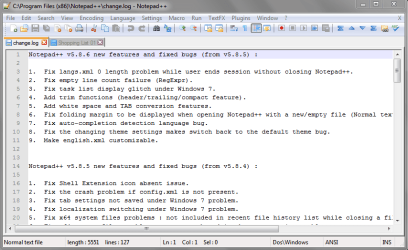
A popular recommended choice is Notepad++.
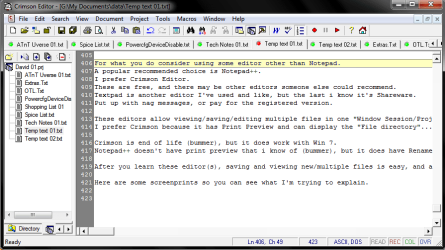
I prefer Crimson Editor.
These are free, and there may be other editors someone else could recommend.

Textpad is another editor I've used and like, but the last i know it's Shareware.
Put up with nag messages, or pay for the registered version.

These editors allow viewing/saving/editing multiple files in one Window.
You could have Thought1, Thought2, etc. files open in one Window at the same time, and easily switch between files.

I prefer Crimson because it has Print Preview.
Crimson is end of life (bummer), but it does work with Win 7.
Notepad++ does NOT have print preview that i know of (bummer), but it does have Rename.

You would have a bit of a learning curve, but it might well be worth it.
After you learn these editor(s) copying, editing, saving, viewing new/multiple files is easy, and a nice improvement over Notepad.

Below are some screen prints so you can see what I'm trying to explain.

Hope this helps,
David

CrimsonScrPrt 01.PNG

NP++ScrPrt 01.PNG
 

My Computer My Computer

At a glance

Multi-Boot W7_Pro_x64 W8.1_Pro_x64 W10_Pro_x6...AMD Athlon II x4 6206GB GSkill DDR2 800AMD 4670 GPU + AMD 4200 IGP
Computer type
PC/Desktop
Computer Manufacturer/Model Number
home built
OS
Multi-Boot W7_Pro_x64 W8.1_Pro_x64 W10_Pro_x64 +Linux_VMs +Chromium_VM
CPU
AMD Athlon II x4 620
Motherboard
Gigabyte GA-MA785G-UD3H
Memory
6GB GSkill DDR2 800
Graphics Card(s)
AMD 4670 GPU + AMD 4200 IGP
Sound Card
on board Realtek ALC889A
Monitor(s) Displays
RCA 40" LCD TV, Insignia 32" LCD TV, HP 15" LCD monitor
Screen Resolution
1680 x 1050
Hard Drives
OCZ Vertex 3 120GB,
Samsung F3 1TB (3),
Several others - WD, Seagate, Hitachi, ...
PSU
Corsair 500 W
Case
Rosewill mid tower
Cooling
CM 90mm rifle
Keyboard
Gyration wireless, Logitech wireless, Dell USB wired
Mouse
Gyration wireless, Logitech wireless, V7 USB wired
Internet Speed
Spectrum - 100Mbps D / 10Mbps U
Antivirus
Avast, MBAM3, EMET, WinPatrol
Browser
Pale Moon, Firefox, IE
Other Info
2 multi-boot PC's
Mainly HTPC/Office/Gen purpose (no gaming).
Trendnet USB KVM.
LG DVD burner/Blue Ray Player.
Tray system for removable SATA backup drives.

Not currently OCd, under-volted.
I use Hybrid sleep, rarely re-boot or shutdown.

Hauppauge HD-PVR, Avermedia PCIe TV Tuner, Hauppauge PCI TV Tuner.
Windows was behaving normally and did what it was supposed to do when you did the above procedure.

When you open a text file in notepad, the file is loaded in to RAM and the notepad program also load the file name in RAM while you are editing it. Then you went back to windows explorer and changed the original name of the opened file on the hard disk.

Normally when a file is opened in an application, the application will lock the file to prevent such untoward changes while it is opened. But it seems that notepad does not do this and you were successful in changing the file name.

Afterwards, when you tried to save the file in notepad (not Save As), it will look in the folder for the same file and if found will overwrite it. But in this case the file name has been changed by you. So the notepad program does not find the file in the original location. Hence it will create a new file with the same old name upon save command.

That is how you end up with two different files.

This normally happens when you try to do more than one thing on a single file. Hence take care not to change the name of the file while it is opened in another application.
 

My Computer My Computer

At a glance

MS Windows 7 Ultimate 64-bit SP1i5-2410M 2.3GHz (2.9GHz Turbo-Boost) Sandy Br...4GB+4GB Samsung DDR3 PC3-10700 (1333 MHz)Video Intel(R) HD Graphics Family, 1696MB ava...
Computer Manufacturer/Model Number
Toshiba Satellite P775-S7232
OS
MS Windows 7 Ultimate 64-bit SP1
CPU
i5-2410M 2.3GHz (2.9GHz Turbo-Boost) Sandy Bridge 32nm
Motherboard
Toshiba PHRAA ver. PSBY1U-00F003
Memory
4GB+4GB Samsung DDR3 PC3-10700 (1333 MHz)
Graphics Card(s)
Video Intel(R) HD Graphics Family, 1696MB available memory
Sound Card
Realtek High Definition Audio version=6.0.1.6323
Monitor(s) Displays
17.3 " Trubrite TFT LCD, LED Backlit
Screen Resolution
1600x900 32 bit, Native support for 720P content
Hard Drives
TOSHIBA MK6476GSXN
580.614 [GB] partitioned C: 80GB and D: 500GB with hidden recovery partitons.

Spare bay for 2nd HDD but no SATA connector :-(
PSU
Toshiba AC/DC Adapter
Case
Notebook
Cooling
Built-in Fan
Keyboard
Premium Raised Tile keyboard
Mouse
Logitech M215 wireless mouse
Internet Speed
Not fast enough
Other Info
Built-in Harman Kardon speakers with Dolby Advanced Audio, Waves MaxxAudio® 3. HDMI, 1xUSB3+3xUSB2 ports, WebCam, Battery life 4hrs 11mins, 4GB Readyboost SDHC card, WD My Book Essential Ext HDDs 2 TB, 2x1TB, My Passport SE 1TB and WDTV 1st Gen for Multimedia playing on a Sony Wega 32" LCD.
Recent addition to my toys are Asus Transformer Pad TF300T with 32GB onboard sd card + 32GB microsd card.
Have you scanned your PC with Antivirus program it seems to be a case of virus program.
 

My Computer My Computer

At a glance

Windows XP
OS
Windows XP
Have you scanned your PC with Antivirus program it seems to be a case of virus program.
What?! Where did you get that foolish idea?
There is nothin about this case that says virus.
 

My Computer My Computer

At a glance

Windows 10 Pro (x64)Intel Core i7-3930K (3.2GHz - 4.5GHz)4x Samsung 4GB PC3-12800 DDR3 (16GB 1600MHz)Nvidia Geforce GTX 690
Computer type
PC/Desktop
Computer Manufacturer/Model Number
Alienware Aurora ALX R4
OS
Windows 10 Pro (x64)
CPU
Intel Core i7-3930K (3.2GHz - 4.5GHz)
Motherboard
Alienware Aurora-R4 x79
Memory
4x Samsung 4GB PC3-12800 DDR3 (16GB 1600MHz)
Graphics Card(s)
Nvidia Geforce GTX 690
Sound Card
SteelSeries Siberia Elite
Monitor(s) Displays
Dell UltraSharp U3011
Screen Resolution
2560x1600
Hard Drives
Samsung 850 Pro 256 GB, Seagate 1TB Desktop Hybrid HDD, 2x Western Digital 4TB Green HDD
PSU
875W Some Dell PSU <.<
Case
Alienware Aurora ALX
Cooling
Custom Liquid Cooling (EK CPU & GPU blocks) dual EK 480RAD
Keyboard
Logitech G710+ Mechanical
Mouse
Logitech G700s
Internet Speed
Verizon Fios (50 mbps average)
Other Info
Server: Intel NUC D54250WYK: i5-4250U, 16GB, 256 GB mSATA, Windows Server 2012 R2
Back
Top