Unknown issues, possible start up repair loop.

TechSore

New member
Local time
6:28 PM
Messages
7
First time user here, desperately seeking help(right before work, that's smart T_T) Roughly four to five months ago my partner bought me a factory refurbished laptop to replace my old one that was slowly dying. It's a Toshiba Satellite C850 running Win7 home premium service pack 1 64bit. For ages it ran just fine. Then out of the blue it wouldn't boot normally. I could get it to run in safe mode but after trying system repair and restore it still wouldn't boot normally. So I backed up my files and formatted to out of box condition. This seemed to work for awhile. Then again with no warning I was unable to boot normally, I've forgotten how I fixed it that time but I remember it only worked provided I never switched it off. However after windows installed some updates I was forced to restart and the issue resurfaced. After fruitless attempts to fix it I ended up just formatting the damn thing again. It was running fine for roughly a month and now today it's having the same issue. It was running fine all night and there didn't appear to be any issues after shutting down.

I've booted in safe mode with networking to try and find some kind of solution to this issue without having to format again as it's getting to be tedious. I've been running Malwarebytes Pro and never encountered a virus before so I don't think that's the issue. When attempting to boot in normal mode start-up repair does load but just get's stuck in an endless loop, it doesn't say failed and it doesn't fix anything. So I thought it was a loop. However I've checked some other threads on that issue and so far nothing suggested has helped(again do not want to format my HDD as it would be the fifth time since buying it) Before I leave for work I'm posting this here in the hopes someone else might have an idea what I can do to restore my laptop to it's previous working condition without formatting the HDD. Although at this rate I'm wondering if the place my partner bought it from offered some kind of warranty(doubtful since it was refurbished).
 

My Computer

Computer type
Laptop
Computer Manufacturer/Model Number
Toshiba Satellite C850
OS
Win7 Home Premium Service pack 1, 64 bit
CPU
Intel Pentium
Memory
4Gb
Antivirus
Malwarebytes Pro
Browser
Chrome

My Computer

Computer type
PC/Desktop
Computer Manufacturer/Model Number
Dell optiplex 740
OS
Win 7 Home Premium SP1 32 bit
CPU
AMD Athlon 64 X2 5000B
Motherboard
Dell Inc. 0YP696 (Socket M2 )
Memory
4.00 GB Dual-Channel DDR2 @ 370MHz (6-6-6-18)
Graphics Card(s)
Acer E181H (1366x768@60Hz) 64MB GeForce 6150 LE (Dell)
Sound Card
SigmaTel High Definition Audio CODEC
Monitor(s) Displays
Acer E181H (1366x768@60Hz) 64MB GeForce 6150 LE (Dell)
Hard Drives
699GB Seagate ST375064 0NS SCSI Disk Device (ATA)
Case
Mini tower
Internet Speed
Ping 36 ms, Download 57.71 mbps , Upload 11.79mbps
Antivirus
Free Avast. Pro paid Mbam , Free Sas
Browser
Palemoon .
Tech mate you didn't say what sort of HDD you had and what sort of use you put it to - heaps of stuff or just general everyday emails etc.

I only ask because I have two Toshibas and with the annoying amount of bloat they put on and the constant problems a bit like you I stuck SSD's in both and an OEM. I must admit I only surf and email with mine and get away with 120GB in both and I would reckon a 256GB would be more than enough. Just for the record I cut the boot time in half using 7 using the SSD and this
http://www.sevenforums.com/tutorials/11728-optimize-windows-7-a.html

But that is before I found this http://www.sevenforums.com/tutorials/219487-clean-reinstall-factory-oem-windows-7-a.html which is a good option.
 

My Computer

Computer type
PC/Desktop
Computer Manufacturer/Model Number
Own build (new) Desk1 / Asus ROG Win 7 / Desk2 1st build
OS
Desk1 7 Home Prem / Desk2 10 Pro / Main lap Asus ROG 10 Pro 2 laptop Toshiba 7 Pro Asus P2520 7 & 10
CPU
Desk1 i5 3750K / Laptop i7 GTX 860M / Desk2 i5 2500
Motherboard
Desk1 Asus P877-V / Desk2 Gigabyte H67 UD3H / Laptop ?
Memory
Desk1 8GB (1866) / Desk2 16GB (1333) / Laptop 8Gb DDR3
Graphics Card(s)
Desk 1& 2NVidia GTX 650 & Laptops on board Intel
Sound Card
Desk 1 & 2 -XONAR DG Realtek High Def audio Laptop
Monitor(s) Displays
Desk 1 Benq HD 2450 / Desk2 Philips 24" / Laptop 17.5"
Screen Resolution
1920x1080 D1 & D2 & Laptop 1
Hard Drives
Desk1 Samsung 120GB 830 SSD
Asus ROG 256GB 850 Pro SSD
Desk2 Samsung 840 256 SSD
Toshiba 120GB EVO
PSU
Desk 1 Corsair HX 1050/ Laptop ? / Desk 2 Corsair HX 650
Case
Desk 1 Cooler HAF XM ? Toshiba laptop / Desk2 Coolermaster
Cooling
Fans on all Desk1 -2 Desk2 - all Coolermasters 5 Laptop ?
Keyboard
Desk 1 MS Sidewinder X6 Desk 2 MS Sidewinder X 4
Mouse
Desk 1&2 - Gigabyte MS 900 gamer - laptop - Logitec wireless
Internet Speed
ADSL2+
Other Info
One other Desktop (tester) and spare Toshba laptop both with SSD's
Running Kaspersky 2016 ISS on all machines config'd identically
Logitec audio stereo systems on each machine (x3)
Canon MG5250MFC
Router/modem TP-Link running WPA2SK
I'll be honest and say I don't know much about HDD specs but what I managed to get is that I have an IDE Toshiba MQ01ABD050 500GB. I mostly use it for just web surfing but will play a few various Steam games as well. Nothing to large though.
 

My Computer

Computer type
Laptop
Computer Manufacturer/Model Number
Toshiba Satellite C850
OS
Win7 Home Premium Service pack 1, 64 bit
CPU
Intel Pentium
Memory
4Gb
Antivirus
Malwarebytes Pro
Browser
Chrome

My Computer

Computer type
Laptop
Computer Manufacturer/Model Number
MSI GE72VR Apache Pro-416
OS
Windows 10x64 Build 1709
CPU
Intel i7 7700HQ Kaby Lake
Motherboard
Micro-Star Intl. MS-179B (U3C1)
Memory
16 GB DDR4 @2400
Graphics Card(s)
Nvidia Geforce GTX 1060
Screen Resolution
1920x1080 120Hz
Hard Drives
256 GB Nvme M.2 SSD

1TB HDD@7200
Cooling
Cooler Blast 4
Keyboard
Steel Series
Antivirus
Bit Defender Free
Browser
Edge
Yep well you said the magic words to me at least Toshiba drive - rotten things and the reason I replaced mine.
Now if you want to get a new one (spinner) this is good and local http://www.pccasegear.com/index.php?main_page=product_info&cPath=210_267&products_id=22915&zenid=a8d93144c130ca6c2be5d00a2f4362cf
Personally I prefer Seagate but the choice is yours.
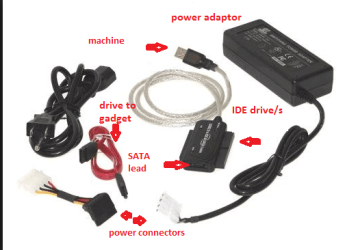
You can then run that tutorial (second link) I mentioned before and transfer the data back (that you want) form the old drive by using a SATA to USB gadget which you can get reasonably cheap and are always a handy gadget to have. (see pic)
Seems a fussy way around but you will end up with a bloat free machine with just you stuff on it.
 

Attachments

  • USB.PNG
    USB.PNG
    45.8 KB · Views: 13

My Computer

Computer type
PC/Desktop
Computer Manufacturer/Model Number
Own build (new) Desk1 / Asus ROG Win 7 / Desk2 1st build
OS
Desk1 7 Home Prem / Desk2 10 Pro / Main lap Asus ROG 10 Pro 2 laptop Toshiba 7 Pro Asus P2520 7 & 10
CPU
Desk1 i5 3750K / Laptop i7 GTX 860M / Desk2 i5 2500
Motherboard
Desk1 Asus P877-V / Desk2 Gigabyte H67 UD3H / Laptop ?
Memory
Desk1 8GB (1866) / Desk2 16GB (1333) / Laptop 8Gb DDR3
Graphics Card(s)
Desk 1& 2NVidia GTX 650 & Laptops on board Intel
Sound Card
Desk 1 & 2 -XONAR DG Realtek High Def audio Laptop
Monitor(s) Displays
Desk 1 Benq HD 2450 / Desk2 Philips 24" / Laptop 17.5"
Screen Resolution
1920x1080 D1 & D2 & Laptop 1
Hard Drives
Desk1 Samsung 120GB 830 SSD
Asus ROG 256GB 850 Pro SSD
Desk2 Samsung 840 256 SSD
Toshiba 120GB EVO
PSU
Desk 1 Corsair HX 1050/ Laptop ? / Desk 2 Corsair HX 650
Case
Desk 1 Cooler HAF XM ? Toshiba laptop / Desk2 Coolermaster
Cooling
Fans on all Desk1 -2 Desk2 - all Coolermasters 5 Laptop ?
Keyboard
Desk 1 MS Sidewinder X6 Desk 2 MS Sidewinder X 4
Mouse
Desk 1&2 - Gigabyte MS 900 gamer - laptop - Logitec wireless
Internet Speed
ADSL2+
Other Info
One other Desktop (tester) and spare Toshba laptop both with SSD's
Running Kaspersky 2016 ISS on all machines config'd identically
Logitec audio stereo systems on each machine (x3)
Canon MG5250MFC
Router/modem TP-Link running WPA2SK
The check disk option came up with nothing. The start up recovery option though successful once before seems to be failing me now. Looks like I will have to get a new HDD, however would I also need to download necessary drivers for the hardware on my laptop? Last time this issue happened I attempted to switch out the HDD for one my partners old laptop used and it booted fine but I couldn't connect to the internet or use the mouse pad because it didn't seem compatible with the hardware my laptop was using.
 

My Computer

Computer type
Laptop
Computer Manufacturer/Model Number
Toshiba Satellite C850
OS
Win7 Home Premium Service pack 1, 64 bit
CPU
Intel Pentium
Memory
4Gb
Antivirus
Malwarebytes Pro
Browser
Chrome
Is there some type of warranty on the laptop? Maybe a hardware issue and you can get the laptop replaced.
 

My Computer

Computer type
PC/Desktop
Computer Manufacturer/Model Number
custom build
OS
Windows 7 Professional 64bit
CPU
Intel i7-5960X
Motherboard
EVGA X99 Classified
Memory
64GB Corsair Dominator 2400MHz
Graphics Card(s)
3 EVGA GTX980's
Sound Card
on board
Monitor(s) Displays
3 Dell E2715H 27"
Screen Resolution
1920x1080 (5760x1080)
Hard Drives
Samsung 950 Pro 1TB M.2 SSD,
Western Digital Black 2TB HDD's x5
Western Digital Black 1TB HDD's x3
PSU
Corsair AX1200i
Case
Corsair 750D
Cooling
Corsair H110i GT
Keyboard
Corsair K70
Mouse
Corsair M45
Internet Speed
250 down/10 up
Antivirus
Microsoft Security Essentials
Browser
IE 11, Google Chrome
Well it was bought factory refurbished so I'm unsure, I will be looking into it though.
 

My Computer

Computer type
Laptop
Computer Manufacturer/Model Number
Toshiba Satellite C850
OS
Win7 Home Premium Service pack 1, 64 bit
CPU
Intel Pentium
Memory
4Gb
Antivirus
Malwarebytes Pro
Browser
Chrome
My laptop has put me through another fresh level of hell. Without knowing how I got it to boot normally. Switched it off before bed and turned it back on the following morning. Windows boots fine and everything appears to load but I cannot launch anything. I cannot run chrome or steam, not even clicking the start menu has any effect. All I can do is hover my mouse around. Booting into safe mode everything works fine. So what is going on?? I am completely lost, I contacted a specialist in laptop repairs via email. But after giving him an extensive walk through on what's wrong he hasn't contacted me since. Should I assume that this thing is more ****ed than I thought and buy a new laptop?
 

My Computer

Computer type
Laptop
Computer Manufacturer/Model Number
Toshiba Satellite C850
OS
Win7 Home Premium Service pack 1, 64 bit
CPU
Intel Pentium
Memory
4Gb
Antivirus
Malwarebytes Pro
Browser
Chrome
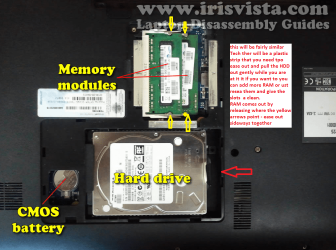
Well mate for what it is worth I have had several Toshibas all with HDD's I have had to replace in the pic if yu want to slip a new one in it isn't exactly your model but close.
This is a nice spinner if you want one Seagate ST500LM000 Laptop Thin SSHD 500GB Hard Drive [ST500LM000] - $89.00 : PC Case Gear
On the same site look at the SSD's if you can afford one it knocks spots off the spinners.

While yo are at that you may as well clean the slots and u the RAM if you want to .

SLOTCLEANING

Now as for the slots to clean them use astrip of old credit card about 1/2 inch wide nip the corners off one end - preferably round them off hold apiece of thin lint free cloth over the end dab on some form of alcohol - isopropyl alcohol (what we swab the skin with before an injection) is good and GENTLY swipe along the slots.

This can also be done for the GPU slot/s.
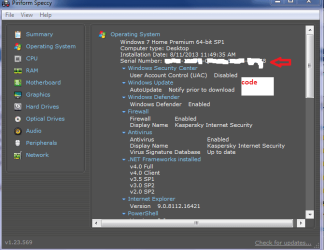
To reinstall use this http://www.sevenforums.com/tutorials/219487-clean-reinstall-factory-oem-windows-7-a.html the activation code should be on the sticker on the bottom of the machine if not you can usually find it with Speccy Speccy - Download under Operating system.
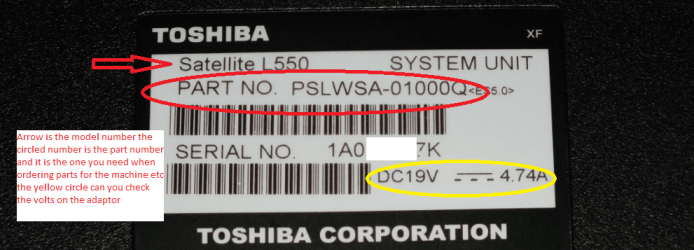
For future use if you need to order specific parts you will need the PARS NO as in pic of mine it denotes where the machine was made and for what region it was made for
 

Attachments

  • C850.PNG
    C850.PNG
    281.8 KB · Views: 0
  • STICK CLEANER.PNG
    STICK CLEANER.PNG
    4.9 KB · Views: 6
  • PART NO.PNG
    PART NO.PNG
    112.5 KB · Views: 0
  • SPECC.PNG
    SPECC.PNG
    23.2 KB · Views: 6

My Computer

Computer type
PC/Desktop
Computer Manufacturer/Model Number
Own build (new) Desk1 / Asus ROG Win 7 / Desk2 1st build
OS
Desk1 7 Home Prem / Desk2 10 Pro / Main lap Asus ROG 10 Pro 2 laptop Toshiba 7 Pro Asus P2520 7 & 10
CPU
Desk1 i5 3750K / Laptop i7 GTX 860M / Desk2 i5 2500
Motherboard
Desk1 Asus P877-V / Desk2 Gigabyte H67 UD3H / Laptop ?
Memory
Desk1 8GB (1866) / Desk2 16GB (1333) / Laptop 8Gb DDR3
Graphics Card(s)
Desk 1& 2NVidia GTX 650 & Laptops on board Intel
Sound Card
Desk 1 & 2 -XONAR DG Realtek High Def audio Laptop
Monitor(s) Displays
Desk 1 Benq HD 2450 / Desk2 Philips 24" / Laptop 17.5"
Screen Resolution
1920x1080 D1 & D2 & Laptop 1
Hard Drives
Desk1 Samsung 120GB 830 SSD
Asus ROG 256GB 850 Pro SSD
Desk2 Samsung 840 256 SSD
Toshiba 120GB EVO
PSU
Desk 1 Corsair HX 1050/ Laptop ? / Desk 2 Corsair HX 650
Case
Desk 1 Cooler HAF XM ? Toshiba laptop / Desk2 Coolermaster
Cooling
Fans on all Desk1 -2 Desk2 - all Coolermasters 5 Laptop ?
Keyboard
Desk 1 MS Sidewinder X6 Desk 2 MS Sidewinder X 4
Mouse
Desk 1&2 - Gigabyte MS 900 gamer - laptop - Logitec wireless
Internet Speed
ADSL2+
Other Info
One other Desktop (tester) and spare Toshba laptop both with SSD's
Running Kaspersky 2016 ISS on all machines config'd identically
Logitec audio stereo systems on each machine (x3)
Canon MG5250MFC
Router/modem TP-Link running WPA2SK
Once you get your computer fixed please remember that you need to also run a anti virus program along with Malwarebytes Anti Malware Professional. One does not replace the other. They work together.
Malware and viruses are two different things.
 

My Computer

Computer type
PC/Desktop
Computer Manufacturer/Model Number
Home made Desktop
OS
Windows 10 Pro. 64/ version 1709 Windows 7 Pro/64
CPU
Intel i7-6800K @ 4.3
Motherboard
ASUS X-99 Deluxe II
Memory
Corsair Platinum 16 gig @2400
Graphics Card(s)
EVGA GTX 1070 OC
Monitor(s) Displays
Asus 27" LED LCD/VE278Q
Screen Resolution
1920-1080 or 1280-720 HDMI
Hard Drives
INTEL SSD 730-240 Gb Sata 3.0/
PSU
EVGA Platium 1200W
Case
Phanteks Luxe Tempered Glass 8 fans/ one radiator
Cooling
XSPC/ Water Cooled CPU
Keyboard
Das 4 Professional
Mouse
Logitech M705/MX Anywhere 2-S
Internet Speed
100 mbits
Antivirus
Microsoft Security Essentials/ Malwarebytes Premium 3.0/ SAS
Browser
I.E. 11 default/Firefox/ ISP Time Warner Cable/Spectrum
Other Info
LG BluRay Burner/
Sound system-KLipsch-THX/
Icy Dock ssd Hot Swap bays.

My Computer

Computer type
PC/Desktop
Computer Manufacturer/Model Number
Own build (new) Desk1 / Asus ROG Win 7 / Desk2 1st build
OS
Desk1 7 Home Prem / Desk2 10 Pro / Main lap Asus ROG 10 Pro 2 laptop Toshiba 7 Pro Asus P2520 7 & 10
CPU
Desk1 i5 3750K / Laptop i7 GTX 860M / Desk2 i5 2500
Motherboard
Desk1 Asus P877-V / Desk2 Gigabyte H67 UD3H / Laptop ?
Memory
Desk1 8GB (1866) / Desk2 16GB (1333) / Laptop 8Gb DDR3
Graphics Card(s)
Desk 1& 2NVidia GTX 650 & Laptops on board Intel
Sound Card
Desk 1 & 2 -XONAR DG Realtek High Def audio Laptop
Monitor(s) Displays
Desk 1 Benq HD 2450 / Desk2 Philips 24" / Laptop 17.5"
Screen Resolution
1920x1080 D1 & D2 & Laptop 1
Hard Drives
Desk1 Samsung 120GB 830 SSD
Asus ROG 256GB 850 Pro SSD
Desk2 Samsung 840 256 SSD
Toshiba 120GB EVO
PSU
Desk 1 Corsair HX 1050/ Laptop ? / Desk 2 Corsair HX 650
Case
Desk 1 Cooler HAF XM ? Toshiba laptop / Desk2 Coolermaster
Cooling
Fans on all Desk1 -2 Desk2 - all Coolermasters 5 Laptop ?
Keyboard
Desk 1 MS Sidewinder X6 Desk 2 MS Sidewinder X 4
Mouse
Desk 1&2 - Gigabyte MS 900 gamer - laptop - Logitec wireless
Internet Speed
ADSL2+
Other Info
One other Desktop (tester) and spare Toshba laptop both with SSD's
Running Kaspersky 2016 ISS on all machines config'd identically
Logitec audio stereo systems on each machine (x3)
Canon MG5250MFC
Router/modem TP-Link running WPA2SK
Well now I feel like a colossal idiot. Before my last format I was running AVG internet security 2013, somehow completely forgot about re-installing it. I was more paranoid about the malware since my partners laptop had the Ukash virus not too long ago. I've made a decision on how to fix all my problems but I'm running into some walls. What I'm attempting to do is replace the HDD with one from an old gateway laptop. I want to clone the HDD I'm currently using with Macrium Reflect since I've heard positive things about it but right now I can only boot my laptop in safe mode and though I can still download Macrium I can't install it. Also my previous restore point has been deleted somehow so I can't fall back on that and windows start up repair claims there is nothing wrong. Yet trying to boot in normal mode doesn't get me past the welcome screen anymore. It either just loads infinitely or loads a blank black screen. What options do I have left besides hurling this thing into a river in frustration?
 

My Computer

Computer type
Laptop
Computer Manufacturer/Model Number
Toshiba Satellite C850
OS
Win7 Home Premium Service pack 1, 64 bit
CPU
Intel Pentium
Memory
4Gb
Antivirus
Malwarebytes Pro
Browser
Chrome
Also might help to add, checked the device manager (again) but this time clicked show hidden devices. This brought up a list and one of the items in it has a yellow flag. Security Processor Loader Driver, is not working properly code 24. The driver details only show that the service has been stopped and attempting to hit start comes up with error, the service cannot be started in safe mode. Could this be my issue or is it just safe mode giving me false positives?
 

My Computer

Computer type
Laptop
Computer Manufacturer/Model Number
Toshiba Satellite C850
OS
Win7 Home Premium Service pack 1, 64 bit
CPU
Intel Pentium
Memory
4Gb
Antivirus
Malwarebytes Pro
Browser
Chrome
Back
Top