Solved Unknown User

Oscar53

New member
Member
Local time
10:55 AM
Messages
40
Location
Canada
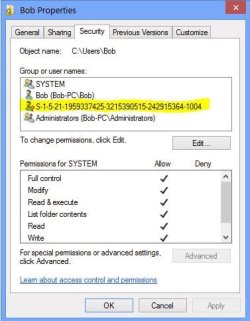
Please can anyone help me. When I go to C:\Users\[My User Name], Properties, Security, an unknown user with a red question mark and a long series of numbers for a name shows up. I did remove this unknown user but now what happens is when I go to C:\Users\[My User Name], Properties, Security this unknown shows up momentarily and then disappears. It does however remain in the registry. I deleted it from the registry as well but it keeps comming back. It's no big deal because everything still works OK. But it is annoying. Does anyone know how to fix this. I do have some screenshots in case it helps. OS is Windows 7 Ultimate X64.
 

Attachments
  • Registry.JPG
    Registry.JPG
    61.8 KB · Views: 2
  • S-1-5-21-1959337425-3215390515-242915364-1004.jpg
    S-1-5-21-1959337425-3215390515-242915364-1004.jpg
    36.5 KB · Views: 56

My Computer

OS
Windows 7 Ultimate 64Bit SP1
CPU
Intel Core 2 Quad Q9650 3GHZ
Motherboard
ASUS P5Q-E
Memory
Corsair Dominator Twin CM2X2048 DDR2 1066 MHZ 6GB
Graphics Card(s)
Asus NVIDIA GTX 560 Ti DirectCU II
Sound Card
Creative Sound Blaster X-Fi Titanium Fatal1ty Pro
Monitor(s) Displays
LG Flatron W2353V LCD HDMI Monitor
Screen Resolution
1920x1080
Hard Drives
Seagate ST1000DM003-1ER162 (Z4Y6GDCA) 1TB SATAIII
PSU
Cooler Master Extreme 700 Watt (RS700-PCAAE3-US)
Case
Thermaltake Soprano DX
Cooling
Zalman CNPS9500A LED
Keyboard
Logitech Cordless Desktop® MX™ 5500 Revolution
Mouse
Logitech® Bluetooth® MX™ Revolution Laser Mouse
Internet Speed
Cable Modem 30MB
It's probably a user that was deleted.
-1004

Press Edit and remove the id from the security list.

You might want to check the security tab on root of each partition (C:\ D:\ E:\ ...) to see if the -1004 user is defined in those security settings. It's probably inherited downwards.

Where did you remove the -1004 in the registry?
HKLM\......\Microsoft\WindowsNT\ProfileList?

I'll have to look up the full key if you need it.

Hmmm, why is the advanced button greyed out. Are you not an administrator?
 

My Computer

Computer type
Laptop
Computer Manufacturer/Model Number
HP Pavilion dv6-6c10us
OS
x64 (6.3.9600) Win8.1 Pro & soon dual boot x64 (6.1.7601) Win7_SP1 HomePrem
CPU
AMD A6-3420M APU with Radeon(tm) HD Graphics
Motherboard
Hewlett-Packard 1805
Memory
6.00 GB
Graphics Card(s)
AMD Radeon(TM) HD 6520G
Sound Card
(1) AMD High Definition Audio Device (2) IDT High Definiti
Monitor(s) Displays
HP W2072a 20" LCD (1600 x 900) @ 60 Hz
Screen Resolution
1366 x 768 x 32 bits (4294967296 colors) @ 60 Hz
Hard Drives
ST640LM0 00 HM641JI SATA Disk Device
Keyboard
Logitech k520 wireless KB
Mouse
Logitech m320 wireless mouse (bundled with KB)
Internet Speed
15/5 | 54 MB Wireless 'n'
Antivirus
Realtime: Defender or Avast | On-demand: Malwarebytes, ESET
Browser
IE 11 on Win8, IE 10 on win 7
Other Info
Media: [Gimp, Audacity, VLC] || Comm: [WEmail 2012, Skype] || Productivity: [OpenOffice,| Textpad] || Utils: [Sysinternals, cCleaner, Speccy, Defraggler]
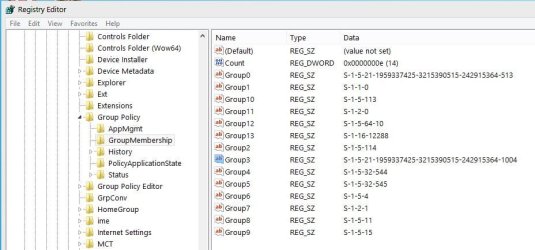
This is where they showed up when I did a search in the registry. I delete them they come back.
HKEY_CURRENT_USER\Software\Microsoft\Windows\CurrentVersion\Group Policy\GroupMembership
HKEY_LOCAL_MACHINE\Software\Microsoft\Windows\CurrentVersion\Group Policy\S-1-5-21-1959337425-3215390515-242915364-1001\GroupMembership
Yes I am the admin and by the way the advanced button was only greyed out on that unknown user.
 

My Computer

OS
Windows 7 Ultimate 64Bit SP1
CPU
Intel Core 2 Quad Q9650 3GHZ
Motherboard
ASUS P5Q-E
Memory
Corsair Dominator Twin CM2X2048 DDR2 1066 MHZ 6GB
Graphics Card(s)
Asus NVIDIA GTX 560 Ti DirectCU II
Sound Card
Creative Sound Blaster X-Fi Titanium Fatal1ty Pro
Monitor(s) Displays
LG Flatron W2353V LCD HDMI Monitor
Screen Resolution
1920x1080
Hard Drives
Seagate ST1000DM003-1ER162 (Z4Y6GDCA) 1TB SATAIII
PSU
Cooler Master Extreme 700 Watt (RS700-PCAAE3-US)
Case
Thermaltake Soprano DX
Cooling
Zalman CNPS9500A LED
Keyboard
Logitech Cordless Desktop® MX™ 5500 Revolution
Mouse
Logitech® Bluetooth® MX™ Revolution Laser Mouse
Internet Speed
Cable Modem 30MB
Different Install?

Did the HDD (and files) come from another Windows machine?
Are you dual booting with another version of Windows (e.g. XP)?

That normally happens if the user ID has been assigned by a different Windows installation.
One Windows install doesn't know the names that are assigned to the SIDs by a different Windows install.

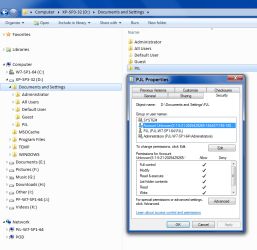
This picture shows what W7 says when I look at my XP user folder.
Unknown User.png
 

My Computer

Computer type
PC/Desktop
Computer Manufacturer/Model Number
n/a
OS
W7 Ultimate SP1, LM19.2 MATE, W10 Home 1703, W10 Pro 1703 VM, #All 64 bit
CPU
AMD Phenom II x6 1100T, 3.3 GHz
Motherboard
ASUS M4A88T-M/USB3 (AM3)
Memory
12GB DDR3 1333 G-Skill (4GB x 2), G-Skill (2GB x 2)
Graphics Card(s)
NVIDIA GeForce GTX 660
Sound Card
Realtek?
Monitor(s) Displays
Samsung S23B350
Screen Resolution
1920x1080
Hard Drives
WD Green 2TB (SATA), WD Green 3TB (SATA), WD Blue 4TB (SATA), WD Blue 6TB (SATA)
PSU
Cooler Master
Case
Antec GX300 Tower
Cooling
3x Antec TRICOOL 120mm Fans
Mouse
Wired Optical
Internet Speed
DSL
Antivirus
Avast
Browser
Pale Moon (64 bit)
Other Info
2018-12-27 Upgraded HDDs
2015-12-10 Upgraded case, graphics card, storage
2015-08-15 Upgraded motherboard & RAM
2015-07-15 Upgraded LM17.1 to LM17.2
Good point lehnerus2000 - either way, it's an account not currently on the system and it seems as though Oscar53 wants it removed.

Please check the following registry location for the -1004 account
HKEY_LOCAL_MACHINE\SOFTWARE\Microsoft\Windows NT\CurrentVersion\ProfileList

Remove it if found.

You only have the one 500GB drive - how many partitions?
In the Explorer computer view,
right click each drive
pick properties
open the security tab
if -1004 is presented, press the edit button
highlight -1004
press remove
apply to this folder and sub-folders.

let it change the security on the files. It might complain about some system files, but that's ok.


.....
HKEY_LOCAL_MACHINE\Software\Microsoft\Windows\CurrentVersion\Group Policy\S-1-5-21-1959337425-3215390515-242915364-1001\GroupMembership
Yes I am the admin and by the way the advanced button was only greyed out on that unknown user.

You're showing a different user: -1001; is that your GUID?

BTW, the title in the image you posted shows Bob Properites
Object C:\Users\Bob
That's what the dialog window has in focus. The advanced tab is for Bob: user -1004 is simply included in the security setting for that object. Advanced should not be greyed out.
 

My Computer

Computer type
Laptop
Computer Manufacturer/Model Number
HP Pavilion dv6-6c10us
OS
x64 (6.3.9600) Win8.1 Pro & soon dual boot x64 (6.1.7601) Win7_SP1 HomePrem
CPU
AMD A6-3420M APU with Radeon(tm) HD Graphics
Motherboard
Hewlett-Packard 1805
Memory
6.00 GB
Graphics Card(s)
AMD Radeon(TM) HD 6520G
Sound Card
(1) AMD High Definition Audio Device (2) IDT High Definiti
Monitor(s) Displays
HP W2072a 20" LCD (1600 x 900) @ 60 Hz
Screen Resolution
1366 x 768 x 32 bits (4294967296 colors) @ 60 Hz
Hard Drives
ST640LM0 00 HM641JI SATA Disk Device
Keyboard
Logitech k520 wireless KB
Mouse
Logitech m320 wireless mouse (bundled with KB)
Internet Speed
15/5 | 54 MB Wireless 'n'
Antivirus
Realtime: Defender or Avast | On-demand: Malwarebytes, ESET
Browser
IE 11 on Win8, IE 10 on win 7
Other Info
Media: [Gimp, Audacity, VLC] || Comm: [WEmail 2012, Skype] || Productivity: [OpenOffice,| Textpad] || Utils: [Sysinternals, cCleaner, Speccy, Defraggler]
No other OS's, no transfers from other machines, just this stange behaviour. It doesn't show up in HKEY_LOCAL_MACHINE\SOFTWARE\Microsoft\Windows NT\CurrentVersion\ProfileList

I will record exactly what happens and post it. Does this forum support video recordings as attachments.
 
Last edited:

My Computer

OS
Windows 7 Ultimate 64Bit SP1
CPU
Intel Core 2 Quad Q9650 3GHZ
Motherboard
ASUS P5Q-E
Memory
Corsair Dominator Twin CM2X2048 DDR2 1066 MHZ 6GB
Graphics Card(s)
Asus NVIDIA GTX 560 Ti DirectCU II
Sound Card
Creative Sound Blaster X-Fi Titanium Fatal1ty Pro
Monitor(s) Displays
LG Flatron W2353V LCD HDMI Monitor
Screen Resolution
1920x1080
Hard Drives
Seagate ST1000DM003-1ER162 (Z4Y6GDCA) 1TB SATAIII
PSU
Cooler Master Extreme 700 Watt (RS700-PCAAE3-US)
Case
Thermaltake Soprano DX
Cooling
Zalman CNPS9500A LED
Keyboard
Logitech Cordless Desktop® MX™ 5500 Revolution
Mouse
Logitech® Bluetooth® MX™ Revolution Laser Mouse
Internet Speed
Cable Modem 30MB
You cannot directly attach a video, but if you post it on a cloud or Youtube, you can post a link to it.

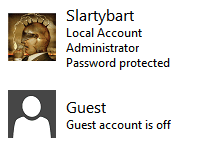
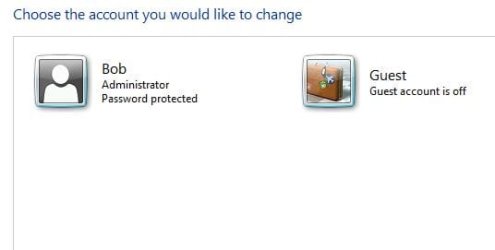
I'd like to see what your system knows about users. Please post a screen shot of
Control Panel > User Accounts >Manage another account
See: http://www.sevenforums.com/tutorials/9733-screenshots-files-upload-post-seven-forums.html

Capture.PNG

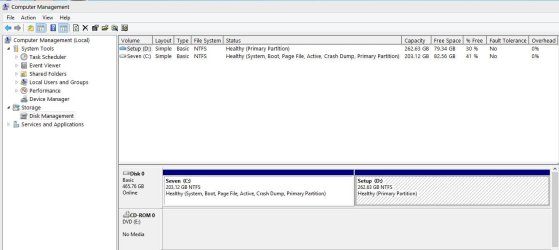
I'd also like to see how your disks are partitioned.
Having this information makes it easier to a discuss course of action.
See: http://www.sevenforums.com/tutorials/274797-disk-management-post-screen-capture-image.html

Thanks
 

My Computer

Computer type
Laptop
Computer Manufacturer/Model Number
HP Pavilion dv6-6c10us
OS
x64 (6.3.9600) Win8.1 Pro & soon dual boot x64 (6.1.7601) Win7_SP1 HomePrem
CPU
AMD A6-3420M APU with Radeon(tm) HD Graphics
Motherboard
Hewlett-Packard 1805
Memory
6.00 GB
Graphics Card(s)
AMD Radeon(TM) HD 6520G
Sound Card
(1) AMD High Definition Audio Device (2) IDT High Definiti
Monitor(s) Displays
HP W2072a 20" LCD (1600 x 900) @ 60 Hz
Screen Resolution
1366 x 768 x 32 bits (4294967296 colors) @ 60 Hz
Hard Drives
ST640LM0 00 HM641JI SATA Disk Device
Keyboard
Logitech k520 wireless KB
Mouse
Logitech m320 wireless mouse (bundled with KB)
Internet Speed
15/5 | 54 MB Wireless 'n'
Antivirus
Realtime: Defender or Avast | On-demand: Malwarebytes, ESET
Browser
IE 11 on Win8, IE 10 on win 7
Other Info
Media: [Gimp, Audacity, VLC] || Comm: [WEmail 2012, Skype] || Productivity: [OpenOffice,| Textpad] || Utils: [Sysinternals, cCleaner, Speccy, Defraggler]
Here are the screenshots you asked for.
 

Attachments

  • Capture.JPG
    Capture.JPG
    71.8 KB · Views: 2
  • Capture1.JPG
    Capture1.JPG
    15.7 KB · Views: 28

My Computer

OS
Windows 7 Ultimate 64Bit SP1
CPU
Intel Core 2 Quad Q9650 3GHZ
Motherboard
ASUS P5Q-E
Memory
Corsair Dominator Twin CM2X2048 DDR2 1066 MHZ 6GB
Graphics Card(s)
Asus NVIDIA GTX 560 Ti DirectCU II
Sound Card
Creative Sound Blaster X-Fi Titanium Fatal1ty Pro
Monitor(s) Displays
LG Flatron W2353V LCD HDMI Monitor
Screen Resolution
1920x1080
Hard Drives
Seagate ST1000DM003-1ER162 (Z4Y6GDCA) 1TB SATAIII
PSU
Cooler Master Extreme 700 Watt (RS700-PCAAE3-US)
Case
Thermaltake Soprano DX
Cooling
Zalman CNPS9500A LED
Keyboard
Logitech Cordless Desktop® MX™ 5500 Revolution
Mouse
Logitech® Bluetooth® MX™ Revolution Laser Mouse
Internet Speed
Cable Modem 30MB
Thanks,

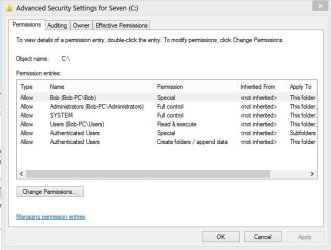
In Explorer, view Computer
Right click C:\
pick properties
open Security tab
press the advanced button
if user -1004 is displayed
press change permissions
select user -1104
press remove
press OK
answer yes if asked to replace security settings

let it change the files

then for each folder on C:\
do the same
check for user -1004 on the security tab
remove and apply

You'll probably only find if on the Users folder

Then check D:\

I recommended this twice before, if you don't want to do it, that's ok - it's your machine. I won't recommend it again.

Good luck,

Bill
.
 

My Computer

Computer type
Laptop
Computer Manufacturer/Model Number
HP Pavilion dv6-6c10us
OS
x64 (6.3.9600) Win8.1 Pro & soon dual boot x64 (6.1.7601) Win7_SP1 HomePrem
CPU
AMD A6-3420M APU with Radeon(tm) HD Graphics
Motherboard
Hewlett-Packard 1805
Memory
6.00 GB
Graphics Card(s)
AMD Radeon(TM) HD 6520G
Sound Card
(1) AMD High Definition Audio Device (2) IDT High Definiti
Monitor(s) Displays
HP W2072a 20" LCD (1600 x 900) @ 60 Hz
Screen Resolution
1366 x 768 x 32 bits (4294967296 colors) @ 60 Hz
Hard Drives
ST640LM0 00 HM641JI SATA Disk Device
Keyboard
Logitech k520 wireless KB
Mouse
Logitech m320 wireless mouse (bundled with KB)
Internet Speed
15/5 | 54 MB Wireless 'n'
Antivirus
Realtime: Defender or Avast | On-demand: Malwarebytes, ESET
Browser
IE 11 on Win8, IE 10 on win 7
Other Info
Media: [Gimp, Audacity, VLC] || Comm: [WEmail 2012, Skype] || Productivity: [OpenOffice,| Textpad] || Utils: [Sysinternals, cCleaner, Speccy, Defraggler]
It doesn't show up there, here's what shows up.
 

Attachments

  • Capture.JPG
    Capture.JPG
    45.1 KB · Views: 24

My Computer

OS
Windows 7 Ultimate 64Bit SP1
CPU
Intel Core 2 Quad Q9650 3GHZ
Motherboard
ASUS P5Q-E
Memory
Corsair Dominator Twin CM2X2048 DDR2 1066 MHZ 6GB
Graphics Card(s)
Asus NVIDIA GTX 560 Ti DirectCU II
Sound Card
Creative Sound Blaster X-Fi Titanium Fatal1ty Pro
Monitor(s) Displays
LG Flatron W2353V LCD HDMI Monitor
Screen Resolution
1920x1080
Hard Drives
Seagate ST1000DM003-1ER162 (Z4Y6GDCA) 1TB SATAIII
PSU
Cooler Master Extreme 700 Watt (RS700-PCAAE3-US)
Case
Thermaltake Soprano DX
Cooling
Zalman CNPS9500A LED
Keyboard
Logitech Cordless Desktop® MX™ 5500 Revolution
Mouse
Logitech® Bluetooth® MX™ Revolution Laser Mouse
Internet Speed
Cable Modem 30MB
ok, keep digging down on the top most folders on C:\

remove when found

A lot of security is inherited, so it really isn't that much work. It is some work, though.

Wash, rinse, repeat.
 

My Computer

Computer type
Laptop
Computer Manufacturer/Model Number
HP Pavilion dv6-6c10us
OS
x64 (6.3.9600) Win8.1 Pro & soon dual boot x64 (6.1.7601) Win7_SP1 HomePrem
CPU
AMD A6-3420M APU with Radeon(tm) HD Graphics
Motherboard
Hewlett-Packard 1805
Memory
6.00 GB
Graphics Card(s)
AMD Radeon(TM) HD 6520G
Sound Card
(1) AMD High Definition Audio Device (2) IDT High Definiti
Monitor(s) Displays
HP W2072a 20" LCD (1600 x 900) @ 60 Hz
Screen Resolution
1366 x 768 x 32 bits (4294967296 colors) @ 60 Hz
Hard Drives
ST640LM0 00 HM641JI SATA Disk Device
Keyboard
Logitech k520 wireless KB
Mouse
Logitech m320 wireless mouse (bundled with KB)
Internet Speed
15/5 | 54 MB Wireless 'n'
Antivirus
Realtime: Defender or Avast | On-demand: Malwarebytes, ESET
Browser
IE 11 on Win8, IE 10 on win 7
Other Info
Media: [Gimp, Audacity, VLC] || Comm: [WEmail 2012, Skype] || Productivity: [OpenOffice,| Textpad] || Utils: [Sysinternals, cCleaner, Speccy, Defraggler]
Please explain, I'm not sure what you mean. I'm not a novice but I'm not an expert either. What do I need to remove or edit if any?
 

My Computer

OS
Windows 7 Ultimate 64Bit SP1
CPU
Intel Core 2 Quad Q9650 3GHZ
Motherboard
ASUS P5Q-E
Memory
Corsair Dominator Twin CM2X2048 DDR2 1066 MHZ 6GB
Graphics Card(s)
Asus NVIDIA GTX 560 Ti DirectCU II
Sound Card
Creative Sound Blaster X-Fi Titanium Fatal1ty Pro
Monitor(s) Displays
LG Flatron W2353V LCD HDMI Monitor
Screen Resolution
1920x1080
Hard Drives
Seagate ST1000DM003-1ER162 (Z4Y6GDCA) 1TB SATAIII
PSU
Cooler Master Extreme 700 Watt (RS700-PCAAE3-US)
Case
Thermaltake Soprano DX
Cooling
Zalman CNPS9500A LED
Keyboard
Logitech Cordless Desktop® MX™ 5500 Revolution
Mouse
Logitech® Bluetooth® MX™ Revolution Laser Mouse
Internet Speed
Cable Modem 30MB
You're looking at the security tab on folders starting at the topmost C:\ and D:\
You've done this on other folder (C:\Users\Bob for instance) so I don't need to explain the how.

Then working your way down the folder tree
C:\Program Files
C:\Program Files (86)
C:\ProgramData
C:\Users
C:\Windows

You'll examine the properties of each folder, security tab

If you find that -1004 user, you want to edit the security for that object (folder)
select that mystery user -1004 and remove that entry ( remove button)

Make sure you press the OK button and answer yes to any dialog windows that might pop up

You'll continue doing that same process for each folder I listed above.

The reason I wanted you to go into the advanced properties page is because it's easier to tell ig the descriptor is inherited - it uses the word instead of greyed out check boxes.

Simply put
1) right click a folder
2) select properites
3) select the security tab
4) look for user -1004
5) found? edit and remove
6) not found exit and move on to the next folder

It's easiest if you do it all in one session working down the folder tree, but you don't have to. You can remove the user
-1004 as you come across it.

If the security descriptor comes form the folder above it (inherited), the user will reappear, so you have to work your way up the tree in that case.
 

My Computer

Computer type
Laptop
Computer Manufacturer/Model Number
HP Pavilion dv6-6c10us
OS
x64 (6.3.9600) Win8.1 Pro & soon dual boot x64 (6.1.7601) Win7_SP1 HomePrem
CPU
AMD A6-3420M APU with Radeon(tm) HD Graphics
Motherboard
Hewlett-Packard 1805
Memory
6.00 GB
Graphics Card(s)
AMD Radeon(TM) HD 6520G
Sound Card
(1) AMD High Definition Audio Device (2) IDT High Definiti
Monitor(s) Displays
HP W2072a 20" LCD (1600 x 900) @ 60 Hz
Screen Resolution
1366 x 768 x 32 bits (4294967296 colors) @ 60 Hz
Hard Drives
ST640LM0 00 HM641JI SATA Disk Device
Keyboard
Logitech k520 wireless KB
Mouse
Logitech m320 wireless mouse (bundled with KB)
Internet Speed
15/5 | 54 MB Wireless 'n'
Antivirus
Realtime: Defender or Avast | On-demand: Malwarebytes, ESET
Browser
IE 11 on Win8, IE 10 on win 7
Other Info
Media: [Gimp, Audacity, VLC] || Comm: [WEmail 2012, Skype] || Productivity: [OpenOffice,| Textpad] || Utils: [Sysinternals, cCleaner, Speccy, Defraggler]
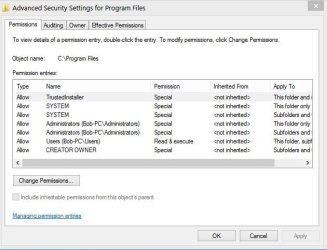
OK thanks will do. Just one quick question. See how System and Administrators (B0b PC... have two entries, is that normal?
 

Attachments

  • Capture.JPG
    Capture.JPG
    49.5 KB · Views: 15

My Computer

OS
Windows 7 Ultimate 64Bit SP1
CPU
Intel Core 2 Quad Q9650 3GHZ
Motherboard
ASUS P5Q-E
Memory
Corsair Dominator Twin CM2X2048 DDR2 1066 MHZ 6GB
Graphics Card(s)
Asus NVIDIA GTX 560 Ti DirectCU II
Sound Card
Creative Sound Blaster X-Fi Titanium Fatal1ty Pro
Monitor(s) Displays
LG Flatron W2353V LCD HDMI Monitor
Screen Resolution
1920x1080
Hard Drives
Seagate ST1000DM003-1ER162 (Z4Y6GDCA) 1TB SATAIII
PSU
Cooler Master Extreme 700 Watt (RS700-PCAAE3-US)
Case
Thermaltake Soprano DX
Cooling
Zalman CNPS9500A LED
Keyboard
Logitech Cordless Desktop® MX™ 5500 Revolution
Mouse
Logitech® Bluetooth® MX™ Revolution Laser Mouse
Internet Speed
Cable Modem 30MB
Latest update, first ignore the last question regarding the two entries. I did what you said about checking Program Files etc.. but I went one step further. I checked the AppData folder and found this unknown user in both the Local and Roaming folders. I deleted it and that seems to have fixed the issue. Thanks to all who replied and helped.
 

My Computer

OS
Windows 7 Ultimate 64Bit SP1
CPU
Intel Core 2 Quad Q9650 3GHZ
Motherboard
ASUS P5Q-E
Memory
Corsair Dominator Twin CM2X2048 DDR2 1066 MHZ 6GB
Graphics Card(s)
Asus NVIDIA GTX 560 Ti DirectCU II
Sound Card
Creative Sound Blaster X-Fi Titanium Fatal1ty Pro
Monitor(s) Displays
LG Flatron W2353V LCD HDMI Monitor
Screen Resolution
1920x1080
Hard Drives
Seagate ST1000DM003-1ER162 (Z4Y6GDCA) 1TB SATAIII
PSU
Cooler Master Extreme 700 Watt (RS700-PCAAE3-US)
Case
Thermaltake Soprano DX
Cooling
Zalman CNPS9500A LED
Keyboard
Logitech Cordless Desktop® MX™ 5500 Revolution
Mouse
Logitech® Bluetooth® MX™ Revolution Laser Mouse
Internet Speed
Cable Modem 30MB
Glad to hear you managed to unravel the mystery user.

In case you still want an answer re: two entries: if you look closely - on the right side, there are further definitions
1) this folder and
2) subfolders and

different permissions can be assigned to access objects (folders) based on the hierarchy of the folder (this folder) or (subfolders)

If you observe other folders with the -1004 user defined in the security descriptor, you have good working knowledge on how to fix it.

Thank you for marking the thread solved too.

Regards,

Bill
 

My Computer

Computer type
Laptop
Computer Manufacturer/Model Number
HP Pavilion dv6-6c10us
OS
x64 (6.3.9600) Win8.1 Pro & soon dual boot x64 (6.1.7601) Win7_SP1 HomePrem
CPU
AMD A6-3420M APU with Radeon(tm) HD Graphics
Motherboard
Hewlett-Packard 1805
Memory
6.00 GB
Graphics Card(s)
AMD Radeon(TM) HD 6520G
Sound Card
(1) AMD High Definition Audio Device (2) IDT High Definiti
Monitor(s) Displays
HP W2072a 20" LCD (1600 x 900) @ 60 Hz
Screen Resolution
1366 x 768 x 32 bits (4294967296 colors) @ 60 Hz
Hard Drives
ST640LM0 00 HM641JI SATA Disk Device
Keyboard
Logitech k520 wireless KB
Mouse
Logitech m320 wireless mouse (bundled with KB)
Internet Speed
15/5 | 54 MB Wireless 'n'
Antivirus
Realtime: Defender or Avast | On-demand: Malwarebytes, ESET
Browser
IE 11 on Win8, IE 10 on win 7
Other Info
Media: [Gimp, Audacity, VLC] || Comm: [WEmail 2012, Skype] || Productivity: [OpenOffice,| Textpad] || Utils: [Sysinternals, cCleaner, Speccy, Defraggler]
You're welcome, appreciate all the help and suggestions.
 

My Computer

OS
Windows 7 Ultimate 64Bit SP1
CPU
Intel Core 2 Quad Q9650 3GHZ
Motherboard
ASUS P5Q-E
Memory
Corsair Dominator Twin CM2X2048 DDR2 1066 MHZ 6GB
Graphics Card(s)
Asus NVIDIA GTX 560 Ti DirectCU II
Sound Card
Creative Sound Blaster X-Fi Titanium Fatal1ty Pro
Monitor(s) Displays
LG Flatron W2353V LCD HDMI Monitor
Screen Resolution
1920x1080
Hard Drives
Seagate ST1000DM003-1ER162 (Z4Y6GDCA) 1TB SATAIII
PSU
Cooler Master Extreme 700 Watt (RS700-PCAAE3-US)
Case
Thermaltake Soprano DX
Cooling
Zalman CNPS9500A LED
Keyboard
Logitech Cordless Desktop® MX™ 5500 Revolution
Mouse
Logitech® Bluetooth® MX™ Revolution Laser Mouse
Internet Speed
Cable Modem 30MB
Back
Top