unlocking my 4870

danneth

New member
Local time
10:05 AM
Messages
32
Hey guys,

i have a xfx 4870 1024mb im trying to overclock it even though i have done it with the CCC overdrive its still showing stock clocks in cpu-z done quite abit of reading and it seems i have to flash the bios? but ive been searching for quite a while now with no joy :cry:

anyone help me out on this one???
 

My Computer

OS
windows 7
Hey guys,

i have a xfx 4870 1024mb im trying to overclock it even though i have done it with the CCC overdrive its still showing stock clocks in cpu-z done quite abit of reading and it seems i have to flash the bios? but ive been searching for quite a while now with no joy :cry:

anyone help me out on this one???

hi there......:)


do you mean the clocks in GPUZ remain the same..??, CPUZ is um for the CPU :p

but no, you shouldn't have to flash the BIOS for a moderate OC.
 

My Computer

Computer Manufacturer/Model Number
myself
OS
SEVEN x64
CPU
Q9450 @ 3.6GHZ 1.34v
Motherboard
ASUS P5K PREMIUM P35
Memory
8GB 1066 buffalo firestix @ 1152mhz CL5
Graphics Card(s)
Sapphire HD 5970 + GTX260 (physX)
Sound Card
Creative X-FI Xtreme Gamer
Monitor(s) Displays
SAMSUNG 20'' & SAMSUNG 23'' (dual screens)
Screen Resolution
2048x1152 & 1680x1050
Hard Drives
1x seagate 160gb IDE & 1x seagate 160gb SATA
PSU
XCILIO 850w (78A)
Case
CM590 1x 120x38mm & 2x92x38mm / 4x 120x25mm
Cooling
AC7 PRO @ 92x38mm blower, Lamptron military bus bay controll
Keyboard
LOGITECH E110
Mouse
logitech NX5
Internet Speed
2MB
Other Info
its a continual ''work in progress''....
Hi,

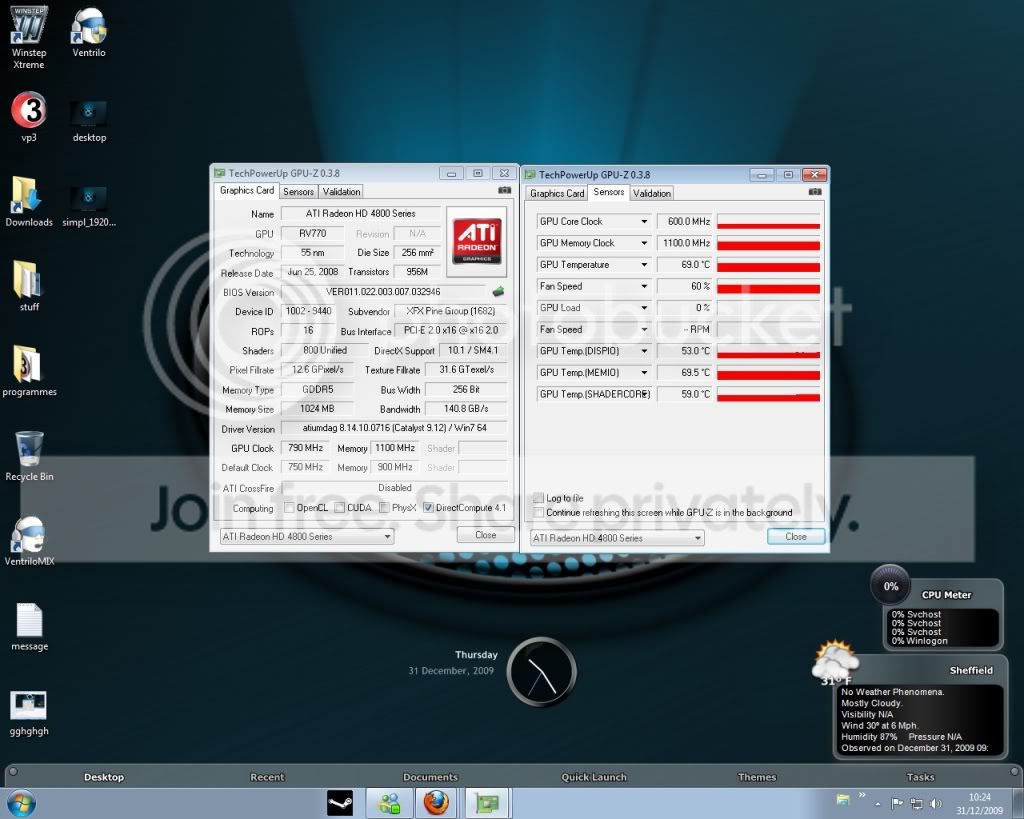
sorry on gpu-z, in the value page it shows the overclocked speed, but then under the sensors tab ( the one where you see the live clock speed ) its showing standard clock speed
 

My Computer

OS
windows 7
Hi,

sorry on gpu-z, in the value page it shows the overclocked speed, but then under the sensors tab ( the one where you see the live clock speed ) its showing standard clock speed

can you throw up a screenie for us mate, a pic speaks a thousand words..... :)
 

My Computer

Computer Manufacturer/Model Number
myself
OS
SEVEN x64
CPU
Q9450 @ 3.6GHZ 1.34v
Motherboard
ASUS P5K PREMIUM P35
Memory
8GB 1066 buffalo firestix @ 1152mhz CL5
Graphics Card(s)
Sapphire HD 5970 + GTX260 (physX)
Sound Card
Creative X-FI Xtreme Gamer
Monitor(s) Displays
SAMSUNG 20'' & SAMSUNG 23'' (dual screens)
Screen Resolution
2048x1152 & 1680x1050
Hard Drives
1x seagate 160gb IDE & 1x seagate 160gb SATA
PSU
XCILIO 850w (78A)
Case
CM590 1x 120x38mm & 2x92x38mm / 4x 120x25mm
Cooling
AC7 PRO @ 92x38mm blower, Lamptron military bus bay controll
Keyboard
LOGITECH E110
Mouse
logitech NX5
Internet Speed
2MB
Other Info
its a continual ''work in progress''....
gfx.jpg


hope this helps lol
 

My Computer

OS
windows 7
gfx.jpg


hope this helps lol

ok....that looks right to me :p

at the top you have your ''current'' GPU clocks (OC)

& below you have your cards ''default'' clocks..


:)
 

My Computer

Computer Manufacturer/Model Number
myself
OS
SEVEN x64
CPU
Q9450 @ 3.6GHZ 1.34v
Motherboard
ASUS P5K PREMIUM P35
Memory
8GB 1066 buffalo firestix @ 1152mhz CL5
Graphics Card(s)
Sapphire HD 5970 + GTX260 (physX)
Sound Card
Creative X-FI Xtreme Gamer
Monitor(s) Displays
SAMSUNG 20'' & SAMSUNG 23'' (dual screens)
Screen Resolution
2048x1152 & 1680x1050
Hard Drives
1x seagate 160gb IDE & 1x seagate 160gb SATA
PSU
XCILIO 850w (78A)
Case
CM590 1x 120x38mm & 2x92x38mm / 4x 120x25mm
Cooling
AC7 PRO @ 92x38mm blower, Lamptron military bus bay controll
Keyboard
LOGITECH E110
Mouse
logitech NX5
Internet Speed
2MB
Other Info
its a continual ''work in progress''....
ye but if you look on the right hand side, where the sensors pick up the live clock speed, its still standard same with when you view it through CCC overdrive its showing standard clock speed, and the results are still the same on 3d mark as when i did it as standard to
 

My Computer

OS
windows 7
ye but if you look on the right hand side, where the sensors pick up the live clock speed, its still standard same with when you view it through CCC overdrive its showing standard clock speed, and the results are still the same on 3d mark as when i did it as standard to

hmm....??

that is strange, the default clock is 750mhz on your card is it not..

im not sure why it states 600mhz..??, have you flashed the card BIOS since you've had it..??

....you are also saying CCC is showing 600mhz as your current clock speed too.
 

My Computer

Computer Manufacturer/Model Number
myself
OS
SEVEN x64
CPU
Q9450 @ 3.6GHZ 1.34v
Motherboard
ASUS P5K PREMIUM P35
Memory
8GB 1066 buffalo firestix @ 1152mhz CL5
Graphics Card(s)
Sapphire HD 5970 + GTX260 (physX)
Sound Card
Creative X-FI Xtreme Gamer
Monitor(s) Displays
SAMSUNG 20'' & SAMSUNG 23'' (dual screens)
Screen Resolution
2048x1152 & 1680x1050
Hard Drives
1x seagate 160gb IDE & 1x seagate 160gb SATA
PSU
XCILIO 850w (78A)
Case
CM590 1x 120x38mm & 2x92x38mm / 4x 120x25mm
Cooling
AC7 PRO @ 92x38mm blower, Lamptron military bus bay controll
Keyboard
LOGITECH E110
Mouse
logitech NX5
Internet Speed
2MB
Other Info
its a continual ''work in progress''....
3D clock are only supposed to kick in when the GPU is running 3D apps. Run a game or benchmark of some kind while leaving GPU-Z running and then check the graph.
 

My Computer

Computer type
PC/Desktop
Computer Manufacturer/Model Number
Me
OS
Win 7 Ultimate x64
CPU
FX-8350 @ 4.6 GHz so far
Motherboard
Asus M5A97 EVO
Memory
ADATA XPG V1 Series Black 8GB DDR3 1600
Graphics Card(s)
Sapphire R9 270x Dual-X
Sound Card
Xonar DGX w/ Corsair Vengence 1300
Monitor(s) Displays
Acer S232HL Abid
Screen Resolution
1920x1080
Hard Drives
120 GB OCZ Vertex 3
500 GB Seagate 7200.12
PSU
Antec Earthwatts 650W Green
Case
Antec Three Hundred
Cooling
Cooler Master 212 EVO
Keyboard
Logitech G510
Mouse
Logitech G500s
Internet Speed
35000/3000
3D clock are only supposed to kick in when the GPU is running 3D apps. Run a game or benchmark of some kind while leaving GPU-Z running and then check the graph.

it could be.......


i think his 3dmark results show that same 600mhz clockspeed to..??, surly 3dmark will only work off of the ''set'' 3D clock..??

:)
 

My Computer

Computer Manufacturer/Model Number
myself
OS
SEVEN x64
CPU
Q9450 @ 3.6GHZ 1.34v
Motherboard
ASUS P5K PREMIUM P35
Memory
8GB 1066 buffalo firestix @ 1152mhz CL5
Graphics Card(s)
Sapphire HD 5970 + GTX260 (physX)
Sound Card
Creative X-FI Xtreme Gamer
Monitor(s) Displays
SAMSUNG 20'' & SAMSUNG 23'' (dual screens)
Screen Resolution
2048x1152 & 1680x1050
Hard Drives
1x seagate 160gb IDE & 1x seagate 160gb SATA
PSU
XCILIO 850w (78A)
Case
CM590 1x 120x38mm & 2x92x38mm / 4x 120x25mm
Cooling
AC7 PRO @ 92x38mm blower, Lamptron military bus bay controll
Keyboard
LOGITECH E110
Mouse
logitech NX5
Internet Speed
2MB
Other Info
its a continual ''work in progress''....
3D clock are only supposed to kick in when the GPU is running 3D apps. Run a game or benchmark of some kind while leaving GPU-Z running and then check the graph.


still remains the same no matter what im running
 

My Computer

OS
windows 7
ye but if you look on the right hand side, where the sensors pick up the live clock speed, its still standard same with when you view it through CCC overdrive its showing standard clock speed, and the results are still the same on 3d mark as when i did it as standard to

hmm....??

that is strange, the default clock is 750mhz on your card is it not..

im not sure why it states 600mhz..??, have you flashed the card BIOS since you've had it..??

....you are also saying CCC is showing 600mhz as your current clock speed too.


i haven't flashed anything no mate, and yes the CCC is showing 600mhz to :(
 

My Computer

OS
windows 7
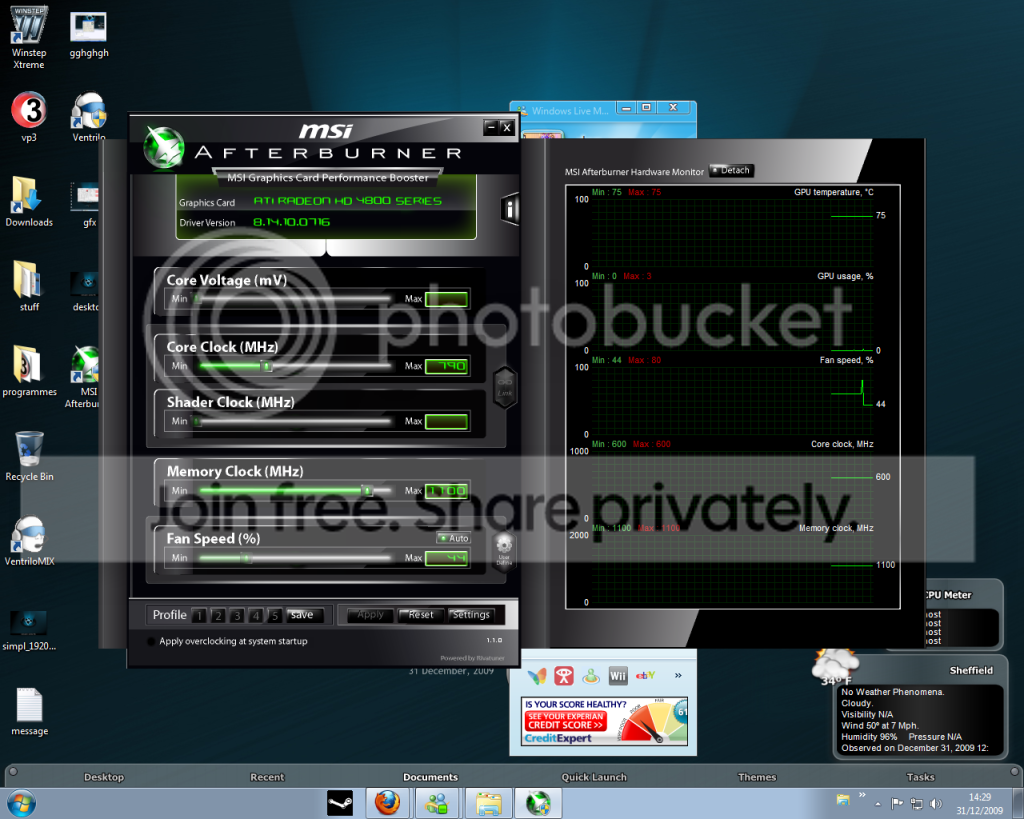
download & run ''MSI Afterburner'' this has its own sensor, lets see what that has to say about your anomalous clocks.... :)
 

My Computer

Computer Manufacturer/Model Number
myself
OS
SEVEN x64
CPU
Q9450 @ 3.6GHZ 1.34v
Motherboard
ASUS P5K PREMIUM P35
Memory
8GB 1066 buffalo firestix @ 1152mhz CL5
Graphics Card(s)
Sapphire HD 5970 + GTX260 (physX)
Sound Card
Creative X-FI Xtreme Gamer
Monitor(s) Displays
SAMSUNG 20'' & SAMSUNG 23'' (dual screens)
Screen Resolution
2048x1152 & 1680x1050
Hard Drives
1x seagate 160gb IDE & 1x seagate 160gb SATA
PSU
XCILIO 850w (78A)
Case
CM590 1x 120x38mm & 2x92x38mm / 4x 120x25mm
Cooling
AC7 PRO @ 92x38mm blower, Lamptron military bus bay controll
Keyboard
LOGITECH E110
Mouse
logitech NX5
Internet Speed
2MB
Other Info
its a continual ''work in progress''....

My Computer

Computer Manufacturer/Model Number
myself
OS
SEVEN x64
CPU
Q9450 @ 3.6GHZ 1.34v
Motherboard
ASUS P5K PREMIUM P35
Memory
8GB 1066 buffalo firestix @ 1152mhz CL5
Graphics Card(s)
Sapphire HD 5970 + GTX260 (physX)
Sound Card
Creative X-FI Xtreme Gamer
Monitor(s) Displays
SAMSUNG 20'' & SAMSUNG 23'' (dual screens)
Screen Resolution
2048x1152 & 1680x1050
Hard Drives
1x seagate 160gb IDE & 1x seagate 160gb SATA
PSU
XCILIO 850w (78A)
Case
CM590 1x 120x38mm & 2x92x38mm / 4x 120x25mm
Cooling
AC7 PRO @ 92x38mm blower, Lamptron military bus bay controll
Keyboard
LOGITECH E110
Mouse
logitech NX5
Internet Speed
2MB
Other Info
its a continual ''work in progress''....
can i have a link to the EXACT card you have.....


there's a problem here & it could well be H/W related, if all apps are showing this ''600mhz'' its likely not a S/W bug.
 

My Computer

Computer Manufacturer/Model Number
myself
OS
SEVEN x64
CPU
Q9450 @ 3.6GHZ 1.34v
Motherboard
ASUS P5K PREMIUM P35
Memory
8GB 1066 buffalo firestix @ 1152mhz CL5
Graphics Card(s)
Sapphire HD 5970 + GTX260 (physX)
Sound Card
Creative X-FI Xtreme Gamer
Monitor(s) Displays
SAMSUNG 20'' & SAMSUNG 23'' (dual screens)
Screen Resolution
2048x1152 & 1680x1050
Hard Drives
1x seagate 160gb IDE & 1x seagate 160gb SATA
PSU
XCILIO 850w (78A)
Case
CM590 1x 120x38mm & 2x92x38mm / 4x 120x25mm
Cooling
AC7 PRO @ 92x38mm blower, Lamptron military bus bay controll
Keyboard
LOGITECH E110
Mouse
logitech NX5
Internet Speed
2MB
Other Info
its a continual ''work in progress''....
there's certainly an issue here..... if it was a 2D downclock i'd think it to be lower than 600mhz (there's nothing on the web about a 4870 being that speed @ idle or load)

& even if im wrong & that IS the 2D downclock, it should revert as soon as stressed back up to 3D numbers....

how long have you had the card, is there a warranty..??
 

My Computer

Computer Manufacturer/Model Number
myself
OS
SEVEN x64
CPU
Q9450 @ 3.6GHZ 1.34v
Motherboard
ASUS P5K PREMIUM P35
Memory
8GB 1066 buffalo firestix @ 1152mhz CL5
Graphics Card(s)
Sapphire HD 5970 + GTX260 (physX)
Sound Card
Creative X-FI Xtreme Gamer
Monitor(s) Displays
SAMSUNG 20'' & SAMSUNG 23'' (dual screens)
Screen Resolution
2048x1152 & 1680x1050
Hard Drives
1x seagate 160gb IDE & 1x seagate 160gb SATA
PSU
XCILIO 850w (78A)
Case
CM590 1x 120x38mm & 2x92x38mm / 4x 120x25mm
Cooling
AC7 PRO @ 92x38mm blower, Lamptron military bus bay controll
Keyboard
LOGITECH E110
Mouse
logitech NX5
Internet Speed
2MB
Other Info
its a continual ''work in progress''....
there's certainly an issue here..... if it was a 2D downclock i'd think it to be lower than 600mhz (there's nothing on the web about a 4870 being that speed @ idle or load)

& even if im wrong & that IS the 2D downclock, it should revert as soon as stressed back up to 3D numbers....

how long have you had the card, is there a warranty..??

had the card around 2 months now, so will still be in warranty ye
 

My Computer

OS
windows 7
Back
Top