unlocking my 4870

there's certainly an issue here..... if it was a 2D downclock i'd think it to be lower than 600mhz (there's nothing on the web about a 4870 being that speed @ idle or load)

& even if im wrong & that IS the 2D downclock, it should revert as soon as stressed back up to 3D numbers....

how long have you had the card, is there a warranty..??

had the card around 2 months now, so will still be in warranty ye

have you tried the new 9.12 drivers, that might be your last ditch attempt to try & rectify the problem.

if that dont work i'd give the vendor a ring explaining the situation, tell them all the apps you've used to monitor the clocks.... see what they have to say about it.

they'll ask for it back to test, but they'll have the same results no doubt....& you'll get a new one. ;)
 

My Computer

Computer Manufacturer/Model Number
myself
OS
SEVEN x64
CPU
Q9450 @ 3.6GHZ 1.34v
Motherboard
ASUS P5K PREMIUM P35
Memory
8GB 1066 buffalo firestix @ 1152mhz CL5
Graphics Card(s)
Sapphire HD 5970 + GTX260 (physX)
Sound Card
Creative X-FI Xtreme Gamer
Monitor(s) Displays
SAMSUNG 20'' & SAMSUNG 23'' (dual screens)
Screen Resolution
2048x1152 & 1680x1050
Hard Drives
1x seagate 160gb IDE & 1x seagate 160gb SATA
PSU
XCILIO 850w (78A)
Case
CM590 1x 120x38mm & 2x92x38mm / 4x 120x25mm
Cooling
AC7 PRO @ 92x38mm blower, Lamptron military bus bay controll
Keyboard
LOGITECH E110
Mouse
logitech NX5
Internet Speed
2MB
Other Info
its a continual ''work in progress''....
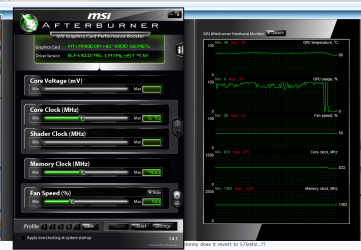
Could very well be a software issue. Here is what Afterburner shows for my 4830,

afterburner.JPG

Notice what it shows for the core in the graph?
 

My Computer

Computer type
PC/Desktop
Computer Manufacturer/Model Number
Me
OS
Win 7 Ultimate x64
CPU
FX-8350 @ 4.6 GHz so far
Motherboard
Asus M5A97 EVO
Memory
ADATA XPG V1 Series Black 8GB DDR3 1600
Graphics Card(s)
Sapphire R9 270x Dual-X
Sound Card
Xonar DGX w/ Corsair Vengence 1300
Monitor(s) Displays
Acer S232HL Abid
Screen Resolution
1920x1080
Hard Drives
120 GB OCZ Vertex 3
500 GB Seagate 7200.12
PSU
Antec Earthwatts 650W Green
Case
Antec Three Hundred
Cooling
Cooler Master 212 EVO
Keyboard
Logitech G510
Mouse
Logitech G500s
Internet Speed
35000/3000
Could very well be a software issue. Here is what Afterburner shows for my 4830,

View attachment 44750

Notice what it shows for the core in the graph?

lol....... your seems to go the other way :p, when you stress the card stormy does it revert to 575mhz..??
 

My Computer

Computer Manufacturer/Model Number
myself
OS
SEVEN x64
CPU
Q9450 @ 3.6GHZ 1.34v
Motherboard
ASUS P5K PREMIUM P35
Memory
8GB 1066 buffalo firestix @ 1152mhz CL5
Graphics Card(s)
Sapphire HD 5970 + GTX260 (physX)
Sound Card
Creative X-FI Xtreme Gamer
Monitor(s) Displays
SAMSUNG 20'' & SAMSUNG 23'' (dual screens)
Screen Resolution
2048x1152 & 1680x1050
Hard Drives
1x seagate 160gb IDE & 1x seagate 160gb SATA
PSU
XCILIO 850w (78A)
Case
CM590 1x 120x38mm & 2x92x38mm / 4x 120x25mm
Cooling
AC7 PRO @ 92x38mm blower, Lamptron military bus bay controll
Keyboard
LOGITECH E110
Mouse
logitech NX5
Internet Speed
2MB
Other Info
its a continual ''work in progress''....
yes mate ive got the latest drivers

afterburner is showing 8.14 cat drivers in the pic above..??

EDIT: i see the driver code matches eventhough its not showing 9.12

before you ring the vendor let me do a little more digging into this 2D issue, b/c eventhough in my experience the 2D clocks are usually lower stormy is only showing a 25mhz drop to 2D..

so....there is a chance 600mhz IS the 2D speed, but there's a S/W problem preventing 750mhz being shown in real time..
 

My Computer

Computer Manufacturer/Model Number
myself
OS
SEVEN x64
CPU
Q9450 @ 3.6GHZ 1.34v
Motherboard
ASUS P5K PREMIUM P35
Memory
8GB 1066 buffalo firestix @ 1152mhz CL5
Graphics Card(s)
Sapphire HD 5970 + GTX260 (physX)
Sound Card
Creative X-FI Xtreme Gamer
Monitor(s) Displays
SAMSUNG 20'' & SAMSUNG 23'' (dual screens)
Screen Resolution
2048x1152 & 1680x1050
Hard Drives
1x seagate 160gb IDE & 1x seagate 160gb SATA
PSU
XCILIO 850w (78A)
Case
CM590 1x 120x38mm & 2x92x38mm / 4x 120x25mm
Cooling
AC7 PRO @ 92x38mm blower, Lamptron military bus bay controll
Keyboard
LOGITECH E110
Mouse
logitech NX5
Internet Speed
2MB
Other Info
its a continual ''work in progress''....
Don't change a lick,

afterburner1.png

Used to do the same in Everest as well, but somewhere in the last couple of updates for it it started reading them correctly.

afterburner is showing 8.14 cat drivers in the pic above..??
That would be the Direct3D driver version that Afterburner is showing, not the Catalyst version. This is from my CCC,

Driver Packaging Version 8.682.2-091214a-092914E
Catalyst™ Version 09.12
Provider ATI Technologies Inc.
2D Driver Version 8.01.01.984
2D Driver File Path /REGISTRY/MACHINE/SYSTEM/ControlSet001/Control/CLASS/{4D36E968-E325-11CE-BFC1-08002BE10318}/0000
Direct3D Version 8.14.10.0716
OpenGL Version 6.14.10.9239
Catalyst™ Control Center Version 2009.1214.1801.32312
 

My Computer

Computer type
PC/Desktop
Computer Manufacturer/Model Number
Me
OS
Win 7 Ultimate x64
CPU
FX-8350 @ 4.6 GHz so far
Motherboard
Asus M5A97 EVO
Memory
ADATA XPG V1 Series Black 8GB DDR3 1600
Graphics Card(s)
Sapphire R9 270x Dual-X
Sound Card
Xonar DGX w/ Corsair Vengence 1300
Monitor(s) Displays
Acer S232HL Abid
Screen Resolution
1920x1080
Hard Drives
120 GB OCZ Vertex 3
500 GB Seagate 7200.12
PSU
Antec Earthwatts 650W Green
Case
Antec Three Hundred
Cooling
Cooler Master 212 EVO
Keyboard
Logitech G510
Mouse
Logitech G500s
Internet Speed
35000/3000
so what about the clock speed issue????
 

My Computer

OS
windows 7
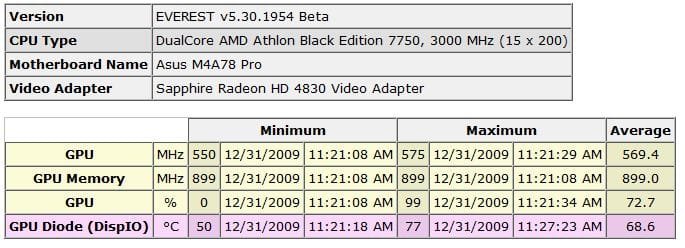
If you don't have it grab the free trial of Everest Ultimate,

Lavalys - Comprehensive IT Security and Management

and in the Preferences enable logging for just the GPU core and memory speeds. Then fire up something full screen 3D, and check the logs after (turn off logging once done or it will keep going.

The free version puts "trial Version" in some of the readings, but hopefully for this it will not be anywhere that we're trying to see now. If it doesn't you should get one like this,

everestlog.JPG

which shows the proper 2D clock and the max clock once in 3D mode, unlike what Afterburner shows.
 

My Computer

Computer type
PC/Desktop
Computer Manufacturer/Model Number
Me
OS
Win 7 Ultimate x64
CPU
FX-8350 @ 4.6 GHz so far
Motherboard
Asus M5A97 EVO
Memory
ADATA XPG V1 Series Black 8GB DDR3 1600
Graphics Card(s)
Sapphire R9 270x Dual-X
Sound Card
Xonar DGX w/ Corsair Vengence 1300
Monitor(s) Displays
Acer S232HL Abid
Screen Resolution
1920x1080
Hard Drives
120 GB OCZ Vertex 3
500 GB Seagate 7200.12
PSU
Antec Earthwatts 650W Green
Case
Antec Three Hundred
Cooling
Cooler Master 212 EVO
Keyboard
Logitech G510
Mouse
Logitech G500s
Internet Speed
35000/3000
Hey guys,

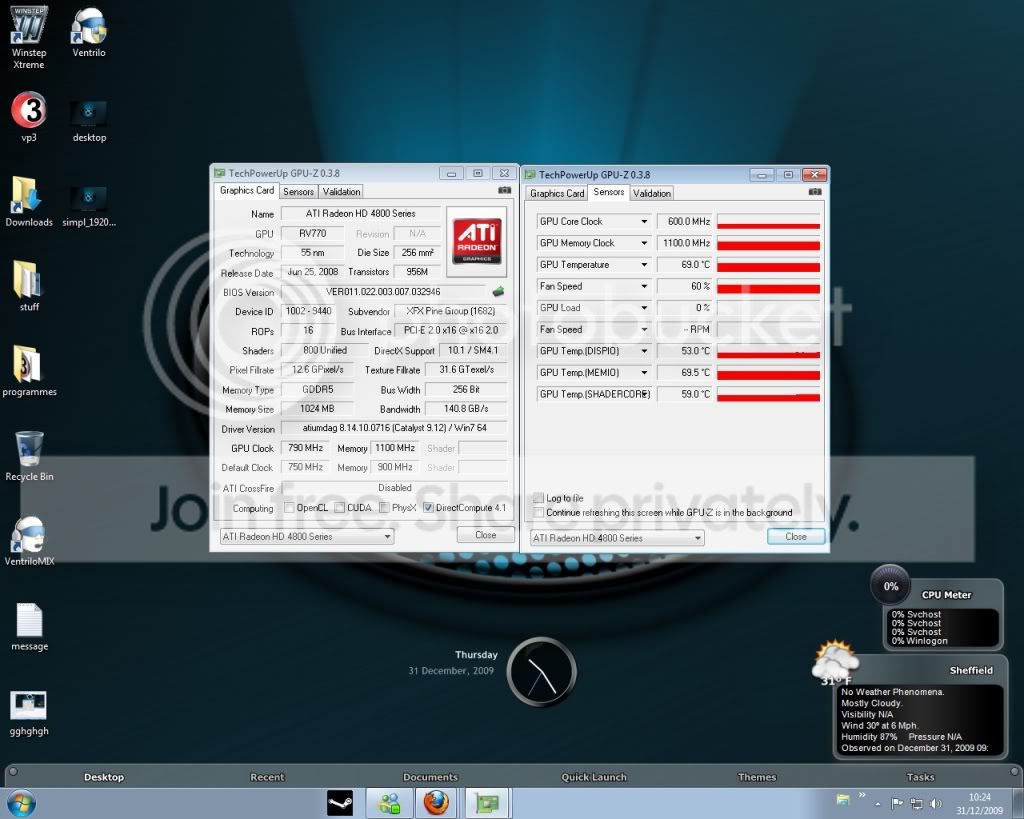
i have a xfx 4870 1024mb im trying to overclock it even though i have done it with the CCC overdrive its still showing stock clocks in cpu-z done quite abit of reading and it seems i have to flash the bios? but ive been searching for quite a while now with no joy :cry:

anyone help me out on this one???

gfx.jpg


hope this helps lol[/QUOTE

not as knowledgeable as the others, imo, but from what i've read and seen in your screen shot, the problem with gpu-z not showing your clocks correct (sensor tab) seems to be that the app is running in the background, or should i say: there is a check box at the bottom that reads "Continue refreshing this screen while GPU-Z is in the background." i ran some 3d games and monitored gpu-z in the process--nothing happened. however, when i checked the box and ran a game, gpu-z showed the clocks increasing when the game starting and going back to min-levels when the game stopped.

i hope i'm not stepping on anyone's toes:huh: (or am i not in the same ballpark with respect to what the problem is?)

also, it was stated that the card was successfully o.c.'d with ccc--how does everything work with the card running at stock clocks?
 
Last edited:

My Computer

Computer Manufacturer/Model Number
Rig 1
OS
Windows 7 Ultimate x64
CPU
AMD Phenom II X4 940 Black Edition @ 3.4GHz (AM2+)
Motherboard
Gigabyte GA-MA790X-UD4P (AM2+)
Memory
Corsair CM2X4096-8500C5 (4 X 2GB)
Graphics Card(s)
XFX Radeon HD 5770 / Diamond Radeon HD 5770 CrossFireX
Sound Card
Asus Xonar DS (PCI)
Monitor(s) Displays
Samsung SyncMaster 932bw+ (3)
Screen Resolution
4320x900
Hard Drives
OCZ Vertex 2 80 GB - Windows 7 System --
WD Caviar Black 1TB - Music, Movies, Vids, Pics --
WD Caviar Black 640GB - User Profiles & Games --
WD My Book 320GB external
PSU
Corsair CMPSU-750TX
Case
Cooler Master HAF 932
Cooling
Corsair Hydro Series H50
Keyboard
Logitech Desktop Wave
Mouse
Logitech LX8 Laser
Internet Speed
20 down / 2 up
Other Info
LG GGC-H20L Blu-Ray / HDDVD combo --
Hauppauge HVR-1250 --
Silverstone MFP-51 --
Logitech Webcam C600
Wow thats odd. I didnt know the 4890 would have a 200 MHz clock speed difference. My card is stock at 850 MHz. (I have a PowerColor Radeon HD 4890 LCS)
 

My Computer

Computer Manufacturer/Model Number
iBuyPower Chimera X58
OS
Windows 8 Pro x64
CPU
Intel Core i7 920
Motherboard
Asus P6T Deluxe V2
Memory
12GB (2GB x6) Triple Channel DDR3 1333 MHz
Graphics Card(s)
ATI Radeon HD 4870 X2 2GB GDDR5
Sound Card
Integrated Digital HD 7.1 Surround Sound
Monitor(s) Displays
24.6-inch ASUS VW246H 20000:1 Contrast, 2 ms response time,
Screen Resolution
1920x1080
Hard Drives
1 TB 7200 RPM SATA II 3 GBps 16MB cache
PSU
NZXT 800W Gaming Series
Case
Guardian Inferno (Custom Painted NZXT Guardian 921)
Cooling
Thermaltake V1 Fan Cooling System OC Proof
Keyboard
Razer Lycosa
Mouse
iBuyPower Ergonomical Internet Mouse
Internet Speed
11 MBps High-speed Cable
Hey guys,

i have a xfx 4870 1024mb im trying to overclock it even though i have done it with the CCC overdrive its still showing stock clocks in cpu-z done quite abit of reading and it seems i have to flash the bios? but ive been searching for quite a while now with no joy :cry:

anyone help me out on this one???

gfx.jpg


hope this helps lol[/QUOTE

not as knowledgeable as the others, imo, but from what i've read and seen in your screen shot, the problem with gpu-z not showing your clocks correct (sensor tab) seems to be that the app is running in the background, or should i say: there is a check box at the bottom that reads "Continue refreshing this screen while GPU-Z is in the background." i ran some 3d games and monitored gpu-z in the process--nothing happened. however, when i checked the box and ran a game, gpu-z showed the clocks increasing when the game starting and going back to min-levels when the game stopped.

i hope i'm not stepping on anyone's toes:huh: (or am i not in the same ballpark with respect to what the problem is?)

also, it was stated that the card was successfully o.c.'d with ccc--how does everything work with the card running at stock clocks?

lol........ that would be a good place to start :p, tick the box at the bottom to refresh in ''real-time'' maybe that'll fix it (cant believe i missed that)

though that's probably not the problem, b/c ive spoke to a few 4870 owners & they've all told me the cards 2D clock is 500mhz, none of them are able to reproduce what your seeing...

600mhz simply is not a clock related to this card...???


re tick that GPUZ box & see if that helps...;)
 

My Computer

Computer Manufacturer/Model Number
myself
OS
SEVEN x64
CPU
Q9450 @ 3.6GHZ 1.34v
Motherboard
ASUS P5K PREMIUM P35
Memory
8GB 1066 buffalo firestix @ 1152mhz CL5
Graphics Card(s)
Sapphire HD 5970 + GTX260 (physX)
Sound Card
Creative X-FI Xtreme Gamer
Monitor(s) Displays
SAMSUNG 20'' & SAMSUNG 23'' (dual screens)
Screen Resolution
2048x1152 & 1680x1050
Hard Drives
1x seagate 160gb IDE & 1x seagate 160gb SATA
PSU
XCILIO 850w (78A)
Case
CM590 1x 120x38mm & 2x92x38mm / 4x 120x25mm
Cooling
AC7 PRO @ 92x38mm blower, Lamptron military bus bay controll
Keyboard
LOGITECH E110
Mouse
logitech NX5
Internet Speed
2MB
Other Info
its a continual ''work in progress''....
when i tick the box on gpu-z its now started jumping up to 790mhz when under load
 

My Computer

OS
windows 7
when i tick the box on gpu-z its now started jumping up to 790mhz when under load

well....there's nothing wrong with the card @ 3D settings then, its just reporting a weird 2D clock.

in light of this i'd say the card is functioning ok, there's an idle monitoring fault :)
 

My Computer

Computer Manufacturer/Model Number
myself
OS
SEVEN x64
CPU
Q9450 @ 3.6GHZ 1.34v
Motherboard
ASUS P5K PREMIUM P35
Memory
8GB 1066 buffalo firestix @ 1152mhz CL5
Graphics Card(s)
Sapphire HD 5970 + GTX260 (physX)
Sound Card
Creative X-FI Xtreme Gamer
Monitor(s) Displays
SAMSUNG 20'' & SAMSUNG 23'' (dual screens)
Screen Resolution
2048x1152 & 1680x1050
Hard Drives
1x seagate 160gb IDE & 1x seagate 160gb SATA
PSU
XCILIO 850w (78A)
Case
CM590 1x 120x38mm & 2x92x38mm / 4x 120x25mm
Cooling
AC7 PRO @ 92x38mm blower, Lamptron military bus bay controll
Keyboard
LOGITECH E110
Mouse
logitech NX5
Internet Speed
2MB
Other Info
its a continual ''work in progress''....
is his 2d clock at 600mhz because the card is already o.c.'d?
 

My Computer

Computer Manufacturer/Model Number
Rig 1
OS
Windows 7 Ultimate x64
CPU
AMD Phenom II X4 940 Black Edition @ 3.4GHz (AM2+)
Motherboard
Gigabyte GA-MA790X-UD4P (AM2+)
Memory
Corsair CM2X4096-8500C5 (4 X 2GB)
Graphics Card(s)
XFX Radeon HD 5770 / Diamond Radeon HD 5770 CrossFireX
Sound Card
Asus Xonar DS (PCI)
Monitor(s) Displays
Samsung SyncMaster 932bw+ (3)
Screen Resolution
4320x900
Hard Drives
OCZ Vertex 2 80 GB - Windows 7 System --
WD Caviar Black 1TB - Music, Movies, Vids, Pics --
WD Caviar Black 640GB - User Profiles & Games --
WD My Book 320GB external
PSU
Corsair CMPSU-750TX
Case
Cooler Master HAF 932
Cooling
Corsair Hydro Series H50
Keyboard
Logitech Desktop Wave
Mouse
Logitech LX8 Laser
Internet Speed
20 down / 2 up
Other Info
LG GGC-H20L Blu-Ray / HDDVD combo --
Hauppauge HVR-1250 --
Silverstone MFP-51 --
Logitech Webcam C600
Back
Top