Solved Unobeident Mouse Issues

despuit

New member
Power User
Local time
11:30 PM
Messages
88
Location
Everywhere
My mouse simply will not behave since purchase of this Dell LATITUDE E6400. Personally I think this is why the previous owner disowned her. She will double click automagically when you use the right key. Or as you type your palm will hit on enter on the track pad.

The dillema:


Disabling the track disables the two buttons that actually function properly at the base of the device. Is there any software out there so I can just disable the upper two buttons and track pad?


If not I am going to have to buy an external mouse :(
 

My Computer

Computer type
Laptop
Computer Manufacturer/Model Number
Lenovo
OS
Windows 7 - Home Edition - Build 7601x8086
Memory
Samsung DDR3 4GB
Graphics Card(s)
Intergrated
Sound Card
Intergrated
Screen Resolution
1400 x 1050
Hard Drives
80GB HDD 2.5
PSU
20V adapter
Case
Piece of plastic
Cooling
Copper heatsink
Keyboard
Intergrated PS2
Mouse
TouchPad
Antivirus
Commodo
Browser
K-Melon
Hi,

Do the mouse button keys feel like they are 'sticking' or anything?
 

My Computer

Computer type
PC/Desktop
Computer Manufacturer/Model Number
Me :D
OS
Windows 7
CPU
AMD X6 1090T 4.02Ghz
Motherboard
ASUS Crosshair IV Formula
Memory
16.00GB
Graphics Card(s)
Nvidia Geforce 470
Sound Card
ASUS Xonar DX
Monitor(s) Displays
Dell 24" Monitor
Hard Drives
2TB WD
1TB WD
2TB WD
60 SSD
60 SSD
PSU
700W Crosshair
Case
Antec Three hundred
Cooling
Water Cooling
Hi,
I would imaging they could be disabled and the touch pad adjusted for palm sensitivity and zone,
Use winkey and type in the search box
mouse
Or Start and control panel and look for mouse and properties,
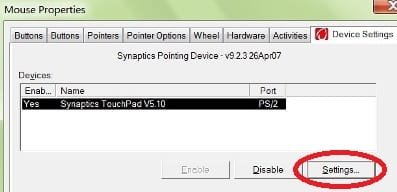
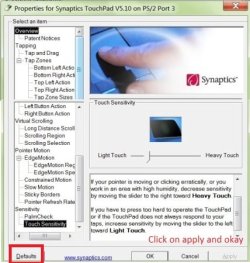
The touchpad setting are usually on the right end of the mouse properties section which you would need to expand those entries to see what is available,
Touch pad section 1.jpg
touch pad section all.jpg
 

My Computer

Computer type
PC/Desktop
Computer Manufacturer/Model Number
Custom assembled by me :}
OS
Win-7-Pro64bit 7-H-Prem-64bit
CPU
i7-5930K 2nd i9-9940x both water blocked VRM's too
Motherboard
ASUS SABERTOOTH X99 2nd ASUS x299 Apex
Memory
Trident-z 3200C14 2nd Trident-z 3600C16
Graphics Card(s)
EVGA 1080ti ftw3 2nd Titan Xp both water blocked
Sound Card
Built-in Realtek
Monitor(s) Displays
1-AOC G2460PG 24"G-Sync 144Hz/ 2nd 1-ASUS VG248QE 24" 144Hz
Screen Resolution
1920 x 1080 144Hz
Hard Drives
2-Samsung M.2 Evo & Evo Plus
2-Samsung 850 EVO 500GB SSD's/ 3-2.5 W.D. Black 1tb-&3-1tb/3-3.5 WD Black 1tb hdd's
PSU
EVGA SuperNOVA 1000-P2 2nd 1200-P2
Case
2-Corsair Obsidian Series 450D Black ATX Mid Tower
Cooling
Custom water loops
Keyboard
Logitech G710+/ 2nd Logitech G910
Mouse
2-RedDragon M901 Perdition 16400 dpi Gaming mouse = wired
Internet Speed
Comcast Ping 19ms 89.31mbps download speed 6.12mbps upload
Antivirus
Malwarebytes Pro/ Superantispyware Pro
Browser
FireFox & Pale moon
Other Info
2nd ASUS X299 Apex/Intel i9-9940x with Custom water loop/7H-Prem-x64/Corsair 450D case/Ram Trident-z 3600C16 4x8gb / Samsung970Evo plus 500gb SSD/Dual ssd EZ swap evo/PSU EVGA SuperNova 1200w-P2 80+Platinum/GPU Titan Xp /8-ML-140 on push-pull on 2-280GTX rads
Nope no sticky keys. Thanks Thrash! I tried this not sure if it is a driver issue or what but I have very limited options in that menu. I can only adjust speed to the cursor and add trails.
 

My Computer

Computer type
Laptop
Computer Manufacturer/Model Number
Lenovo
OS
Windows 7 - Home Edition - Build 7601x8086
Memory
Samsung DDR3 4GB
Graphics Card(s)
Intergrated
Sound Card
Intergrated
Screen Resolution
1400 x 1050
Hard Drives
80GB HDD 2.5
PSU
20V adapter
Case
Piece of plastic
Cooling
Copper heatsink
Keyboard
Intergrated PS2
Mouse
TouchPad
Antivirus
Commodo
Browser
K-Melon
Hi sorry for the late reply,
Please post a screen shot of the mouse properties page,
If you don't see the section on the far right as shown then yes it's definitely a driver issue
You'd be missing the entire touch pad section = no way to adjust the pad at all
The manufacture of the machine would offer the driver for the touchpad just make sure you have your snid so you can search for tha drive
It's either that or you'll have to search via model....
Cheers.
 

My Computer

Computer type
PC/Desktop
Computer Manufacturer/Model Number
Custom assembled by me :}
OS
Win-7-Pro64bit 7-H-Prem-64bit
CPU
i7-5930K 2nd i9-9940x both water blocked VRM's too
Motherboard
ASUS SABERTOOTH X99 2nd ASUS x299 Apex
Memory
Trident-z 3200C14 2nd Trident-z 3600C16
Graphics Card(s)
EVGA 1080ti ftw3 2nd Titan Xp both water blocked
Sound Card
Built-in Realtek
Monitor(s) Displays
1-AOC G2460PG 24"G-Sync 144Hz/ 2nd 1-ASUS VG248QE 24" 144Hz
Screen Resolution
1920 x 1080 144Hz
Hard Drives
2-Samsung M.2 Evo & Evo Plus
2-Samsung 850 EVO 500GB SSD's/ 3-2.5 W.D. Black 1tb-&3-1tb/3-3.5 WD Black 1tb hdd's
PSU
EVGA SuperNOVA 1000-P2 2nd 1200-P2
Case
2-Corsair Obsidian Series 450D Black ATX Mid Tower
Cooling
Custom water loops
Keyboard
Logitech G710+/ 2nd Logitech G910
Mouse
2-RedDragon M901 Perdition 16400 dpi Gaming mouse = wired
Internet Speed
Comcast Ping 19ms 89.31mbps download speed 6.12mbps upload
Antivirus
Malwarebytes Pro/ Superantispyware Pro
Browser
FireFox & Pale moon
Other Info
2nd ASUS X299 Apex/Intel i9-9940x with Custom water loop/7H-Prem-x64/Corsair 450D case/Ram Trident-z 3600C16 4x8gb / Samsung970Evo plus 500gb SSD/Dual ssd EZ swap evo/PSU EVGA SuperNova 1200w-P2 80+Platinum/GPU Titan Xp /8-ML-140 on push-pull on 2-280GTX rads
Hi sorry for the late reply,
Please post a screen shot of the mouse properties page,
If you don't see the section on the far right as shown then yes it's definitely a driver issue
You'd be missing the entire touch pad section = no way to adjust the pad at all
The manufacture of the machine would offer the driver for the touchpad just make sure you have your snid so you can search for tha drive
It's either that or you'll have to search via model....
Cheers.

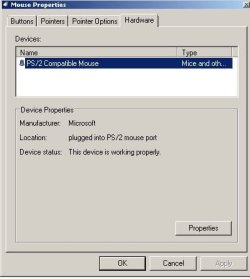
lol I should apologise, it took me over a week to reply to you! I'll check online, my computer seems confused as denoted below. Thanks again, never had any problems with computer mouse before on laptop so didn't even know such a menu was to be in existence. By the way is a Dell Latitude E6400 x64 P8400

RZXqE4M3BiAAAAAASUVORK5CYII=
 

Attachments

  • Mouse Properites - 041415 - Ver 1.0.JPG
    Mouse Properites - 041415 - Ver 1.0.JPG
    24.9 KB · Views: 17

My Computer

Computer type
Laptop
Computer Manufacturer/Model Number
Lenovo
OS
Windows 7 - Home Edition - Build 7601x8086
Memory
Samsung DDR3 4GB
Graphics Card(s)
Intergrated
Sound Card
Intergrated
Screen Resolution
1400 x 1050
Hard Drives
80GB HDD 2.5
PSU
20V adapter
Case
Piece of plastic
Cooling
Copper heatsink
Keyboard
Intergrated PS2
Mouse
TouchPad
Antivirus
Commodo
Browser
K-Melon
Thanks Oscer, just downloading her after posting my last reply. Took me offline for a good 20-25 minutes, for whatever reason when I ran the networking script (by default all unneeded services for the computer to run are turned off so networking and audio) I couldn't resolve any webpages. Rebooted a few times and finally initialised was just odd. Just disabled apoint.exe the installed software and blocked it. The computer now recognises it is utilising a laptop based touchpad system. And seems to have rectified the right clicking issue. Still issues with the touchpad, however am going to reboot to configure disabling the software and disable the touchpad through the bios. That way too can see if the networking issue was a fluke or not.
------------------------UPDATE------------------------------------------
All right, every computer is different! So this one does not allow the bios to be configured in such a way is either everything or external. That application I tried it again, the features are there. However it runs like three different programs, totaling 15MB which is ridiculous considering the usage. I tried exiting it again hoping there would be log files to save the settings, nope. I am typing wide here so my hands do not hit the pad and have found out that the pressure settings did keep, though disabling did not. Just locked up my system. Now however everything is fixed and working beyond expectation hardware wise, I am now running into the issue where the cursor is self-clicking. Wherever you have it located it is autoclicking. Not sure why, even ran every key and that has no correlation.

And yeah the networking was just a fluke.
------------------------SUBMENU TEST-------------------------
the quick bro...................... tried disabling submenu hover option no correlation. I think is directly related to driver though it says everything is fine. Testing dell software again... computer locks up again takes 3 minutes apparently to resume. Going to try a restart and try one more time.

the quick brown fox jumps over the lazy dog, the quick bro (even with the software running it is auto-clicking)

*logged out, logged in explorer/desktop is just gone whippty doo... however configuring it through the applet rather then the apoint manager did key in the settings and if I restrated the desktop would be normal the system is just locked up cause of the software (is why we have taskmgr). Is just the autoclick issue now which is increasing I find in activity.

External Mouse Test....

the quick br...................... nope even with an external mouse this issue occurs........
 
Last edited:

My Computer

Computer type
Laptop
Computer Manufacturer/Model Number
Lenovo
OS
Windows 7 - Home Edition - Build 7601x8086
Memory
Samsung DDR3 4GB
Graphics Card(s)
Intergrated
Sound Card
Intergrated
Screen Resolution
1400 x 1050
Hard Drives
80GB HDD 2.5
PSU
20V adapter
Case
Piece of plastic
Cooling
Copper heatsink
Keyboard
Intergrated PS2
Mouse
TouchPad
Antivirus
Commodo
Browser
K-Melon
Hi,
I'm missing something here,
You downloaded the driver .zip folder,
Saved it in documents or where ever,
Right click the zip folder and selected Extract All,
Opened the extracted folder and found the Install Setup .exe file and ran it = Correct ?

But yes the image confirms your missing the entire touch pad settings
The default settings for my laptop are completely crazy too :D
 
Last edited:

My Computer

Computer type
PC/Desktop
Computer Manufacturer/Model Number
Custom assembled by me :}
OS
Win-7-Pro64bit 7-H-Prem-64bit
CPU
i7-5930K 2nd i9-9940x both water blocked VRM's too
Motherboard
ASUS SABERTOOTH X99 2nd ASUS x299 Apex
Memory
Trident-z 3200C14 2nd Trident-z 3600C16
Graphics Card(s)
EVGA 1080ti ftw3 2nd Titan Xp both water blocked
Sound Card
Built-in Realtek
Monitor(s) Displays
1-AOC G2460PG 24"G-Sync 144Hz/ 2nd 1-ASUS VG248QE 24" 144Hz
Screen Resolution
1920 x 1080 144Hz
Hard Drives
2-Samsung M.2 Evo & Evo Plus
2-Samsung 850 EVO 500GB SSD's/ 3-2.5 W.D. Black 1tb-&3-1tb/3-3.5 WD Black 1tb hdd's
PSU
EVGA SuperNOVA 1000-P2 2nd 1200-P2
Case
2-Corsair Obsidian Series 450D Black ATX Mid Tower
Cooling
Custom water loops
Keyboard
Logitech G710+/ 2nd Logitech G910
Mouse
2-RedDragon M901 Perdition 16400 dpi Gaming mouse = wired
Internet Speed
Comcast Ping 19ms 89.31mbps download speed 6.12mbps upload
Antivirus
Malwarebytes Pro/ Superantispyware Pro
Browser
FireFox & Pale moon
Other Info
2nd ASUS X299 Apex/Intel i9-9940x with Custom water loop/7H-Prem-x64/Corsair 450D case/Ram Trident-z 3600C16 4x8gb / Samsung970Evo plus 500gb SSD/Dual ssd EZ swap evo/PSU EVGA SuperNova 1200w-P2 80+Platinum/GPU Titan Xp /8-ML-140 on push-pull on 2-280GTX rads
Hi,
I'm missing something here,
You downloaded the driver .zip folder,
Saved it in documents or where ever,
Right click the zip folder and selected Extract All,
Opened the extracted folder and found the Install Setup .exe file and ran it = Correct ?

But yes the image confirms your missing the entire touch pad settings
The default settings for my laptop are completely crazy too :D

hey at least you're replying, appreciate that. That post is indeed a mess yeah I ran the installer to install the driver, then disable the associated software. The only setting that will stick if it is not running after reboot is the presure settings which actually ruled out the touchpad as the culprit. Apparently I was never hitting it, the cursor just autoclicks with/without the driver and with/without the software running. So half the problem is fixed, thanks for that the double click was the most annoying. This auto-click thing though causes a lot of havoc in forums, even running an external mouse does not allievate the problem. Thanks again for baring with me!
 

My Computer

Computer type
Laptop
Computer Manufacturer/Model Number
Lenovo
OS
Windows 7 - Home Edition - Build 7601x8086
Memory
Samsung DDR3 4GB
Graphics Card(s)
Intergrated
Sound Card
Intergrated
Screen Resolution
1400 x 1050
Hard Drives
80GB HDD 2.5
PSU
20V adapter
Case
Piece of plastic
Cooling
Copper heatsink
Keyboard
Intergrated PS2
Mouse
TouchPad
Antivirus
Commodo
Browser
K-Melon
Okay thank you :)
Can you post a new imagine to make sure we're set in properties or what it looks like now,
Then see about the double click speed setting in both the touchpad tap
Do as I did in my image and expand all listings possibly something might jump out at me :)
Cheers.
 

My Computer

Computer type
PC/Desktop
Computer Manufacturer/Model Number
Custom assembled by me :}
OS
Win-7-Pro64bit 7-H-Prem-64bit
CPU
i7-5930K 2nd i9-9940x both water blocked VRM's too
Motherboard
ASUS SABERTOOTH X99 2nd ASUS x299 Apex
Memory
Trident-z 3200C14 2nd Trident-z 3600C16
Graphics Card(s)
EVGA 1080ti ftw3 2nd Titan Xp both water blocked
Sound Card
Built-in Realtek
Monitor(s) Displays
1-AOC G2460PG 24"G-Sync 144Hz/ 2nd 1-ASUS VG248QE 24" 144Hz
Screen Resolution
1920 x 1080 144Hz
Hard Drives
2-Samsung M.2 Evo & Evo Plus
2-Samsung 850 EVO 500GB SSD's/ 3-2.5 W.D. Black 1tb-&3-1tb/3-3.5 WD Black 1tb hdd's
PSU
EVGA SuperNOVA 1000-P2 2nd 1200-P2
Case
2-Corsair Obsidian Series 450D Black ATX Mid Tower
Cooling
Custom water loops
Keyboard
Logitech G710+/ 2nd Logitech G910
Mouse
2-RedDragon M901 Perdition 16400 dpi Gaming mouse = wired
Internet Speed
Comcast Ping 19ms 89.31mbps download speed 6.12mbps upload
Antivirus
Malwarebytes Pro/ Superantispyware Pro
Browser
FireFox & Pale moon
Other Info
2nd ASUS X299 Apex/Intel i9-9940x with Custom water loop/7H-Prem-x64/Corsair 450D case/Ram Trident-z 3600C16 4x8gb / Samsung970Evo plus 500gb SSD/Dual ssd EZ swap evo/PSU EVGA SuperNova 1200w-P2 80+Platinum/GPU Titan Xp /8-ML-140 on push-pull on 2-280GTX rads
Just going to throw it out, I can't deal with stuff like this any more it is too much. I have an old lenovo the screen is all cracked up but it is functional unlike this.
 

My Computer

Computer type
Laptop
Computer Manufacturer/Model Number
Lenovo
OS
Windows 7 - Home Edition - Build 7601x8086
Memory
Samsung DDR3 4GB
Graphics Card(s)
Intergrated
Sound Card
Intergrated
Screen Resolution
1400 x 1050
Hard Drives
80GB HDD 2.5
PSU
20V adapter
Case
Piece of plastic
Cooling
Copper heatsink
Keyboard
Intergrated PS2
Mouse
TouchPad
Antivirus
Commodo
Browser
K-Melon
Back
Top