Solved Unwanted Program Installation

clw2613

New member
Member
Local time
11:28 PM
Messages
35
Periodically I check the listing of programs installed on my Windows 7 system and quite often find things that have installed that I/we did not intentionally authorize. These can be adware, toolbars or a myriad of other unwanted applications. Each time one is found, time & effort is required to remove them, so ---

The question - Is there a Windows setting that can be applied that will require specific authorization before a program will be installed?

Thanks in advance for any assistance offered.

C.
 

My Computer My Computer

Computer type
PC/Desktop
Computer Manufacturer/Model Number
Gateway
OS
Microsoft Windows 7 Home Premium 64-bit 7601 Multiprocessor Free Service Pack 1
CPU
Intel(R) Core(TM) i5 CPU 650 @ 3.20GHz
Motherboard
Gateway FX6840
Memory
8.00 GB
Graphics Card(s)
ATI Radeon HD 5570
Sound Card
(1) ATI High Definition Audio Device (2) Realtek High Defi
Screen Resolution
1920 x 1080 x 32 bits (4294967296 colors) @ 60 Hz
Hard Drives
(1) ST31000528AS (2) ST31000528AS (3) Generic- Compact Flash USB Device (4) Generic- MicroSD USB Device (5) Generic- MS/MS-Pro/HG USB Device (6) Generic- SD/MMC USB Device (7) Generic- xD-Picture USB Device
My point is that, No program gets installed in your PC without your permission. Things that get installed without your permission are only Adwares and Trojans. So keep your antivirus upto date.
Also keep your eyes open while installing any program. There may be any check boxes in the installer windows which gets the permission to install the adware without you even noticing. So, Check every step in Installation wizard of a program. Mostly these check boxes are found after 'Accept terms and conditions page'. For Example, Avast installers comes with Chrome online installer embeded in them. AVG installers come with ASK toolbar installers. Flash Player installer comes with McAfee Security Toolbar. So Its your duty to uncheck the unwanted programs during your Installation.
 

My Computer My Computer

Computer type
Laptop
Computer Manufacturer/Model Number
Dell XPS L502x
OS
Windows 7 Home Premium 64bit
CPU
Intel Core i7 2670QM
Motherboard
Intel HM67 Mobile Express Chipset
Memory
Samsung 8GB 1333Mhz
Graphics Card(s)
nVidia Geforce 540M GT 2GB
Sound Card
Realtek High Definition Audio
Monitor(s) Displays
15.6" Dell Standard RGB-LED Backlit Display
Screen Resolution
1366x768
Hard Drives
Seagate Momentus 2.5" 750GB HDD 5400rpm
Internet Speed
3.1 Mbits/s
Antivirus
AVG Free, Kaspersky
Browser
Google chrome
My point is that, No program gets installed in your PC without your permission. Things that get installed without your permission are only Adwares and Trojans. So keep your antivirus upto date.
Also keep your eyes open while installing any program. There may be any check boxes in the installer windows which gets the permission to install the adware without you even noticing. So, Check every step in Installation wizard of a program. Mostly these check boxes are found after 'Accept terms and conditions page'. For Example, Avast installers comes with Chrome online installer embeded in them. AVG installers come with ASK toolbar installers. Flash Player installer comes with McAfee Security Toolbar. So Its your duty to uncheck the unwanted programs during your Installation.

I currently use Kaspersky Internet Security that updates automatically. I would respectfully disagree about all installs requiring permission. These things happen without installing other (wanted) applications so it does not appear to be a matter of noticing & checking/unchecking some boxes. I suspect these things happen when visiting sites on the web but so far have been unable to pinpoint where. The system is presently free of those however, the most recent one encountered was "dealplylive"!

The idea was to find a Windows setting that would require SPECIFIC authorization before proceeding with an installation. Perhaps this is a browser issue instead?

C.
 

My Computer My Computer

Computer type
PC/Desktop
Computer Manufacturer/Model Number
Gateway
OS
Microsoft Windows 7 Home Premium 64-bit 7601 Multiprocessor Free Service Pack 1
CPU
Intel(R) Core(TM) i5 CPU 650 @ 3.20GHz
Motherboard
Gateway FX6840
Memory
8.00 GB
Graphics Card(s)
ATI Radeon HD 5570
Sound Card
(1) ATI High Definition Audio Device (2) Realtek High Defi
Screen Resolution
1920 x 1080 x 32 bits (4294967296 colors) @ 60 Hz
Hard Drives
(1) ST31000528AS (2) ST31000528AS (3) Generic- Compact Flash USB Device (4) Generic- MicroSD USB Device (5) Generic- MS/MS-Pro/HG USB Device (6) Generic- SD/MMC USB Device (7) Generic- xD-Picture USB Device
These can be adware, toolbars or a myriad of other unwanted applications. Each time one is found, time & effort is required to remove them, so ---
Those come from installers provided by bad sources. Suppose I am installing Shark007 codecs. I choose Softonic as a source. When I opted for download, I am provided this button ....

1.jpg

What does it download? Not the program but something else. Let us see ....

2.jpg

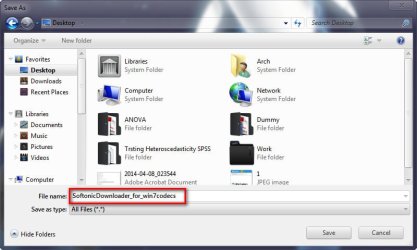
So it downloads "SoftonicDownloader_for_win7codecs". Let us get it. And then execute it ....

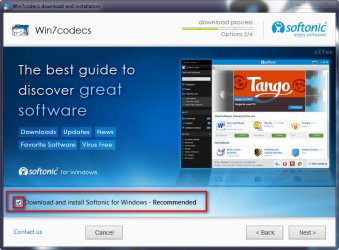
3.jpg

Click the accept button, and get the unwanted thing .....

4.jpg

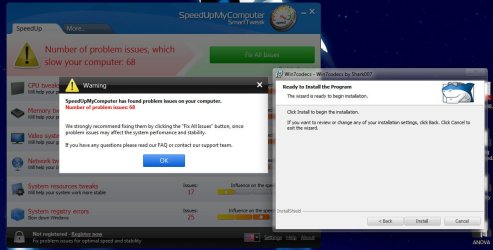
If you dont uncheck, you got the unwanted program. I did not uncheck and proceed with the download .... But .....
See what I got, even before the download is completed.

2014-04-08_194556.jpg

What a practical Joke! :D

The essence is ..... never install programs from sources those are not trustworthy. Get your programs from these two places only:

And, BE VERY MUCH CAREFUL BEFORE YOU CLICK THE ACCEPT BUTTON. Read everything very carefully. Dont leave everything checked.

The question - Is there a Windows setting that can be applied that will require specific authorization before a program will be installed?

Thanks in advance for any assistance offered.

C.
Apparently no! But Some programs like MBAM gives you alert when you are getting a really bad thing.

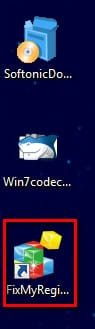
Edit: After uninstalling SpeedUp My Computer, I noticed that I got on more thing via the Softonic Downloader ..... :sarc:

2014-04-08_195624.jpg

One mort thing to uninstali.
 

My Computer My Computer

Computer type
PC/Desktop
Computer Manufacturer/Model Number
Self Assembled
OS
Microsoft Windows 10 Pro Insider Preview 64-bit
CPU
Intel(R) Core(TM) i3-4130 CPU @ 3.40GHz
Motherboard
Gigabyte Technology Co., Ltd. B85M-D3H
Memory
Corsair Vengence 4GB x2 (8.00GB Dual-Channel DDR3 @ 798MHz)
Graphics Card(s)
2047MB GeForce GTS 450 (ZOTAC International)
Sound Card
Onboard (Realtek High Definition Audio)
Monitor(s) Displays
LG Flatron E2040T
Screen Resolution
1600x900
Hard Drives
Western Digital 1 TB
Seagate 500 GB
PSU
Corsair VS550
Case
Cooler Master K380
Cooling
Cooler Master Seidon 120V Plus
Keyboard
Logitech MK260r
Mouse
Logitech MK260r
Internet Speed
PMPL Broadband
Antivirus
Windows Defender + MBAM
Browser
Firefox
Other Info
Dell Studio 15" Laptop
As Arc has said there is no settings that disable installing a software. When UAC asks permission for exe to execute, you select 'yes'. So you have given all the rights for the installer to do whatever it wants to do in your Windows. It may give you additional program that you dont need. Or it may contain programs you need. So it depends on the executable you have given permission. Always run a Trustworthy program executable/installer that wont harm your PC and dont go beyond its limit.
 

My Computer My Computer

Computer type
Laptop
Computer Manufacturer/Model Number
Dell XPS L502x
OS
Windows 7 Home Premium 64bit
CPU
Intel Core i7 2670QM
Motherboard
Intel HM67 Mobile Express Chipset
Memory
Samsung 8GB 1333Mhz
Graphics Card(s)
nVidia Geforce 540M GT 2GB
Sound Card
Realtek High Definition Audio
Monitor(s) Displays
15.6" Dell Standard RGB-LED Backlit Display
Screen Resolution
1366x768
Hard Drives
Seagate Momentus 2.5" 750GB HDD 5400rpm
Internet Speed
3.1 Mbits/s
Antivirus
AVG Free, Kaspersky
Browser
Google chrome
OK - Thx for the information!

C.
 

My Computer My Computer

Computer type
PC/Desktop
Computer Manufacturer/Model Number
Gateway
OS
Microsoft Windows 7 Home Premium 64-bit 7601 Multiprocessor Free Service Pack 1
CPU
Intel(R) Core(TM) i5 CPU 650 @ 3.20GHz
Motherboard
Gateway FX6840
Memory
8.00 GB
Graphics Card(s)
ATI Radeon HD 5570
Sound Card
(1) ATI High Definition Audio Device (2) Realtek High Defi
Screen Resolution
1920 x 1080 x 32 bits (4294967296 colors) @ 60 Hz
Hard Drives
(1) ST31000528AS (2) ST31000528AS (3) Generic- Compact Flash USB Device (4) Generic- MicroSD USB Device (5) Generic- MS/MS-Pro/HG USB Device (6) Generic- SD/MMC USB Device (7) Generic- xD-Picture USB Device

Something else - most installers offer you a Complete install or a Custom install, the latter often marked 'for advanced users' which is bunk. Always take the Custom option as that often gives you the option to opt out of things you do not want. I would also download from the author's site if MajorGeeks or FileHippo don't have what you are looking for.
 

My Computer My Computer

Computer type
PC/Desktop
Computer Manufacturer/Model Number
PC Specialist Custom
OS
Windows 7 Pro 64 bit
CPU
Intel i5
Motherboard
ASUS® H81M-PLUS
Memory
8GB KINGSTON DUAL-DDR3 1600MHz
Graphics Card(s)
2GB AMD RADEON™ R7 250
Hard Drives
120GB KINGSTON V300 SSD
1TB WD CAVIAR BLACK WD1003FZEX

My Computer My Computer

Computer type
PC/Desktop
Computer Manufacturer/Model Number
Custom Built
OS
Windows 10 Pro
CPU
AMD Ryzen 5 2400G Processor with Radeon RX Vega 11 Graphics
Motherboard
ASRock X470 Master SLI/AC AM4 AMD Promontory X470 SATA 6Gb/s
Memory
G.SKILL Ripjaws V Series 16GB (2 x 8GB) 288-Pin DDR4 SDRAM D
Graphics Card(s)
2047MB NVIDIA GeForce GTX 1060 6GB (EVGA)
Sound Card
Motherboard Built in
Monitor(s) Displays
Acer R240HY bidx 23.8-Inch IPS HDMI DVI VGA (1920 x 1080) Wi
Screen Resolution
1920 x 1080
Hard Drives
1TB Sandisk SSD PLUS (Main drive)
500 GB Seagate 7200 RPM (Games)
500 GB Western Digital 7200 RPM (Virtual Machines)
PSU
CORSAIR TX Series TX650M 650W 80+ Gold Modular Power Supply
Case
CORSAIR CARBIDE SPEC-02 Mid-Tower Gaming Case, Red LED Fan
Cooling
220mm, two 120mm, and four 60mm fans
Keyboard
Wired Dell keyboard
Mouse
Wireless Logitech mouse
Internet Speed
250mb down, 30mb up
Antivirus
Panda Cloud Antivirus
Browser
Chrome-ish x64
Other Info
Your awesome for reading this.
PC Tools Firewall provides a great solution to this, it pops up a warning every time a certain exe wanted to write to registry, access kernels etc. It's annoying but you'll get used to if you realy wanted to know what's happening behind the screen.
 

My Computer My Computer

Computer type
Laptop
Computer Manufacturer/Model Number
Acer 5733Z
OS
Windows 7 Professional 32bit
CPU
P6200 @ 2.13GHz
Memory
2043 MB
Graphics Card(s)
Intel HD graphics
Hard Drives
C: Total - 49899 MB; D: Total - 149999; E: Total - 149999 MB; F: Total - 123107 MB;
Antivirus
Microsoft Security Essentials, ESET NOD 32
Browser
Mozilla
Back
Top